Муқаддима
Ташаккур ба шумо барои харидasing the OontZ Angle 3 Ultra Portable Bluetooth Speaker by Cambridge Soundworks. This manual provides essential information for setting up, operating, maintaining, and troubleshooting your speaker. Designed for superior sound quality and durability, the OontZ Angle 3 Ultra features a 14-watt output, rich bass, IPX7 waterproofing, and an impressive 30-meter Bluetooth range. Enjoy up to 20 hours of playtime on a single charge.

Image: The OontZ Angle 3 Ultra Portable Bluetooth Speaker, showcasing its sleek black, triangular design with control buttons on one end.
Ташкил кардан
1. Адад дохил карда шудааст
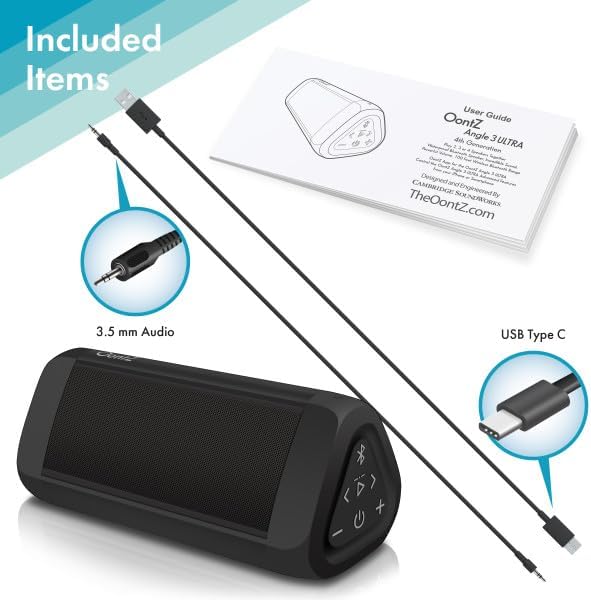
Image: The OontZ Angle 3 Ultra speaker along with its accessories: a Quick Start Guide, a 3.5mm audio cable, and a USB Type-C charging cable.
Before first use, ensure all components are present:
- OontZ Angle 3 Ultra Bluetooth Speaker
- Quick Start Guide (Full manual available online)
- Кабели аудио 3.5 мм
- Сими барқи USB Type-C
2. Барқдиҳии баландгӯяк
The speaker comes with a built-in rechargeable Lithium-ion battery. For optimal performance, fully charge the speaker before first use.
- Locate the charging port on the side of the speaker, protected by a rubber flap.
- Connect the supplied USB Type-C charging cable to the speaker's charging port.
- Connect the other end of the USB cable to a USB wall charger (not included) or a computer USB port.
- The charging indicator light will illuminate. A full charge takes approximately 20 hours for the first charge, and subsequent charges will be faster.

Тасвир: Нақшаи наздик view of the speaker's side, showing the 3.5mm AUX input and the USB-C charging port, typically protected by a waterproof flap.
3. Ҷуфти Bluetooth
Pair your OontZ Angle 3 Ultra with your Bluetooth-enabled device (smartphone, tablet, laptop).
- Ба воситаи пахш ва нигоҳ доштани тугмаи барқ (⏻) until the indicator light flashes blue.
- Дар дастгоҳи худ, ба танзимоти Bluetooth равед ва боварӣ ҳосил кунед, ки Bluetooth фаъол аст.
- Look for "OontZ Angle 3 Ultra" in the list of available devices and select it.
- Once paired, the speaker will emit a confirmation tone, and the indicator light will turn solid blue.
4. Пайвастшавӣ тавассути вуруди AUX
You can connect non-Bluetooth devices using the 3.5mm audio cable.
- Connect one end of the 3.5mm audio cable to the AUX IN port on the speaker.
- Нуги дигарашро ба варақи гӯшмонак ё баромади аудиоии дастгоҳи худ пайваст кунед.
- Баландгӯяк ба таври худкор ба ҳолати AUX мегузарад.
5. Pairing Two Speakers for Stereo Sound (OontZ Dual Wireless Stereo)
Enhance your audio experience by wirelessly connecting two OontZ Angle 3 Ultra speakers for impressive stereo separation.

Image: Two OontZ Angle 3 Ultra speakers positioned to provide stereo sound, with two individuals enjoying music in an outdoor setting.
- Ensure both OontZ Angle 3 Ultra speakers are charged and powered on.
- Ҳарду баландгӯякро аз ҳама гуна дастгоҳҳои қаблан ҷуфтшудаи Bluetooth ҷудо кунед.
- On one speaker (this will be the Left Channel), press and hold the Bluetooth button (Ⓑ) for 3 seconds until you hear a tone.
- On the second speaker (this will be the Right Channel), press and hold the Bluetooth button (Ⓑ) for 3 seconds until you hear a tone.
- The speakers will automatically connect to each other. Once connected, you will hear a confirmation tone, and the indicator lights on both speakers will turn solid blue.
- Now, connect your audio device to the Left Channel speaker via Bluetooth as described in "Bluetooth Pairing" above.
- For video audio, connect your device or TV to the Left Channel speaker using the 3.5mm audio cable.
Дастурҳои амалиётӣ
1. Назорат аз болоиview
| Тугма/Индикатор | Функсия |
|---|---|
| ⏻ (Қувва) | Барои фурӯзон/хомӯш пахш кунед ва нигоҳ доред. |
| + (баланд бардоштани овоз) | Барои зиёд кардани садо пахш кунед. |
| - (Паст кардани овоз) | Барои кам кардани овоз пахш кунед. |
| ▷ (Бозӣ/Таваққуф) | Барои навозиш/таваққи мусиқӣ пахш кунед. |
| < (Previous Track) | Барои гузаштан ба суруди қаблӣ пахш кунед. |
| > (Next Track) | Барои гузаштан ба суруди навбатӣ пахш кунед. |
| Ⓑ (Блутуз) | Press to disconnect current Bluetooth device and enter pairing mode. Press and hold for 3 seconds to initiate OontZ Dual Wireless Stereo pairing. |
| Нишондиҳандаи нур | Flashes blue for pairing, solid blue for connected, red for charging. |
2. Зангҳои дастӣ
The OontZ Angle 3 Ultra has a built-in microphone for hands-free calls.
- Вақте ки занг ворид мешавад, мусиқӣ таваққуф мекунад. -ро пахш кунед ▷ тугмаи барои ҷавоб додан ба занг.
- Барои анҷом додани занг, -ро пахш кунед ▷ боз тугмаи.
- Барои рад кардани занг, -ро пахш кунед ва доред ▷ тугмаро барои 2 сония пахш кунед.
- Барои фаъол кардани Siri ё Google Assistant, тугмаро пахш карда нигоҳ доред ▷ button for 2 seconds when not on a call.
3. Waterproof Features (IPX7)
The OontZ Angle 3 Ultra is IPX7 certified, meaning it is fully waterproof and can be immersed in water up to 1 meter (3.3 feet) for up to 30 minutes.
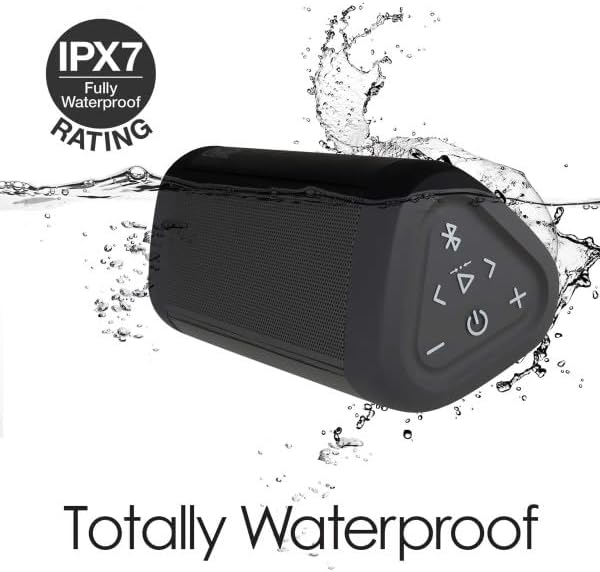
Image: The OontZ Angle 3 Ultra speaker shown partially submerged in water, illustrating its IPX7 waterproof capability.
- Ensure the rubber flap covering the charging and AUX ports is securely closed before exposing the speaker to water.
- Ideal for use by the pool, at the beach, or in the shower.
- Do not expose to salt water or chemicals. Rinse with fresh water after exposure to chlorinated water.
Нигоҳдорӣ
1. Тозакунӣ
To clean your speaker, use a soft, damp матоъ. Тозакунанда ё ҳалкунандаҳои абразивиро истифода набаред.
2. Нигоҳдорӣ
Динамикро дар ҷои хунук ва хушк аз нури бевоситаи офтоб ва ҳарорати аз ҳад зиёд дур нигоҳ доред.
3. Нигоҳубини батарея
Барои дароз кардани мӯҳлати батарея:
- Батареяро зуд-зуд пурра холӣ накунед.
- Барои нигоҳ доштани саломатии батарея, баландгӯякро, ҳатто агар истифода набошанд, мунтазам пур кунед.
- Do not expose the speaker to temperatures above 60°C (140°F).
Мушкилкушо
| Мушкилот | Ҳалли |
|---|---|
| Speaker will not turn on. | Боварӣ ҳосил кунед, ки батарея пур карда шудааст. Бо истифода аз сими USB-C баландгӯякро ба манбаи барқ пайваст кунед. |
| Овоз нест ё садои паст. | Check the volume level on both the speaker and your connected device. Ensure the speaker is properly paired via Bluetooth or connected via AUX. |
| Тавассути Bluetooth пайваст карда намешавад. | Ensure the speaker is in pairing mode (flashing blue light). Turn off and on Bluetooth on your device. Move the speaker closer to your device. Disconnect from other Bluetooth devices. |
| Таҳрифи садо дар ҳаҷми баланд. | Reduce the volume on the speaker or your connected device. Ensure the audio source is not distorted. |
| OontZ Dual Wireless Stereo not connecting. | Ensure both speakers are disconnected from other Bluetooth devices. Follow the pairing steps carefully, ensuring both speakers are in pairing mode for stereo connection. |
Мушаххасоти
Key technical specifications for the OontZ Angle 3 Ultra Portable Bluetooth Speaker:
- Рақами модел: SWOA3UBLK
- Андозаҳо (L x W x H): 16.26 x 7.11 x 7.11 см (6.4 x 2.8 x 2.8 инч)
- Вазн: 480 грамм (1.06 фунт)
- Қувваи баромади баландгӯяк: 14 Ватт
- Версияи Bluetooth: 4.2
- Диапазони бесим: Up to 30 meters (100 feet) unobstructed
- Ҳаёти батарея: То 20 соат (бо ҳаҷми 2/3)
- Рейтинги обногузар: IPX7 (Ғарқ кардан то 1 метр барои 30 дақиқа)
- Пайвастшавӣ: Bluetooth, 3.5mm AUX Input, USB-C Charging
- Компонентҳо дохил мешаванд: Speaker, 3.5mm Audio Cable, USB-C Charging Cable, Quick Start Guide

Image: Diagram showing the dimensions of the OontZ Angle 3 Ultra speaker: 6.5 inches in length, 3 inches in width, and 2.75 inches in height.
Кафолат ва дастгирӣ
For detailed warranty information and customer support, please visit the official OontZ website. The full localized manual is also available there.
расмӣ Webсайт: www.theoontz.com
Cambridge Soundworks is committed to providing high-quality audio products and customer satisfaction.


