Муқаддима
Ташаккур ба шумо барои харидasing the Klip Xtreme BluWave II KWS-616 2.1 Channel Stereo System. This system is designed to provide a rich audio experience for music, games, and movies. It features Bluetooth connectivity, USB and SD card playback, and an auxiliary input for versatile audio sources. Please read this manual thoroughly before operating the device to ensure proper use and to maximize your listening experience.
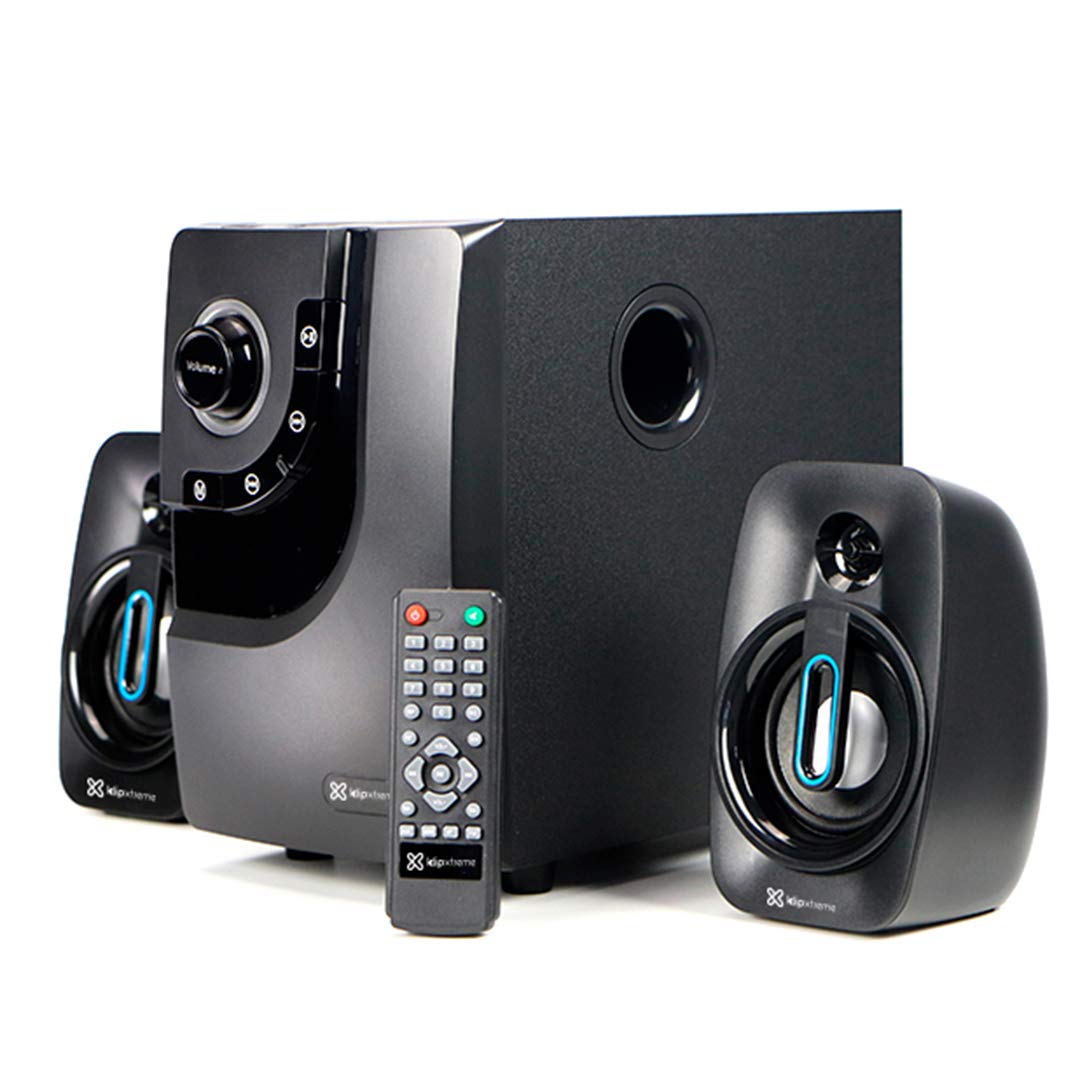
Image: The Klip Xtreme BluWave II KWS-616 system, including the subwoofer, two satellite speakers, and remote control, shown with its packaging and connecting cables.
Мундариҷаи баста
Лутфан боварӣ ҳосил кунед, ки ҳама ашё дар баста мавҷуд аст:
- Subwoofer Unit
- Баландгӯякҳои моҳвораӣ (x2)
- Назорати дурдаст
- Кабели аудио 3.5 мм
- Дастури корбар (ин ҳуҷҷат)

Image: The Klip Xtreme BluWave II KWS-616 system components, including the subwoofer, satellite speakers, remote, and cables, displayed alongside its retail packaging.
Маҳсулот ба охир расидview
Subwoofer Front Panel Controls

Тасвир: Муфассал view of the subwoofer's front panel, showing the volume knob with blue LED illumination, mode button, playback controls, and digital display.
- Тугмаи баландии овоз: Rotate to adjust the master volume. Press to change input mode (Bluetooth, USB, SD, AUX).
- Тугмаи басс: Сатҳи бассро танзим мекунад.
- Назорати бозикунии: Навозиш/Таваққуф, Треки қаблӣ, Треки навбатӣ.
- Намоиши рақамӣ: Shows current mode, track number, or volume level.
Subwoofer Rear Panel Connections

Image: The rear panel of the subwoofer, displaying input and output ports, power switch, and AC power input.
- Input (R/L): Вуруди стерео RCA барои пайваст кардани манбаъҳои аудиои беруна.
- Output (R/L): Connects to the satellite speakers.
- Порти USB: Барои флешҳои USB.
- Ковокии корти SD: Барои кортҳои хотираи SD.
- Калиди барқ: Turns the system ON or OFF.
- Вуруди AC: Ба сими барқ пайваст мешавад.
Ташкил кардан
1. Пайвастагии баландгӯяк
- Connect the cables from the satellite speakers to the "Output (R/L)" ports on the rear panel of the subwoofer. Ensure correct polarity.
- Position the satellite speakers to the left and right of your listening area for optimal stereo separation. The subwoofer can be placed on the floor or a sturdy surface.
2. Пайвастшавии барқ
- Ensure the power switch on the rear of the subwoofer is in the OFF position.
- Connect the AC power cord to the "AC Input" on the subwoofer's rear panel.
- Plug the other end of the power cord into a standard wall outlet (110V/220V 60Hz/50Hz auto-sensing).
Дастурҳои амалиётӣ
Фаъол/хомӯш
Flip the power switch on the rear panel of the subwoofer to the ON position to power on the system. Flip it to the OFF position to power off.
Volume and Bass Control
- Ҳаҷм: Rotate the large knob on the front of the subwoofer or use the volume buttons on the remote control to adjust the overall volume.
- Бас: Use the dedicated bass knob on the front of the subwoofer or the bass control buttons on the remote to adjust the bass intensity.
Усулҳои вуруд
Press the Volume knob on the front panel or the "Mode" button on the remote control to cycle through available input modes: Bluetooth, USB, SD, and AUX.
Ҷуфти Bluetooth
- Switch the system to Bluetooth mode. The digital display will show "BT" and an indicator light may flash, indicating it's in pairing mode.
- Дар дастгоҳи Bluetooth-и худ (смартфон, планшет, компютер) Bluetooth-ро фаъол созед ва дастгоҳҳои дастрасро ҷустуҷӯ кунед.
- Select "Klip Xtreme KWS-616" (or similar name) from the list of devices.
- Once paired, the system will confirm the connection, and you can begin playing audio from your device. The effective wireless range is approximately 33 feet (10 meters).
Бозии USB/SD
- Insert a USB flash drive or an SD card containing audio files into the respective port on the subwoofer's rear panel.
- Switch the system to USB or SD mode. The system will automatically detect and begin playing audio files.
- Use the playback controls on the front panel or remote control to play, pause, skip tracks, or adjust volume.
Пайвастшавӣ AUX
- Connect one end of the provided 3.5mm audio cable to the "Input (R/L)" RCA ports on the subwoofer (using an adapter if necessary).
- Connect the other end of the 3.5mm audio cable to the headphone jack or audio output of your external audio device (e.g., TV, DVD player, gaming console, MP3 player).
- Switch the system to AUX mode.
- Овозро аз дастгоҳи пайвасти худ бозӣ кунед.
Функсияҳои идоракунии дурдаст
The included remote control provides convenient access to all major functions:
- Қувва: Turns the system on/off (standby).
- Режим: Cycles through input sources (Bluetooth, USB, SD, AUX).
- Ҷилди +/-: Ҳаҷми асосии овозро танзим мекунад.
- Бас +/-: Сатҳи бассро танзим мекунад.
- Хомӯш кардан: Аудио хомӯш/кушода мешавад.
- Бозӣ/Таваққуф: Controls playback for USB/SD/Bluetooth.
- Пешина/Оянда: Skips tracks for USB/SD/Bluetooth.
Нигоҳдорӣ
- Keep the system away from direct sunlight, heat sources, and moisture.
- Clean the exterior surfaces with a soft, dry cloth. Do not use abrasive cleaners or solvents.
- Барои пешгирӣ аз гармшавии аз ҳад зиёд, вентилятсияи дурусти атрофи сабвуферро таъмин кунед.
- Do not block the subwoofer's bass port.
Мушкилкушо
| Мушкилот | Ҳалли имконпазир |
|---|---|
| Не қудрат |
|
| Садо нест |
|
| Пайвасткунии Bluetooth ноком мешавад |
|
| Овози вайроншуда |
|
Мушаххасоти

Image: The Klip Xtreme BluWave II KWS-616 subwoofer and satellite speakers displayed with rulers to indicate their physical dimensions.
| Навъи дастгоҳ | 2.1 speaker system with Bluetooth technology |
| Баромади ҳадди аксар (RMS) | 40W (80W Peak Power) |
| Вуруди AC | 110V/220V 60Hz/50Hz (autosensing) |
| Satellite Driver Unit | 3 инч (76мм) |
| Моҳвораи RMS Power | 10W each (20W total) |
| Satellite Frequency Response | 120Гц-18кГц |
| Satellite Impedance | 8 Ом |
| Subwoofer Driver Unit | 4 инч (102мм) |
| Сабвуфери RMS Power | 20 Вт |
| Вокуниши басомади сабвуфер | 20Гц-150Гц |
| Импеданси сабвуфер | 4 Ом |
| Сигнал ба таносуби садо | 60дБ |
| Пайвастшавӣ | Bluetooth, SD, USB, 3.5mm (via RCA input) |
| Диапазони бесим | То 33 фут (10 метр) |
| Андозаҳои сабвуфер (WxHxD) | 6.1 x 9.8 x 10.8 инч (15.5 x 24.9 x 27.4 см) |
| Satellite Dimensions (WxHxD) | 3.9 x 6.3 x 3.8 инч (9.9 x 16.0 x 9.7 см) |
| Вазни маҳсулот | 6.8 фунт (3.08 кг) |
| Дарозии кабел | 4.9 фут (1.5 метр) |
| Рақами модел | KWS-616 |
Кафолат ва дастгирӣ
The Klip Xtreme BluWave II KWS-616 system comes with a кафолати маҳдуди як сол from the date of purchase. This warranty covers defects in materials and workmanship under normal use. It does not cover damage caused by misuse, accident, unauthorized modification, or external causes.
For technical support or warranty claims, please contact your local Klip Xtreme authorized dealer or visit the official Klip Xtreme webсайт барои маълумоти тамос.


