1. Муқаддима
Ташаккур ба шумо барои харидasing the PNI Clementine 9545 Car MP5 Stereo Player. This manual provides essential information for the correct installation, operation, and maintenance of your new car stereo. Please read this manual thoroughly before using the device to ensure optimal performance and safety.
The PNI Clementine 9545 is a versatile 1DIN car multimedia player featuring a 4-inch color LCD screen, Bluetooth connectivity, FM/AM radio, USB and SD card playback, and video input/output capabilities. Enjoy your favorite music and videos on the go, make hands-free calls, and connect a reverse camera for enhanced safety.
2. Маълумот оид ба бехатарӣ
- Насбкунии касбӣ тавсия дода мешавад: For safety and proper functionality, it is highly recommended to have this product installed by a qualified professional.
- Таъмини нерӯ: Ensure the device is connected to a 12V DC power supply with proper grounding. Incorrect wiring can cause damage or fire.
- Аз парешонӣ канорагирӣ кунед: Do not operate the device or watch videos while driving. This can lead to accidents. Always prioritize road safety.
- Ҳарорат: Дастгоҳро ба ҳарорати аз ҳад зиёд, нурҳои бевоситаи офтоб ё намии баланд нагузоред.
- Тозакунӣ: Барои тоза кардан матои мулоим ва хушкро истифода баред. Аз тозакунандаҳои абразивӣ ё ҳалкунандаҳо худдорӣ кунед.
- Вентилятсия: Барои пешгирӣ кардани гармии аз ҳад зиёд дар атрофи дастгоҳ вентилятсияи мувофиқро таъмин кунед.
3. Маҳсулот ба охир расидview
3.1 Идоракунӣ ва портҳои панели пеш
The front panel of the PNI Clementine 9545 features a 4-inch LCD touchscreen display and various buttons and ports for easy operation.

Тавсифи тасвир: This image displays a detailed, labeled diagram of the PNI Clementine 9545 car stereo's front panel. Key components include the power/mode/end call button, menu button, equalizer button, band/AMS button, a central main knob for volume control, and various numbered buttons for functions like pause, repeat, file list, and track navigation. On the right side, there's an IR receiver, microphone, Micro SD slot, USB port, AUX in, and a reset button. The central part is dominated by the 4-inch touchscreen display.

Тавсифи тасвир: Пеш аз наздик view of the PNI Clementine 9545 car stereo. The left side features several control buttons and a prominent central rotary knob with red backlighting. The right side is dominated by the 4-inch color display, currently showing FM radio information with frequency 87.5 MHz. Below the display, there are touch-sensitive buttons for radio presets. The overall design is sleek and functional.
3.2 Мундариҷаи баста
Баста одатан ҷузъҳои зеринро дар бар мегирад:
- PNI Clementine 9545 Car MP5 Stereo Player
- Бари васлкунӣ
- Назорати дурдаст
- Кабелҳои пайвастшавӣ
- Дастури корбар
4. Танзим ва насб
This device is designed for 1 DIN installation. Proper wiring is crucial for safe and correct operation. Refer to the wiring diagram below.
4.1 Диаграммаи пайвастшавӣ

Тавсифи тасвир: This image displays a detailed wiring diagram for the PNI Clementine 9545 car stereo. It shows color-coded wires for speaker connections (Right rear, Right front, Left front, Left rear, with positive and negative terminals), and power connections (Rear view camera sensor, positive pole, car antenna, negative pole, lighter plug). Each wire is clearly labeled with its function and corresponding color, facilitating correct installation.
4.2 Қадамҳои умумии насбкунӣ
- Батареяро ҷудо кунед: Пеш аз оғози ҳама гуна корҳои барқӣ, терминали манфии батареяи мошинро ҷудо кунед, то аз занҷирҳои кӯтоҳ пешгирӣ карда шавад.
- Монтаж: Install the mounting bar into your car's dashboard opening (1 DIN size). Secure the player into the mounting bar.
- Ноқил: Connect the power wires (12V DC, ground), speaker wires (4 x 50W output), and any auxiliary inputs/outputs (RCA, AUX, USB, SD) according to the diagram.
- Reverse Camera (Optional): If installing a reverse camera, connect its video output to the dedicated RCA video input on the player. Connect the camera's power to the reverse light circuit.
- Батареяро аз нав пайваст кунед: Once all connections are secure, reconnect the vehicle's negative battery terminal.
- Функсияи санҷиш: Turn on the car stereo and test all functions (radio, media playback, Bluetooth, camera) to ensure correct installation.
5. Дастурҳои истифодабарӣ
5.1 Идоракунии асосӣ
- Power/Mode (PWR MOD): Press to turn the unit ON/OFF. Short press to switch between modes (Radio, USB, SD, AUX, Bluetooth).
- Volume Control (Main Knob): Rotate the central knob to adjust the volume level.
- Меню: Press to access the main menu or settings.
- EQ (эквалайзер): Press to cycle through preset equalizer settings or access custom EQ adjustments.
- Band/AMS (BND AMS): In radio mode, press to switch between FM bands (FM1, FM2, FM3) or AM bands. Long press for Automatic Memory Store (AMS).
- Navigation Buttons (◀◀ / ▶▶): Use to skip tracks, fast forward/rewind, or tune radio frequencies.
- 1/PAU (Pause): Play/Pause media playback.
- 2/LIST: In media mode, press to view ба file рӯйхат.
- Аз нав танзимкунӣ (RST): Use a thin object to press the reset button to restore factory settings if the unit malfunctions.
5.2 Амалиёти радио
The unit supports FM (87.5 – 108.0 MHz) and AM (522 KHz - 1620 KHz) radio bands.
- Танзими: Use the navigation buttons (◀◀ / ▶▶) to manually tune frequencies.
- Ҷустуҷӯи худкор: Long press the navigation buttons to automatically search for the next strong station.
- Пойгоҳҳои пешакӣ муқарраршуда: The unit can store up to 18 FM preset stations. Use the numbered buttons (1-6) to select or save presets. Long press a numbered button to save the current station to that preset.
5.3 Бозии медиа (USB/SD)
Insert a USB drive into the USB port or an SD card into the SD card slot. The unit will automatically switch to USB/SD mode and begin playback of supported files (MP5, MP3, MP4, WMA, WAV, etc.).
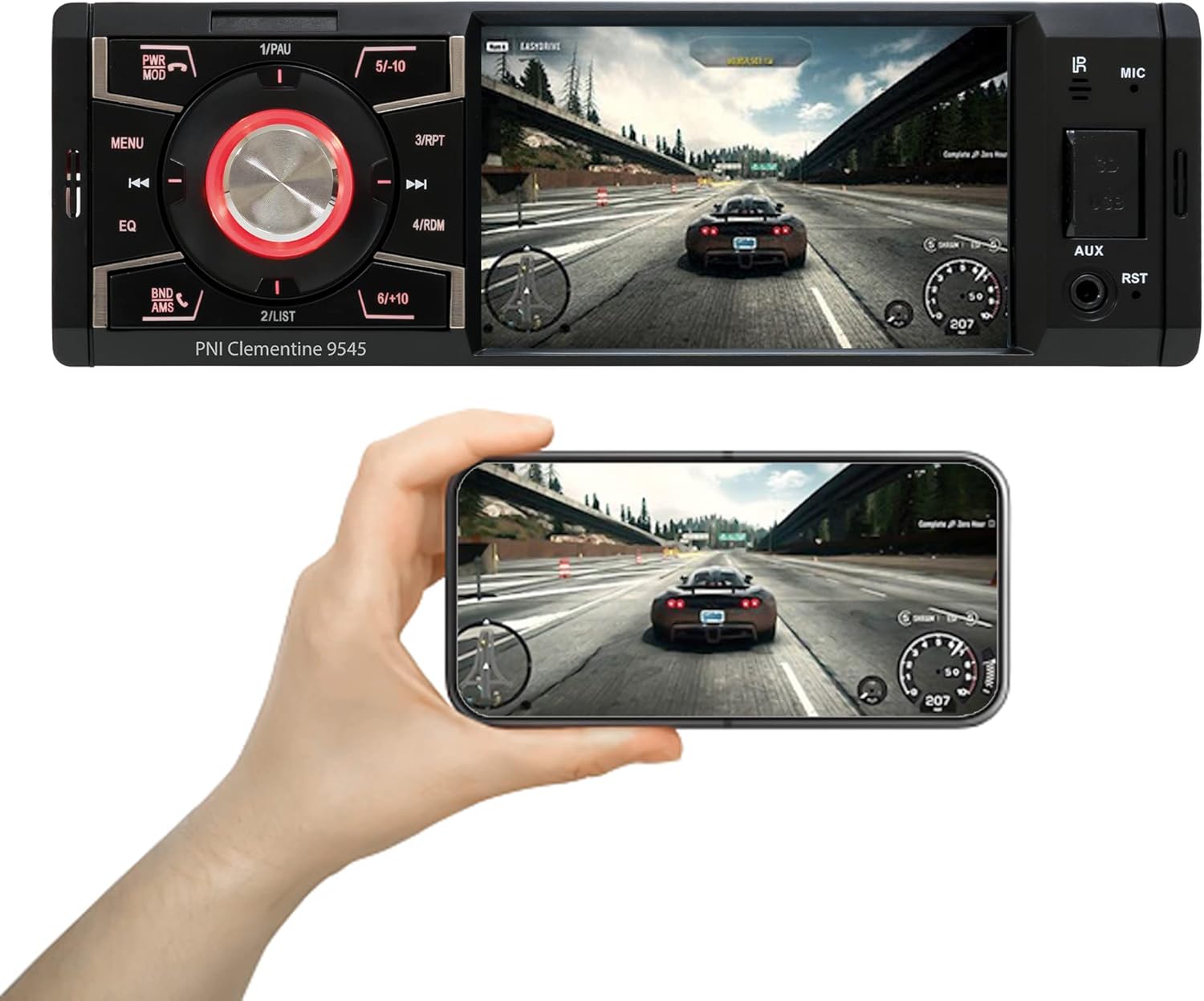
Тавсифи тасвир: The PNI Clementine 9545 car stereo is shown playing a video game scene on its 4-inch display. Below the stereo, a hand holds a smartphone that mirrors the same video content, demonstrating the unit's video playback capabilities and potential for screen mirroring or external display connection.
5.4 Функсияи Bluetooth
The integrated Bluetooth feature allows for hands-free calling and audio streaming.
- Ҷуфт кардан: Enable Bluetooth on your mobile device and search for "PNI Clementine 9545". Select it to pair.
- Зангҳои дастӣ: Once paired, you can make and receive calls directly through the car stereo. Use the PWR MOD button to answer/end calls.
- Ҷараёни аудио: Play music from your paired phone through the car's audio system.
5.5 Вуруди AUX
Connect external audio devices (e.g., MP3 players, smartphones) to the 3.5mm AUX input jack on the front panel using an audio cable.
5.6 Амали экрани сенсорӣ
The 4-inch LCD display is a touchscreen, allowing for intuitive control of various functions and settings.

Тавсифи тасвир: A human finger is shown touching the 4-inch touchscreen display of the PNI Clementine 9545 car stereo. The screen displays a 'HOME' menu with various media and function icons, indicating the interactive nature of the display for navigating the stereo's features.
5.7 Функсияи камераи ақибгард
When an optional reverse camera is connected and the vehicle is put into reverse gear, the player's display will automatically switch to show the reverse camera feed, assisting with parking and maneuvering.

Тавсифи тасвир: The PNI Clementine 9545 car stereo's display shows a reverse camera view of a parking garage, complete with colored parking guidelines (red, yellow, green) overlaid on the image. Below the stereo, a small image of an optional rear view camera is shown, indicating the unit's compatibility with such accessories.
6. Нигоҳдорӣ
- Тоза кардани дастгоҳ: Барои тоза кардани панели пеш ва дисплей бо матои мулоим ва хушк истифода баред. Барои ифлосии якрав, каме тоза кунед.ampen the cloth with water. Do not use harsh chemicals, abrasive cleaners, or solvents as they may damage the finish or screen.
- Cleaning Ports: Periodically check USB and SD card slots for dust or debris. Use a can of compressed air to gently clear them if necessary.
- Нигоҳубини умумӣ: Avoid placing heavy objects on the unit. Protect it from direct sunlight and extreme temperatures when the vehicle is parked for extended periods.
7. Баррасии мушкилот
If you encounter issues with your PNI Clementine 9545, refer to the following common problems and solutions:
| Мушкилот | Сабаби эҳтимолӣ | Ҳалли |
|---|---|---|
| Не қудрат | Ноқилҳои нодуруст; Пӯшидани сӯзишворӣ; Аккумулятори мошин кам. | Check power connections and fuses. Ensure battery voltage is sufficient. Consult a professional for wiring inspection. |
| Садо нест | Садо хеле паст аст; Хомӯш фаъол аст; Симҳои баландгӯяк ҷудо шудаанд; Манбаи нодурусти аудио. | Баландии овозро баланд кунед. Санҷед, ки оё хомӯш кардан фаъол аст. Пайвастшавии баландгӯякҳоро тасдиқ кунед. Манбаи дурусти аудиоро интихоб кунед. |
| Bluetooth пайваст нест | Bluetooth дар телефон фаъол нест; Дастгоҳ дар ҳолати ҷуфтшавӣ нест; Халал. | Ensure Bluetooth is active on your phone. Put the stereo in Bluetooth pairing mode. Try restarting both devices. |
| USB/SD бозӣ намекунад | Дастгирнашаванда file формат; Медиа вайрон шудааст; Нодуруст ворид карда шудааст. | Санҷед file formats (MP5, MP3, MP4, WMA, WAV). Ensure media is not corrupted. Reinsert USB/SD card correctly. |
| Screen Frozen/Unresponsive | Хатогии нармафзор. | Press the RST (Reset) button with a thin object to restart the unit. |
If the problem persists after trying these solutions, please contact customer support or a qualified service technician.
8. Мушаххасоти
| Хусусият | Мушаххасоти |
|---|---|
| Модели | Clementine 9545 |
| Таҳвили ҷилдиtage | 12В DC |
| Импеданс | 4 Ом |
| Максимум баромади қувваи аудио | 4 x 50 Вт |
| Фосилаи радиои FM | 87.5 – 108.0 МГс |
| Радиобасомади AM | 522 KHz - 1620 KHz |
| Порти USB | USB 2.0 |
| Қуттиҳои кортҳо | Корти SD |
| Таносуби сигнал/садо | > 40 дБ |
| Андозаҳо (W x H x D) | 178 x 50 x 110 мм |
| Вазн | 0.627 кг |
| Максимум истеъмоли ҷорӣ | 10 Ampэрес |
| Вуруди аудио AUX | 3.5 мм мини-сел |
| Навъи насб | 1 ДИН |
| Намоиш | 4-inch LCD, 800 x 480 pixels, Red button illumination |
| Навозиши видео | Full HD 1920 x 1080px (AVI format) |
| Бозии аудио | MP5, MP3, MP4, WMA, WAV, etc. (Stereo output) |
| Ҳарорати корӣ | -26°C ~ +80°C |
| блутуз | Integrated Bluetooth for calls and audio streaming |
| Вуруди / баромади видео | 1 x RCA Video Input/Output, 1 x RCA Video Input for Reverse Camera |
9. Кафолат ва дастгирӣ
9.1 Маълумот дар бораи кафолат
Your PNI Clementine 9545 Car MP5 Stereo Player is covered by a manufacturer's warranty. Please refer to the warranty card included in your package or contact your retailer for specific warranty terms and conditions. Keep your proof of purchase for any warranty claims.
9.2 Дастгирии муштариён
For technical assistance, troubleshooting beyond this manual, or warranty inquiries, please contact the retailer where you purchased the product or visit the official PNI webсайт барои захираҳои дастгирӣ.


