1. Маҳсулот ба охир расидview
The Sharp EL-531TG-GY is a scientific calculator designed for students and professionals requiring advanced mathematical functions. It features a 2-line display and Multi-Line Playback, facilitating the input and review of complex equations. This model is suitable for general math, algebra, geometry, trigonometry, statistics, biology, chemistry, and general science applications.
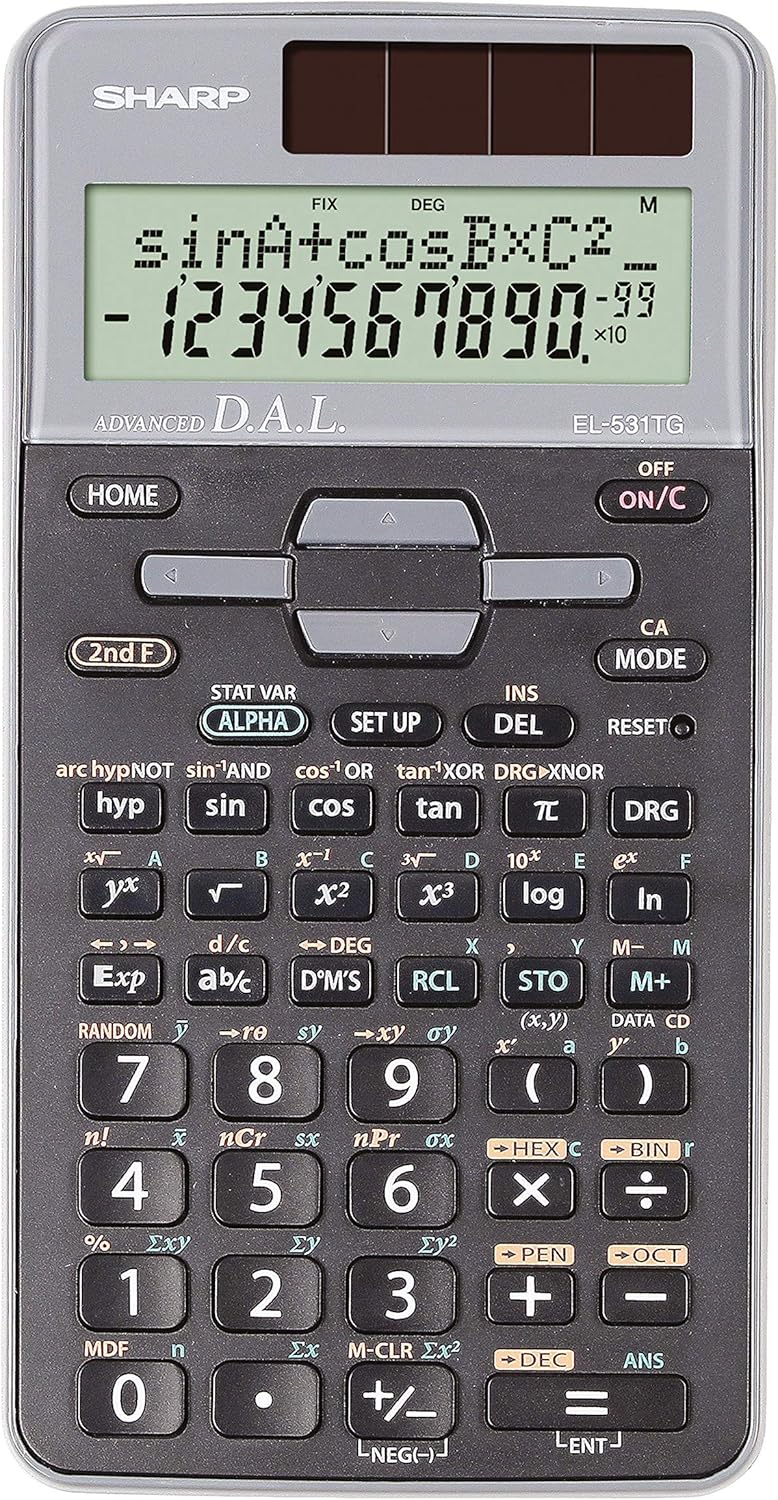
Расми 1: Пеш view of the Sharp EL-531TG-GY Scientific Calculator, showing the display, keypad, and solar panel.
2. Танзимот ва истифодаи аввала
2.1 Манбаи барқ
The EL-531TG-GY calculator operates using both solar power and a single LR44 button cell battery. The solar panel provides power in well-lit environments, while the battery ensures operation in low-light conditions or when solar power is insufficient. An LR44 battery is included with the calculator.
2.2 Фурӯзон/хомӯш кардан
- Барои гардонидани калкулятор ON, пахш кунед ON/C калид.
- Барои гардонидани калкулятор ХОМӮШ, пахш кунед 2 Ф калид пас аз ХОМӮШ key (which is typically the same as ON/C).
2.3 Initial Display Settings
Upon first use or after a reset, the calculator will typically default to certain settings (e.g., DEG for angle units). Refer to Section 3.3 for details on changing mode settings.
3. Дастурҳои истифодабарӣ
3.1 Амалҳои асосии арифметикӣ
Рақамҳоро бо истифода аз клавиатураи рақамӣ ворид кунед. +, -, ×, ва ÷ тугмаҳо барои ҷамъ, тарҳ, зарб ва тақсим мутаносибан. Пахш кунед = to obtain the result.
3.2 Вазифаҳои илмӣ
The calculator performs over 273 advanced scientific functions. Many functions are accessed by pressing the 2 Ф key before the desired function key.
- Функсияҳои тригонометрӣ: Истифода баред гуноҳ, cos, тан. Inverse functions (гуноҳ⁻¹, cos⁻¹, тан⁻¹) тавассути дастрасӣ ба 2 Ф.
- Функсияҳои логарифмӣ: Истифода баред сабт (пойгоҳи 10) ва ln (логарифми табиӣ).
- Қудратҳо ва решаҳо: Истифода баред x², √, x³, ³√.
- Фраксияҳо: -ро истифода баред d/c калид барои ворид ва табдил додани каср.
3.3 Mode Settings (DEG/RAD/GRAD)
To change the angle unit mode (Degrees, Radians, Gradians):
- -ро пахш кунед DRG калид.
- Такрор пахш кунед DRG to cycle through DEG (Degrees), RAD (Radians), and GRAD (Gradians). The current mode is indicated on the display.
3.4 Функсияҳои хотира
The calculator includes memory functions for storing and recalling values.
- Мағозаи STO: пахш кунед СТО followed by a variable key (e.g., A, B) to store the displayed value.
- RCL (Бозхонд): пахш кунед RCL followed by the variable key to recall the stored value.
- M+ (Memory Plus): Қимати нишондодашударо ба хотираи мустақил илова мекунад.
- M- (минуси хотира): Қимати нишондодашударо аз хотираи мустақил тарҳ мекунад.
3.5 Multi-Line Playback
The 2-line display allows for Multi-Line Playback, enabling users to review previous calculations and expressions. Use the directional arrow keys (up/down) to scroll through past entries and results. This feature is useful for checking work or re-using parts of previous calculations.
4. Нигоҳдорӣ
4.1 Тозакунӣ
To clean the calculator, wipe the surface gently with a soft, dry cloth. Do not use abrasive cleaners, solvents, or excessive moisture, as these can damage the display or internal components.
4.2 Иваз кардани батарея
The calculator uses one LR44 button cell battery. If the display becomes dim or erratic in low-light conditions, the battery may need replacement. To replace the battery:
- Боварӣ ҳосил кунед, ки ҳисобкунак хомӯш аст.
- Қисми батареяро дар қафои калкулятор пайдо кунед.
- Сарпӯши қисмро бодиққат кушоед.
- Батареяи кӯҳнаи LR44-ро гиред ва батареяи навро ворид кунед, бо ин роҳ қутби дурустро таъмин кунед (+/-).
- Сарпӯши қисмати батареяро бехатар пӯшед.
4.3 Нигоҳдорӣ
When not in use, store the calculator in a cool, dry place away from direct sunlight and extreme temperatures. The hard cover included with the calculator provides protection from scratches and minor impacts.
5. Баррасии мушкилот
5.1 Масъалаҳои намоиш
- Намоиши холӣ ё хира: Ensure sufficient light for the solar panel. If the issue persists, replace the LR44 battery.
- Erratic Display: This may indicate a low battery. Replace the LR44 battery.
5.2 Incorrect Results
- Check Mode Settings: Verify that the angle unit (DEG, RAD, GRAD) is set correctly for trigonometric calculations.
- Input Error: Review your input using the Multi-Line Playback feature to ensure the expression was entered correctly.
- Memory Contents: If using memory functions, ensure the stored values are correct.
5.3 Calculator Not Responding
If the calculator becomes unresponsive, try performing a reset. Locate the АЗ НАВОР КУНЕД button (often a small recessed button requiring a thin object like a paperclip to press). Pressing this button will clear all memory and return the calculator to its factory default settings.
6. Мушаххасоти

Расми 2: Пеш view of the Sharp EL-531TG-GY Scientific Calculator, illustrating its dimensions.
| Хусусият | Тавсифи |
|---|---|
| Рақами модел | SH-EL531TGGY |
| Навъи намоиш | 2-line LCD with Multi-Line Playback |
| Функсияҳо | Зиёда аз 273 функсияи пешрафтаи илмӣ |
| Манбаи нерӯ | Solar and 1 x LR44 battery (included) |
| Материал | Пластмасса |
| Андозаҳо (L x W x H) | 16.1 x 8 x 1.5 см (тақрибан) |
| Вазн | 100 г (тақрибан) |

Расми 3: Тараф view of the Sharp EL-531TG-GY Scientific Calculator, showing its slim profile.
7. Кафолат ва дастгирӣ
7.1 Маълумот дар бораи кафолат
This product is covered by a manufacturer's warranty. Please refer to the warranty card included with your purchase or visit the official Sharp webсайт барои шартҳои кафолати муфассал ва шартҳои мушаххаси минтақаи шумо.
7.2 Дастгирии муштариён
For technical assistance, troubleshooting not covered in this manual, or service inquiries, please contact Sharp customer support. Contact information can typically be found on the Sharp official webсайт ё дар бастаи маҳсулот.


