1. Муқаддима
This manual provides detailed instructions for the installation, operation, and maintenance of your Thomson SB260IBT 2.1 Channel Soundbar. Please read this manual thoroughly before using the product and retain it for future reference.
1.1 Маълумот дар бораи бехатарӣ
- Таъмини таъминоти барқ voltage ба талаботи дар тамғаи маҳсулот нишондодашуда мувофиқат мекунад.
- Саундбар ё сабвуферро дар зери борон, намӣ ё ҳарорати аз ҳад зиёд нагузоред.
- Дастгоҳро дар наздикии манбаъҳои гармӣ ё зери нури бевоситаи офтоб ҷойгир накунед.
- Барои пешгирӣ кардани гармии аз ҳад зиёд дар атрофи дастгоҳ вентилятсияи дурустро таъмин кунед.
- в-ро кушоедasinг; тамоми хизматрасониро ба кормандони соҳибихтисос фиристед.
- Дастгоҳро танҳо бо матои мулоим ва хушк тоза кунед.
2. Мундариҷаи баста
Боварӣ ҳосил кунед, ки ҳама ашё дар баста мавҷуд аст:
- Thomson SB260IBT Soundbar
- Сабвуфер
- Назорати дурдаст
- Кабели барқ
- Audio Cables (e.g., Optical, AUX - may vary by region)
- Дастури корбар
3. Маҳсулот ба охир расидview
3.1 Саундбар ва сабвуфер

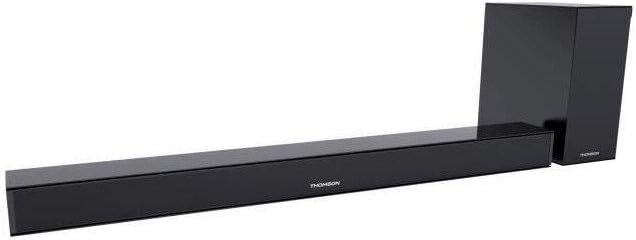
This image displays the Thomson SB260IBT soundbar unit alongside its accompanying subwoofer. The soundbar is a long, slender black unit, and the subwoofer is a compact black cube, both designed to complement modern home entertainment systems.
3.2 Панели идоракунӣ ва портҳо
This image shows a close-up of the soundbar's side panel, revealing various control buttons and input/output ports. These include buttons for power, mode selection, volume control, and ports such as USB, SD card slot, and auxiliary input.
3.2.1 Панели Асосӣ
- Нишондиҳандаи LED: Ҳолати ҷорӣ ё ҳолати ҳозираро нишон медиҳад.
- Қабулкунандаи IR: Барои сигналҳои идоракунии дурдаст.
3.2.2 Панели пушти
- Вуруди барқ: Connects to the AC power cable.
- Вуруди оптикӣ: Барои пайвасти аудиои рақамӣ аз телевизор ё дигар дастгоҳ.
- Вуруди AUX: For analog audio connection using a 3.5mm cable.
3.2.3 Панели паҳлӯ
- Порти USB: Барои навохтани аудио fileс аз диски USB.
- Ковокии корти SD: Барои навохтани аудио fileс аз корти SD.
- Тугмаҳои назорат: Power, Mode, Volume Up/Down.
3.2.4 Идоракунии дурдаст
The remote control provides full functionality for power, input selection, volume adjustment, and playback controls.
4. Танзимот
4.1 Ҷойгиркунӣ
Place the soundbar on a stable, flat surface directly in front of your television. Position the subwoofer on the floor near the soundbar for optimal bass response. Ensure adequate ventilation around both units.
4.2 Пайвастшавӣ ба барқ
- Сими барқро ба вуруди барқи саундбар пайваст кунед.
- Нӯги дигари сими барқро ба васлаки деворӣ пайваст кунед.
- Connect the subwoofer to its power source (if separate).
4.3 Пайвастҳои аудио
4.3.1 Пайвастагии оптикӣ
For high-quality digital audio, connect an optical cable from your TV's optical output to the soundbar's OPTICAL input. Select 'Optical' mode on the soundbar.
4.3.2 Пайвасти AUX
Use a 3.5mm audio cable to connect your device's audio output (e.g., smartphone, MP3 player) to the soundbar's AUX input. Select 'AUX' mode on the soundbar.
4.3.3 Пайвасти Bluetooth
For wireless audio, select 'Bluetooth' mode on the soundbar. Refer to section 5.4 for detailed pairing instructions.
5. Дастурҳои истифодабарӣ
5.1 Фаъол кардан/хомӯш кардан
-ро пахш кунед Қувва тугмаи саундбар ё идоракунии дурдастро пахш кунед, то дастгоҳро фаъол ё хомӯш кунед.
5.2 Интихоби вуруд
-ро пахш кунед Режим button on the soundbar or remote control to cycle through available input sources: Bluetooth, Optical, AUX, USB, SD Card. The LED indicator will show the selected mode.
5.3 Назорати баландии овоз
-ро истифода баред Ҳаҷм + ва Ҳаҷми - buttons on the soundbar or remote control to adjust the master volume level.
5.4 Пайвасткунии Bluetooth
- Саундбарро фаъол созед ва пахш кунед Режим button to select Bluetooth mode. The LED indicator will flash, indicating it is in pairing mode.
- Дар дастгоҳи дорои Bluetooth (масалан, смартфон, планшет)-и худ, Bluetooth-ро фаъол созед ва дастгоҳҳои дастрасро ҷустуҷӯ кунед.
- Select "SB260IBT" from the list of found devices to pair.
- Once successfully paired, the soundbar's LED indicator will stop flashing and remain solid. You can now play audio from your device through the soundbar.
5.5 Бозии корти USB/SD
Insert a USB drive or SD card (containing compatible audio files) into the corresponding port on the soundbar's side panel. The soundbar will automatically switch to USB/SD mode and begin playback. Use the remote control for playback functions such as Play/Pause, Next Track, and Previous Track.
6. Нигоҳдорӣ
6.1 Тозакунӣ
Disconnect the soundbar from the power supply before cleaning. Use a soft, dry cloth to gently wipe the surfaces. Do not use liquid cleaners, abrasive materials, or chemical solvents, as these may damage the finish.
6.2 Нигоҳдорӣ
If storing the unit for an extended period, disconnect it from power and store it in a cool, dry place, away from direct sunlight and extreme temperatures. It is recommended to keep the original packaging for storage.
7. Баррасии мушкилот
| Мушкилот | Ҳалли |
|---|---|
| Не қудрат | Check if the power cable is securely connected to the soundbar and the wall outlet. Ensure the wall outlet is functional. |
| Садо нест | Ensure the correct input source (e.g., Optical, AUX, Bluetooth) is selected. Check all audio cable connections. Increase the volume on both the soundbar and the connected device. |
| Bluetooth Disconnection or Failure to Pair | Ensure the device is within the Bluetooth operating range (approximately 10 meters). Turn off and on Bluetooth on your device, then try re-pairing. Ensure no other devices are actively connected to the soundbar. |
| Идоракунии дурдаст кор намекунад | Check the battery in the remote control and replace if necessary. Ensure there are no obstacles between the remote control and the soundbar's IR receiver. |
8. Мушаххасоти
- Номи модел: SB260IBT
- Бренд: Томсон
- Танзимоти канал: 2.1 Канал
- Қувваи ҳадди аксар: 200 Ватт
- Технологияи пайвастшавӣ: Bluetooth, Wired/Wireless
- Навъи вуруд: Multiple (Optical, AUX, USB, SD Card)
- Манбаи нерӯ: Электри симдор
- Усули назорат: Via App, Remote Control, On-unit Buttons
- Хусусиятҳои махсус: блутуз
- Истифодаи тавсияшаванда: For Computers, Gaming Consoles, Music Players, Smartphones or Tablets, Televisions
- Андозаҳои маҳсулот: 100 x 15 x 7 см (Саундбар)
- Вазни маҳсулот: Approximately 3 kg (Soundbar and Subwoofer combined)
- Шумораи воҳидҳо: 2 (Soundbar and Subwoofer)
- Обногузар: Не
- Навъи васлкунӣ: Мизи мизи корӣ
9. Кафолат ва дастгирӣ
9.1 Маълумот дар бораи кафолат
This product comes with a limited warranty. Please refer to the warranty card included in your package for specific terms and conditions, including the warranty period and coverage details. Retain your proof of purchase for warranty claims.
9.2 Дастгирии муштариён
For technical assistance, troubleshooting, or service inquiries, please contact Thomson customer support. Contact details can typically be found on the manufacturer's official website or in your product documentation. Please have your model number (SB260IBT) and purchase information ready when contacting support.


