Муқаддима
The Intel NUC 7 Essential Kit (NUC7PJYH) is a compact computing solution designed for various applications. This manual provides essential information for setting up, operating, and maintaining your device. The NUC7PJYH Kit features a Pentium Silver processor, dual Ultra HD 4K display support via two full-sized HDMI ports, consumer infrared, and a TOSLINK audio jack. It is suitable for media streaming, productivity tasks, and entry-level digital signage. Please note that memory, storage, and operating system are not included and must be acquired separately.
Дар қуттӣ чӣ ҳаст
- Intel NUC Unit
- Адаптери барқии 19V
- Пластинаи васлкунии VESA
- Дастури дастурӣ
Маҳсулот ба охир расидview
The Intel NUC 7 Essential Kit is a versatile mini PC designed for efficiency and performance. Key features include:
- Intel Pentium Silver J5005 Processor
- Customizable to your needs (Requires Memory, Storage, and Operating System - not included)
- 2.5" 9.5mm SATA3 bay and port with Dual-channel DDR4-2400 SODIMMs support, up to 8GB maximum
- Dual HDMI, 4 x USB, Wi-Fi and LAN connection
- Supports 4K via Intel UHD, 605 graphics
Панели пеши
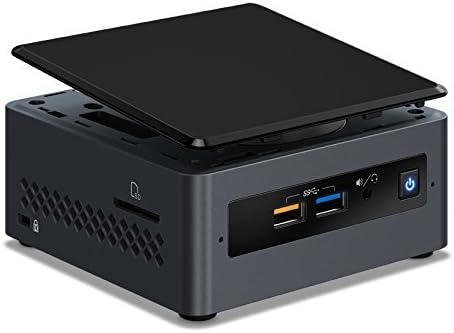
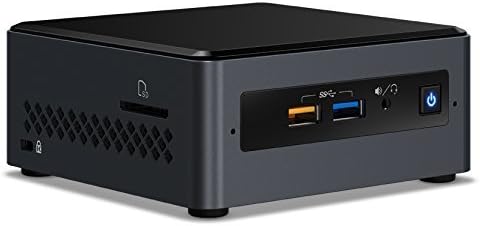
Тасвир: Пеш view of the Intel NUC 7 Essential Kit, showing two USB 3.0 ports, a headphone/microphone jack, and the power button.
Панели пушти
Тасвир: Қафо view of the Intel NUC 7 Essential Kit, displaying various ports including HDMI, USB, Ethernet, and power input.
дохилӣ View

Тасвир: дохилӣ view of the Intel NUC 7 Essential Kit, showing the layout for RAM and storage installation.
Ташкил кардан
- Хотира насб кунед (RAM): Open the NUC chassis. Locate the SODIMM slots. Gently insert DDR4-2400 SODIMM modules (up to 8GB total) into the slots until they click into place.
- Анбори насб: For a 2.5" SATA drive, connect the drive to the SATA port and secure it within the designated bay.
- Шасси пӯшида: Carefully close the NUC chassis, ensuring all cables are properly routed and secured.
- Дастгоҳҳои перифериро пайваст кунед: Connect your monitor(s) to the HDMI ports. Connect a keyboard and mouse to the USB ports. Plug in the power adapter.
- Install Operating System: Power on the NUC. Follow the on-screen instructions to install your preferred operating system (e.g., Windows, Linux, Chrome OS) from a USB drive or network.
Фаъолият
- Фаъол / Хомӯш: Press the power button on the front panel to turn the NUC on or off.
- Connecting to Display: Use the HDMI ports to connect to up to two 4K displays. Ensure your displays are set to the correct input source.
- Дастгоҳҳои USB: Connect USB devices such as external storage, printers, or other peripherals to the available USB 3.0 ports.
- Пайвасти шабакавӣ: Connect an Ethernet cable to the LAN port for a wired network connection, or configure Wi-Fi through your operating system settings.
Нигоҳдорӣ
- Тозакунӣ: Regularly clean the exterior of the NUC with a soft, dry cloth. Ensure ventilation grilles are free from dust to maintain optimal airflow.
- Навсозии нармафзор: Keep your operating system and drivers updated to ensure optimal performance and security. Check the Intel support website for the latest NUC-specific drivers.
- Firmware/BIOS Updates: Дастгирии Intel-ро мунтазам тафтиш кунед website for BIOS/firmware updates. Follow instructions carefully when performing updates.
Мушкилкушо
- Намоиши: Ensure the monitor is powered on and set to the correct input. Check HDMI cable connections. Try a different HDMI port or cable.
- Дастгоҳҳои периферӣ шинохта нашудаанд: Ensure USB devices are properly connected. Try different USB ports. Update USB drivers in the operating system.
- Пастшавии система: Check Task Manager (Windows) or system monitor (Linux) for high CPU/RAM usage. Ensure sufficient free storage space. Update drivers and operating system.
- Масъалаҳои пайвастшавӣ ба шабака: Verify Ethernet cable connection or Wi-Fi settings. Restart your router/modem. Update network drivers.
- OS Installation Problems: Ensure your installation media is bootable and correctly configured. Check BIOS settings for boot order and compatibility.
Мушаххасоти
| Хусусият | Мушаххасоти |
|---|---|
| Протсессор | Intel Pentium Silver J5005 |
| RAM | Up to 8GB DDR4-2400 SODIMMs (not included) |
| Нигоҳдорӣ | 2.5" SATA3 bay (not included) |
| Графика | Intel UHD Graphics 605 (4K support) |
| Натиҷаҳои видео | 2 x HDMI |
| Портҳои USB | 4 х USB 3.0, 2 х USB 2.0 |
| Шабака | Gigabit Ethernet, Wi-Fi (802.11a/b/g/n) |
| Аудио | TOSLINK audio jack, 3.5mm headphone/microphone jack |
| Андозаҳо | 5.43 x 5.27 x 4.64 инч |
| Вазн | 2.46 фунт |
Кафолат ва дастгирӣ
For warranty information and technical support, please refer to the documentation included with your Intel NUC Kit or visit the official Intel support website. Online resources often include driver downloads, FAQs, and community forums.


