Муқаддима
This manual provides instructions for the UpStart Components replacement remote control, designed for compatibility with Emerson TVs, specifically models that use the NH000UD remote. This remote control is engineered to function like the original, offering a straightforward replacement solution without the need for complex programming.
Ташкил кардан
Насби батарея
Барои кор кардани идоракунии дурдаст ду батареяи AAA (дохил карда нашудааст) лозим аст. Барои насб кардани батареяҳо ин қадамҳоро иҷро кунед:
- Қисмати батареяро дар қафои идоракунии дурдаст ҷойгир кунед.
- Сарпӯши қисмати батареяро барои кушодан ба поён лағжонед.
- Ду батареяи AAA-ро гузоред, ки терминалҳои мусбат (+) ва манфӣ (-) бо аломатҳои дар дохили қисм мувофиқат мекунанд.
- Сарпӯши қисмати батареяро то он даме ки бехатар клик кунад, ба ҷои худ ғеҷонед.

Image: Back of the remote control, illustrating the battery compartment and how to open it for battery installation.
Once batteries are installed, the remote is ready for use with your compatible Emerson TV. No programming is required.
Дастурҳои амалиётӣ
This replacement remote control is designed to replicate the functionality of your original Emerson TV remote. Point the remote directly at your television's infrared sensor for optimal performance.
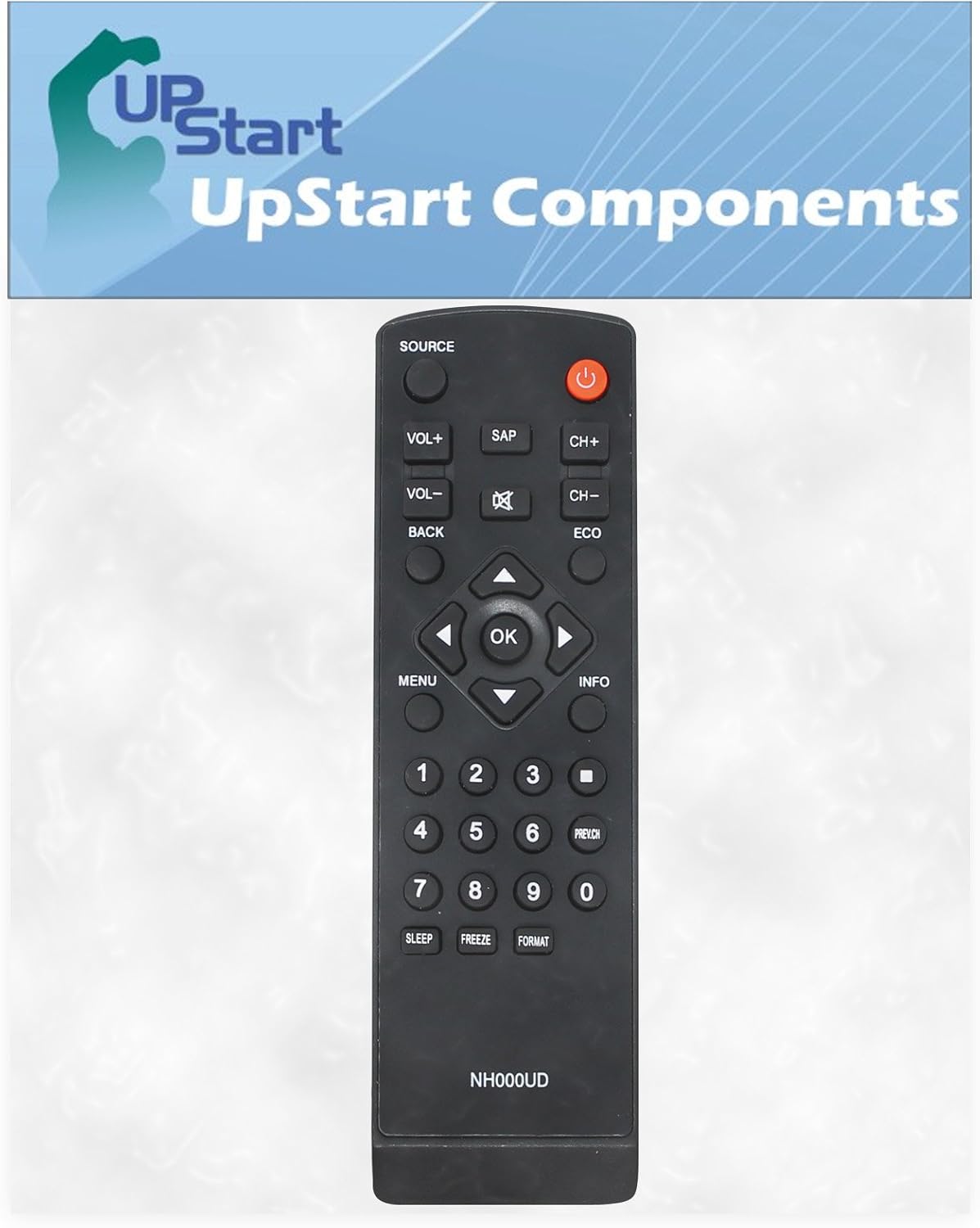
Тасвир: Пеш view of the remote control, displaying the layout of all operational buttons.
Функсияҳои асосӣ:
- Қудрат (Тугмаи сурх): Телевизорро фурӯзон ё хомӯш мекунад.
- МАНБАИ: Сарчашмаҳои вурудро интихоб мекунад (масалан, HDMI 1, AV).
- VOL+ / VOL-: Сатҳи овозро зиёд ё кам мекунад.
- CH+ / CH-: Каналҳоро боло ё поён тағир медиҳад.
- Хомӯш кардан (Баландгӯяк бо X): Овози телевизионро хомӯш мекунад ё мекушояд.
- Тугмаҳои рақамӣ (0-9): Рақамҳои каналро мустақиман ворид кунед.
- Меню: Ба менюи асосии телевизион дастрасӣ пайдо мекунад.
- Navigation Arrows (Up, Down, Left, Right) & OK: Аз менюҳо паймоиш кунед ва интихобҳоро тасдиқ кунед.
- ПУШТ: Ба меню ё экрани қаблӣ бармегардад.
- МАЪЛУМОТ: Маълумотро дар бораи барнома ё вуруди ҷорӣ нишон медиҳад.
- SAP: Secondary Audio Program function.
- ЭКО: Activates or deactivates energy-saving modes.
- ХОБ: Sets a timer for the TV to turn off automatically.
- ЯХДОН: Pauses the current image on screen.
- Формат: Таносуби тарафҳои экранро танзим мекунад.
- PREV.CH: Ба ҳолати қаблӣ мегузарад viewканали ed.
Нигоҳдорӣ
Тозакунӣ
To clean your remote control, use a soft, dry cloth. For stubborn dirt, lightly dampen the cloth with water or a mild, non-abrasive cleaner. Avoid using harsh chemicals or abrasive materials, as these can damage the remote's surface or internal components.
Иваз кардани батарея
Replace batteries when the remote's response becomes sluggish or stops working. Always replace both batteries at the same time with new AAA alkaline batteries. Do not mix old and new batteries, or different types of batteries, as this can lead to leakage or improper function. Dispose of used batteries according to local regulations.
Мушкилкушо
- Ҷавоб намедиҳад.
- Ensure fresh AAA batteries are correctly installed with proper polarity.
- Check for any obstructions between the remote control and the TV's infrared sensor.
- Verify that you are pointing the remote directly at the TV.
- Confirm that the TV is powered on.
- Intermittent response:
- Батареяҳо метавонанд кам бошанд; иваз кунанд.
- Ensure there are no strong light sources (like direct sunlight or bright fluorescent lights) interfering with the remote's signal.
Мушаххасоти
| Бренд | UpStart Components |
| Номи модел | RC-NH000UD-DL6 |
| Дастгоҳҳои мувофиқ | Television (Emerson TVs compatible with NH000UD) |
| Технологияи пайвастшавӣ | Инфрасурх |
| Навъи назораткунанда | Назорати тугма |
| Манбаи нерӯ | 2 x батареяҳои AAA (дохил карда намешаванд) |
| Навъи батарея | Alkaline AAA |
| Вазни ашё | 2.5 унс |
| Ранги | Сиёҳ |
| Хусусияти махсус | Тарҳрезии эргономикӣ |
Кафолат ва дастгирӣ
This product is a replacement part manufactured by UpStart Components. Any warranties for this product are offered solely by UpStart Components and are not covered under any warranties offered by the original equipment manufacturers (OEMs).
For support or warranty inquiries, please contact UpStart Components directly through their official channels. Refer to the product packaging or the seller's information for specific contact details.


