1. Муқаддима
This manual provides detailed instructions for the safe and proper installation, operation, and maintenance of your RICOO S3811 TV Wall Mount. Please read this manual thoroughly before installation to ensure correct setup and to prevent damage or injury.

Image: The RICOO S3811 TV Wall Mount, a black, articulated arm mount designed for flat-panel displays.
2. Маълумот оид ба бехатарӣ
WARNING: Failure to read and follow these instructions may result in serious personal injury, property damage, or voiding of your warranty.
- Ensure the mounting surface can safely support the combined weight of the mount and the display.
- Иқтидори ҳадди аксар аз 20 кг (44 фунт) зиёд накунед.
- This mount is designed for VESA patterns 75x75mm and 100x100mm. Verify your display's VESA pattern before installation.
- Use appropriate tools and follow all drilling instructions carefully.
- Always use a stud finder to locate wooden studs or ensure you are drilling into solid concrete/brick walls.
- Ҳангоми насб кӯдакон ва ҳайвонотро аз дур нигоҳ доред.
- Агар шумо дар бораи ягон қисми раванди насб боварӣ надошта бошед, ба мутахассиси соҳибихтисос муроҷиат кунед.
3. Мундариҷаи баста
Пеш аз оғози насб санҷед, ки ҳамаи ҷузъҳо мавҷуд ва осеб надидаанд.
- Pre-assembled Wall Mount Unit (1)
- Wall Plugs for Concrete Walls (Quantity as needed)
- Screws for TV/Monitor Attachment (Various sizes)
- Wall Mounting Screws (Quantity as needed)
- Installation Hardware and Accessories (Washers, spacers, etc.)
4. Дастури насб
4.1 Санҷишҳои пеш аз насб
- Мутобиқати VESA: Ensure your TV or monitor has a VESA mounting pattern of 75x75mm or 100x100mm.
- Иқтидори вазн: Confirm your display's weight does not exceed 20 kg (44 lbs).
- Навъи девор: Identify your wall type (solid concrete, brick, wood stud). Use appropriate anchors/screws.
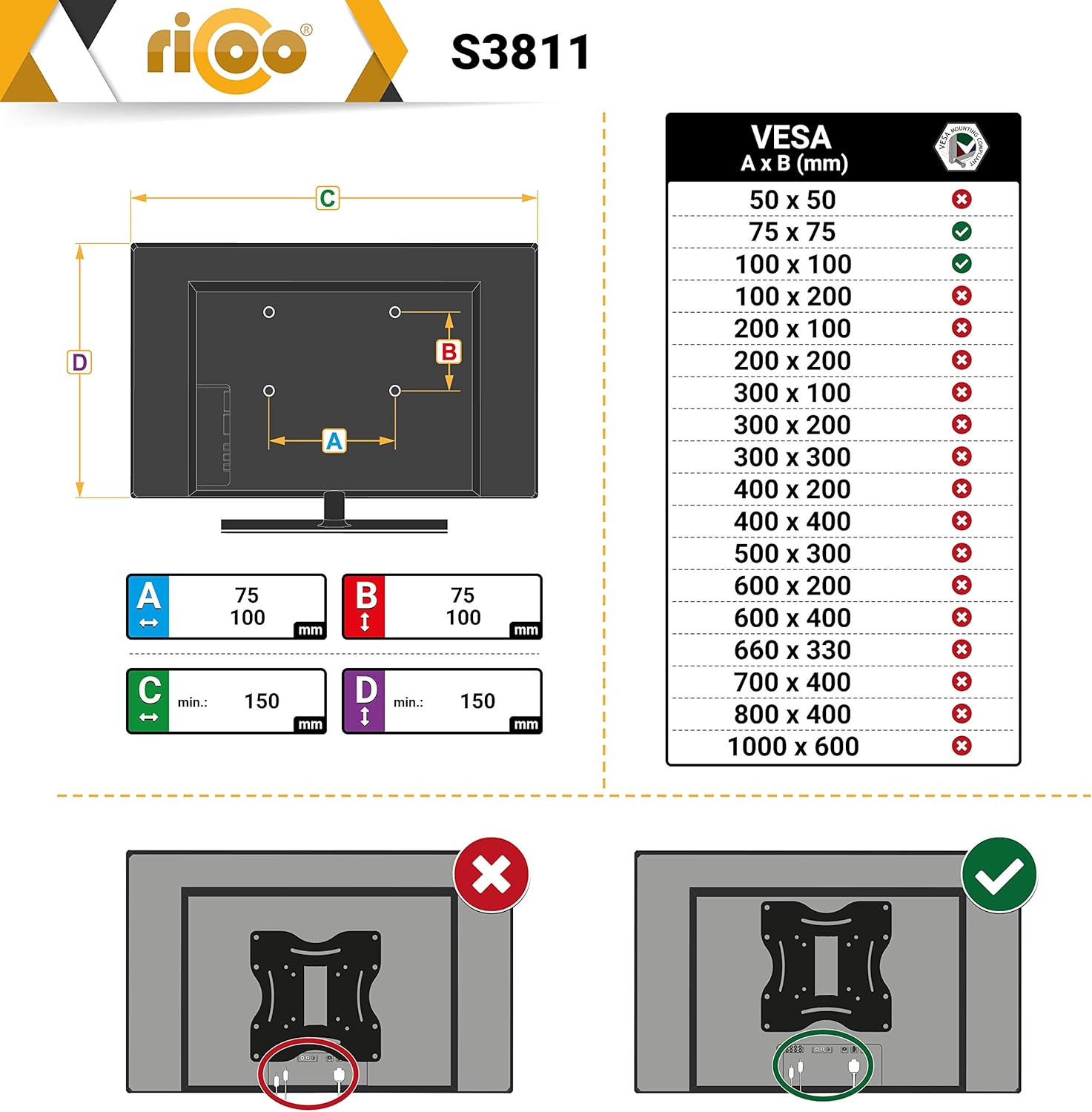
Image: A diagram illustrating VESA compatibility, showing supported (green check) and unsupported (red X) VESA patterns. The S3811 supports 75x75mm and 100x100mm.
4.2 Насб кардани плитаи деворӣ
- Determine the desired height and position for your display.
- Place the wall plate against the wall and mark the drilling holes. Use a level to ensure it is straight.
- Drill pilot holes at the marked locations. For wood studs, drill directly. For concrete/brick, insert wall plugs.
- Secure the wall plate to the wall using the provided wall mounting screws. Ensure it is firmly attached.
4.3 Attaching the Bracket to the Display
- Carefully place your TV/monitor face down on a soft, clean surface to prevent scratches.
- Align the mounting bracket of the S3811 to the VESA holes on the back of your display.
- Select the appropriate screws from the provided hardware kit that fit your display's VESA holes. Use washers and spacers if necessary to ensure a secure fit without overtightening.
- Бурдаҳоро сахт маҳкам кунед, аммо аз ҳад зиёд нагиред.
4.4 Mounting the Display to the Wall Plate
- With assistance, carefully lift the display with the attached bracket.
- Hook the bracket onto the wall plate. Ensure it is securely seated.
- Secure the display to the wall plate using any locking mechanisms or screws provided with the mount.
5. Амалиёт ва танзимот
The RICOO S3811 offers various adjustment options for optimal viewing.
- Танзими чархиш: The display can be tilted +12°/-5° to reduce glare and achieve a comfortable viewing angle. Loosen the tilt knobs, adjust, and then retighten.
- Танзими гардиш: The mount allows for 180° swivel (left/right) depending on screen width, providing flexible viewing from different positions in the room.
- Ротатсия: The front panel can be rotated +/-3° for fine-tuning the horizontal level of your display after installation.
- Масофа аз девор: The distance from the wall can be adjusted between 50mm and 180mm by extending or retracting the arm.

Image: A composite image demonstrating the various adjustment capabilities of the mount, including tilt, swivel, rotation, and cable management.
5.1 Идоракунии кабел
The mount includes integrated cable management clips or channels to keep cables tidy and out of sight. Route your display cables through these features for a clean installation.
6. Нигоҳдорӣ
- Ҳама винтҳо ва пайвастҳоро давра ба давра тафтиш кунед, то боварӣ ҳосил кунед, ки онҳо мустаҳкам ва бехатар мемонанд.
- Clean the mount with a soft, dry cloth. Do not use abrasive cleaners or solvents.
- Do not lubricate any parts of the mount.
7. Баррасии мушкилот
| Мушкилот | Сабаби эҳтимолӣ | Ҳалли |
|---|---|---|
| Mount feels unstable after installation. | Screws not fully tightened; incorrect wall anchors used; wall not strong enough. | Re-tighten all screws. Ensure correct anchors for your wall type. Consult a professional if wall strength is a concern. |
| Display is not level. | Wall plate not level; front panel rotation needs adjustment. | Use the +/-3° rotation feature to level the display. If the wall plate is significantly off, re-install. |
| Difficulty adjusting tilt/swivel. | Тугмаҳо/винтҳои танзимкунанда хеле сахт баста шудаанд. | Loosen the relevant adjustment knobs/screws slightly, make the adjustment, then re-tighten. |
8. Мушаххасоти
| Рақами модел | S3811 |
| Бренд | РИКО |
| Андозаи экрани мувофиқ | 13 - 27 инч (33 - 69 см) |
| Мутобиқати VESA | 75х75мм, 100х100мм |
| Иқтидори максималии сарборӣ | 20 кг (44 фунт) |
| Кунҷи майл | +12° / -5° |
| Кунҷи гардиш | 180° (screen dependent) |
| Ротатсия | +/-3° |
| Масофа аз девор | 50мм - 180мм |
| Материал | Пӯлоди хӯлаи |
| Ранги | Сиёҳ |

Image: A technical diagram showing the detailed dimensions and adjustable angles of the RICOO S3811 wall mount in millimeters.
9. Кафолат ва дастгирӣ
RICOO products are manufactured with quality and durability in mind. For specific warranty information, please refer to the warranty card included with your product or visit the official RICOO webсайт.
If you encounter any issues or have questions regarding your RICOO S3811 TV Wall Mount, please contact RICOO customer support for assistance. Contact details can typically be found on the product packaging or the official brand webсайт.


