Муқаддима
This manual provides essential information for the setup, operation, and maintenance of your DirecTV H25-100 HD Receiver. Please read it thoroughly before using the device to ensure proper functionality and to maximize your viewтаҷрибаи ғанӣ.
Хусусиятҳои асосӣ
- Designed for SWiM (Single Wire Multiswitch) networks only.
- High-Definition (HD) video output.
- Тарҳрезии компакт.
- 12V DC power input, suitable for various power setups.
- Multiple output options: 2x HDMI, 1x Composite, 1x Component, 1x Optical Audio.
- No DVR capability.
Дар қуттӣ чӣ ҳаст
- DirecTV H25-100 HD Receiver
- Адаптери барқии AC

Тасвир: боло view of the DirecTV H25-100 HD Receiver, showcasinтарҳи сиёҳи паймонаш.
Ташкил кардан
Кушодан
Carefully remove the receiver and all accessories from the packaging. Retain the packaging for future transport or storage.
Пайвастшавӣ
The H25-100 receiver offers various ports for connecting to your television and satellite dish. Ensure all connections are secure before powering on the device.
- Вуруди моҳвора: Connect the coaxial cable from your SWiM-enabled satellite dish to the 'SAT IN' port on the back of the receiver.
- Натиҷаҳои HDMI: Use an HDMI cable to connect one of the 'HDMI' ports on the receiver to an HDMI input on your television for high-definition video and audio.
- Composite Output: For standard definition video, connect the yellow (video), white (left audio), and red (right audio) RCA cables from the receiver's 'VIDEO OUT' and 'AUDIO OUT' ports to the corresponding inputs on your television.
- Component Output: For high-definition analog video, connect the green (Y), blue (Pb), and red (Pr) component video cables from the receiver's 'COMPONENT OUT' ports to your television. Connect the white and red RCA cables for audio.
- Натиҷаи аудиои оптикӣ: For digital audio, connect an optical audio cable from the 'OPTICAL AUDIO' port to a compatible audio receiver or sound system.
- Қувва: Connect the included AC power adapter to the 'POWER IN 12V' port on the receiver, then plug the adapter into a wall outlet.

Тасвир: Пеш ва қафо views of the DirecTV H25-100 HD Receiver, highlighting all input and output ports for connection.
Фаъолсозии ибтидоӣ
After all connections are made, press the 'POWER' button on the front of the receiver or on your DirecTV remote control. Follow any on-screen prompts for initial setup, such as language selection and satellite signal acquisition.
Дастурҳои амалиётӣ
Назорати панели пеши
The front panel of the H25-100 receiver provides basic controls for operation:
- Қудрат: Қабулкунандаро фаъол ё хомӯш мекунад.
- Меню: Ба менюи асосӣ барои танзимот ва имконот дастрасӣ пайдо мекунад.
- ИНТИХОБ: Интихобҳоро дар менюҳо тасдиқ мекунад.
- ДАСТРАС: Дастури барномаро нишон медиҳад.
- RES (Resolution): Cycles through available video resolutions.
- Тирҳои роҳнамо (боло/поён/чап/рост): Used to navigate through menus and change channels.
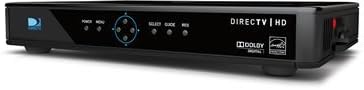
Тасвир: тараф view of the DirecTV H25-100 HD Receiver, clearly showing the front panel buttons for power, menu, selection, guide, and resolution.
Амалиёти асосӣ
Once powered on and configured, you can use your DirecTV remote control (not included with this receiver) to navigate channels, access the program guide, adjust settings, and enjoy your DirecTV service.
- Тағир додани каналҳо: Use the CH+/CH- buttons or enter channel numbers directly on your remote.
- Accessing Guide: Press the 'GUIDE' button to view program listings.
- Навигатсия меню: Use the 'MENU' button to access system settings, parental controls, and other features.
Нигоҳдорӣ
Тозакунӣ
To maintain the appearance and performance of your receiver, periodically clean its exterior. Use a soft, dry cloth to wipe away dust. For stubborn marks, slightly dampen the cloth with water. Do not use harsh chemicals, abrasive cleaners, or solvents, as these can damage the finish.
Навсозии нармафзор
The DirecTV H25-100 receiver may receive automatic software updates via satellite. Ensure the receiver remains connected to power and the satellite dish to allow these updates to occur, which can improve performance and add new features.
Мушкилкушо
If you encounter issues with your DirecTV H25-100 receiver, refer to the table below for common problems and their solutions.
| Мушкилот | Сабаби эҳтимолӣ | Ҳалли |
|---|---|---|
| Не қудрат | Power cable loose or disconnected; power outlet not working. | Check power cable connection; try a different outlet; ensure power adapter is functioning. |
| No Signal / Searching for Satellite | Satellite cable loose or disconnected; dish alignment issue; bad weather. | Check 'SAT IN' cable connection; ensure clear line of sight to dish; wait for weather to clear. |
| Тасвир нест / Экрани сиёҳ | Incorrect TV input selected; video cable loose or faulty; receiver not powered on. | Select correct HDMI/AV input on TV; check video cable connections; power cycle receiver. |
| Аудио нест | Audio cable loose or faulty; TV/audio system muted or volume low; incorrect audio output setting. | Check audio cable connections; unmute TV/audio system and increase volume; verify audio settings on receiver. |
Мушаххасоти
Detailed technical specifications for the DirecTV H25-100 HD Receiver:
| Хусусият | Тавсифи |
|---|---|
| Модели | H25-100 |
| Бренд | DIRECTV |
| Ранги | Сиёҳ |
| Технологияи пайвастшавӣ | HDMI, Композитсия, Компонент, Аудио оптикӣ |
| Вуруди моҳвораӣ | 1 (SWM System Only) |
| Баромади HDMI | 2 |
| Натиҷаи таркибии видео | 1 |
| Натиҷаи видеои компонент | 1 |
| Натиҷаи аудиои оптикӣ | 1 |
| Вуруди нерӯ | 12В DC |
| ASIN | B07DB2YP79 |
| Санаи аввалин дастрас | 7 августи соли 2018 |
Кафолат ва дастгирӣ
For information regarding product warranty, technical support, or service, please refer to the documentation provided by DirecTV at the time of purchase or visit the official DirecTV support webсайт. Квитансияи хариди худро ҳамчун далели харид барои даъвоҳои кафолат нигоҳ доред.


