1. Муқаддима
Ташаккур ба шумо барои харидasing the Yenkee YKB 3200 Gaming Keyboard. This manual provides essential information for the proper setup, operation, and maintenance of your new keyboard. Please read this manual thoroughly before using the product to ensure optimal performance and longevity.
2. Маълумот оид ба бехатарӣ
- Клавиатураро аз моеъ ва намии аз ҳад зиёд дур нигоҳ доред.
- Клавиатураро ба ҳарорати аз ҳад зиёд нагузоред.
- Аз афтидан ё дучор шудан ба зарбаҳои сахт ба клавиатура худдорӣ кунед.
- Худатон кӯшиш накунед, ки клавиатураро ба қисмҳо ҷудо кунед ё таъмир кунед. Ҳама хидматрасониро ба кормандони соҳибихтисос муроҷиат кунед.
- Барои тоза кардан танҳо матои хушк ва нарм истифода баред.
3. Мундариҷаи баста
Лутфан, ҳангоми кушодани бастабандӣ мундариҷаи бастаро тафтиш кунед. Агар ягон ашё гум шуда ё вайрон шуда бошад, бо фурӯшандаи худ тамос гиред.
- Yenkee YKB 3200 Gaming Keyboard with integrated smartphone holder
- Сими USB (замима карда мешавад)
4. Маҳсулот ба охир расидview
The Yenkee YKB 3200 is a robust gaming keyboard designed for an enhanced gaming experience. It features a durable metal construction, responsive rubber dome keys, and dynamic rainbow backlighting.
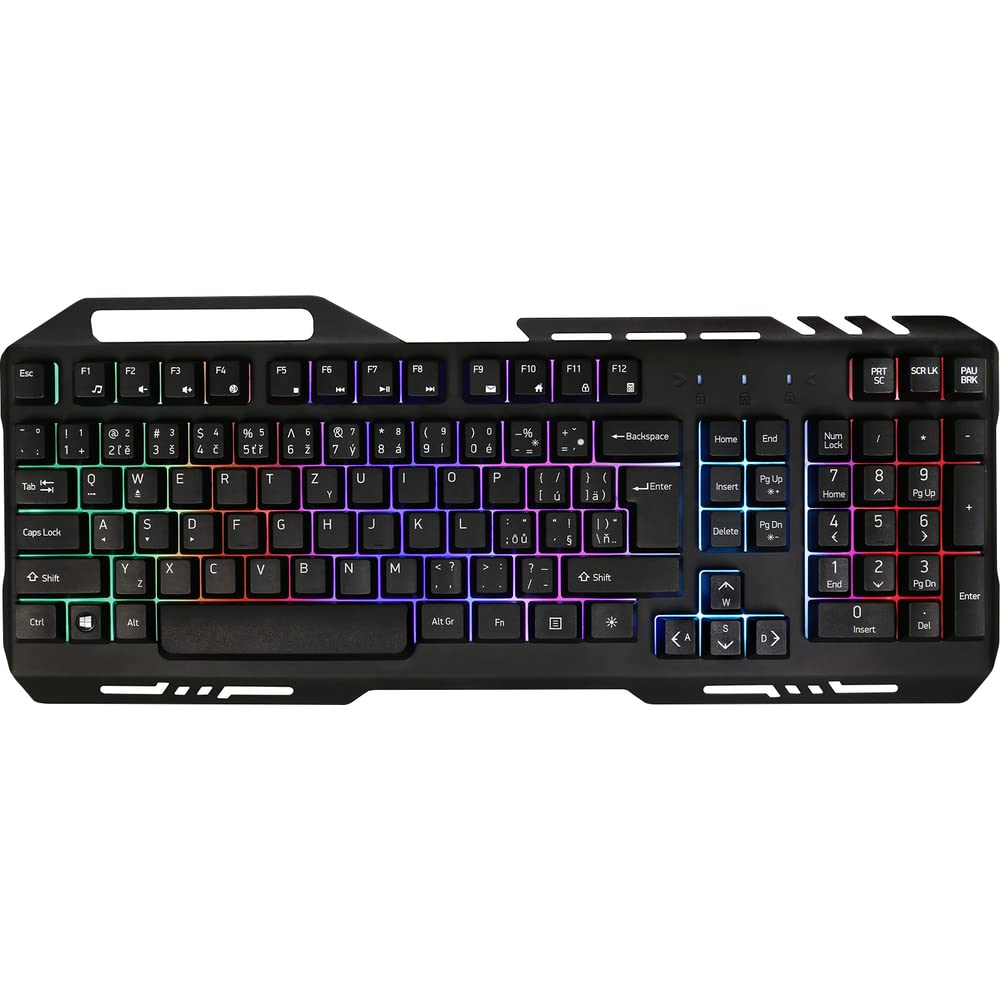
Image 1: Yenkee YKB 3200 Gaming Keyboard. This image displays the full keyboard with its metal frame and illuminated keys, highlighting the integrated smartphone holder at the top.
Хусусиятҳои асосӣ:
- Metal Keyboard Design: Provides enhanced durability and a premium feel.
- Дорандаи смартфони ҳамгирошуда: Conveniently located at the top of the keyboard for easy access to your mobile device.
- Durable Rubber Dome Keys: Offers a comfortable and responsive typing experience.
- Nine Rainbow Backlight Modes: Customizable lighting effects to suit your preference and gaming atmosphere.
- Пайвастшавӣ USB: Simple plug-and-play connection to your computer.
- 1.5m Cable Length: таъмин менамояд ample барои танзимоти гуногун дастрас кунед.
5. Танзимот
- Клавиатураро кушоед: Клавиатураро бодиққат аз бастабандиаш берун кунед.
- Ба компютер пайваст шавед: Locate an available USB port on your computer (PC or laptop). Insert the USB connector of the keyboard into the USB port.
- Насби драйвер: The keyboard is plug-and-play and typically does not require additional driver installation. Your operating system should automatically detect and install the necessary drivers.
- Ҷойгиршавӣ: Place the keyboard on a stable, flat surface. You can use the integrated smartphone holder to position your mobile device.
- Функсияи санҷиш: Open a text editor or browser to test if the keys are responding correctly.
6. Дастурҳои истифодабарӣ
Назорати рӯшноӣ:
The Yenkee YKB 3200 features nine distinct rainbow backlight modes. These modes can typically be cycled through using a dedicated function key combination.
- Тағир додани режимҳо: Look for a key labeled 'FN' (Function) and a key with a light bulb icon or 'Scroll Lock' / 'Pause Break'. Pressing FN + Light Bulb / Scroll Lock / Pause Break (depending on keyboard layout) will cycle through the available backlight modes.
- Танзими равшанӣ: Some keyboards allow brightness adjustment using FN + Up/Down Arrow keys. Refer to your specific keyboard layout for exact key combinations.
- Фаъол/хомӯш кардани чароғаки қафо: A long press of the backlight control key or a specific FN combination might turn the backlight on or off.
Multimedia and Function Keys:
The keyboard may include additional function keys (F1-F12) that, when combined with the 'FN' key, provide multimedia control or quick access to applications. Common functions include:
- FN + F1-F12: Volume control, media playback, email, web browser, etc. (Specific functions vary by model).
7. Нигоҳдорӣ
Тозакунӣ:
- Тозакунии умумӣ: Барои тоза кардани сатҳи клавиатура аз матои нарм, хушк ва бепахта истифода баред.
- Тоза кардани чанг: Барои тоза кардани чанг ва хошок аз байни калидҳо ҳавои фишурдашударо истифода баред.
- Доғҳои якрав: Барои доғҳои якрав, каме гampМатоъро бо об ё маҳлули нарми тозакунанда ва ғайриабразивӣ бишӯед. Боварӣ ҳосил кунед, ки ягон моеъ ба клавиатура надарояд.
Нигоҳдорӣ:
Вақте ки клавиатураро муддати тӯлонӣ истифода намебаред, онро дар ҷои хунук ва хушк, дур аз нури бевоситаи офтоб ва ҳарорати аз ҳад зиёд нигоҳ доред.
8. Баррасии мушкилот
| Мушкилот | Сабаби эҳтимолӣ | Ҳалли |
|---|---|---|
| Клавиатура ҷавоб намедиҳад | Пайвасти USB фуҷур, порти USB хато, мушкилоти ронанда. | Боварӣ ҳосил кунед, ки сими USB боэътимод пайваст аст. Порти дигари USB-ро санҷед. Компютери худро аз нав фаъол созед. |
| Нури паси кор намекунад | Backlight turned off, low brightness setting. | Press the backlight control key combination (e.g., FN + Scroll Lock) to cycle modes or adjust brightness. |
| Тугмаҳо часпанда ё ҷавоб намедиҳанд | Dirt or debris under keys. | Clean the keyboard using compressed air and a soft cloth. |
9. Мушаххасоти
| Хусусият | Мушаххасоти |
|---|---|
| Бренд | Yenkee |
| Рақами модел | YKB 3200 |
| Технологияи пайвастшавӣ | USB |
| Дарозии кабел | 1.5 метр |
| Тавсифи клавиатура | Бозӣ |
| Backlight Theme | Rainbow (9 modes) |
| Дастгоҳҳои мувофиқ | Ноутбук, компютер |
| Андозаҳои маҳсулот | 45.2 х 20 х 3.5 см |
| Вазни маҳсулот | 841 гр |
| Компонентҳои дохилшуда | USB cable (attached) |
10. Кафолат ва дастгирӣ
Yenkee products are designed and manufactured to the highest quality standards. For information regarding warranty terms and conditions, please refer to the warranty card included with your purchase or visit the official Yenkee website. For technical support or service inquiries, please contact your local retailer or the Yenkee customer support team.


