Муқаддима
This manual provides essential instructions for the safe operation, setup, and maintenance of your Protocol Director HD Foldable Drone. Please read this manual thoroughly before operating the drone to ensure proper function and to prevent damage or injury.
The Protocol Director HD is a foldable drone equipped with a live streaming HD camera, designed for capturing aerial video and photos. It features an intuitive 2.4 GHz remote control, an altitude sensor for stable flight, and a free downloadable app for enhanced camera control and flight path drawing.
Чорабиниҳои бехатарӣ
- Always operate the drone in open, unobstructed areas, away from people, animals, and obstacles.
- Do not operate near airports, restricted airspace, or sensitive facilities.
- Maintain a safe distance from power lines, trees, and water bodies.
- Ensure all propellers are securely attached and undamaged before each flight.
- Дар шамолҳои сахт ё шароити номусоиди обу ҳаво парвоз накунед.
- Ангуштон ва мӯйро аз пропеллерҳои гардишкунанда дур нигоҳ доред.
- Adult supervision is recommended for users under 18 years of age. Recommended age for operation is 14 years and up.
- Only use original Protocol replacement parts and accessories.
- Кӯшиш накунед, ки дрон ё ҷузъҳои онро тағир диҳед.
- Вақте ки дрон истифода намебаред, идоракунии дурдаст ва дронро хомӯш кунед.
Мундариҷаи баста
Боварӣ ҳосил кунед, ки ҳама ашё дар баста мавҷуд аст:
- Protocol Director HD Foldable Drone with Camera
- Remote Control with Phone Mount
- Сими пуркунандаи USB
- 2 x Батареяҳои дрон
- Халтаи сафар
- Дастури таълимӣ (ин ҳуҷҷат)
- Spare Parts: Blades, Screwdriver

Image: The Protocol Director HD Foldable Drone, showcasing its compact design with propellers extended and camera visible at the front.
Ташкил кардан
1. Пур кардани батареяи дрон
- Insert one of the drone batteries into the USB charging cable.
- Connect the USB charging cable to a USB power source (e.g., computer USB port, USB wall adapter).
- The charging indicator light on the USB cable will illuminate during charging and turn off when fully charged.
- Пуркунии барқ одатан тақрибан 60-90 дақиқа мегирад. Аз ҳад зиёд пардохт накунед.
2. Насб кардани батареяҳои идоракунии дурдаст
- Қисмати батареяро дар қафои пулти дурдаст кушоед.
- 4 батареяи АА-ро ҷойгир кунед (дохил карда нашудааст), ки полярии дурустро таъмин мекунад (+/-).
- Қисмати батареяро бехатар пӯшед.

Image: The drone's remote control with a smartphone securely mounted, displaying a live feed from the drone's camera.
3. Кушодани дрон
- Gently unfold each of the four rotor arms until they click into place.
- Ensure all arms are fully extended and locked before flight.
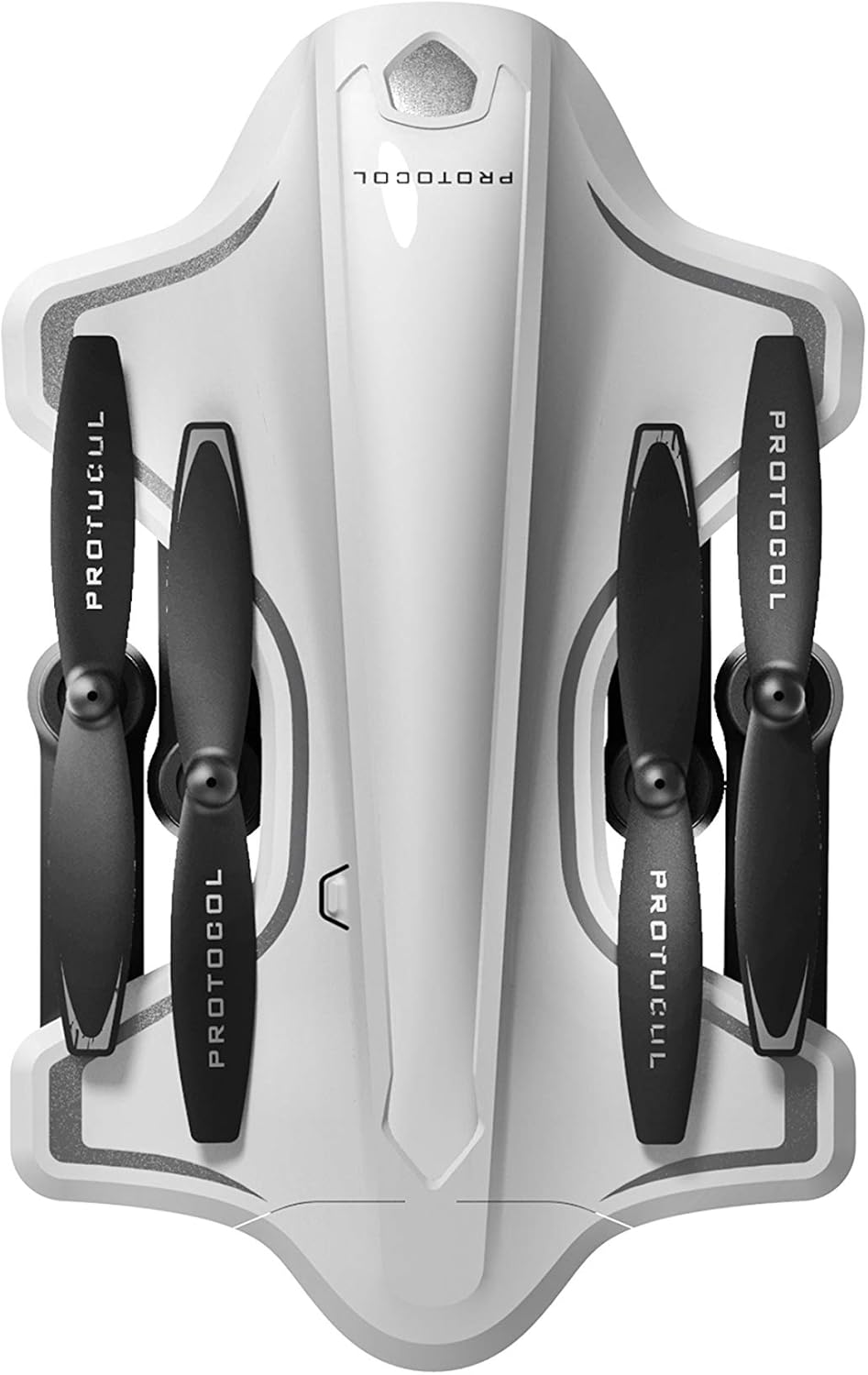
Image: The Protocol Director HD Foldable Drone in its compact, folded configuration, ready for transport.
4. Installing the Drone Battery
- Қисмати батареяро дар дрон ҷойгир кунед.
- Insert the fully charged drone battery, ensuring it is securely seated.
- Сарпӯши қисмати батареяро пӯшед.
5. Downloading the App (Optional for Camera Features)
- Ҷустуҷӯ the "Protocol Director HD" app in your smartphone's app store (iOS or Android).
- Download and install the free application.
- Mount your smartphone onto the remote control's phone mount.
Дастурҳои амалиётӣ
1. Фаъолсозӣ ва пайвастшавӣ
- Дронро ба сатҳи ҳамвор ва ҳамвор ҷойгир кунед.
- Turn on the drone by pressing the power button. The drone's lights will flash.
- Пули дурдастро фаъол кунед.
- Push the left joystick (throttle) all the way up, then all the way down. The drone's lights will become solid, indicating successful pairing.
2. Calibrating the Gyroscope
After pairing, it is recommended to calibrate the gyroscope for stable flight:
- With the drone on a flat surface, push both joysticks down and to the right simultaneously for a few seconds.
- The drone's lights will flash rapidly and then become solid, indicating calibration is complete.
3. Усулҳои асосии идоракунии парвоз
The Protocol Director HD features auto launch, hover, and land functions due to its altitude sensor.
- Auto Launch: Press the dedicated auto launch button on the remote. The drone will ascend to a stable hovering altitude.
- Дроссел (ҷойстики чап):
- Push up: Increase altitude
- Push down: Decrease altitude
- Push left/right: Rotate drone left/right (yaw)
- Назорати самт (Ҷойстики рост):
- Отжимание: Парвоз ба пеш
- Push down: Fly backward
- Push left: Fly left (strafe)
- Push right: Fly right (strafe)
- Auto Land: Press the dedicated auto land button. The drone will slowly descend and land.
- Интихоби суръат: Use the speed button on the remote to cycle through three selectable speeds (low, medium, high).
4. Camera and App Features
Connect your smartphone to the drone's Wi-Fi network (usually named "Protocol_Drone_XXXXXX") to access live streaming and advanced camera functions via the app.
- Ҷараёни мустақим: View the drone's camera feed in real-time on your smartphone.
- Сабти видео: Initiate and stop video recording (480p resolution) through the app.
- Аксбардорӣ: Take still images through the app.
- Multiple Camera Angles: The app supports three different camera angles (Aerial, POV, Selfie) for varied content creation.
- Сабти аудио: The app allows for audio recording alongside video.
- Draw Your Own Flight Path: Utilize the app's feature to draw a flight path on your screen, and the drone will follow it.
- VR Capability: The app is VR capable; VR goggles are sold separately.
Нигоҳдорӣ
- Санҷиши пропеллер: Regularly check propellers for cracks, bends, or damage. Replace any damaged propellers using the provided spare parts and screwdriver.
- Тозакунӣ: Use a soft, dry cloth to clean the drone and remote control. Avoid using liquids or harsh chemicals.
- Нигоҳубини батарея:
- Батареяҳоро аз ҳад зиёд пур накунед.
- Батареяҳоро дар ҷои хунук ва хушк нигоҳ доред.
- Remove batteries from the drone and remote control during long periods of non-use.
- Нигоҳдорӣ: Fold the drone arms for compact storage in the provided travel bag when not in use. Store in a cool, dry environment.
Мушкилкушо
| Мушкилот | Сабаби эҳтимолӣ | Ҳалли |
|---|---|---|
| Дрон фаъол нест. | Батарея пур карда нашудааст ё нодуруст насб карда шудааст. | Боварӣ ҳосил кунед, ки батарея пурра пур шудааст ва дуруст ҷойгир карда шудааст. |
| Идоракунии дурдаст фаъол намешавад. | AA batteries are dead or incorrectly installed. | Replace AA batteries, checking polarity. |
| Дрон ва дурдаст ҷуфт намешаванд. | Pairing sequence not followed correctly. | Ensure drone is on, then remote. Push left joystick up then down completely. |
| Дрон ҳангоми парвоз ғарқ мешавад. | Gyroscope needs calibration; uneven surface at launch. | Land the drone, place on a flat surface, and recalibrate the gyroscope (both joysticks down and right). |
| One propeller does not spin. | Propeller damaged or motor issue. | Check for obstructions. Replace damaged propeller. If issue persists, contact support. |
| No live video feed on smartphone. | Not connected to drone's Wi-Fi; app not open. | Ensure smartphone is connected to the drone's Wi-Fi network and the app is running. |
Мушаххасоти
| Бренд | Протокол |
| Номи модел | Director HD |
| Рақами модел | 6182-7RCHA |
| Андозаҳо (Пӯшида) | Тақрибан 4.75 дюйм (дарозӣ) |
| Андозаҳо (васеъ) | Approximately 9 inches (length, including blades) |
| Вазн | 0.94 килограмм (940г) |
| Қарори камера | 480p (Сабти видеоӣ) |
| Пайвастшавӣ | Wi-Fi (for app control and live streaming), 2.4 GHz (for remote control) |
| Муътадилшавӣ | 6-axis motion-sensitive auto stabilizers, Altitude sensor |
| Усулҳои суръат | Three selectable speeds |
| Батареяи бесарнишин | Rechargeable (2 included) |
| Батареяи идоракунии дурдаст | 4 x батареяҳои AA (дохил карда намешаванд) |
| Материал | Plastic (Crash-resistant) |
| Синну соли тавсияшуда | 14 сол ва боло |
Кафолат ва дастгирӣ
For warranty information, technical support, or to purchase replacement parts, please visit the official Protocol webсайт ё шӯъбаи хидматрасонии муштариёни онҳо тамос гиред. Квитансияи хариди худро ҳамчун далели харид нигоҳ доред.
Webсайт: www.protocolny.com (Хурampистинод, истиноди воқеӣ метавонад фарқ кунад)
Тамос: Refer to the Protocol website for contact details, including phone numbers or email support.


