Муқаддима
This manual provides detailed instructions for the installation, operation, and maintenance of the Hanwha Techwin HCV-6070R 2MP Outdoor Vandal-Resistant Dome Camera. This camera is designed for outdoor security surveillance, offering 2-megapixel resolution, a 2.8-12mm manual varifocal lens, and night vision capabilities with a BNC connection.
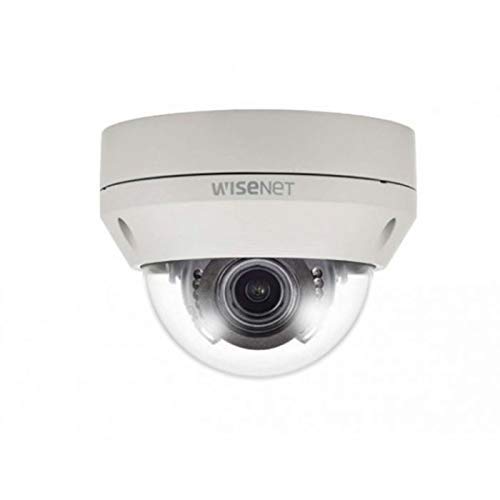
Figure 1: Hanwha Techwin HCV-6070R 2MP Outdoor Vandal-Resistant Dome Camera.
Маълумот оид ба бехатарӣ
Please read all safety instructions carefully before installing or operating the camera. Keep this manual for future reference.
- Ensure the power supply matches the camera's requirements to prevent electrical shock or fire.
- Камераро дар ҳарорати аз ҳад зиёд, намӣ ё муҳитҳои зангзананда қарор надиҳед.
- Насбкунӣ бояд аз ҷониби кормандони соҳибихтисос мувофиқи кодексҳои барқии маҳаллӣ анҷом дода шавад.
- Avoid direct exposure of the lens to strong light sources for extended periods.
- Кӯшиш накунед, ки камераро қисм-қисм кунед ё тағйир диҳед. Ин кафолатро бекор мекунад.
Мундариҷаи баста
Боварӣ ҳосил кунед, ки ҳама ашё дар баста мавҷуд аст:
- Hanwha Techwin HCV-6070R Dome Camera (1 unit)
- Виддаҳо ва лангарҳои васлкунӣ
- Шаблон насб
- Дастури оғози зуд
- Waterproof Cap (if applicable)
Ташкил кардан
1. Ҷойгиркунии камера
The HCV-6070R is designed for wall mounting. Choose a suitable outdoor location that provides the desired surveillance coverage and is protected from direct impact.
- Use the provided installation template to mark the drilling holes on the wall.
- Drill holes according to the template and insert the wall anchors.
- Secure the camera base to the wall using the mounting screws.
- Танзими камераро танзим кунед viewing angle as needed before tightening all screws.
2. Ноқилҳо ва пайвастҳо
The camera utilizes a BNC connection for video output and requires a separate power supply. Ensure all connections are secure and weatherproof for outdoor use.
- Пайвасти видео: Connect a BNC cable from the camera's BNC port to the video input of your DVR (Digital Video Recorder).
- Пайвасти барқ: Connect a 12V DC power adapter (not included) to the camera's power input. The camera operates at 8 watts.
- Пайвасти бесим: The camera supports Wi-Fi for remote control and monitoring. Refer to the operating section for initial Wi-Fi setup.

Расми 2: Мисample of a BNC coaxial cable for video connection. Ensure a secure connection to the camera and DVR.
3. Танзимоти ибтидоӣ
After physical installation and power-up, access the camera settings via your connected DVR or a compatible mobile application (Android controller type specified).
- Сана ва вақтро таъин кунед.
- Configure network settings for Wi-Fi connectivity.
- Adjust video quality and recording preferences.
Истифода бурдани камера
1. Мониторинг ва сабти видео
The camera provides 2MP effective video resolution, capturing video at 1080p and a frame rate of 30 fps. Video is typically recorded in MPEG-4 format.
- Дастрасӣ ба зинда view ва foo сабт шудаастtage through your connected DVR or the remote control application.
- Ensure your DVR is configured to record from the correct channel.
2. Adjusting Focus and Zoom
The HCV-6070R features a 2.8-12mm manual varifocal lens with optical zoom. Adjustments are made manually on the camera body.
- Loosen the focus and zoom locking screws on the camera lens assembly.
- Adjust the zoom ring to achieve the desired field of view.
- Adjust the focus ring until the image is clear and sharp.
- Tighten the locking screws to secure the settings.
3. Night Vision and Low Light Performance
Equipped with night vision and "Night Color" low light technology, the camera automatically switches to infrared mode in low light conditions to provide clear surveillance footage. The light source type is LED.
- Ensure no obstructions block the infrared LEDs on the camera.
- The camera will automatically activate its infrared illuminators when ambient light levels drop.
4. Муайянкунии ҳаракат
The camera supports motion-only alerts. Configure motion detection zones and sensitivity settings through your DVR or the remote control application.
- Минтақаҳои мушаххасро дар дохили камера муайян кунед view барои муайян кардани ҳаракат.
- Set the sensitivity level to minimize false alarms.
- Configure alert notifications (e.g., email, push notifications) via your DVR or application.
5. Идоракунии дурдаст
The camera can be controlled remotely using a compatible Android application. Ensure the camera is connected to your Wi-Fi network.
- Download and install the Hanwha Techwin mobile application on your Android device.
- Follow the in-app instructions to add and connect to your HCV-6070R camera.
- Тавассути барнома, шумо метавонед view зинда бошиtage, access recordings, and adjust certain camera settings.
Нигоҳдорӣ
Нигоҳубини мунтазам иҷрои беҳтарин ва дарозумрии камераи шуморо таъмин мекунад.
- Тоза кардани линза: Gently wipe the camera lens with a soft, clean, lint-free cloth. For stubborn dirt, use a lens cleaning solution specifically designed for optical surfaces.
- Тоза кардани манзил: Корпуси берунии камераро бо истифода аз таблиғ тоза кунедamp матоъ. Моддаҳои кимиёвии сахт ё тозакунандаи абразивиро истифода набаред.
- Санҷиши кабелӣ: Periodically check all cables and connections for signs of wear, damage, or corrosion, especially for outdoor installations.
- Навсозии нармафзор: Check the Hanwha Techwin website for any available firmware updates to ensure your camera has the latest features and security patches.
Мушкилкушо
| Мушкилот | Сабаби эҳтимолӣ | Ҳалли |
|---|---|---|
| Не баромади видео | No power; Loose BNC connection; Incorrect DVR input selected. | Check power supply; Secure BNC cable; Select correct channel on DVR. |
| Тасвири норавшан ё норавшан | Lens out of focus; Dirty lens. | Manually adjust focus (refer to Operating section); Clean the lens. |
| Биниш шабона кор намекунад | IR LEDs blocked; Insufficient power; Camera stuck in day mode. | Clear obstructions; Verify power supply; Restart camera. |
| Муайянкунии ҳаракат фаъол намешавад | Incorrect sensitivity settings; Motion detection zone not configured. | Adjust sensitivity; Configure motion detection zones in DVR/app. |
| Cannot connect via Wi-Fi | Incorrect Wi-Fi password; Camera out of range; Network issues. | Verify Wi-Fi credentials; Move camera closer to router; Check network status. |
Мушаххасоти
| Модели | HCV-6070R |
| Бренд | HANWHA Techwin |
| Ҳалли самараноки видео | 2 MP (1080p) |
| Меъёри кадр | 30 кадр/сония |
| Навъи линза | 2.8-12mm Manual Varifocal Lens |
| Навъи Фокус | Фокуси дастӣ |
| Навъи масштаб | Масштаби оптикӣ |
| Технологияи пайвастшавӣ | Wireless (Wi-Fi), BNC Connection |
| Манбаи нерӯ | Manual (requires external 12V DC power adapter) |
| Ватtage | 8 ватт |
| Истифодаи дарунӣ/берунӣ | Дар берун |
| Хусусияти махсус | Night Vision (Night Color low light technology) |
| Формаи форма | Гунбаз |
| Навъи васлкунӣ | Монтажи девор |
| Дастгоҳҳои мувофиқ | DVR |
| Усули назорат | Remote (Android Controller Type) |
| Рейтинги байналмилалии муҳофизат | IP54 |
| Технологияи сенсори акс | CMOS |
| Формати сабти видео | MPEG-4 |
| Навъи огоҳӣ | Танҳо ҳаракат |
Кафолат ва дастгирӣ
For warranty information and technical support, please refer to the official Hanwha Techwin webсайт ё бевосита бо хадамоти муштариёни худ тамос гиред. Квитансияи хариди худро ҳамчун далели харид барои даъвоҳои кафолат нигоҳ доред.
Истеҳсолкунанда: Хануха
Санаи аввалин дастрас: 19 феврали соли 2019


