1. Муқаддима
The Edifier S3000Pro Audiophile Active Speakers are designed to deliver high-fidelity audio with versatile connectivity options. Featuring Bluetooth 5.0 with aptX HD, USB audio, planar diaphragm tweeters, and 6.5-inch woofers, these speakers offer a premium listening experience. The innovative KleerNet wireless technology allows for a wire-free connection between the left and right speakers, providing flexible placement without compromising sound quality.
2. Мундариҷаи баста
Лутфан боварӣ ҳосил кунед, ки ҳама ашё дар баста мавҷуд аст:
- Edifier S3000Pro Speakers (1 pair)
- Назорати дурдаст
- Кабели барқ
- Сими USB
- Кабели оптикӣ
- Кабели аудиоии RCA ба RCA
- 3.5 мм ба RCA кабели аудио
- Дастури корбар
3. Танзимот ва Пайвастшавӣ
The Edifier S3000Pro speakers are designed for easy setup. The left and right speakers connect wirelessly to each other, eliminating the need for a speaker cable between them. Each speaker requires its own power connection.
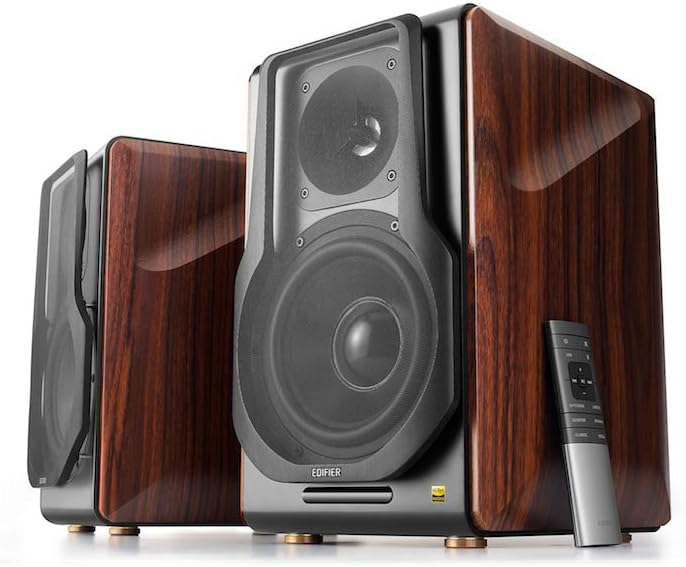
Figure 3.1: Edifier S3000Pro Speakers and Remote Control.
3.1 Ҷойгиркунии баландгӯяк
Place the speakers in your desired listening area. Due to their wireless inter-speaker connection, you have flexibility in positioning them. Ensure each speaker is near a power outlet.

Расми 3.2: Мисample placement of Edifier S3000Pro speakers in a room.
3.2 Пайвастшавии барқ
Connect the included power cables to each speaker and then to a wall outlet. The speakers will automatically attempt to pair with each other upon power-on.
3.3 Пайвастҳои вуруди аудио
The active (right) speaker features a variety of input ports:
- Bluetooth 5.0 with aptX HD: Барои ҷараёни бесими аудио аз дастгоҳҳои мувофиқ.
- Аудио USB: Connect directly to a computer for high-resolution audio playback.
- Оптикӣ: For digital audio connection from TVs, game consoles, etc.
- Коаксиалӣ: Варианти дигари вуруди аудиои рақамӣ.
- Хати даромад (RCA): Standard analog input for various audio sources.
- Мувозинат (XLR): Professional-grade input for balanced audio signals.

Figure 3.3: Rear panel of the active speaker with various input options.
3.4 Wireless Inter-Speaker Connection
The S3000Pro utilizes KleerNet wireless technology for lossless audio transmission between the left and right speakers. This connection is established automatically. If re-pairing is ever needed, refer to the troubleshooting section.
Video 3.1: Official Edifier S3000Pro Audiophile Active Speakers overview, demonstrating key features and connectivity.
4. Дастурҳои истифодабарӣ
Control your S3000Pro speakers using the included wireless remote or the controls located on the active (right) speaker.
4.1 Функсияҳои идоракунии дурдаст

Figure 4.1: The wireless remote control for Edifier S3000Pro speakers.
- Тугмаи барқ: Баландгӯякҳоро фаъол ё хомӯш мекунад.
- Назорати овоз: Сатҳи умумии овозро танзим мекунад.
- Хомӯш кардан: Баромади аудиоро хомӯш мекунад ё мекушояд.
- Интихоби вуруд: Dedicated buttons for USB, Bluetooth, Optical/Coaxial, and Line/Balanced inputs.
- Назорати бозикунии: Play/Pause, Skip Forward, Skip Backward (for Bluetooth and USB modes).
- Усулҳои садо: Buttons for Monitor, Dynamic, Classic, and Vocal sound profiles.
4.2 Идоракунии дар болои баландгӯяк
The active speaker features rotary knobs for direct control:
- Volume/Input Selection: Rotate to adjust volume; press to cycle through inputs.
- Назорати treble: Баромади басомади баландро танзим мекунад.
- Назорати басс: Баромади басомади пастро танзим мекунад.
5. Хусусиятҳо ва тарҳрезӣ
The S3000Pro speakers are crafted with both acoustic performance and aesthetic appeal in mind.
5.1 Acoustic Design
- Planar Diaphragm Tweeters: Deliver clear, detailed high frequencies.
- 6.5-inch Aluminum Alloy Woofers: Provide powerful and accurate bass response.
- Дарунсохт Ampумр: Each speaker features a 78 watts amplifier, eliminating the need for external ampҳаёт.
- Audio Hi-Res: Supports higher bit depth and sample rates (96 kHz or higher) for superior sound quality.
5.2 Construction and Aesthetics
The speaker cabinets are constructed from high-quality MDF (Medium-Density Fiberboard) with a brown wood finish, offering both durability and a classic aesthetic. The front features a matt black finish with removable cloth grilles.

Расми 5.1: Пеш view highlighting the drivers and finish.

Расми 5.2: Тараф view showcasing the wood finish.
6. Нигоҳдорӣ
To ensure the longevity and optimal performance of your Edifier S3000Pro speakers, follow these maintenance guidelines:
- Тозакунӣ: Use a soft, dry cloth to wipe down the speaker cabinets. Avoid using abrasive cleaners, waxes, or solvents.
- чанг: Панҷараҳои баландгӯякҳо ва драйверҳоро мунтазам бо хасуи нарм ё чангкашак бо замимаи хасу тоза кунед.
- Ҷойгиршавӣ: Avoid placing speakers in direct sunlight, near heat sources, or in areas with high humidity. Ensure adequate ventilation around the speakers.
- Муносибат: Handle the speakers with care. Avoid pressing on the speaker cones or tweeters.
7. Баррасии мушкилот
If you encounter issues with your S3000Pro speakers, refer to the following common solutions:
- Овоз нест:
- Ensure both speakers are powered on and connected to an electrical outlet.
- Verify the correct input source is selected on the active speaker or remote.
- Ҳама кабелҳои аудиоиро барои пайвасти бехатар санҷед.
- Баландии овозро ҳам дар баландгӯякҳо ва ҳам дар манбаи аудио зиёд кунед.
- Speakers Not Pairing Wirelessly:
- Ensure both speakers are powered on. The wireless connection between them is factory-paired and should resume automatically.
- If the wireless connection fails, locate the small "Pair" button on the back panel of both the active (R) and passive (L) speakers. Press and hold the "Pair" button on the active speaker first, then on the passive speaker. The LED indicator on the passive speaker will blink rapidly during pairing.
- Масъалаҳои пайвасти Bluetooth:
- Ensure the speakers are in Bluetooth input mode.
- Delete the "Edifier S3000Pro" from your device's Bluetooth list and attempt to re-pair.
- Move your Bluetooth device closer to the speakers to reduce interference.
- Овози вайроншуда:
- Баландии овозро ҳам дар баландгӯякҳо ва ҳам дар манбаи аудио кам кунед.
- Кабелҳои аудиоиро барои осеб ё пайвасти фуҷур тафтиш кунед.
- Ensure the audio source is not overdriving the input.
8. Мушаххасоти
| Хусусият | Мушаххасоти |
|---|---|
| Бренд | Таҳриркунанда |
| Номи модел | S3000PRO |
| Навъи баландгӯяк | Рафи китоб |
| Материал | MDF |
| Технологияи пайвастшавӣ | Bluetooth, USB |
| Технологияи алоқаи бесим | блутуз |
| Версияи Bluetooth | 5.0 бо aptX HD |
| Диаметри Вуфер | 6.5 инч |
| Навъи Tweeter | Planar Diaphragm |
| Баландгӯяк Максимум қудрати баромади | 256 Ватт |
| Таносуби сигнал ба садо | 85 дБ |
| Андозаҳои маҳсулот | 21.6"D x 13.4"W x 17.3"H |
| Вазни ашё | 3.3 фунт (1.5 килограмм) |
| Компонентҳои дохилшуда | маҳсулот, дастур |
9. Кафолат ва дастгирӣ
The Edifier S3000Pro speakers come with a full warranty. For detailed warranty information, product registration, or technical support, please visit the official Edifier webсайт ё бо хидмати мизоҷони худ тамос гиред. Квитансияи хариди худро барои даъвоҳои кафолат нигоҳ доред.
Барои кӯмаки иловагӣ, шумо метавонед ба сайт муроҷиат кунед Мағозаи Edifier дар Amazon.


