1. Муқаддима
This manual provides essential information for the safe and efficient operation, setup, maintenance, and troubleshooting of the Keba KeTop T50-xxx/67641/06 industrial control panel. The KeTop T50-xxx/67641/06 is designed for robust performance in industrial environments, serving as a human-machine interface (HMI) for various control applications.
Лутфан, пеш аз истифода бурдани дастгоҳ, ин дастурро бодиққат хонед, то истифодаи дурусти дастгоҳ ва пешгирӣ аз осеб ё ҷароҳат таъмин карда шавад.
2. Маълумот оид ба бехатарӣ
Барои пешгирии осеби шахсӣ ё осеб дидани таҷҳизот ҳамеша чораҳои бехатарии зеринро риоя кунед:
- Кормандони соҳибихтисос: Installation, operation, and maintenance should only be performed by qualified and authorized personnel.
- Қатъи барқ: Always disconnect power before performing any installation, maintenance, or repair work.
- Шароити экологӣ: Operate the device within specified environmental limits (temperature, humidity, etc.).
- Истгоҳи фавқулодда: Familiarize yourself with the location and operation of the emergency stop button on the device and the connected system.
- Идоракунии кабелӣ: Боварӣ ҳосил кунед, ки ҳамаи кабелҳо дуруст ҷойгир ва мустаҳкам карда шудаанд, то хатари лағжиш ё зарар пешгирӣ карда шавад.
3. Маҳсулот ба охир расидview
The Keba KeTop T50-xxx/67641/06 is a robust handheld control panel designed for industrial applications. It features a display screen, various control buttons, and an emergency stop button, all integrated into an ergonomic housing.

Расми 1: Пеш view of the KeTop T50-xxx/67641/06 control panel, showing the display, control buttons, and the attached red connection cable.
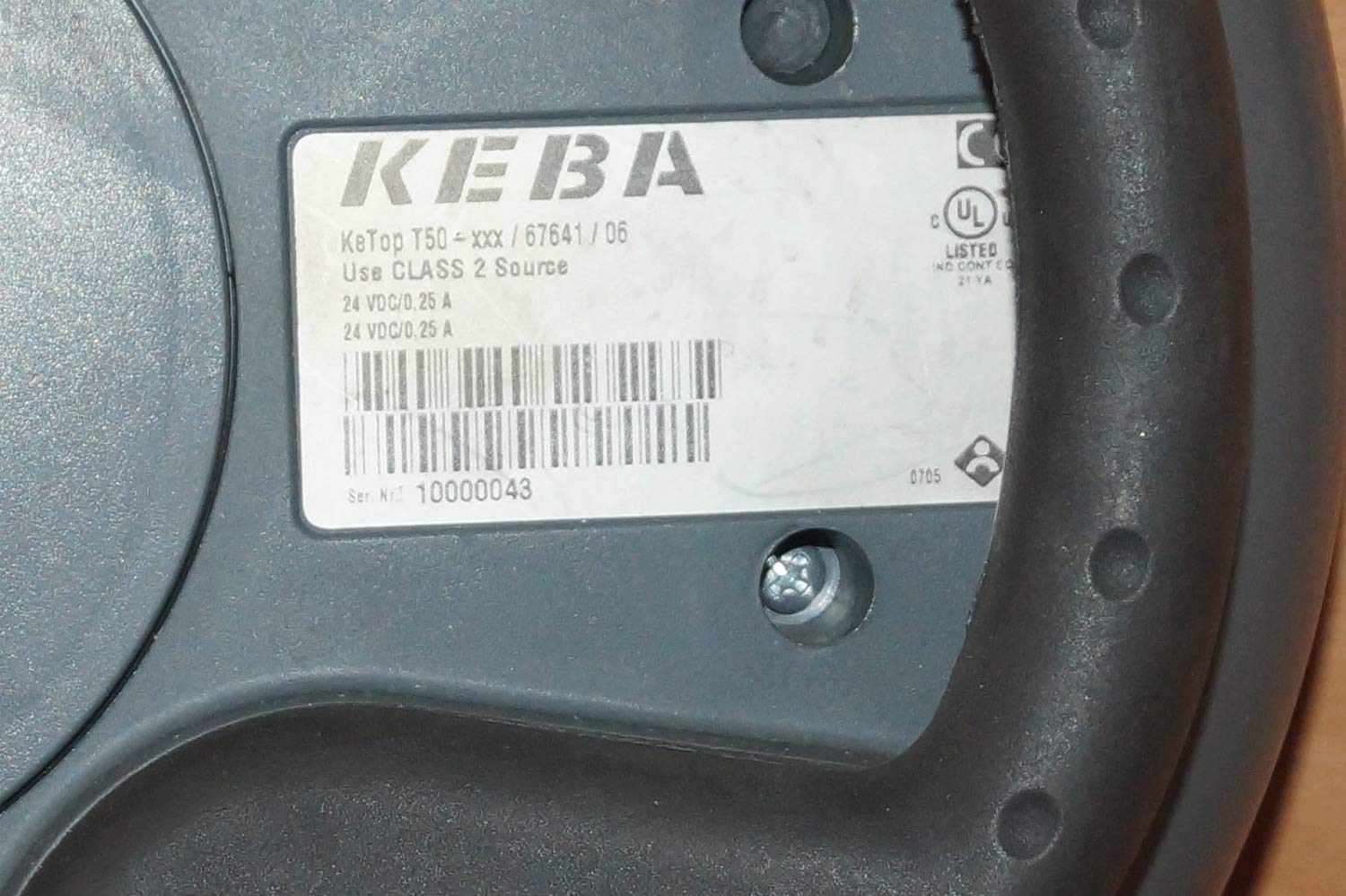
Figure 2: Rear label of the KeTop T50-xxx/67641/06, indicating model details and power requirements.
4. Танзим ва насб
Before connecting the KeTop T50-xxx/67641/06, ensure the host system is powered off and secured.
- Таҷҳизотро тафтиш кунед: Unpack the control panel and inspect it for any visible damage during transit.
- Кабелро пайваст кунед: Connect the red multi-pin cable from the KeTop T50-xxx/67641/06 to the corresponding port on your industrial control system. Ensure the connection is secure and properly seated.
- Таъмини нерӯ: Verify that the power supply for the control system meets the specifications required by the KeTop T50-xxx/67641/06 (24 VDC/0.25 A).
- Монтаж (ихтиёрӣ): If applicable, use the integrated mounting points to secure the panel in a convenient location, or ensure it is placed on a stable surface when not handheld.
- Қувваи ибтидоӣ: Once all connections are secure, power on the host system. The KeTop T50-xxx/67641/06 display should illuminate, indicating successful power-up.
5. Дастурҳои истифодабарӣ
The KeTop T50-xxx/67641/06 serves as an interface for controlling industrial machinery. Specific operations will depend on the programming of the connected system.
- Намоиши Навигатсия: Use the directional buttons (if present) or touch screen (if applicable) to navigate through menus and display information.
- Тугмаҳои Функсия: The various buttons around the display are typically assigned specific functions by the system integrator. Refer to your system's documentation for button assignments.
- Истгоҳи фавқулодда: In case of an emergency, press the large red emergency stop button immediately. This will typically halt all connected machine operations. Ensure the button is reset before resuming operations.
- Вуруди маълумот: Use the integrated keypad or on-screen keyboard for data entry as required by the application.
- Алоқа: Pay attention to visual cues on the display and any audible signals from the device or connected system.
6. Нигоҳдорӣ
Regular maintenance ensures the longevity and reliable operation of your KeTop T50-xxx/67641/06.
- Тозакунӣ:
- Пеш аз тоза кардан, барқро ҷудо кунед.
- Сатҳи беруниро бо нарм пок кунед, гamp матоъ.
- Do not use abrasive cleaners, solvents, or excessive moisture.
- Боварӣ ҳосил кунед, ки моеъ ба дастгоҳ ворид намешавад.
- Санҷиши кабелӣ: Periodically inspect the connection cable for signs of wear, cuts, or damage. Replace damaged cables immediately.
- Функсияи тугма: Regularly test all buttons, including the emergency stop, to ensure they respond correctly.
- Нигоҳдорӣ: When not in use, store the device in a clean, dry environment, away from extreme temperatures and direct sunlight.
7. Баррасии мушкилот
This section provides solutions to common issues. For more complex problems, contact qualified service personnel.
| Мушкилот | Сабаби эҳтимолӣ | Ҳалли |
|---|---|---|
| Дастгоҳ фаъол нест. | No power from host system; loose cable connection; faulty power supply. | Check host system power; ensure cable is securely connected; verify power supply output. |
| Дисплей холӣ ё милт-милт аст. | Insufficient power; cable issue; internal fault. | Verify power supply; check cable integrity; if problem persists, contact support. |
| Тугмаҳо ҷавоб намедиҳанд. | Software issue on host system; physical button damage. | Restart the host system; inspect buttons for physical damage. |
| Emergency Stop button is stuck. | Button mechanism issue. | Do not force. Contact qualified service personnel immediately. |
8. Мушаххасоти
| Хусусият | Тафсилот |
|---|---|
| Модели | KeTop T50-xxx/67641/06 |
| Бренд | Keba |
| Вуруди нерӯ | 24 VDC / 0.25 A (as per device label) |
| ASIN | B07NSF65HM |
| Маълумотномаи истеҳсолкунанда | 2186 |
| Санаи аввалини дастрас | 10 майи соли 2019 |
| Мавҷудияти қисмҳои эҳтиётӣ | Маълумот дастрас нест |
9. Кафолат ва дастгирӣ
Information regarding specific warranty terms and conditions for the Keba KeTop T50-xxx/67641/06 is not provided in the product details. Please refer to the original purchase documentation or contact your supplier for warranty details.
For technical support or service inquiries, please contact the manufacturer, Keba, or your authorized distributor. Ensure you have the model number (KeTop T50-xxx/67641/06) and serial number (if applicable) ready when contacting support.


