Муқаддима
This manual provides comprehensive instructions for the GameSir GK300 Wireless Mechanical Gaming Keyboard. It covers setup, operation, maintenance, and troubleshooting to ensure optimal performance and longevity of your device. Please read this manual thoroughly before using the keyboard.

Image: The GameSir GK300 Wireless Mechanical Gaming Keyboard, shown with its detachable wrist rest, highlighting its full-sized layout and sleek design.
Мундариҷаи баста
Боварӣ ҳосил кунед, ки ҳама ашё дар баста мавҷуд аст:
- GameSir GK300 Wireless Mechanical Gaming Keyboard
- USB Adapter (for 2.4GHz wireless connection)
- Дастури корбар
- Истироҳати даст
- Charging Cable (not explicitly listed but implied for rechargeable battery)
Ташкил кардан
1. Пуркунии клавиатура
The keyboard features a built-in 3600mAh rechargeable Lithium battery. Before initial use, fully charge the keyboard. Connect the provided charging cable to the keyboard's charging port and to a USB power source. Charging typically takes 2.5 to 3 hours.
2. Connecting via 2.4GHz Wireless
- Locate the USB adapter included in the package.
- Plug the USB adapter into an available USB port on your Windows PC, Laptop, or compatible Android device.
- Turn on the keyboard. The keyboard should automatically connect to the adapter.
- The 2.4GHz connection offers a 1ms report rate for high precision and responsiveness.
3. Пайвастшавӣ тавассути Bluetooth
The GameSir GK300 supports Bluetooth 4.1 and below for connection to various devices, including Windows PCs, macOS, Android (4.4 or later), and iOS (7.0 or later).
- Боварӣ ҳосил кунед, ки Bluetooth дар дастгоҳи шумо фаъол аст.
- Put the keyboard into Bluetooth pairing mode (refer to the keyboard's function key combinations for specific instructions, usually Fn + a specific key).
- On your device, search for available Bluetooth devices and select "GameSir GK300" to pair.
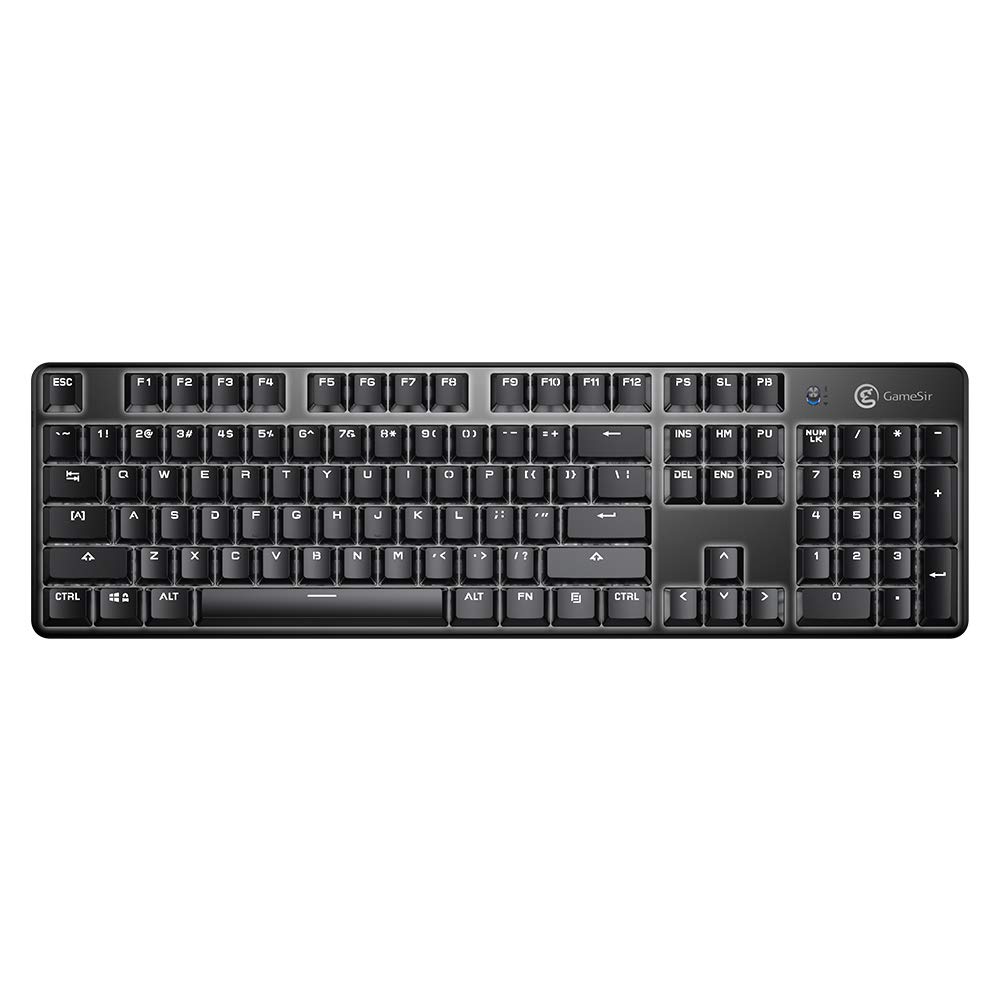
Тасвир: Аз боло ба поён view of the GameSir GK300 keyboard, showing the full 104-key layout and keycap spacing.
Дастурҳои амалиётӣ
1. Dual Mode Connection Switching
The keyboard supports both 2.4GHz wireless and Bluetooth connections. Use the appropriate function key combination (e.g., Fn + 1/2/3 for Bluetooth profiles, or Fn + 4 for 2.4GHz) to switch between connected devices or modes.
2. Назорати равшанӣ
The GameSir GK300 features white LED backlighting with 5 adjustable brightness levels and various lighting effects. Use the dedicated function keys (e.g., Fn + arrow keys or other designated keys) to cycle through effects and adjust brightness.
3. Мубориза бар зидди арвоҳ
The keyboard is equipped with 10-key anti-ghosting, ensuring that up to 10 simultaneous key presses are registered accurately without conflict, which is crucial for gaming performance.
4. Гузаришҳои механикӣ
The keyboard utilizes TTC Blue Mechanical Switches, known for their tactile feedback and audible click. These switches have a lifespan of 50 million keystrokes, providing durability and a distinct typing experience.

Image: The GameSir GK300 keyboard illuminated with its LED backlight, positioned within a gaming setup, demonstrating its visual appeal during use.
Нигоҳдорӣ
1. Тозакунӣ
To clean your keyboard, power it off and disconnect it from any power source. Use a soft, dry cloth to wipe the surface. For dust and debris between keys, use compressed air. Avoid using harsh chemicals or abrasive materials.
2. Нигоҳубини батарея
To prolong battery life, avoid fully discharging the keyboard frequently. Charge the keyboard when the battery indicator is low. If storing the keyboard for an extended period, charge it to approximately 50% and store it in a cool, dry place.
Мушкилкушо
- Клавиатура пайваст намешавад:
Ensure the keyboard is powered on and fully charged. For 2.4GHz, verify the USB adapter is securely plugged in. For Bluetooth, ensure the keyboard is in pairing mode and your device's Bluetooth is active. Try re-pairing the device.
- Interference with Wi-Fi:
The 2.4GHz wireless connection may experience interference from Wi-Fi routers operating on the same frequency band. If you experience missed keystrokes or erratic behavior, try changing the Wi-Fi channel on your router if possible, or move the keyboard closer to the USB adapter.
- Тугмаҳо ҷавоб намедиҳанд ё нодуруст чоп мекунанд:
Ensure the keyboard is clean and free of debris. If individual keys are consistently failing, this may indicate a switch issue. For persistent problems, contact customer support.
- Backlight not working or dim:
Check the battery level; low battery can affect backlight performance. Use the function keys to adjust brightness and cycle through lighting modes. If the issue persists, a factory reset (if available) or contacting support may be necessary.
- Ҳолати хоби худкор:
The keyboard is designed to enter sleep mode after a period of inactivity to conserve battery. Press any key to wake it up. Note that the first key press after waking may not register as input.
Мушаххасоти
| Хусусият | Тафсилот |
|---|---|
| Бренд | GameSir |
| Рақами модел | GK300 |
| Ранги | Сиёҳ |
| Андозаҳо (LxWxH) | 46.5 х 14 х 6.5 см |
| Вазни ашё | 816.47 гр |
| Технологияи бесим | Алоқаи бесими 2.4 ГГц, Bluetooth 4.1 |
| Тарҳбандии тугмаҳо | 104 Калидҳои механикӣ |
| Навъи коммутаторҳо | TTC Blue Switches |
| Мӯҳлати истифодаи тугмача | 50 млн |
| Ранги равшании паси | White, 5-level adjustable brightness |
| Иқтидори батарея | Батареяи литийии барқгиранда 3600 мАч |
| Вақти пуркунии барқ | 2.5-3 соат |
| Муҳлати кори батарея (равшании пасзамина фаъол аст) | То 30 соат |
| Муҳлати кори батарея (равшании пасзамина хомӯш аст) | То 300 соат |
| Бар зидди арвоҳ | 10 калид |
| Платформаҳои мувофиқ | Windows PC (7+), macOS, Android (4.4+), iOS (7.0+) |
| Компонентҳои дохилшуда | Gaming Keyboard, User Manual, USB Adapter |
Видеоҳои маҳсулот
Video: Demonstrates the GameSir GK300 Wireless Mechanical Gaming Keyboard in action during Apex Legends gameplay, showcasing its responsiveness and suitability for gaming.
Video: Highlights the key features and design elements of the GameSir GK300 Wireless Mechanical Gaming Keyboard, providing a detailed overview аз имкониятхои он.
Кафолат ва дастгирӣ
The GameSir GK300 Wireless Mechanical Gaming Keyboard comes with a 3-month warranty. For warranty claims, technical support, or further assistance, please contact GameSir customer service or visit the official GameSir webсайт.
Manufacturer: Gamesir, Room 6, 5/F EasternHarbour Centre, 28 Hoi Chak Street, Quarry Bay, Hong Kong
Importer: Bellstar Trading Pvt Ltd - A24, Naraina INDL Area Ph-1, Delhi-110028 - 01145629914


