1. Муқаддима
This manual provides essential instructions for the installation, operation, and maintenance of your FSP iFP600 Uninterruptible Power Supply (UPS). Please read this manual thoroughly before installing or operating the unit to ensure proper function and safety. The FSP iFP600 is designed to provide reliable power backup and surge protection for your electronic devices.

Тасвири 1.1: Пеш view of the FSP iFP600 UPS, showcasing its compact design and integrated LCD display.
2. Дастурамал оид ба бехатарӣ
Please adhere to these important safety guidelines during installation, operation, and maintenance of the UPS:
- UPS-ро накушоед вasinг. Дар дохили он қисмҳои аз ҷониби корбар хидматшаванда вуҷуд надоранд. Ҳама хидматрасониро ба кормандони соҳибихтисос муроҷиат кунед.
- Do not connect appliances that could overload the UPS, such as laser printers, vacuum cleaners, or heaters.
- Ensure the UPS is connected to a grounded AC power outlet.
- Avoid placing the UPS in direct sunlight, near heat sources, or in environments with excessive dust, humidity, or corrosive substances.
- Position the UPS in a well-ventilated area to prevent overheating.
- In case of fire, use a dry chemical extinguisher. Water can be hazardous.
- The battery inside the UPS is not user-replaceable. Battery replacement should only be performed by qualified personnel.
3. Маҳсулот ба охир расидview
The FSP iFP600 UPS provides reliable power protection for your critical electronics. It features a compact design and an intuitive LCD display for monitoring status.
3.1 Мундариҷаи баста
Ҳангоми кушодани баста, лутфан тафтиш кунед, ки ҳамаи ҷузъҳо мавҷуд ва осеб наёфтаанд:
- FSP iFP600 UPS Unit
- Дастури корбар (ин ҳуҷҷат)
- Сими барқ
- Сими алоқаи USB
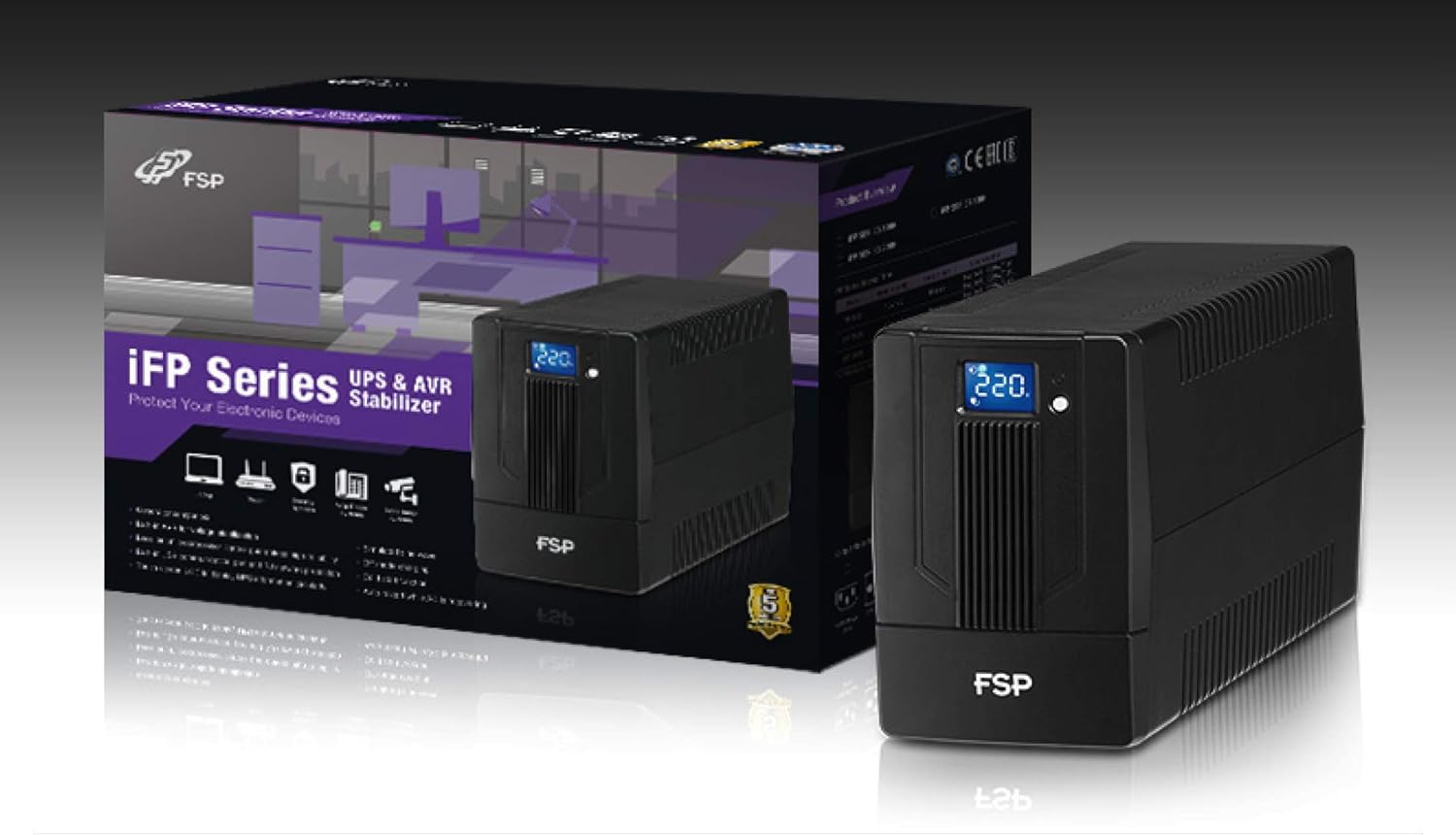
Image 3.1: The FSP iFP600 UPS shown alongside its retail packaging, illustrating the product's presentation.
3.2 Унсурҳои панели пушти сар
Familiarize yourself with the connections on the rear panel of the UPS:

Тасвири 3.2: Муфассал view of the FSP iFP600 UPS rear panel, highlighting connection points.
- Фурӯшгоҳҳо: Two SCHUKO type outlets for connecting protected equipment.
- Вуруди AC: Connects the UPS to the main utility power.
- Fuse/Breaker: Overcurrent protection for the UPS.
- Алоқаи USB: Port for connecting to a computer for monitoring and management.
- Combo RJ11/RJ45 Surge Protection: Provides surge protection for telephone/network lines.
4. Танзим ва насб
Follow these steps to set up your FSP iFP600 UPS:
- Кушодани: UPS-ро бодиққат аз бастааш хориҷ кунед. Ҳама гуна зарари интиқолро тафтиш кунед.
- Ҷойгиршавӣ: Place the UPS on a flat, stable surface in a clean, cool, and well-ventilated area. Ensure adequate clearance around the unit for airflow.
- Пуркунии ибтидоӣ: Connect the UPS to a standard grounded AC outlet using the provided power cord. Allow the unit to charge for at least 4-6 hours before initial use to ensure optimal battery performance. The UPS will charge whether it is turned on or off.
- Таҷҳизоти пайвастшавӣ: Plug your computer, monitor, and other critical electronic devices into the UPS outlets (A). Do not connect surge suppressors or power strips to the UPS outlets.
- USB Communication (Optional): Connect the USB cable from the UPS USB port (D) to your computer's USB port to enable power management software features (software not included, typically downloaded from manufacturer's webсайт).
- RJ11/RJ45 Protection (Optional): For surge protection of your telephone or network line, connect the incoming line to the 'IN' port of the Combo RJ11/RJ45 (E) and connect the 'OUT' port to your device.
5. Дастурҳои истифодабарӣ
5.1 Фурӯзон/хомӯш кардан
- Барои фаъол кардан: Press and hold the power button on the front panel for approximately 2 seconds until you hear a beep and the LCD display illuminates.
- Барои хомӯш кардани барқ: Press and hold the power button for approximately 2 seconds until you hear a beep and the LCD display turns off.
5.2 Маълумот дар бораи дисплейи LCD
The FSP iFP600 features an LCD display that provides real-time status information. The display is touch-sensitive for navigating information.

Image 5.1: The LCD display of the FSP iFP600 UPS, indicating voltage output and its touch-screen functionality.
The LCD display typically shows:
- Вуруди ҷилдиtage
- Натиҷаи ҳаҷtage
- Сатҳи пуркунии батарея
- Сатҳи сарборӣ
- Operating Mode (e.g., AC mode, Battery mode)
- Warning/Fault Indicators
5.3 Battery Mode Operation
When the utility power fails or fluctuates outside acceptable limits, the UPS will automatically switch to battery mode. During battery mode, the UPS will provide power to connected equipment from its internal battery. An audible alarm will sound to indicate battery operation.
6. Нигоҳдорӣ
Proper maintenance ensures the longevity and reliability of your UPS.
- Тозакунӣ: Use a soft, dry cloth to clean the exterior of the UPS. Do not use liquid or aerosol cleaners.
- Нигоҳубини батарея: To maximize battery life, ensure the UPS is connected to AC power and fully charged. If the UPS is stored for an extended period, recharge it every three months to prevent battery degradation.
- Иваз кардани батарея: The internal battery (12V / 7Ah x1) is not user-serviceable. Battery replacement should only be performed by FSP-certified service personnel or a qualified technician. Incorrect battery replacement can pose a risk of explosion or injury.
- Нигоҳдорӣ: Store the UPS in a cool, dry place with adequate ventilation. Ensure the battery is fully charged before storage.
7. Баррасии мушкилот
Refer to the following table for common issues and their solutions. If the problem persists, contact FSP support.
| Аломат | Ҳушдори шунавоӣ | Сабаби эҳтимолӣ | Ҳалли |
|---|---|---|---|
| UPS operating on battery power | Ҳар 10 сония садо медиҳад | Utility power failure or fluctuation | Save work and shut down equipment if power outage is prolonged. UPS will return to AC mode when power is restored. |
| Огоҳии ками батарея | Ҳар сония садо медиҳад | Зарари батарея хеле кам аст | Immediately save work and shut down connected equipment. |
| Ҳолати изофабори | Ҳар 0.5 сония садо медиҳад | Таҷҳизоти пайвастшуда аз иқтидори UPS зиёдтар аст | Disconnect non-essential equipment until the alarm stops. Ensure total load is within UPS capacity. |
| айби UPS | Пайваста садо медиҳад | Хатогии дохилӣ ё корношоямӣ | Turn off the UPS and disconnect it from the AC outlet. Contact FSP technical support. |
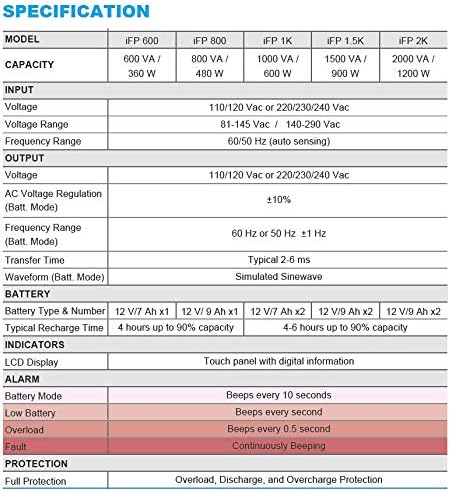
Image 7.1: Excerpt from the FSP iFP series specification table, detailing alarm indicators and their meanings.
8. Мушаххасоти
Detailed technical specifications for the FSP iFP600 UPS:
| Хусусият | Мушаххасоти |
|---|---|
| Модели | iFP 600 |
| Иқтидор | 600 ВА / 360 Вт |
| Вуруди ҷилдиtage | 110/120 Vac or 220/230/240 Vac |
| Вуруди ҷилдиtage Диапазон | 81-145 Vac / 140-290 Vac |
| Диапазони басомади вуруд | 60/50 Гц (ҳасоси худкор) |
| Натиҷаи ҳаҷtage | 110/120 Vac or 220/230/240 Vac |
| Ҷилди ACtage Танзим (Ҳолати Батт) | ±10% |
| Output Frequency Range (Batt. Mode) | 60 Hz or 50 Hz ±1 Hz |
| Вақти интиқол | Одатан 2-6 мс |
| Тарафи мавҷ (режими Батт) | Мавҷи симулятсияшуда |
| Навъи батарея ва рақам | 12V / 7Ah x1 |
| Вақти барқароркунии маъмулӣ | 4 соат то 90% иқтидор |
| Нишондиҳандаҳо | LCD Display (Touch panel with digital information) |
| Муҳофизат | Overload, Discharge, and Overcharge Protection |
| Вазни ашё | 9.24 фунт (4.2 кг) |
| Андозаҳои маҳсулот (LxWxH) | 11.81 x 3.98 x 5.59 инч |
| Ранги | Сиёҳ |
| Материал | Металл |
9. Кафолат ва дастгирӣ
FSP products are designed for reliability and performance. For warranty information, please refer to the warranty card included with your product or visit the official FSP website. For technical support, troubleshooting assistance, or service inquiries, please contact FSP customer service through their official channels.
Шумо метавонед маълумоти бештар ва захираҳои дастгирӣро дар сайт пайдо кунед FSP Store on Amazon.


