1. Маҳсулот ба охир расидview
The AGPTEK A02S is a compact and lightweight MP3 player designed for portable music playback. It features a 1.8-inch screen, 16GB of built-in memory, and supports expandable storage up to 128GB. Enjoy up to 70 hours of music playback on a single charge with lossless sound quality.

Image: AGPTEK A02S MP3 Player in Rose Gold, showcasing тарҳи компакти он.
Видео: Ба охир расидview of the AGPTEK A02 MP3 Player, highlighting its features such as rounded corners, light weight, charging capabilities, HiFi sound quality, FM radio, e-book function, and multi-functionality.
2. Мундариҷаи баста
Боварӣ ҳосил кунед, ки ҳама ашё дар баста мавҷуд аст:
- AGPTEK A02S MP3 Player
- Сими USB
- Дастури корбар
- Earphones (may vary by package)
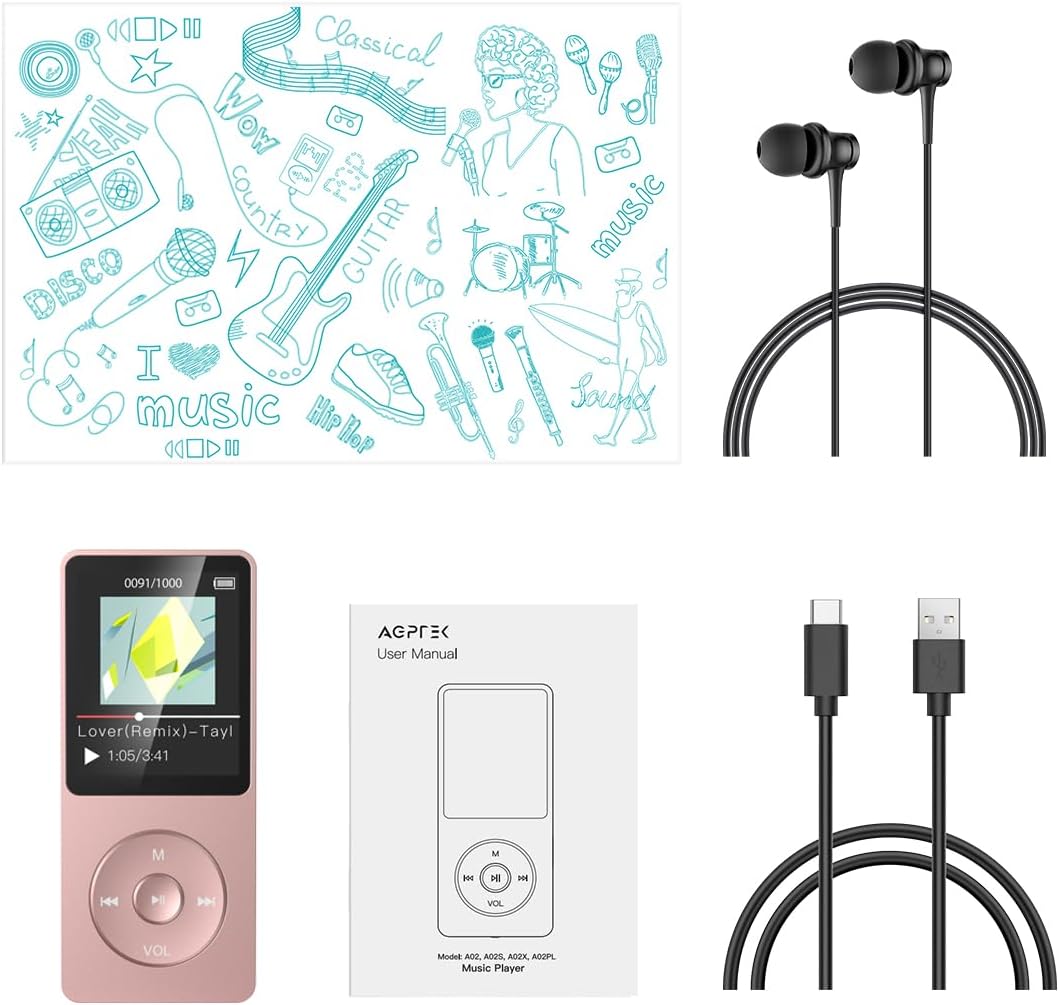
Image: The AGPTEK A02S MP3 Player, USB cable, user manual, and earphones included in the package.
3. Тарҳбандии дастгоҳ
Familiarize yourself with the buttons and ports on your AGPTEK A02S MP3 Player:
- Экрани намоиш: 1.8-inch TFT screen for navigation and content display.
- Тугмаҳои назорат: Central navigation wheel with Play/Pause, Menu (M), Volume (VOL), Previous/Next track buttons.
- Калиди барқ: Located on the side/bottom for turning the device on/off.
- Гӯшаки гӯшмонак: 3.5 мм баромади аудио.
- Порти USB: Type-C port for charging and data transfer.
- Ковокии корти micro SD: Барои васеъ кардани ҳаҷми хотира то 128 ГБ.
4. Оғози кор
4.1 Пур кардани дастгоҳ
Before first use, fully charge the MP3 player. Connect the included Type-C USB cable to the device and a power source (e.g., computer USB port or USB wall adapter). A full charge typically takes about 1.5 hours and provides up to 70 hours of music playback.

Image: The MP3 player connected to a laptop via USB-C cable, indicating charging in progress.
4.2 Фаъол кардан/хомӯш кардан
To power on the device, slide the power switch to the 'On' position. To power off, slide it to 'Off'.
4.3 Connecting to a Computer and Transferring Files
Connect the MP3 player to your computer using the provided USB cable. The device will prompt you to choose between 'Charge & Transfer' or 'Charge & Play'. Select 'Charge & Transfer' to access the device's storage. You can then drag and drop music files (MP3, WMA, OGG, WAV, APE, FLAC, AAC-LC, ACELP) into a designated folder on the player. It is recommended to organize songs by renaming them with sequential numbers (e.g., 0001-SongTitle) for proper sorting.
Video: Demonstrates how to connect the MP3 player to a PC, select 'Charge & Transfer', create a music folder, and copy/paste music files. It also shows how to update the playlist on the device after transfer.
4.4 Memory Expansion
The device has 16GB of internal storage and supports a Micro SD card up to 128GB for additional music storage.

Image: The MP3 player highlighting its 16GB built-in storage and the option to expand memory with a 128GB Micro SD card.
5. Амалиёти асосӣ
5.1 Навигатсия
Use the central navigation wheel to move through menus and select options. The 'M' button typically accesses the main menu or context-sensitive options. The 'VOL' button is used for volume control.
5.2 Навозиши мусиқӣ
From the main menu, select 'Music'. You can browse by 'All songs', 'Artists', 'Albums', 'Genres', or 'Playlists'. Select a song to begin playback. Use the left/right buttons on the navigation wheel to skip tracks and the center button to Play/Pause.
5.3 Назорати баландии овоз
To adjust the volume, long press the 'VOL' button. Then, use the left or right navigation buttons to increase or decrease the volume level.
5.4 Playback Modes (Repeat/Shuffle)
While music is playing, access the submenu (often by pressing the 'M' button or a dedicated menu button) to find 'Playback Mode' options. Here you can select 'Shuffle' for random playback, 'Repeat 1' for repeating the current song, or 'Repeat all folders' to loop through all songs in a folder.
Video: Guide on how to organize music/audiobook files in order and how to set repeat or shuffle playback modes within a folder on the MP3 player.
6. Хусусиятҳои пешрафта
6.1 Радиои FM
The AGPTEK A02S includes an FM radio function. Plug in your earphones, as they act as the antenna. Navigate to the 'FM Radio' option in the main menu to scan for stations and enjoy live broadcasts.

Image: The MP3 player showing the FM radio interface, indicating the frequency range from 87.50MHz to 107.00MHz.
6.2 Сабткунандаи овоз
Utilize the built-in voice recorder for capturing audio. Select 'Recorder' from the main menu to start, pause, and save recordings.

Image: The MP3 player displaying the voice recorder function, with a microphone icon and sound wave graphic.
6.3 E-book and Video Playback
The device supports e-book reading and video playback. Transfer compatible files to the respective folders on the player and select 'e-Books' or 'Videos' from the main menu to access them.
6.4 AUX Connectivity
The MP3 player can connect to car audio systems or other devices via its AUX port, allowing you to enjoy your music through external speakers.

Image: The MP3 player connected to a car's AUX port, demonstrating its compatibility with car audio systems.
7. Нигоҳдорӣ
To ensure the longevity of your AGPTEK A02S MP3 Player:
- Дастгоҳро хушк ва аз намӣ дур нигоҳ доред.
- Аз ҳарорати аз ҳад зиёд канорагирӣ кунед.
- Экран ва корпусро бо матои мулоим ва хушк тоза кунед.
- Дастгоҳро напартоед ва зери таъсири сахт қарор надиҳед.
- Барои нигоҳ доштани саломатии батарея, ҳатто агар истифода нашавед, батареяро мунтазам пур кунед.
8. Баррасии мушкилот
8.1 Computer Not Recognizing MP3 Player
If your computer does not recognize the MP3 player when connected, ensure you are using the original USB cable or a data transmission cable. Some USB cables are for charging only and do not support data transfer. Also, ensure the device is set to 'Charge & Transfer' mode.
Video: Instructions on how to troubleshoot issues when a computer does not recognize the MP3 player, including checking the USB cable and using a force flash method.
8.2 Яхкунии дастгоҳ/Беҷавоб
If the device freezes, try pressing and holding the power button for 10-15 seconds to force a restart. If the issue persists, ensure the battery is charged.
8.3 Сифати пасти садо
Check your earphones for damage or try a different pair. Ensure the music files are of good quality. Adjust the equalizer settings in the device's sound settings.
9. Мушаххасоти
| Номи модел | А02С |
| Рақами модели ашё | SWLP068 |
| Иқтидори нигаҳдории хотира | 16 GB (Supports up to 128GB Micro SD card) |
| Андозаи экран | 1.8 инч |
| Технологияи пайвастшавӣ | Aux, USB |
| Хусусияти махсус | Сабткунандаи овоз |
| Муҳлати батарея | То 70 соат навозиш |
| Вақти пуркунии барқ | тахминан. 1.5 соат |
| Форматҳои аудио дастгирӣшаванда | MP3, WMA, OGG, WAV, APE, FLAC, AAC-LC, ACELP |
| Вазни ашё | 4.2 унция |
10. Кафолат ва дастгирӣ
AGPTEK provides a 1-Year Warranty for this product. Additionally, customers can benefit from Lifetime Technical Support and 7x24 Online Service. For assistance, please visit the official AGPTEK webсайт ё бо хидмати мизоҷон тамос гиред.

Image: AGPTEK's commitment to customer service, including a 1-Year Warranty, Lifetime Technical Support, and 7x24 Online Service.


