1. Муқаддима
This manual provides essential information for the safe and efficient operation of your TCL 55P8 55-inch AI 4K UHD Android Smart LED TV. Please read it thoroughly before using the product and retain it for future reference. This television combines advanced display technology with smart features for an enhanced viewтаҷрибаи ғанӣ.

Тасвири 1.1: Пеш view of the TCL 55P8 TV displaying a vibrant image.
2. Маълумот оид ба бехатарӣ
Барои таъмини бехатарии кор ва пешгирии зарар, чораҳои эҳтиётии зеринро риоя кунед:
- Таъмини нерӯ: Телевизорро танҳо ба манбаи барқи AC дар ҳаҷми муайяншуда пайваст кунедtage диапазон. Боварӣ ҳосил кунед, ки сими барқӣ осеб надидааст ё фишурда нашудааст.
- Вентилятсия: Do not block ventilation openings. Maintain adequate space around the TV for proper airflow to prevent overheating.
- Об ва намӣ: Телевизорро зери борон, намӣ нагузоред ва ашёҳои пур аз моеъро дар назди телевизор нагузоред.
- Тозакунӣ: Пеш аз тоза кардан телевизорро аз розетка ҷудо кунед. Аз матои мулоим ва хушк истифода баред. Моеъ ё тозакунандаи аэрозолро истифода набаред.
- Ҷойгиршавӣ: Телевизорро дар рӯи сатҳи устувор ва ҳамвор гузоред ё онро ба девор мустаҳкам васл кунед. Аз ҷойгир кардани он дар зери нури бевоситаи офтоб ё дар наздикии манбаъҳои гармӣ худдорӣ кунед.
- Хизматрасонӣ: Худатон кӯшиш накунед, ки ба телевизор хидмат расонад. Ҳама хидматрасониро ба кормандони соҳибихтисос муроҷиат кунед.
3. Дар қуттӣ чӣ мавҷуд аст
Upon unpacking your TCL 55P8 TV, verify that all the following components are included:
- 1 x TCL 55P8 LED TV
- 1 x Table Top Stand (set)
- 1 x Wall Mount Bracket (Note: Wall mount is provided, but installation service is separate for TVs above 55 inches.)
- 1 x Дастури корбар
- 1 x Корти кафолат
- 1 x Идоракунии дурдаст
- 2 x батареяҳои AAA (барои идоракунии дурдаст)
- 1 x AV-RCA Adapter
4. Танзимот
4.1 Насби ҷисмонӣ
You can install your TV using the included tabletop stand or a wall mount bracket.
Tabletop Stand Installation:
- Carefully place the TV face down on a soft, flat surface to prevent screen damage.
- Attach the stand bases to the designated slots at the bottom of the TV.
- Пойгоҳҳоро бо винтҳои додашуда мустаҳкам кунед.
- Телевизорро дар сатҳи устувор ва ҳамвор ҷойгир кунед.

Image 4.1: The TCL 55P8 TV securely placed on its tabletop stand.
Ҷойгиркунии девор:
If you choose to wall mount the TV, use the provided wall mount bracket. For TVs above 55 inches, professional installation is recommended. Ensure the wall can support the TV's weight (approximately 12 kg). Refer to the wall mount bracket's specific instructions for detailed steps.
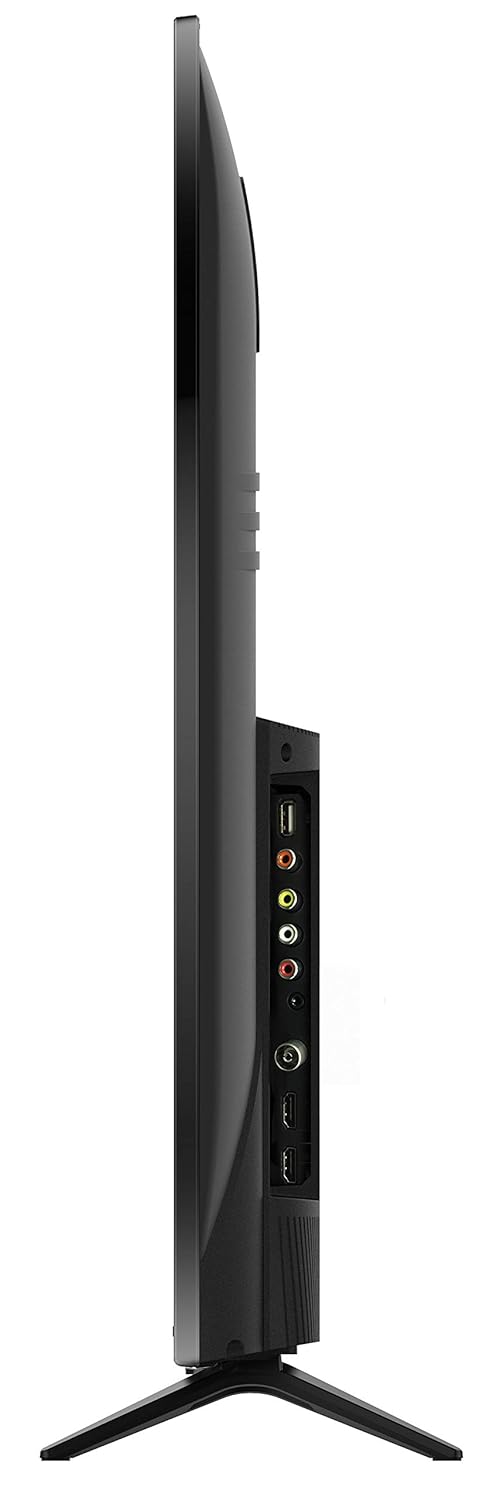
Тасвири 4.2: Қафо view of the TCL 55P8 TV, indicating VESA mounting points for wall installation.
4.2 Пайваст кардани дастгоҳҳои беруна
Your TCL 55P8 TV offers various ports for connecting external devices:
- Портҳои HDMI (x3): Приставкаҳо, плеерҳои Blu-ray, консолҳои бозӣ ё дигар дастгоҳҳои бо HDMI фаъолро пайваст кунед.
- Портҳои USB (x2): Connect USB flash drives or external hard drives for media playback.
- Порти LAN: Сими Ethernet-ро барои пайвасти симии интернет пайваст кунед.
- Вуруди AV: Use the provided AV-RCA adapter to connect older devices with composite video and stereo audio outputs.
- Гӯшаки гӯшмонак: Барои гӯш кардани гӯшии хусусӣ гӯшмонакҳоро пайваст кунед.
- Баромади аудио рақамӣ: Барои беҳтар кардани аудио ба садобар ё системаи театри хонагӣ пайваст шавед.

Image 4.3: Diagram illustrating the various connectivity ports available on the TCL 55P8 TV.
5. Дастурҳои истифодабарӣ
5.1 Фаъол кардан/хомӯш кардан
Press the power button on the remote control or on the TV to turn it on or off. The TV may take a few moments to boot up due to its Android operating system.
5.2 Идоракунии дурдаст
The included remote control allows you to navigate the TV's features. It supports both IR and Bluetooth technology. Insert the two AAA batteries into the remote control, ensuring correct polarity.
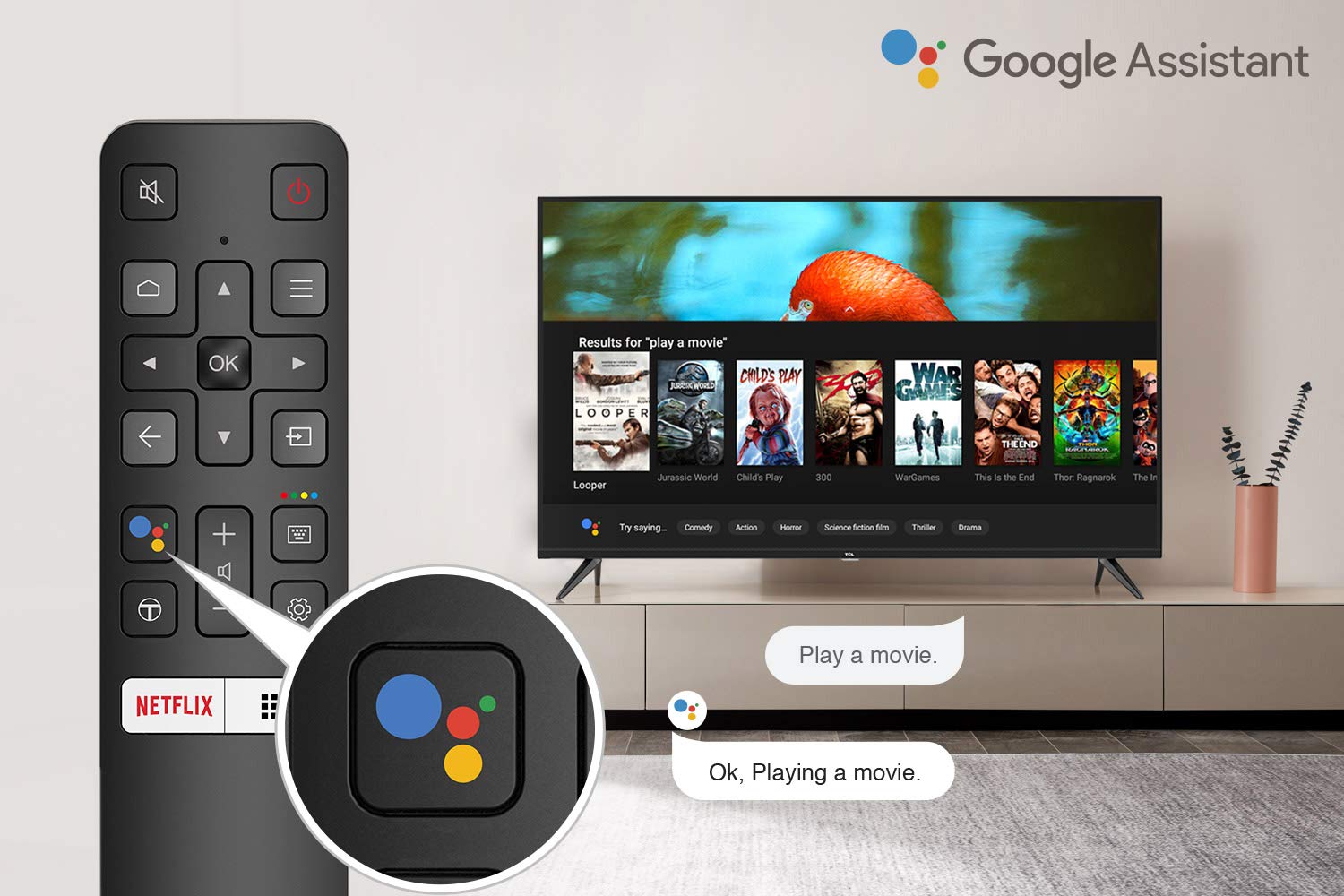
Image 5.1: The remote control for the TCL 55P8 TV, highlighting the Google Assistant button for voice commands.
5.3 Smart TV Features (Android TV 9.0)
Your TCL 55P8 TV runs on Android TV 9.0, offering a wide range of smart functionalities:
- AI-Google Assistant: Фармонҳои овозиро тавассути идоракунии дурдаст барои ҷустуҷӯи мундариҷа, идоракунии дастгоҳҳои хонагии интеллектуалӣ ва гирифтани маълумот истифода баред.
- Google Cast (Chromecast built-in): Cast content from your compatible smartphone, tablet, or computer directly to the TV screen.
- T-cast: Utilize the T-cast app for additional smart features and screen mirroring.
- Блутуз: Connect Bluetooth-enabled devices such as headphones or game controllers.
- Дастрасии барнома: Download and install various applications from the Google Play Store, including streaming services like Netflix, Amazon Prime Video, YouTube, Hotstar, Sony Liv, and Zee5.
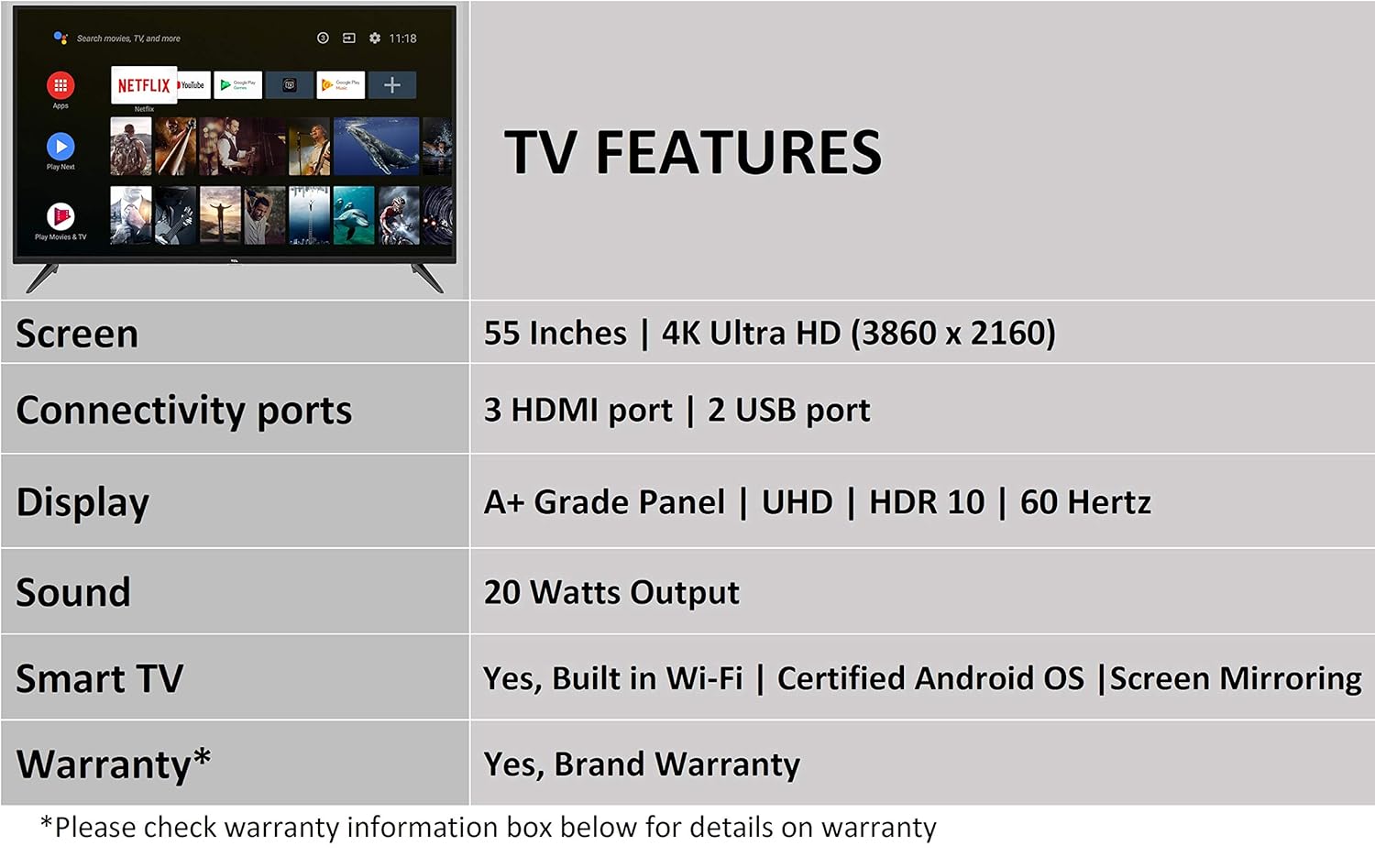
Image 5.2: The Android TV home screen on the TCL 55P8, displaying icons for popular streaming applications.
5.4 Танзимоти тасвир ва садо
- Сурат: Navigate to the picture settings menu to adjust brightness, contrast, color, and sharpness. The TV supports 4K Ultra HD resolution, HDR10, and features Micro Dimming for enhanced contrast.
- Садо: Access sound settings to adjust volume, equalizer, and select audio output modes. The TV provides 20 Watts of audio output and supports Dolby Audio.
6. Нигоҳдорӣ
6.1 Тоза кардани телевизор
- Экран: Gently wipe the screen with a soft, lint-free, dry cloth. For stubborn marks, slightly dampматоъро бо об (бевосита ба экран пошед).
- Бадан: Чаҳорчӯбаи телевизорро пок кунед ва бо матои хушку мулоим гузоред.
- Огоҳӣ: Do not use abrasive cleaners, alcohol, benzene, or thinners, as these can damage the TV's surface.
6.2 Навсозии нармафзор
Your Android TV may receive periodic software updates. Ensure your TV is connected to the internet to receive these updates, which can improve performance and add new features. You can usually check for updates in the TV's settings menu.
7. Баррасии мушкилот
Агар шумо бо телевизиони худ мушкилоте дошта бошед, ба роҳҳои ҳалли маъмулии зерин муроҷиат кунед:
| Мушкилот | Ҳалли имконпазир |
|---|---|
| Не қудрат | Санҷед, ки сими барқ ба телевизор ва розеткаи деворӣ боэътимод пайваст шудааст. Боварӣ ҳосил кунед, ки розеткаи барқ кор мекунад. |
| Тасвир нест, аммо садо мавҷуд аст | Verify the correct input source is selected. Check HDMI/AV cable connections. Try restarting the TV. |
| Садо нест, аммо тасвир мавҷуд аст | Check the volume level and ensure the TV is not muted. Verify audio cable connections if using external speakers. Check audio output settings. |
| Идоракунии дурдаст кор намекунад | Replace batteries. Ensure there are no obstructions between the remote and the TV's IR sensor. Re-pair the Bluetooth remote if necessary. |
| Масъалаҳои пайвастшавӣ ба шабака | Check Wi-Fi password. Restart your router. Ensure the TV is within range of the Wi-Fi signal or the Ethernet cable is properly connected. |
| Иҷрои суст / Суқути барнома | Close unused applications. Clear cache for problematic apps. Restart the TV. Consider a factory reset if issues persist (note: this will erase all data). |
Агар мушкилот пас аз кӯшиши ин роҳҳои ҳал идома ёбад, лутфан бо дастгирии муштариёни TCL тамос гиред.
8. Мушаххасоти
Detailed technical specifications for the TCL 55P8 55-inch AI 4K UHD Android Smart LED TV:
| Хусусият | Мушаххасоти |
|---|---|
| Модели | 55P8 |
| Андозаи экран | 55 инч (138.78 см) |
| Резолюция | 4K Ultra HD (3840 x 2160 пиксел) |
| Меъёри навсозӣ | 60 Гц |
| Viewкунҷи ангушт | 178 дараҷа |
| Навъи намоиш | LED, A+ Grade Panel |
| Дастгирии HDR | HDR 10 |
| Низоми амал | Android 9.0 |
| Протсессор | Quad-core A55 (1.1GHz) |
| Процессори графикӣ | Mali470x3 (600MHz-800MHz) |
| RAM | 2 ГБ |
| Захираи дохилӣ | 16 ГБ |
| Натиҷаи аудио | 20 Ватт |
| Технологияи аудио | AI Sound Engine, Dolby Audio |
| Портҳои HDMI | 3 (HDMI 2.0, HDCP2.2, ARC on Port 1) |
| Портҳои USB | 2 (USB 2.0) |
| Пайвастшавӣ | Wi-Fi (2x2 b/g/n 2.4GHz), Ethernet, Bluetooth 5.0 |
| Хусусиятҳои махсус | AI-Google Assistant, Google Cast, T-cast, Micro Dimming |
| Андозаҳои маҳсулот (LxWxH) | 124.4 x 23.9 x 77.5 см (бо стенд) |
| Вазни ашё | 12 кг |

Image 8.1: Dimensional diagram of the TCL 55P8 TV, showing height, width, and depth measurements.
9. Кафолат ва дастгирӣ
9.1 Маълумот дар бораи кафолат
Your TCL 55P8 TV comes with an Кафолати 18-моҳа provided by TCL from the date of purchase. Please retain your purchase receipt and warranty card for any warranty claims.
9.2 Installation and Customer Support
For requesting installation, wall mounting, or a product demonstration after delivery, please contact TCL customer service:
- Рақамҳои ройгон: 18004190622 ё 18001020622
For any other technical assistance or support, please refer to the contact information provided on your warranty card or the official TCL webсайт.
9.3 Сиёсати баргардонидани
This product is eligible for replacement or refund within 10 days of delivery in case of any product defects, damage, or features not matching the description provided. Please refer to the retailer's return policy for detailed terms and conditions.


