1. Муқаддима ва зиёдаview
This manual provides comprehensive instructions for the Diswoe Wireless Controller, model SW-01. This controller is designed to enhance your gaming experience across multiple platforms.
Хусусиятҳои асосӣ инҳоянд:
- Universal compatibility with Switch, Switch Lite, Switch OLED, Switch 2, Windows PC, and Android phones.
- Upgraded Hall Effect joysticks for precise, drift-free control.
- Dual vibration motors for immersive feedback.
- 6-axis gyro sensor for motion-sensing games.
- High-performance 550mAh rechargeable battery providing up to 8 hours of playtime.
- Ergonomic design with non-slip grips for comfortable extended play.
- Stable wireless Bluetooth connection with strong anti-interference technology.
Эзоҳ муҳим: This controller supports USB CABLE CONNECTION with PC but DOES NOT SUPPORT WIRELESS BLUETOOTH CONNECTION TO PC. It is NOT compatible with Apple TV, Fire Stick TV, Tesla, Xbox, or Playstation consoles. It also DOES NOT SUPPORT WAKE-UP SWITCH 2 and AUDIO FUNCTIONS, and lacks NFC functionality.
2. Насбкунӣ ва пайвастшавӣ
2.1 Пур кардани контроллер
Before first use, ensure the controller is fully charged. Connect the included USB-C cable to the controller's charging port and the other end to a standard USB-A wall charger or a compatible USB port on your device. The controller has a charging prompt and low voltage warning. A full charge typically takes approximately 2 hours and provides 8-10 hours of playtime.
2.2 Pairing Methods for Nintendo Switch
The controller provides a stable and reliable signal without delay or drop-off within eight meters.

Image: Front and top view of the Diswoe Wireless Controller with button labels and pairing instructions.
- Пайвастшавӣ бори аввал:
- On your Switch console, navigate to the "Controllers" menu.
- Select "Change Grip/Order".
- -ро пахш карда нигоҳ доред ХОНА button on the Diswoe controller for 5 seconds.
- The four LED indicators on the controller will blink fast, indicating it is in pairing mode.
- Once successfully paired, the corresponding player LED(s) will light up solid.
- Пайвастҳои минбаъда:
- From any page on your Switch console, simply press the ХОНА тугмаи оид ба контроллер.
- The four LED indicators will blink fast and then light up solid upon successful connection.
2.3 Connecting to PC (Wired Only)
The Diswoe Wireless Controller supports connection to Windows PC ONLY via the included USB-C cable. Wireless Bluetooth connection to PC is not supported.
- Connect the USB-C end of the cable to the controller and the USB-A end to an available USB port on your PC.
- Компютер бояд драйверҳои заруриро ба таври худкор муайян ва насб кунад.
- The controller will be recognized as a standard gamepad.
2.4 Пайвастшавӣ ба телефони Android
The controller is compatible with Android phones via Bluetooth. Refer to your phone's Bluetooth pairing instructions to connect the controller.
3. Дастурҳои истифодабарӣ
3.1 Тарҳбандии тугмаҳо ва функсияҳо
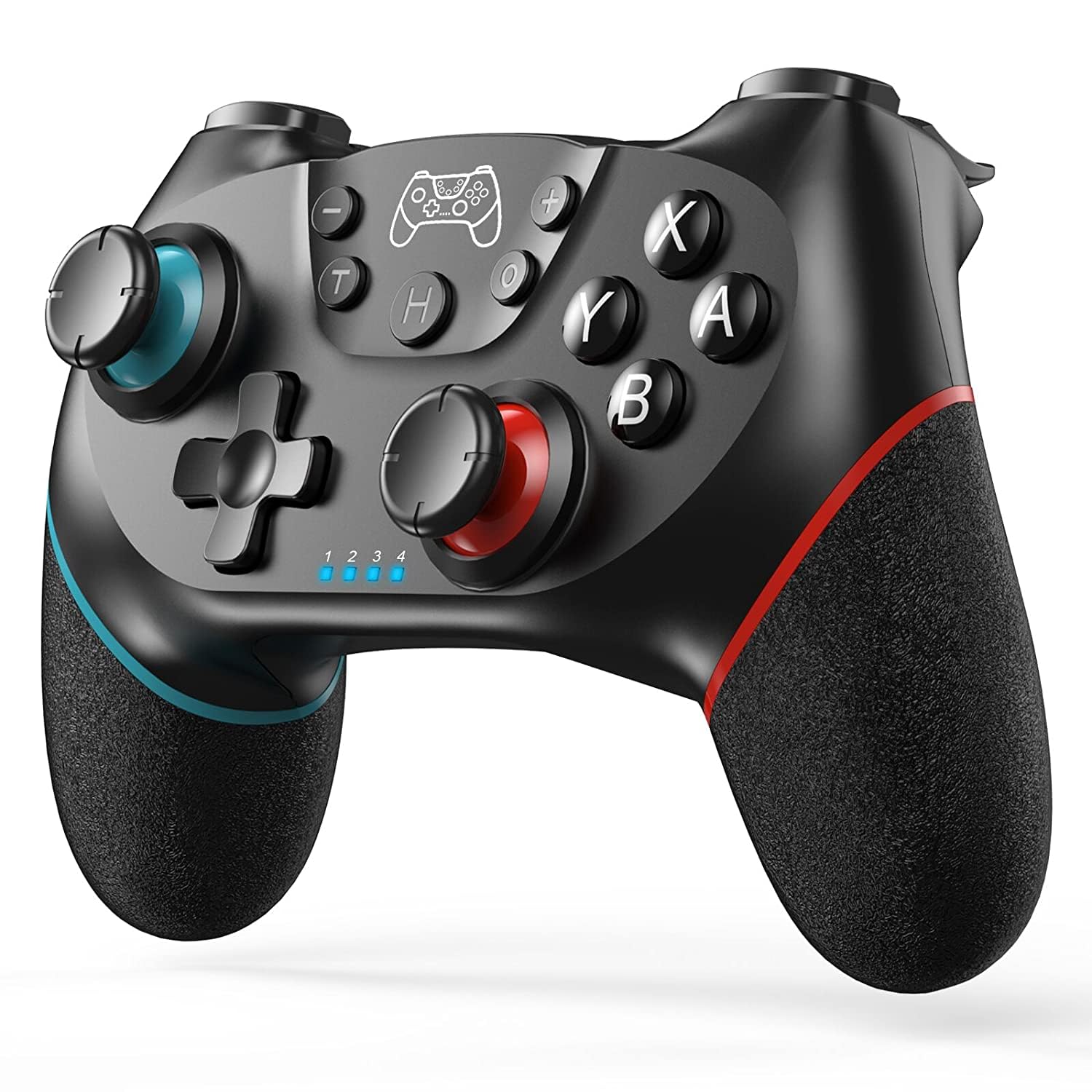
Тасвир: Пеш view of the Diswoe Wireless Controller, highlighting its ergonomic design and button placement.
| Тугма | Функсия |
|---|---|
| Тугмаи HOME | Powers on the controller, returns to the home screen, and initiates pairing. |
| L/R Sticks | Analog joysticks for movement and camera control. Feature Hall Effect technology for precision and durability. |
| Тугмаҳои A/B/X/Y | Тугмаҳои амали стандартӣ. |
| D-pad | Directional pad for precise directional input. |
| L/R/ZL/ZR Buttons | Shoulder and trigger buttons. |
| Тугмаи скриншот | Captures screenshots during gameplay. |
| Тугмаи турбо | Функсияи турборо барои пахши босуръати тугмаҳо фаъол мекунад. |
| +/- Тугмаҳо | Menu selection buttons. |
3.2 Хусусиятҳои махсус
- Вибратсияи дугона: The controller features dual vibration motors that provide excellent haptic feedback, enhancing game immersion.
- Сенсори гиро 6-меҳвар: The built-in 6-axis gyro sensor detects the inclination of the controller, allowing for quick responses in motion-sensing games.
- Функсияи турбо: The Turbo button allows for rapid, continuous pressing of assigned buttons. Consult the full user manual for specific button assignment instructions.
- Функсияи скриншот: Press the dedicated screenshot button to capture in-game moments.

Image: Illustration of the controller highlighting the dual motor vibration feature.

Image: Diagram showing key features like wear-resistant anti-slip joysticks, engraved ABXY buttons, excellent non-slip grip, and high precision D-pad.

Image: Summary of controller features including Bluetooth connectivity, long playtime, vibration, screenshot, precise joysticks, adjustable triggers, and compatibility with Switch/Lite/OLED/Windows, and wake-up function (note: wake-up Switch 2 is not supported).
4. Нигоҳдорӣ
Proper maintenance ensures the longevity and optimal performance of your Diswoe Wireless Controller.
- Тозакунӣ: Барои тоза кардани контроллер аз матои нарм ва хушк истифода баред. Барои ифлосии якрав, каме тоза кунед.ampen the cloth with water. Avoid using harsh chemicals, solvents, or abrasive cleaners, as these can damage the surface and internal components.
- Нигоҳдорӣ: Контроллерро дар ҷои хунук ва хушк аз нури бевоситаи офтоб ва ҳарорати аз ҳад зиёд дур нигоҳ доред.
- Нигоҳубини батарея: Барои нигоҳ доштани мӯҳлати хизмати батарея, аз холӣ кардани пурраи контроллер зуд-зуд худдорӣ кунед. Агар шумо муддати тӯлонӣ нигоҳ доред, батареяро пеш аз нигоҳдорӣ тақрибан 50% пур кунед ва ҳар чанд моҳ онро пур кунед.
- Муносибат: Avoid dropping the controller or subjecting it to strong impacts, which can damage internal circuitry and external components.
5. Баррасии мушкилот
If you encounter issues with your Diswoe Wireless Controller, please refer to the following common solutions:
| Мушкилот | Ҳалли имконпазир |
|---|---|
| Controller does not connect/pair. |
|
| Joystick drift or inaccurate input. |
|
| Вибрация кор намекунад. |
|
| Controller does not wake up Switch 2. | This controller does not support the "Wake-up Switch 2" function. You must manually wake up the console. |
| No audio through controller. | This controller does not support audio functions. |
If problems persist, please contact Diswoe customer support for further assistance.
6. Мушаххасоти
| Хусусият | Тафсилот |
|---|---|
| Рақами модел | SW-01 |
| Бренд | Диво |
| Мутобиқати | Switch, Switch Lite, Switch OLED, Switch 2, Windows PC (wired), Android Phone (Bluetooth) |
| Пайвастшавӣ | Wireless Bluetooth (Switch, Android), Wired USB-C (PC) |
| Навъи батарея | Полимери литий |
| Иқтидори батарея | 550 мАч |
| Playtime (approx.) | 8-10 соат (пас аз пур кардани барқ) |
| Вақти пуркунии барқ (тақрибан) | 2 соат |
| Диапазони бесим | То 8 метр (26 фут) |
| Хусусиятҳои махсус | Hall Effect Joysticks, Dual Vibration, 6-Axis Gyro, Turbo Function, Screenshot Function |
| Вазн | 9.9 унция |
| Истеҳсолкунанда | Диво |
| Кишвари аслӣ | Хитой |
7. Кафолат ва дастгирӣ
For warranty information and customer support, please refer to the documentation included with your product or visit the official Diswoe webсайт. Квитансияи хариди худро ҳамчун далели харид барои ҳама даъвоҳои кафолат нигоҳ доред.
Истеҳсолкунанда: Диво
Webсайт: Diswoe Store on Amazon
8. Видеои маҳсулот
The following videos provide additional information and demonstrations of the Diswoe Wireless Controller:
Video: "Wireless Controller for Switch" - An official product video from Diswoe Direct demonstrating the controller's features and usage.


