Муқаддима
This manual provides essential information for setting up, operating, maintaining, and troubleshooting your VAIO SX12 laptop. Please read this manual thoroughly to ensure proper use and to maximize the performance and longevity of your device.

Расми 1: Пеш view of the VAIO SX12 laptop with the screen open.
Ташкил кардан
1. Кушодан ва санҷиши ибтидоӣ
Carefully remove all components from the packaging. Verify that all items listed in the 'What's in the Box' section are present and undamaged. If any items are missing or damaged, contact customer support.
- VAIO SX12 Laptop
- Адаптери AC
- Либоси тозакунӣ
2. Connecting the AC Adapter
Connect the AC adapter to the power input port on the laptop and then plug the adapter into a wall outlet. The battery will begin charging automatically.
3. Фаъолсозии ибтидоӣ
Press the power button located on the top right of the keyboard. The laptop will boot up and guide you through the initial Windows 10 Pro setup process.
Фаъолият
1. Клавиатура ва сенсорӣ
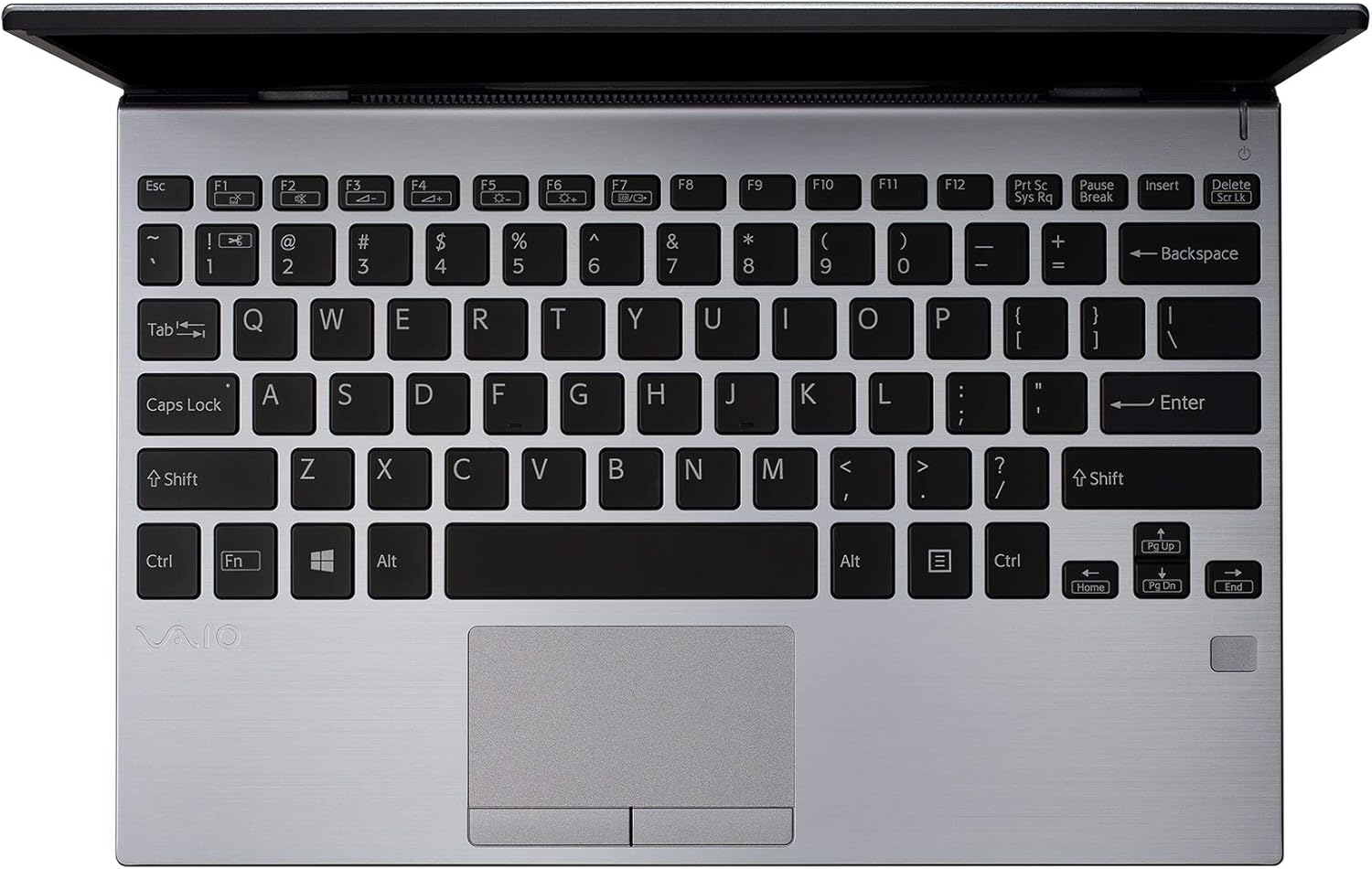
Расми 2: Аз боло ба поён view of the VAIO SX12 keyboard and touchpad.
The VAIO SX12 features a full-sized keyboard and a precision touchpad. Familiarize yourself with the function keys (F1-F12) which control various system settings such as screen brightness, volume, and wireless connectivity.
- Тугмаҳои функсионалӣ: Use the 'Fn' key in combination with F1-F12 for secondary functions.
- Touchpad: Supports multi-touch gestures for scrolling, zooming, and navigating.
2. Пайваст кардани дастгоҳҳои периферӣ
The VAIO SX12 offers a variety of ports for connecting external devices.

Расми 3: Тарафи чап view of the VAIO SX12, showing the power input, USB ports, HDMI, Ethernet, and VGA ports.

Расми 4: Тарафи рост view of the VAIO SX12, showing the SD card slot, USB ports, and audio jack.
- Портҳои USB: Connect USB devices such as external drives, keyboards, or mice.
- Порти HDMI: Connect to an external display or projector.
- Порти VGA: Connect to older external displays or projectors.
- Порти Ethernet: Ба шабакаи симӣ пайваст шавед.
- Ковокии корти SD: Барои интиқоли маълумот корти SD-ро ворид кунед.
- Jack Jack: Наушник ё баландгӯякҳои берунаро пайваст кунед.
Нигоҳдорӣ
1. Тоза кардани ноутбук
- Use the provided cleaning cloth or a soft, lint-free cloth to wipe the screen and exterior surfaces.
- Моддаҳои кимиёвии сахт, тозакунандаи абразивӣ ё ҳалкунандаҳоро истифода набаред.
- Боварӣ ҳосил кунед, ки ноутбук пеш аз тозакунӣ хомӯш карда шудааст.
2. Нигоҳубини батарея
- Барои дароз кардани мӯҳлати хизмати батарея, аз пурра холӣ кардани батарея зуд-зуд худдорӣ намоед.
- Ноутбукро дар ҷои хунук ва хушк нигоҳ доред, агар муддати тӯлонӣ истифода нашавад.
- The battery is internal and not user-replaceable. Contact authorized service for battery replacement.
3. Навсозии нармафзор
Барои таъмини самаранокӣ ва амнияти беҳтарин, мунтазам навсозиҳои системаи амалиётӣ ва драйверҳоро тафтиш ва насб кунед.
Мушкилкушо
1. Ноутбук фурӯзон нест
- Боварӣ ҳосил кунед, ки адаптери AC ҳам ба ноутбук ва ҳам ба васлаки барқии корӣ боэътимод пайваст шудааст.
- Тасдиқ кунед, ки васлаки барқ фаъол аст, тавассути пайваст кардани дастгоҳи дигар.
- Агар батарея пурра холӣ шуда бошад, пеш аз кӯшиши даргиронидани барқ ба он иҷозат диҳед, ки ҳадди аққал 30 дақиқа пур кунад.
2. Намоиши масъалаҳои
- If the screen is blank, try adjusting the brightness using the function keys.
- If an external monitor is connected, ensure the display output is correctly configured (e.g., duplicate, extend).
- Ноутбукро аз нав оғоз кунед.
3. Peripheral Not Recognized
- Ensure the peripheral is properly connected to the correct port.
- Try connecting the peripheral to a different port or another computer to rule out device malfunction.
- Барои мушкилоти драйвер, дар Менеҷери дастгоҳ дар Windows санҷед.
Мушаххасоти
| Хусусият | Мушаххасоти |
|---|---|
| Номи модел | VAIO SX12 |
| Рақами модели ашё | VJS121C11L |
| Протсессор | Intel Core i5-8265U (3.9 GHz max) |
| RAM | 8 ГБ LPDDR3 |
| Диски сахт | 512 ГБ PCIe SSD |
| Низоми амал | Windows 10 Pro |
| Андозаи экран | 12.5 инч |
| Ҳалли экран | 1920 x 1080 пиксел (Full HD) |
| Корти графикӣ | Графикаи ҳамгирошудаи Intel |
| Пайвасти бесим | 802.11a/b/g/n/ac, Bluetooth |
| Портҳои USB 3.0 | 4 |
| Вазни ашё | 1.97 фунт |
| Андозаҳои маҳсулот | 11.3 x 8 x 0.62 инч |
| Ранги | Нуқра |
| Батареяҳо | 1 батареяи литий-ион (дохил) |
Кафолат ва дастгирӣ
For warranty information and technical support, please refer to the documentation included with your product or visit the official VAIO support webсайт. Квитансияи хариди худро ҳамчун далели харид барои даъвоҳои кафолат нигоҳ доред.


