Муқаддима
This manual provides detailed instructions for the setup, operation, and maintenance of your HORI PS4 Onyx Plus Wireless Controller. Please read this manual thoroughly before use to ensure proper functionality and longevity of your device.
Маҳсулот ба охир расидview
The HORI PS4 Onyx Plus Wireless Controller is designed for use with the PlayStation 4 console, offering wireless connectivity and a range of features for an enhanced gaming experience.
Хусусиятҳои асосӣ
- Пайвасти бесим: Connects wirelessly to the PS4 console.
- Adjustable Triggers: Customizable trigger pressure.
- Стикҳои дугонаи аналогӣ: For precise control.
- Мик-скоди дохилӣ: For online chat and voice commands.
- Бисёрфунксионалӣ: Various buttons and features for diverse gameplay.
Тарҳбандии контроллер
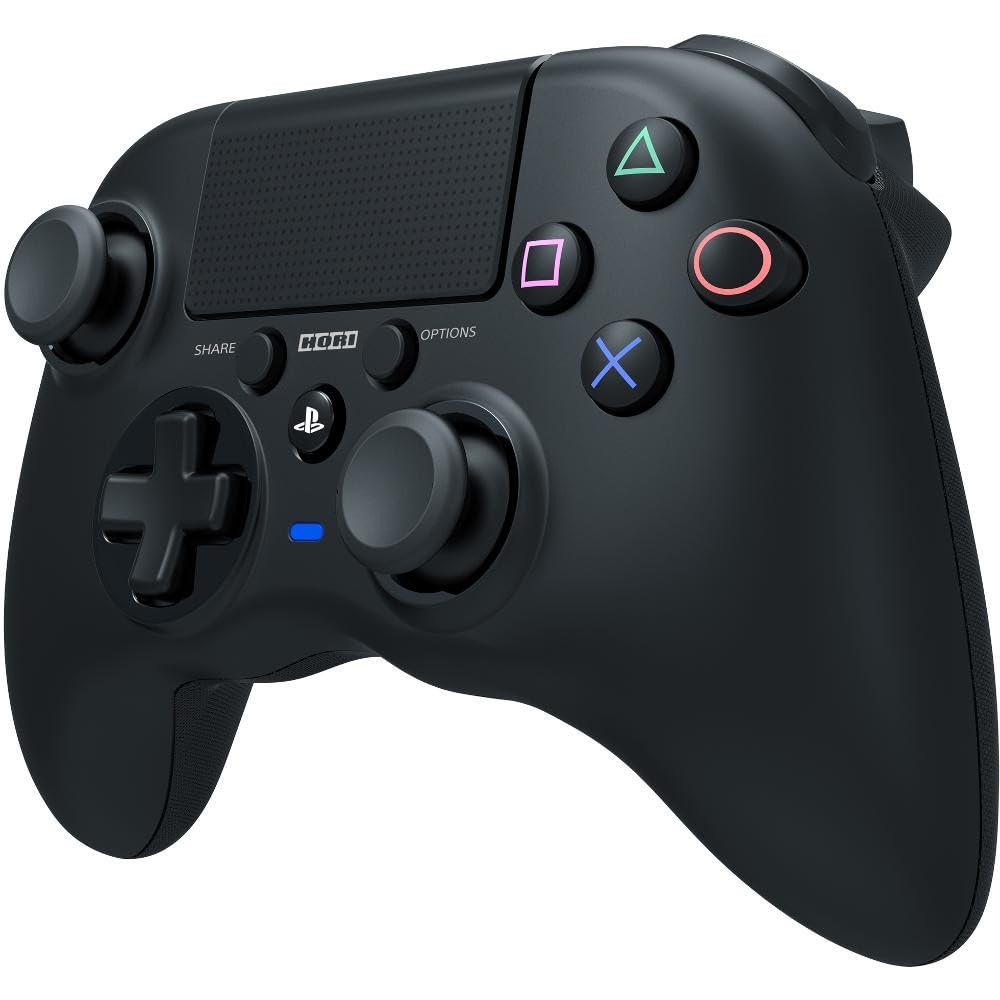
Тасвир: Пеш view of the HORI PS4 Onyx Plus Wireless Controller. It features two analog sticks, a D-pad, four action buttons (Triangle, Circle, Cross, Square), Share and Options buttons, a PS button, a touchpad, and a light bar. The controller is black with textured grips.
Танзимот ва пайвасти ибтидоӣ
Пур кардани контроллер
The controller includes a built-in rechargeable battery. Before first use, fully charge the controller using a standard USB charging cable. Connect the cable to the controller's charging port and a powered USB port on your PS4 console or a USB wall adapter. The light bar on the controller will indicate charging status.
Пайвастшавӣ бо PlayStation 4
- Боварӣ ҳосил кунед, ки консоли PlayStation 4-и шумо фаъол аст.
- With the controller powered off, press and hold the Тугмаи PS ва Тугмаи SHARE simultaneously until the light bar begins to flash rapidly.
- On your PS4 console, navigate to Танзимотҳо > Дастгоҳҳо > Дастгоҳҳои Bluetooth.
- Select the "HORI Onyx Plus" controller from the list of available devices.
- Once paired, the light bar will glow a solid color, indicating a successful connection.
Note: Some versions of this controller may require a USB wireless dongle for connection. If direct Bluetooth pairing is unsuccessful, refer to any included quick start guide for dongle-specific instructions.
Фаъолияти контроллер
Назорати асосӣ
The HORI PS4 Onyx Plus Wireless Controller features standard PlayStation button layouts:
- Стикҳои аналогӣ: Used for movement and camera control. Push the sticks in for L3/R3 functions.
- D-Pad: For directional input in menus and certain games.
- Тугмаҳои амал (секунҷа, доира, салиб, мураббаъ): Perform in-game actions.
- Тугмаи SHARE: Access sharing options (screenshots, video clips).
- Тугмаи OPTIONS: Pause games or access in-game menus.
- Тугмаи PS: Access the PS4 Home screen, switch users, or power off the console.
- Touchpad: Functions as a clickable button and a touch-sensitive surface for specific game interactions.
Adjustable Triggers
The L2 and R2 triggers feature adjustable pressure. Consult your game's settings or the controller's specific software (if available) for customization options. This allows users to fine-tune trigger sensitivity for different game genres.
Микрофони дарунсохт
The integrated microphone allows for voice chat in online multiplayer games and voice commands for the PS4 system. Ensure your PS4 audio settings are configured to use the controller's microphone.
Нигоҳдорӣ ва нигоҳубин
Тозакунӣ
Барои тоза кардани контроллер, матои мулоим ва хушкро истифода баред. Барои ифлосиҳои якрав, каме тоза кунед.ampen the cloth with water. Avoid using harsh chemicals, solvents, or abrasive materials, as these can damage the controller's finish and internal components.
Нигоҳубини батарея
- Барои дароз кардани мӯҳлати истифодааш батареяро зуд-зуд холӣ накунед.
- Контроллерро дар ҷои хунук ва хушк нигоҳ доред, вақте ки дар муддати тӯлонӣ истифода намешаванд.
- Do not expose the controller to extreme temperatures.
Мушкилкушо
Масъалаҳои пайвастшавӣ
- Контроллер пайваст намешавад: Ensure the controller is charged. Re-attempt the pairing process as described in the "Pairing with PlayStation 4" section. Move closer to the PS4 console to rule out range issues.
- Пайвасти фосилавӣ: Check for potential interference from other wireless devices. Ensure the controller is fully charged. If using a dongle, ensure it is securely plugged into the PS4.
Ҳассосияти сенсорӣ
Some users may find the touchpad to be highly sensitive. If accidental inputs occur, adjust your grip or check in-game settings for touchpad sensitivity options. There is no physical adjustment for touchpad sensitivity on the controller itself.
Нишондиҳандаи ҳаёти батарея
The controller does not display battery life on the PS4 system menu. The light bar will indicate charging status, and the controller will power off when the battery is depleted.
Controller Not Turning On Console
This controller may not support turning on the PS4 console directly from a powered-off state. Power on the console manually before connecting the controller.
Мушаххасоти
| Хусусият | Тафсилот |
|---|---|
| Рақами модел | PS4-149E |
| Пайвастшавӣ | Бесимӣ |
| Андозаҳо (L x W x H) | 2.76 x 6.3 x 7.09 инч |
| Вазн | 8.1 унция |
| Батарея | 1 Батарея (дохил) |
| Аввалин дастрас | 30 январи соли 2022 |
Кафолат ва дастгирӣ
Кафолати маҳсулот
For information regarding the product warranty, please refer to the warranty card included with your purchase or visit the official HORI webсайт. Шартҳо ва шартҳои кафолат вобаста ба минтақа метавонанд фарқ кунанд.
Дастгирии муштариён
If you encounter any issues not covered in this manual or require further assistance, please contact HORI customer support. You can find contact information on the official HORI webсайт ё тавассути фурӯшандае, ки шумо маҳсулотро харидед.
Visit the HORI Store on Amazon барои маълумоти бештари маҳсулот ва захираҳои дастгирӣ.


