1. Муқаддима
The LG OLED CX Series 65-inch 4K Smart TV (OLED65CXPUA) offers a premium viewing experience with its self-lit OLED pixels, delivering perfect blacks, intense colors, and stunning picture quality. This manual provides essential information for setting up, operating, maintaining, and troubleshooting your new television.
Equipped with the α9 Gen 3 AI Processor 4K, this TV intelligently enhances everything you see and hear, providing clearer, smoother, and more dynamic content. Its advanced features make it ideal for both cinematic viewing and high-performance gaming.

Image: The LG OLED CX Series 65-inch 4K Smart TV showcasing its vibrant display with various streaming application icons.
2. Дар қуттӣ чӣ мавҷуд аст
Upon unboxing your LG OLED CX Series TV, please ensure all the following components are present:
- LG OLED CX Series 65-inch 4K Smart TV
- TV Stand (for tabletop placement)
- Кабели барқ
- Идоракунии дурдасти LG Magic
- 2 батареяи AAA (барои идоракунии дурдаст)
- Дастури корбар (ин ҳуҷҷат)

Image: A visual representation of the LG OLED CX Series TV's dimensions and the items included in the box, such as the TV, stand, power cable, and Magic Remote.
Кушодани видео
Video: Official LG OLED Unboxing guide, demonstrating the safe and proper way to remove the TV from its packaging and prepare it for setup.
3. Танзимот
3.1 Ҷойгиркунии стенд / васлкунии девор
Carefully place the TV screen-down on a soft, flat surface. Attach the stand to the TV using the provided screws, following the instructions in the separate stand assembly guide. If wall-mounting, ensure you use a compatible VESA mount and follow the mount manufacturer's instructions. Due to the TV's size and weight, it is recommended that two people handle the TV during assembly or mounting.
3.2 Пайваст кардани дастгоҳҳои беруна
Your LG OLED CX TV offers multiple connectivity options for various external devices. Locate the ports on the back and side of the TV.

Image: The back panel of the LG OLED CX TV, highlighting the main input/output ports for connecting devices.

Image: The side panel of the LG OLED CX TV, providing easy access to additional HDMI and USB ports.
- Портҳои HDMI: Connect gaming consoles, Blu-ray players, soundbars, and other HDMI-compatible devices. The LG OLED CX features 4 HDMI 2.1 ports, supporting advanced features like 4K@120Hz, VRR, and ALLM for optimal gaming performance.
- Портҳои USB: Дастгоҳҳои нигаҳдории USB-ро барои бозикунии медиа ё навсозии нармафзор пайваст кунед.
- Порти Ethernet (LAN): Барои пайвасти устувори интернетии симӣ.
- Баромади аудиои рақамии оптикӣ: Барои беҳтар кардани садо ба садои панел ё қабулкунаки аудио пайваст шавед.
- Антенна/кабел дар: Антенна ё телевизиони кабелии худро пайваст кунед.
3.3 Пайвастшавии барқ
Connect the power cable to the TV's power input and then to a wall outlet. Press the power button on the remote control or the TV to turn it on.
4. Корбарии телевизиони шумо
4.1 LG Magic Remote
The LG Magic Remote provides intuitive control over your TV with its point, click, scroll, and voice recognition features. It simplifies navigation through menus and content.

Image: The LG Magic Remote, featuring a central scroll wheel, directional buttons, and dedicated app buttons.

Тасвир: кунҷӣ view of the LG Magic Remote, emphasizing its modern design and button accessibility.
Magic Remote Features Video
Video: An official LG video demonstrating the various features and functionalities of the LG Magic Remote, including point-and-click navigation and voice commands.
4.2 webПлатформаи телевизиони интеллектуалии OS
Дар webOS platform provides a user-friendly interface for accessing streaming services, live TV, and connected devices. Navigate using the Magic Remote to explore apps like Netflix, Prime Video, Hulu, and more.

Тасвир: LG webOS Smart TV home screen, displaying a selection of popular streaming applications and personalized content suggestions.
4.3 Picture Modes and AI Processing
Your LG OLED CX TV features various picture modes and AI processing to optimize content. The α9 Gen 3 AI Processor 4K uses AI Picture Pro and AI Sound Pro to automatically adjust settings for the best viewтаҷрибаи шунидан ва шунидан.
- Реҷаи филмсоз: Бинишҳои аслии директорро тавассути хомӯш кардани ҳамворкунии ҳаракат ва дигар эффектҳои пас аз коркард нигоҳ медорад.
- Равшан: Enhances colors and brightness for a more dynamic picture.
- Стандарт: Provides a balanced picture suitable for most content.
- Кинотеатр: Optimizes settings for movie viewing.
- Варзиш: Enhances motion clarity for fast-paced sports.
OLED Self-Lit Pixels Video
Video: An LG Electronics video explaining the technology behind self-lit OLED pixels and how they contribute to superior picture quality with perfect blacks and vibrant colors.
4.4 Хусусиятҳои бозӣ
The LG OLED CX is designed for an exceptional gaming experience, featuring a 120Hz refresh rate, NVIDIA G-SYNC, and FreeSync compatibility for smooth, tear-free gameplay. The Game Optimizer mode allows for quick adjustments to gaming settings.
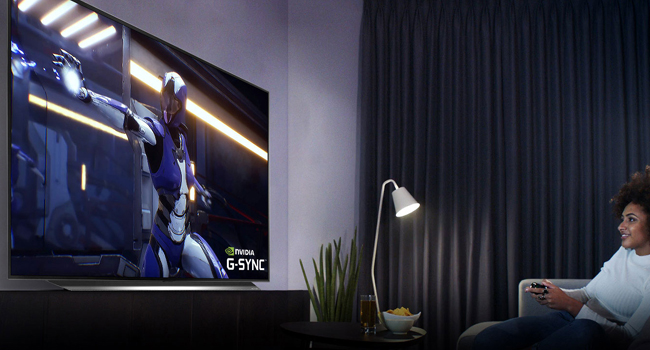
Image: A dynamic image of the LG OLED TV showcasing its 'OLED Gaming' features with vivid graphics.
LG OLED CX vs GX Series Video
Video: An LG Electronics video comparing the features and performance of the LG OLED CX and GX series TVs, providing insights into their differences and shared technologies.
5. Нигоҳдорӣ
5.1 Нигоҳубини экран
Барои тоза кардани экран, онро бо матои микрофибери хушк ва мулоим хушк кунед. Барои доғҳои якрав, каме гampen the cloth with water or a screen-safe cleaner. Avoid harsh chemicals, abrasive materials, or excessive pressure, as these can damage the OLED panel.
5.2 Burn-in Prevention
LG OLED TVs incorporate features to minimize the risk of burn-in, such as Pixel Refresher and Screen Shift. To further protect your screen:
- Avoid displaying static images or logos for extended periods.
- Utilize the TV's built-in screen saver and power-saving modes.
- Ҳангоми истифода нашудан телевизорро хомӯш кунед.
5.3 Тозакунии умумӣ
Wipe the TV's frame and stand with a soft, dry cloth. Ensure the TV is unplugged before cleaning.
6. Баррасии мушкилот
If you encounter issues with your LG OLED CX TV, try the following basic troubleshooting steps:
- Не қудрат: Санҷед, ки сими барқӣ ҳам ба телевизор ва ҳам ба розеткаи деворӣ боэътимод пайваст аст. Розеткаи дигарро санҷед.
- Тасвир/садо нест: Ensure all external devices are properly connected and powered on. Verify the correct input source is selected on the TV.
- Пули дурдаст кор намекунад: Батареяҳоро дар Remote Magic иваз кунед. Боварӣ ҳосил кунед, ки дар байни пулти дурдаст ва телевизор ягон монеа вуҷуд надорад.
- Сифати тасвири паст: Check the picture mode settings. Ensure the content source is high-quality (e.g., 4K HDR).
- Масъалаҳои пайвастшавӣ ба Интернет: Check your Wi-Fi router or Ethernet cable connection. Try restarting your router.
- Бозсозии завод: As a last resort, you can perform a factory reset through the TV's settings menu. This will erase all personalized settings and data.
For more detailed troubleshooting, refer to the TV's on-screen help guide or the LG support webсайт.
7. Мушаххасоти
| Хусусият | Мушаххасоти |
|---|---|
| Бренд | LG |
| Рақами модел | OLED65CXPUA |
| Андозаи экран | 65 инч |
| Технологияи намоиш | OLED |
| Резолюция | 4K (3840 x 2160) |
| Меъёри навсозӣ | 120 Гц |
| Протсессор | α9 Gen 3 протсессори AI 4K |
| Технологияи пайвастшавӣ | Bluetooth, Ethernet, HDMI (4x 2.1), USB, Wireless |
| Хидматҳои интернетии дастгирӣшаванда | Google TV, Hulu, Netflix, Prime Video, Vudu (webOS) |
| Вазни ашё | 71.9 фунт |
| Андозаҳои маҳсулот (бо стенд) | 9.9 x 57 x 33.9 инч |
| Компонентҳои дохилшуда | Кабели барқ, Идоракунии дурдаст, стенд |
8. Кафолат ва дастгирӣ
Your LG OLED CX Series TV comes with a manufacturer's warranty. Please refer to the warranty card included in your product packaging for specific terms and conditions, including coverage duration and claim procedures.
For technical support, product registration, or to download the full electronic manual, please visit the official LG Electronics support webсайт ё бевосита бо хадамоти муштариёни LG тамос гиред. Маълумоти тамосро одатан дар LG пайдо кардан мумкин аст webсайт ё дар ҳуҷҷатҳои маҳсулоти шумо.
Дастгирии онлайн: Дастгирии LG Webсайт