1. Муқаддима
Thank you for choosing the FeinTech LED Desk Lamp LTL00600. This high-quality desk lamp is designed to provide optimal lighting for your workspace while offering convenient features such as a USB charging port, adjustable brightness, and customizable color temperature. Please read this manual thoroughly before use to ensure proper operation and to maximize the lifespan of your product.
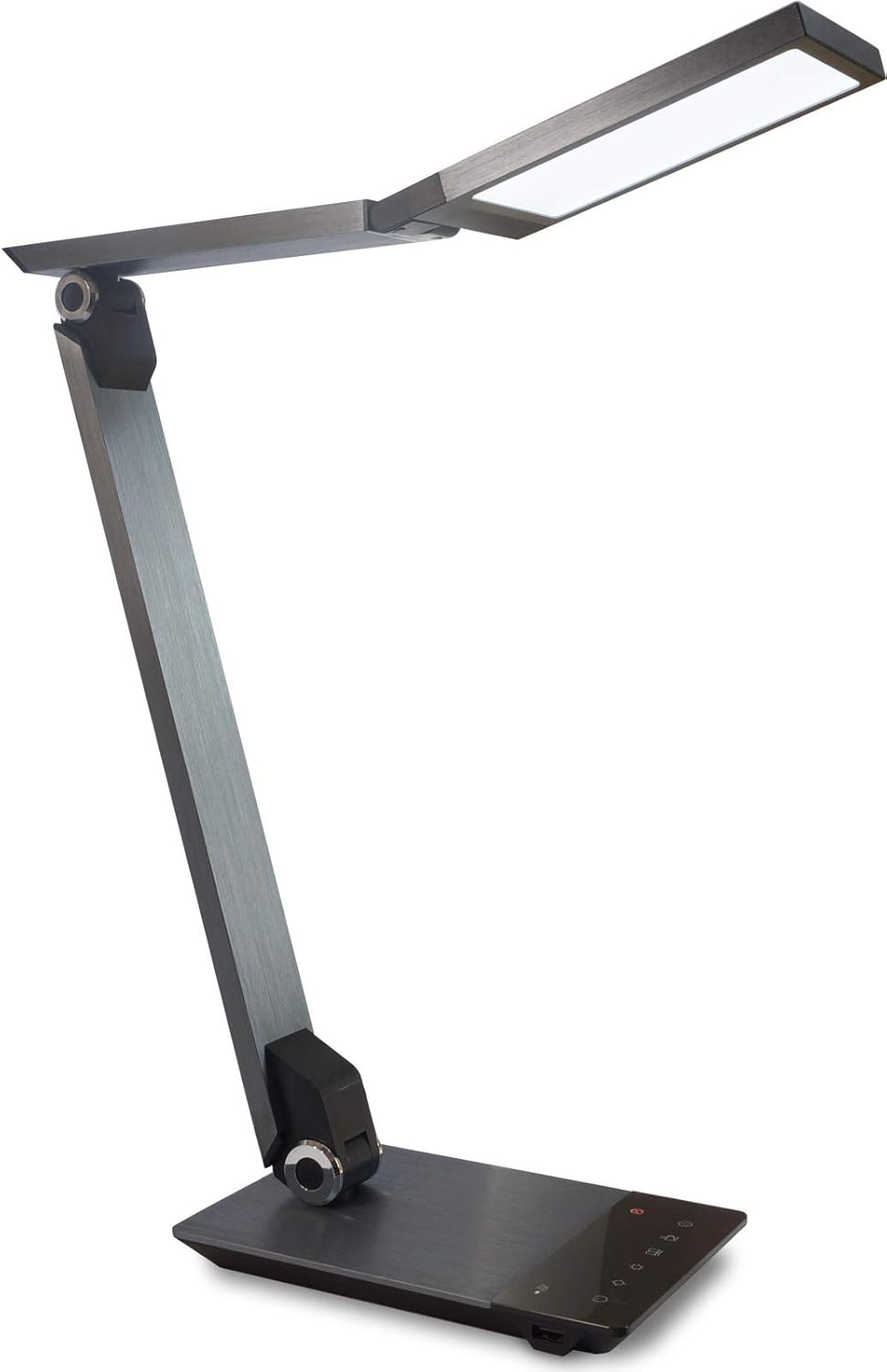
Image 1.1: FeinTech LED Desk Lamp LTL00600. This image displays the lamp in its upright position, showcasing its brushed aluminum finish and sleek design.
2. Дастурамал оид ба бехатарӣ
Барои пешгирӣ аз ҷароҳат ё осеб, лутфан чораҳои бехатарии зеринро риоя кунед:
- Боварӣ ҳосил кунед, ки адаптери барқ ба розеткаи мувофиқ пайваст аст.
- л-ро фош накунедamp to water or excessive humidity.
- Аз қисм-қисм ҷудо кардан ё тағир додани л худдорӣ кунедamp. Repairs should only be performed by qualified personnel.
- л-ро нигоҳ доредamp дур аз манбаъҳои гармӣ ва нури бевоситаи офтоб.
- л тоза кунедamp танҳо бо матои нарм ва хушк тоза кунед. Аз тозакунандаҳои абразивӣ ё ҳалкунандаҳо истифода набаред.
- Do not look directly into the LED light source for extended periods.
3. Мундариҷаи баста
Лутфан тафтиш кунед, ки ҳама ашё дар баста мавҷуд аст:
- FeinTech LED Desk Lamp (Model: LTL00600)
- Адаптери барқ (12V/2A)
4. Маҳсулот ба охир расидview
Familiarize yourself with the components of your FeinTech LED Desk Lamp:
- Lamp Сардор: Манбаи рӯшноии LED-ро дар бар мегирад.
- Дастҳои танзимшаванда: Multiple joints for flexible positioning.
- Асос: Устувориро таъмин мекунад ва панели идоракунӣ ва порти USB-ро дар бар мегирад.
- Сафҳаи идоракунӣ: Touch-sensitive buttons for power, brightness, color temperature, and timer.
- Порти барқи USB: Located on the side of the base for device charging.

Тасвири 4.1: Аз боло ба поён view аз лamp's base and control panel. This image highlights the touch-sensitive buttons for various functions.

Тасвир 4.2: Тараф view аз лamp's base, showing the integrated USB charging port. This port allows for convenient charging of compatible devices.
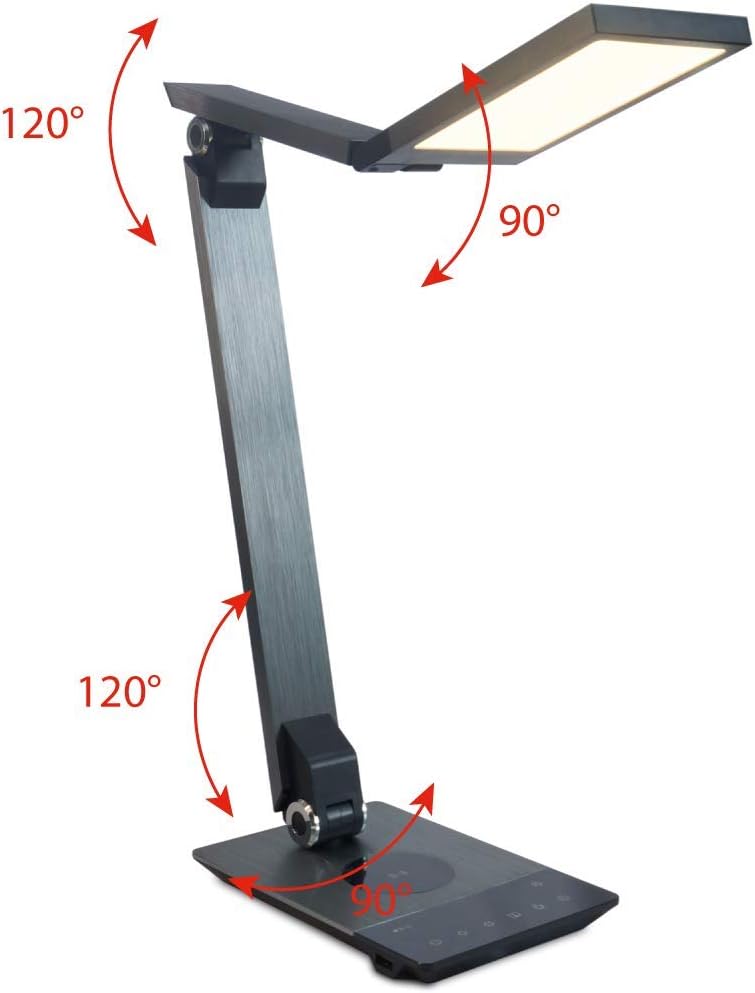
Image 4.3: Diagram illustrating the articulation angles of the lamp's joints. The lamp head can rotate 90 degrees, the upper arm 120 degrees, and the lower arm 120 degrees, allowing for flexible positioning.
5. Танзимот
Барои танзими ибтидоӣ ин қадамҳоро иҷро кунед:
- Кушодани: Ҳама ҷузъҳоро аз бастабандӣ бодиққат хориҷ кунед.
- Ҷойгиршавӣ: Ҷойгир кардани лamp base on a stable, flat surface. Ensure there is enough space for the lamp to be adjusted without obstruction.
- Пайваст кардани барқ: Insert the power adapter cable into the DC input port on the back of the lamp Адаптери барқро ба васлаки барқии стандартӣ пайваст кунед.
6. Дастурҳои истифодабарӣ
The FeinTech LED Desk Lamp features intuitive touch controls on its base.
6.1 Фаъол кардан/хомӯш кардан
- -ро ламс кунед Тугмаи барқ on the control panel (refer to Image 4.1) to turn the lamp фаъол ё хомӯш.
6.2 Танзими равшанӣ (хиракунӣ)
- Бо лamp on, touch and hold the Равшанӣ боло or Равшанӣ паст buttons (refer to Image 4.1) to steplessly adjust the light intensity.
- Дар лamp base will vibrate slightly when the minimum or maximum brightness level is reached.
6.3 Танзими ҳарорати ранг
- Бо лamp on, touch and hold the Color Temperature Up or Color Temperature Down buttons (refer to Image 4.1) to steplessly adjust the light color from warm white (2700K) to cool white (6500K).
- Дар лamp base will vibrate slightly when the minimum or maximum color temperature is reached.
6.4 Favorite Settings
- Дар лamp allows you to store and recall 3 favorite light settings (brightness and color temperature).
- To save a setting: Adjust the brightness and color temperature to your desired level. Then, touch and hold one of the Тугмаҳои дӯстдошта (refer to Image 4.1) until the lamp flashes briefly, indicating the setting is saved.
- To recall a setting: Simply touch the corresponding Тугмаи дӯстдошта.
- The last used brightness and color temperature settings are automatically saved even after the lamp хомӯш карда мешавад.
6.5 Функсияи пуркунии USB
- Connect your smartphone or other compatible device to the USB charging port on the side of the lamp base (refer to Image 4.2) using a suitable USB cable.
- The intelligent USB port delivers up to 2.4A for fast charging.
- An LED indicator will signal ongoing and completed charging status.
6.6 Функсияи таймер
- -ро ламс кунед Тугмаи вақтсанҷ (refer to Image 4.1) to activate the timer function.
- The first touch activates a 3-minute timer.
- A second touch activates a 1-hour timer.
- Дар лamp will automatically turn off after the selected time period.
7. Нигоҳдорӣ
Барои нигоҳ доштани лamp's appearance and functionality:
- Ҳамеша l-ро ҷудо кунедamp аз таъминоти барқ пеш аз тоза кардан.
- л-ро тоза кунедamp бо матои мулоим, хушк ва бе-линт.
- Аз тозакунандаҳои моеъ ё аэрозолӣ истифода набаред, зеро онҳо метавонанд ба қисматҳои ниҳоӣ ё дохилӣ зарар расонанд.
- Avoid scratching the brushed aluminum surface.
8. Баррасии мушкилот
Агар шумо бо рондани мошинатон бо мушкилот дучор шаведamp, ба мушкилоти умумӣ ва роҳҳои ҳалли зерин муроҷиат кунед:
| Мушкилот | Сабаби эҳтимолӣ | Ҳалли |
|---|---|---|
| Lamp фурӯзон намешавад. | Не таъминоти барқ. | Check if the power adapter is securely connected to the lamp ва розеткаи барқӣ. Розеткаро бо дастгоҳи дигар санҷед. |
| Пуркунии USB кор намекунад. | Device not compatible or cable faulty. | Ensure your device is compatible with USB charging. Try a different USB cable. Verify the lamp ба кор андохта мешавад. |
| Назорати ламсӣ ҷавоб намедиҳад. | Хатои муваққатии нармафзор ё мушкилоти барқ. | Disconnect the power adapter for 30 seconds, then reconnect it. Ensure your fingers are clean and dry when operating the touch controls. |
9. Мушаххасоти
| Рақами модел | 00600 LTL |
| Андозаҳо (L x W x H) | 36 x 13.5 x 44 см (тақрибан 14.2 x 5.3 x 17.3 дюйм) |
| Вазн | 1.84 кг (тақрибан 4.06 фунт) |
| Материал | Алюминийи тозашуда |
| Манбаи нур | НН - НУРНИШОН |
| Max. Light Output | 500 lumens (1000 lux at 40 cm distance) |
| Ҳарорати ранг (CCT) | 2700 K (Warm White) to 6500 K (Cool White) |
| Power Consumption (Lamp танҳо) | Макс. 10 Вт |
| Power Consumption (Lamp & Charging) | Макс. 22 Вт |
| Баромади USB | То 2.4 А |
| Вуруди ҷилдиtage (Адаптер) | 12 В / 2 А |
| Навъи гузариш | ламс кунед |

Image 9.1: Diagram showing the dimensions of the FeinTech LED Desk Lamp. Дар лamp measures approximately 36 cm in length, 13.5 cm in width, and 44 cm in height.
10. Кафолат ва дастгирӣ
FeinTech products are designed for reliability and performance. For warranty information or technical support, please refer to the warranty card included with your purchase or visit the official FeinTech webсайт. Лутфан далели хариди худро барои даъвоҳои кафолат нигоҳ доред.