1. Муқаддима
This manual provides comprehensive instructions for the setup, operation, and maintenance of your LIORQUE HM433A Projection Alarm Clock. Please read this manual thoroughly before using the device to ensure proper function and longevity.
The LIORQUE HM433A is a versatile alarm clock featuring a 180° rotatable projection, FM radio, temperature display, and a convenient USB charging port. It is designed for ease of use and enhanced readability.
2. Мундариҷаи баста
Боварӣ ҳосил кунед, ки ҳама ашё дар баста мавҷуд аст:
- 1 x LIORQUE Projection Alarm Clock (Model HM433A)
- 1 x Дастури корбар (Ин ҳуҷҷат)
- 1 x кабели хурди USB
- 1 х AC адаптер
3. Маҳсулот ба охир расидview
Familiarize yourself with the main components and controls of your alarm clock.

Расми 3.1: Пеш view of the LIORQUE HM433A Projection Alarm Clock, showing the digital display, projection, and general design.
3.1. Тугмаҳои идоракунӣ
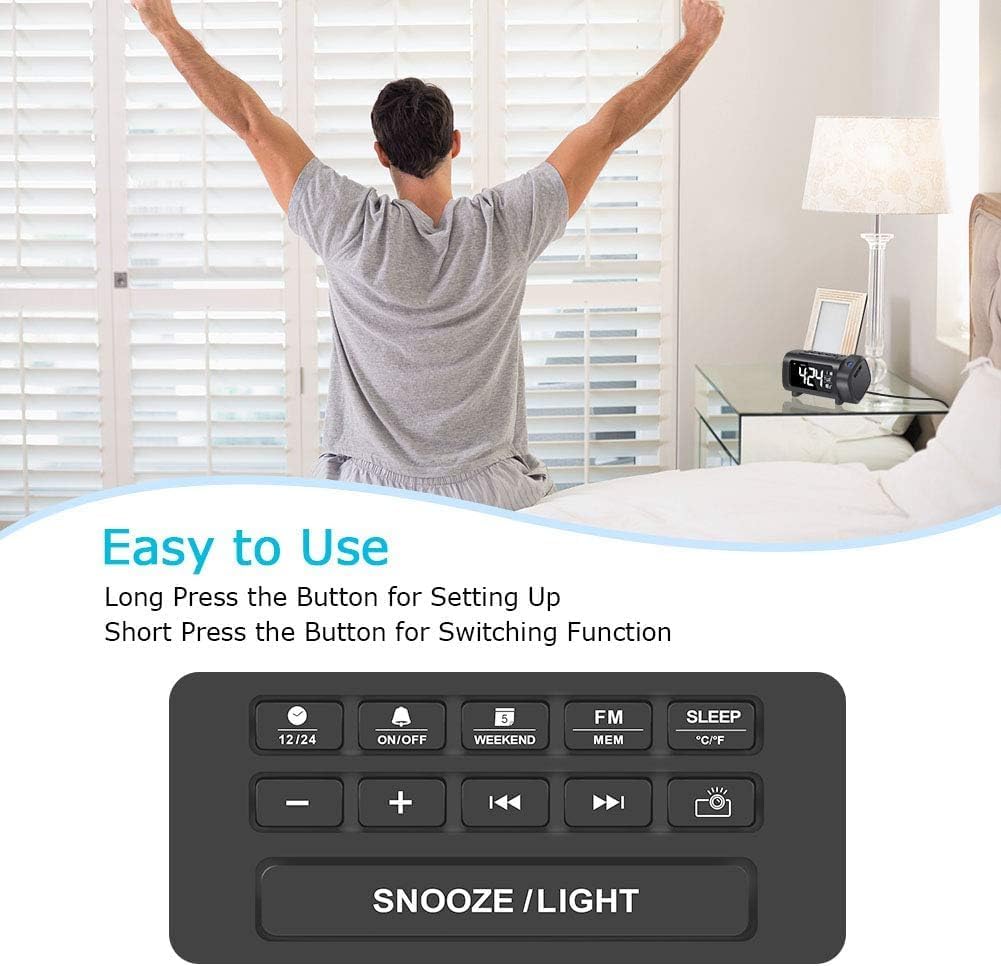
Расми 3.2: Top panel control buttons for various functions.
- 12/24 Тугма: Toggle between 12-hour and 24-hour time format.
- Тугмаи фурӯзон/хомӯш: Power on/off the alarm, or activate/deactivate alarm settings.
- Weekend Button: Enable/disable weekend alarm mode.
- FM/MEM Button: Access FM radio functions and save/recall radio presets.
- Тугмаи SLEEP: Set the sleep timer for the FM radio.
- Тугмаи °C/°F: Switch temperature display between Celsius and Fahrenheit.
- - / + Тугмаҳо: Adjust values (time, volume, frequency) or navigate menus.
- Previous / Next Buttons: Change FM radio stations or navigate tracks.
- Projector Button: Control projection features (on/off, brightness, flip).
- Тугмаи SNOOZE/LIGHT: Activate snooze during an alarm, or adjust display brightness.
4. Танзимот
4.1. Пайвастшавии барқ
- Connect the Micro USB cable to the input port on the back of the alarm clock.
- Plug the AC adapter into a standard wall outlet. The clock display will illuminate.
- Шарҳ: The alarm clock requires continuous AC power for full functionality. It is not battery-operated for primary power.
4.2. Насби батареяи эҳтиётӣ
The device includes a CR2032 battery for backup. This battery preserves time and alarm settings during a power outage but does not power the display or projection.
- Қисми батареяро дар поёни дастгоҳ ҷойгир кунед.
- Сарпӯши қисмро кушоед.
- Insert one CR2032 battery, ensuring correct polarity (+/-).
- Сарпӯши қисмро бехатар пӯшед.
5. Дастурҳои истифодабарӣ
5.1. Муқаррар кардани вақт ва сана
- Танзими вақт: Long press the "12/24" button to enter time setting mode. The hour digits will flash. Use the "+" or "-" buttons to adjust the hour. Press "12/24" again to confirm and move to minute setting. Adjust minutes with "+" or "-" buttons. Press "12/24" to confirm.
- Формати 12/24 соат: Short press the "12/24" button to switch between 12-hour (with AM/PM indicator) and 24-hour formats.
- Муқарраркунии сана: Long press the "Weekend" button to enter date setting mode. The year will flash. Use "+" or "-" to adjust. Press "Weekend" to confirm and move to month, then day. Adjust each with "+" or "-" and confirm with "Weekend".
- Воҳиди ҳарорат: Short press the "°C/°F" button to switch between Celsius and Fahrenheit.
5.2. Танзими ҳушдорҳо
The clock supports multiple alarms. Follow these steps for each alarm:
- Вақти ҳушдорро таъин кунед: Long press the "ON/OFF" button to enter alarm setting mode. The alarm hour will flash. Use "+" or "-" to adjust the hour. Press "ON/OFF" to confirm and move to minute setting. Adjust minutes with "+" or "-" and confirm with "ON/OFF".
- Alarm Sound Selection: After setting the time, you can choose between Buzzer or FM Radio as the alarm sound. Use "+" or "-" to select. Press "ON/OFF" to confirm.
- Ҳушдорро фаъол/ғайрифаъол кунед: Short press the "ON/OFF" button to toggle the alarm on or off. An alarm icon will appear/disappear on the display.
- Функсияи ҳифз: When an alarm sounds, press the "SNOOZE/LIGHT" button to activate snooze. The alarm will pause for 9 minutes and then sound again.
- Weekend Mode: Short press the "Weekend" button to activate/deactivate weekend mode. In weekend mode, alarms will not sound on Saturdays and Sundays.
5.3. Хусусиятҳои проексия
The projector displays the time on a wall or ceiling.

Расми 5.1: 180° Projection Flip Function.
- Фурӯзон/хомӯш кардан: Short press the "Projector" button to turn the projection on or off.
- 180° гардон: Long press the "Projector" button to flip the projected image 180 degrees, allowing for correct orientation regardless of clock placement.
- Равшании проексия: While projection is active, short press the "Projector" button repeatedly to cycle through 4 brightness levels (Off, Dim, Medium, Bright).

Расми 5.2: Adjusting Projection Brightness.
Optimal Projection Distance: For best clarity, the recommended projection distance is 2-3 meters (7-10 feet). For higher ceilings, projecting onto a wall may yield better results.
5.4. Display Brightness and Color
- 4-Level Dimmer: Short press the "SNOOZE/LIGHT" button in standard time display mode to cycle through 4 brightness levels for the main display (0%, 50%, 75%, 100%).
- Display Color Switch: Long press the "SNOOZE/LIGHT" button to switch the display color between white and blue.

Расми 5.3: Main Display Brightness Levels.

Расми 5.4: Display Color Options (White/Blue).
5.5. Фаъолияти радиои FM

Расми 5.5: FM Radio and Sleep Timer Functionality.
- Фурӯзон/хомӯш кардан: Short press the "FM/MEM" button to turn the FM radio on or off.
- Сканкунии худкор: Long press the "FM/MEM" button to automatically scan and save available FM stations (76.0MHz-108.0MHz). The clock can store up to 15 preset stations.
- Танзими дастӣ: Use the "Previous" or "Next" buttons to manually tune to desired frequencies.
- Танзими овоз: Use the "+" or "-" buttons to adjust the radio volume (15 levels).
- Вақти хоб: While the radio is playing, short press the "SLEEP" button repeatedly to set a sleep timer (5-90 minutes). The radio will automatically turn off after the set duration.
5.6. Порт пуркунии USB

Расми 5.6: USB Charging Port in Use.
The alarm clock features a 5V/1.2A USB output port on the side. This allows you to charge your smartphone or other USB-powered devices conveniently while the clock is connected to AC power.
6. Нигоҳдорӣ
- Тозакунӣ: Use a soft, dry cloth to clean the surface of the alarm clock. Do not use liquid cleaners or abrasive materials.
- Нигоҳубини линза: Gently wipe the projection lens with a soft, lint-free cloth to maintain clear projection quality.
- Нигоҳдорӣ: If storing the device for an extended period, disconnect it from power and remove the backup battery.
7. Баррасии мушкилот
| Мушкилот | Сабаби эҳтимолӣ | Ҳалли |
|---|---|---|
| Clock display is off. | No AC power connection. | Ensure the AC adapter is securely plugged into a working outlet and the clock. |
| Проексия норавшан ё норавшан аст. | Incorrect projection distance or dirty lens. | Adjust the clock's position for optimal distance (2-3m). Clean the projection lens with a soft cloth. |
| Projection is upside down or reversed. | Projection image needs to be flipped. | Long press the "Projector" button to flip the image 180 degrees. |
| Огоҳӣ садо намедиҳад. | Alarm is deactivated or weekend mode is on. | Short press "ON/OFF" to ensure alarm is active (icon visible). Check if "Weekend" mode is enabled. |
| Қабули радиои FM бад аст. | Antenna position or interference. | Adjust the position of the clock or its antenna for better reception. Avoid placing near other electronic devices. |
| Пуркунии USB кор намекунад. | Clock not connected to AC power or device incompatibility. | Ensure the clock is powered by AC. Check the charging cable and the device being charged. |
8. Мушаххасоти
| Бренд | ЛИОРК |
| Модели | HM433A |
| Навъи намоиш | Digital (VA Display) |
| Манбаи нерӯ | Адаптери барқии симӣ (AC) |
| Нусхаи батарея | 1 x CR2032 (дохил карда шудааст) |
| Projection Features | 180° Rotatable, 4-Level Brightness |
| Диммерро намоиш диҳед | 4-Level Brightness, 2-Color (White/Blue) |
| Фосилаи радиои FM | 76.0MHz-108.0MHz (15 preset stations) |
| Баромади USB | 5В/1.2А |
| Андозаҳои маҳсулот | 9.38 х 3.81 х 9.5 см |
| Вазн | 320 гр |
9. Кафолат ва дастгирӣ
For warranty information or technical support, please refer to the contact details provided with your purchase or visit the official LIORQUE webсайт. Квитансияи хариди худро барои даъвоҳои кафолат нигоҳ доред.


