1. Муқаддима
The HUANUO HNSS8-E Gas Spring Monitor Arm is designed to enhance your workspace ergonomics by providing flexible and stable positioning for your display. This manual outlines the necessary steps for proper installation, operation, and maintenance to ensure optimal performance and user comfort.
This monitor arm supports monitors from 13 to 32 inches, with a maximum load capacity of 9 kg. It is compatible with VESA mounting patterns of 75x75mm and 100x100mm.

Image 1.1: The monitor arm helps to free up valuable desk space by elevating the monitor.
2. Маълумот оид ба бехатарӣ
- Read all instructions carefully before assembly and installation. Failure to do so may result in personal injury or product damage.
- Ensure your desk surface is strong enough to support the combined weight of the monitor arm and your monitor.
- Иқтидори ҳадди аксар аз 9 кг (19.8 фунт) зиёд накунед.
- Use only the provided hardware. If any parts are missing or damaged, contact HUANUO customer support.
- Keep children away from the assembly area. Small parts may be a choking hazard.
- Adjust the gas spring tension carefully. Improper adjustment can cause the monitor to move unexpectedly.
3. Мундариҷаи баста
Пеш аз оғози насб, санҷед, ки ҳама ҷузъҳо мавҷуданд.
- Мониторинги Ассамблея
- Мизи Clamp База
- Grommet Mount Base
- Судї VESA
- Маҷмӯаи сахтафзор (винтҳо, шайбаҳо, калидҳои Алленшакл)
- Дастури дастурӣ

Тасвири 3.1: Ба охир расидview of the monitor arm components, including both clamp ва имконоти васлкунии grommet.
4. Танзим ва насб
Follow these steps to install your HUANUO HNSS8-E monitor arm.
Step 4.1: Choose Mounting Option
Дастаки монитор ду усули насбкуниро пешниҳод мекунад: C-clamp or Grommet mount.
- C-Clamp Насбкунӣ: Suitable for desks with edges. Attach the C-clamp base to the desk edge and tighten the knob until secure.
- Ҷойгиркунии васлаки Grommet: Requires a hole in the desk (diameter 10-50mm). Insert the grommet base through the hole and secure it from underneath the desk with the provided plate and nut.

Image 4.1: Illustration of the two available mounting methods: C-clamp ва васлкунии гулӯла.
Қадами 4.2: Plate VESA-ро ба монитор замима кунед
Align the VESA plate with the mounting holes on the back of your monitor (75x75mm or 100x100mm). Secure the plate using the appropriate screws and washers from the hardware kit. Ensure the screws are tightened firmly but do not overtighten.
Step 4.3: Mount Monitor to Arm
Slide the VESA plate with the attached monitor onto the arm's mounting head. Ensure it clicks securely into place. For safety, it is recommended to have assistance when lifting and mounting larger monitors.
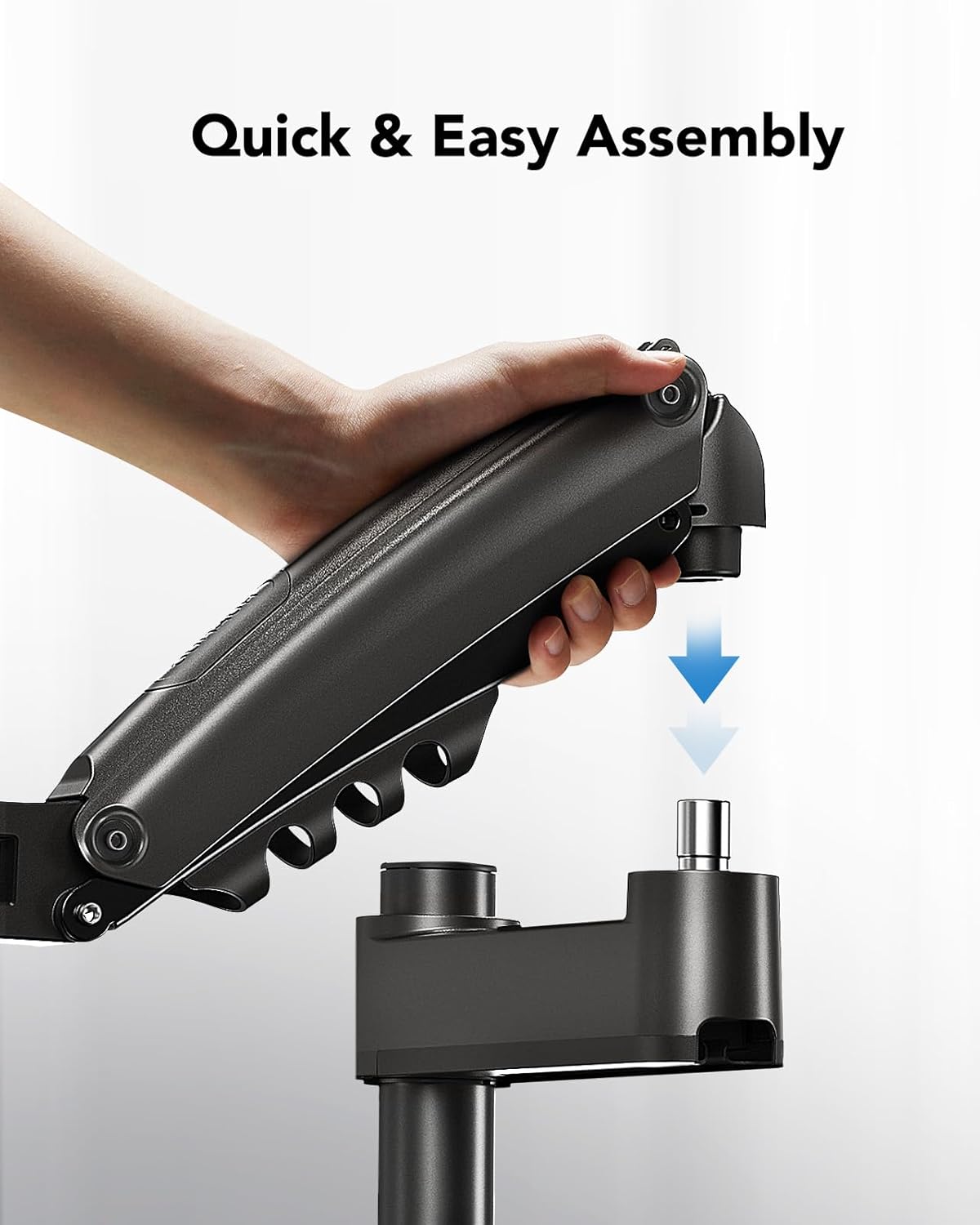
Image 4.2: The monitor arm features a quick and easy assembly design for attaching the arm to the pole.
Step 4.4: Adjust Gas Spring Tension
The gas spring tension needs to be adjusted to match the weight of your monitor. Use the provided Allen key to turn the adjustment screw on the arm. Turn clockwise to decrease tension (for lighter monitors) or counter-clockwise to increase tension (for heavier monitors). Adjust until the monitor stays at any desired height without drifting up or down.
Қадами 4.5: Идоракунии кабел
Route your monitor cables (power, video, etc.) through the integrated cable management clips on the arm and along the pole. This helps maintain a tidy and organized workspace.
5. Operating the Monitor Arm
The HUANUO HNSS8-E monitor arm offers full-motion adjustments for optimal viewтасаллӣ.
5.1 Танзими баландӣ
Gently push or pull the monitor to your desired height. The gas spring mechanism allows for smooth and effortless vertical movement. The arm can reach a maximum height of 62 cm (from the desk surface to the center of the VESA plate) and a minimum height of 36 cm.

Image 5.1: The monitor arm provides a wide range of height adjustment for ergonomic eye-level viewing.
5.2 Tilt, Swivel, and Rotation
The monitor arm allows for flexible positioning:
- Ҷома: Adjust the monitor screen from +85° to -30° to reduce glare and find the best viewкунҷи дохилӣ.
- Чарх: Rotate the arm 180° at the base and 360° at the joint to share your screen with others.
- Ротатсия: Rotate the monitor 360° between landscape and portrait orientation.

Image 5.2: The arm offers comprehensive movement capabilities for tilt, swivel, and rotation.
6. Нигоҳдорӣ
- Ҳамаи винтҳо ва пайвастҳоро мунтазам тафтиш кунед, то боварӣ ҳосил кунед, ки онҳо маҳкам ва бехатар мебошанд.
- Дастаки мониторро бо матои нарм тоза кунед, damp матоъ. Истифодаи тозакунакҳои абразивӣ ё ҳалкунандаҳоро худдорӣ кунед.
- Do not lubricate the gas spring mechanism. It is designed to be maintenance-free.
7. Баррасии мушкилот
| Мушкилот | Сабаби эҳтимолӣ | Ҳалли |
|---|---|---|
| Monitor sags or does not stay at desired height. | Gas spring tension is too low for the monitor's weight. | Increase gas spring tension by turning the adjustment screw counter-clockwise with the Allen key. |
| Monitor is difficult to move or too stiff. | Gas spring tension is too high for the monitor's weight. | Decrease gas spring tension by turning the adjustment screw clockwise with the Allen key. |
| Monitor wobbles or feels unstable. | Насби clamp/grommet is not securely tightened, or VESA plate screws are loose. | Боварӣ ҳосил кунед, ки мизи clamp/grommet mount is firmly secured to the desk. Check and tighten all VESA plate screws. |
| Кабелҳо номураттаб шудаанд. | Cables are not routed through management clips. | Utilize the integrated cable management clips on the arm and pole to organize cables. |
8. Мушаххасоти
- Рақами модел: HNSS8-E
- Бренд: ХУАНУО
- Мавод: Polycarbonate, Aluminum Alloy (95% aluminum alloy body)
- Ранги: Сиёҳ
- Мутобиқати андозаи экран: 13 - 32 инч
- Иқтидори ҳадди аксар: 9 кг (19.8 фунт)
- Мутобиқати VESA: 75х75мм, 100х100мм
- Диапазони танзими баландӣ: 36 cm (min) to 62 cm (max)
- Кунҷи майл: +85° / -30°
- Кунҷи гардиш: 180° (at base), 360° (at arm joint)
- Ротатсия: 360°
- Имконоти васлкунӣ: C-Clamp, Громмет Маунт

Image 8.1: The monitor arm features a robust construction with a 95% aluminum alloy body for solid support.
Image 8.2: Compatibility details for the monitor arm, including supported monitor sizes, weight, and VESA standards.
9. Маълумот дар бораи кафолат
Specific warranty details for the HUANUO HNSS8-E monitor arm are not provided in this manual. Please refer to the product packaging, the official HUANUO webба сомона муроҷиат кунед, ё барои гирифтани маълумоти мукаммали кафолат бо фурӯшандаи худ тамос гиред.
10. Дастгирии муштариён
For technical assistance, missing parts, or any questions regarding your HUANUO HNSS8-E monitor arm, please visit the official HUANUO webсайт ё шӯъбаи хидматрасонии муштариёни онҳо тамос гиред. Маълумоти тамосро одатан дар бастаи маҳсулот ё истеҳсолкунанда пайдо кардан мумкин аст webсайт.
Шумо инчунин метавонед боздид кунед HUANUO Brand Store Барои маълумоти бештар ва маҳсулот.


