1. Муқаддима
This manual provides comprehensive instructions for the safe and effective operation, maintenance, and troubleshooting of the RS PRO RSDS 1052 DL+ Digital Storage Oscilloscope. Please read this manual thoroughly before using the device to ensure proper functionality and to prevent damage or injury.
The RS PRO RSDS 1052 DL+ is a versatile 2-channel digital storage oscilloscope with a 50 MHz bandwidth, designed for precise signal analysis. It features a 7-inch TFT LCD display for clear waveform visualization and supports various measurement parameters and mathematical operations.
2. Маълумот оид ба бехатарӣ
Always adhere to the following safety precautions to prevent electric shock, fire, or damage to the instrument.
- Манбаи нерӯ: Боварӣ ҳосил кунед, ки осциллограф ба манбаи барқ дар доираи ҳаҷми муқарраршуда пайваст астtage range (100-240V AC, 50/60Hz).
- Ба заминканӣ: The instrument must be properly grounded to prevent electric shock. Do not defeat the grounding plug.
- Муҳити зист: Operate the oscilloscope in a dry, well-ventilated area, away from direct sunlight, high temperatures, and excessive dust.
- Санҷишҳо: Use only probes supplied or recommended by RS PRO. Ensure probes are correctly rated for the voltagд чен карда мешавад.
- Нигоҳдорӣ: Ҳама хидматрасониро ба кормандони соҳибихтисос муроҷиат кунед. Барои кушодани асбоб кӯшиш накунед casing unless explicitly instructed.
- Категорияи бехатарӣ: This device is rated CAT I, CAT II. Observe all safety warnings on the device and in this manual.
3. Маҳсулот ба охир расидview ва ҷузъҳо
Ин бахш бартарӣ медиҳадview of the RS PRO RSDS 1052 DL+ oscilloscope and its main components.
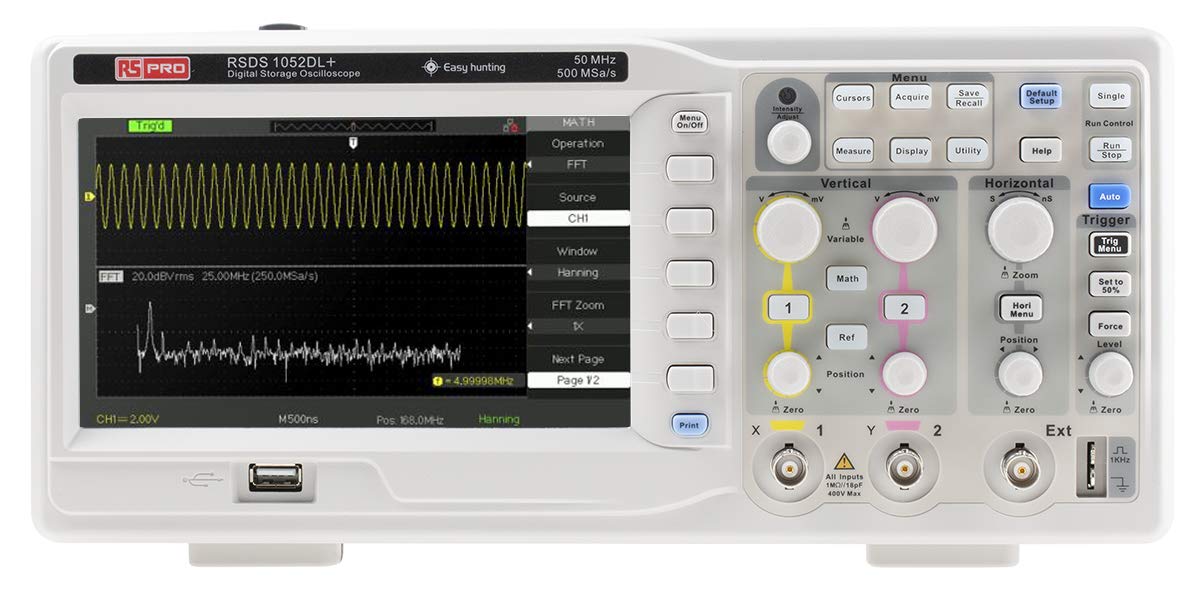
Расми 3.1: Пеш View of the Oscilloscope. This image shows the front panel of the RS PRO RSDS 1052 DL+ oscilloscope, highlighting the 7-inch TFT LCD display, control knobs, function buttons, and input connectors for channels 1 and 2. The screen displays a typical waveform and FFT analysis.

Расми 3.2: кунҷӣ View of the Oscilloscope. This image provides an angled perspective of the RS PRO RSDS 1052 DL+ oscilloscope, showcasing its compact design and integrated handle for portability. The side ventilation grilles are also visible.

Расми 3.3: Қафо View of the Oscilloscope. This image displays the rear panel of the RS PRO RSDS 1052 DL+ oscilloscope, featuring the power input, USB device port, USB host port, LAN port, and Pass/Fail output. Safety warnings and product labels are also visible.
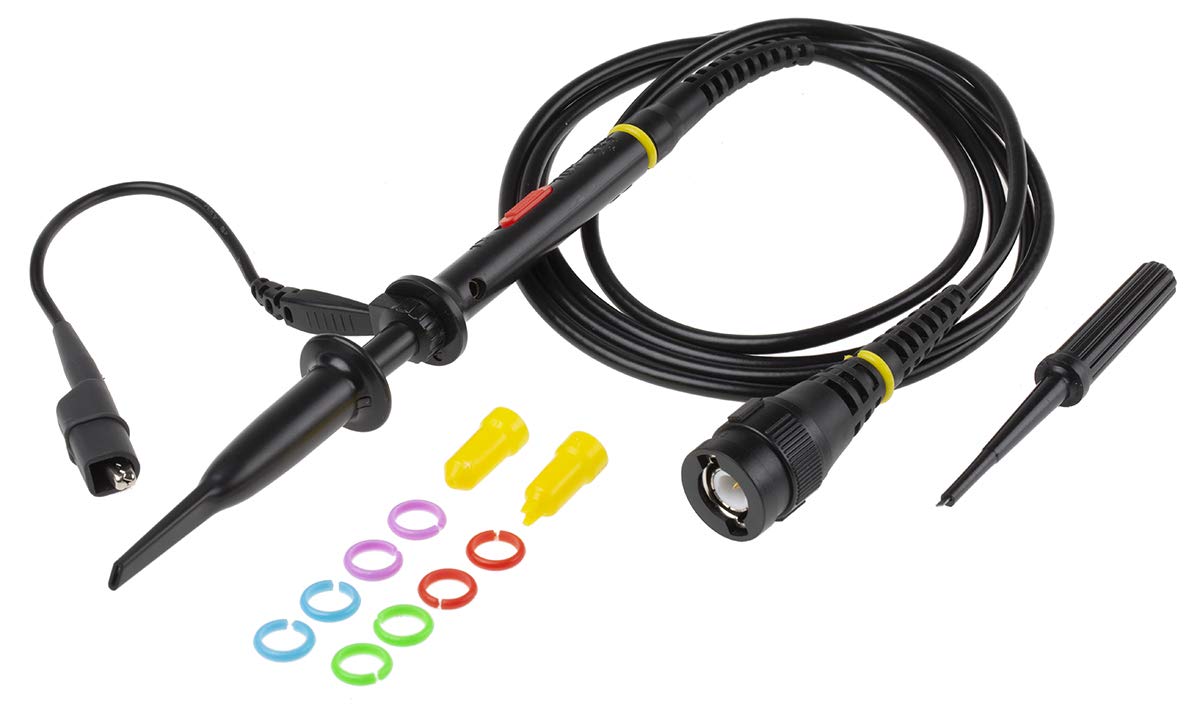
Figure 3.4: Oscilloscope Probe and Accessories. This image shows a passive oscilloscope probe (1:1/10:1) along with various accessories, including colored rings for channel identification and probe tip covers. These are essential for connecting signals to the oscilloscope.

Figure 3.5: Power Plugs and Probe Tip. This image displays an assortment of power plugs (EU, UK, US types) that may be included with the oscilloscope, along with a specialized probe tip. These ensure compatibility with various power outlets and provide versatility for measurements.
3.1 Лавозимоти дохилшуда
The RS PRO RSDS 1052 DL+ typically includes the following accessories:
- Passive Probe 1:1/10:1 (x2)
- Сими USB
- Дастури оғози зуд
- Шаҳодатномаи сифат
- Power Cord (region-specific)
- CD (including User Manual and EasyScopeX software)
4. Танзимот
4.1 Кушодан ва тафтиш
- Carefully remove the oscilloscope and all accessories from the packaging.
- Inspect the instrument for any signs of physical damage during transit. If damage is found, contact your supplier immediately.
- Verify that all included accessories listed in Section 3.1 are present.
4.2 Пайвастшавии барқ
- Боварӣ ҳосил кунед, ки калиди барқ дар панели қафо дар ҳолати OFF аст.
- Сими барқи додашударо ба вуруди AC дар панели қафои осциллограф пайваст кунед.
- Plug the other end of the power cord into a grounded AC power outlet. The oscilloscope supports 100-240V AC, 50/60Hz.
4.3 Probe Connection and Compensation
- Connect the BNC connector of the passive probe to one of the input channels (CH1 or CH2) on the front panel.
- Attach the probe tip to the probe compensation output (usually a square wave test signal) on the front panel.
- Adjust the compensation trimmer on the probe until the displayed square wave is flat-topped, without overshoot or undershoot. This ensures accurate measurements.
5. Дастурҳои истифодабарӣ
5.1 Амалиёти асосӣ
- Фаъол / Хомӯш: Press the power button on the front panel to turn the oscilloscope on or off.
- Танзимоти худкор: -ро пахш кунед Авто button to automatically adjust vertical, horizontal, and trigger settings for a stable waveform display.
- Назорати амудӣ: -ро истифода баред VOLTS/DIV knob to adjust the vertical scale (voltage per division) and the МАВКЕ knob to move the waveform vertically.
- Назорати уфуқӣ: -ро истифода баред SEC/DIV knob to adjust the horizontal scale (time per division) and the МАВКЕ knob to move the waveform horizontally.
- Trigger Controls: танзим кунед ДАРАЧА knob to set the trigger threshold. The trigger ensures a stable display of repetitive waveforms.
5.2 Функсияҳои пешрафта
- Функсияҳои андозагирӣ: -ро пахш кунед Чен кардан button to access automatic measurement parameters such as Vpp, Vmax, Vmin, Freq, Period, etc.
- Функсияҳои математикӣ: -ро пахш кунед Математика button to perform mathematical operations on waveforms (e.g., Add, Subtract, Multiply, Divide, FFT).
- Storage and Recall: -ро истифода баред Захира / Бозхонд buttons to save waveform data, setups, or screenshots to internal memory or a USB drive.
- Пайвастшавӣ USB: Connect a USB drive to the front panel USB host port for data storage. Use the rear USB device port to connect the oscilloscope to a PC for data transfer and control via EasyScopeX software.
6. Нигоҳдорӣ
6.1 Тозакунӣ
- Пеш аз тоза кардан сими барқро ҷудо кунед.
- нармро истифода баред, гamp cloth with mild detergent to clean the exterior of the instrument.
- Do not use abrasive cleaners or solvents that may damage the plastic parts.
- Ensure no liquid enters the instrument.
6.2 Калибрченкунӣ
The oscilloscope is factory calibrated. For optimal performance, periodic calibration by qualified personnel is recommended, typically every 12-24 months, depending on usage and environmental conditions.
6.3 Нигоҳдорӣ
When not in use for extended periods, store the oscilloscope in a dry, dust-free environment, away from extreme temperatures and humidity.
7. Баррасии мушкилот
Ин бахш роҳҳои ҳалли мушкилоти умумӣ, ки шумо метавонед дучор шавед, пешниҳод мекунад.
| Мушкилот | Сабаби эҳтимолӣ | Ҳалли |
|---|---|---|
| Не қудрат | Power cord disconnected; Power switch off; Blown fuse | Check power cord connection; Turn power switch on; Contact service for fuse replacement. |
| Шакли мавҷ нишон дода нашудааст | Input signal too small/large; Incorrect vertical/horizontal settings; Trigger not set correctly; Probe not connected | Adjust VOLTS/DIV and SEC/DIV; Use Auto Setup; Adjust trigger level; Ensure probe is connected and compensated. |
| Шакли мавҷи ноустувор | Incorrect trigger settings; No trigger source selected | Adjust trigger level and mode; Select appropriate trigger source (e.g., CH1, CH2, Ext). |
| Шакли мавҷи таҳрифшуда | Probe compensation incorrect; Probe damaged; Input overloaded | Perform probe compensation; Try a different probe; Check input signal ampгиря |
If the problem persists after attempting these solutions, please contact RS PRO customer support.
8. Мушаххасоти
Key technical specifications for the RS PRO RSDS 1052 DL+ Digital Storage Oscilloscope:
- Каналҳои аналогӣ: 2
- Oscilloscope Type: Захираи рақамӣ
- Паҳнои маҷрои: 50 МГц
- Дар вақти воқеӣ СampНарх: Up to 500 MSa/s
- Амиқии хотира: 32 Kpt
- Навъи намоиш: LCD TFT
- Андозаи намоиш: 7 inches (800 x 480 pixels)
- Vertical Sensitivity: 2mV/div to 10V/div
- Time Base Range: 10ns/div то 50s/div
- Таъмини нерӯ: Mains operated (100-240V AC, 50/60Hz)
- Вазн: 2.5 кг
- Категорияи бехатарӣ: CAT I, CAT II
- Интерфейсҳо: RS232, USB Host, USB Device, LAN
9. Кафолат ва дастгирӣ
RS PRO products are manufactured to high standards and are typically covered by a manufacturer's warranty. Please refer to the warranty card included with your product or visit the official RS PRO webсайт барои шартҳо ва шартҳои кафолати муфассал.
For technical support, service, or inquiries regarding your RS PRO RSDS 1052 DL+ oscilloscope, please contact RS PRO customer service through their official channels. Contact information can usually be found on the RS PRO website or in the documentation provided with the product.
Расмии RS PRO Webсайт: https://uk.rs-online.com/web/


