1. Муқаддима
Thank you for choosing the Solight Outdoor Remote Controlled Socket Set. This manual provides essential information for the safe and efficient use of your new product. Please read these instructions carefully before installation and operation, and retain them for future reference.
This set allows you to remotely control electrical appliances connected to the outdoor sockets, offering convenience and energy management for your garden, patio, or other outdoor areas.
2. Дастурамал оид ба бехатарӣ
- Always ensure the product is installed and used in accordance with local electrical regulations.
- Do not immerse the sockets or remote control in water.
- Ensure the protective covers on the sockets are securely closed when not in use or when exposed to rain/moisture.
- Do not overload the sockets. Refer to the 'Specifications' section for maximum load capacity.
- Keep the remote control away from extreme temperatures and direct sunlight.
- Do not attempt to open or repair the devices yourself. Contact qualified personnel for service.
- This product is designed for outdoor use but should be protected from direct heavy rain or snow where possible to prolong its lifespan.
3. Мундариҷаи баста
Лутфан бастаро барои ҷузъҳои зерин тафтиш кунед:
- 2 x Solight Outdoor Remote Controlled Sockets
- 1 x Solight Remote Control
- 1 x Дастури дастурӣ (ин ҳуҷҷат)
4. Маҳсулот ба охир расидview
Familiarize yourself with the components of your Solight Remote Controlled Socket Set.
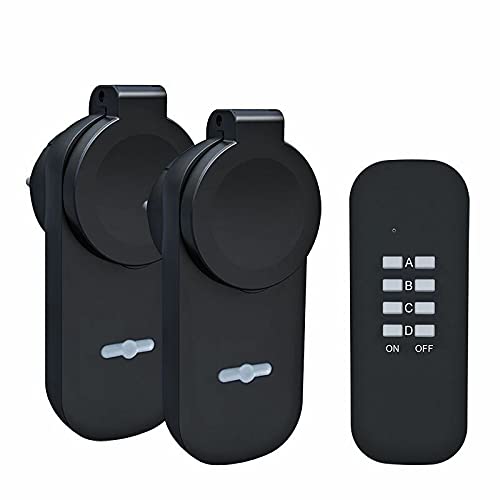
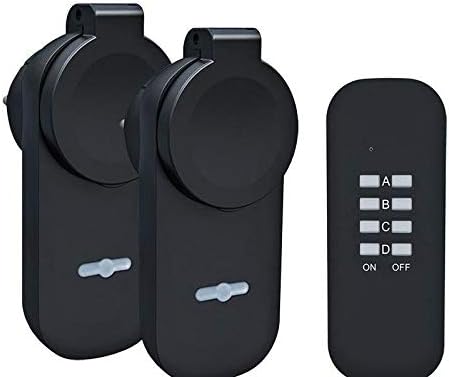
This image displays the complete Solight Outdoor Remote Controlled Socket Set, including two black outdoor sockets and a matching black remote control unit.
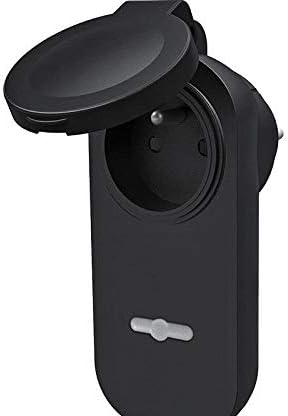
Муфассал view of one Solight outdoor socket, showing the hinged protective cover in the open position, exposing the internal electrical receptacle.
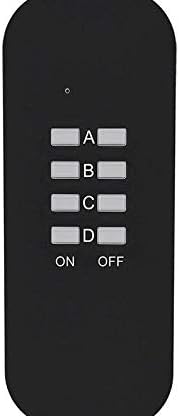
A close-up of the Solight remote control, featuring four distinct channel buttons labeled A, B, C, and D, along with universal ON and OFF buttons at the bottom.
Муфассал view of one Solight outdoor socket, with its hinged protective cover securely closed, indicating its weather-resistant design.

The retail packaging for the Solight Outdoor Wireless Socket Set, clearly displaying the two sockets and remote control. The packaging highlights key features such as a maximum range of 40 meters and a maximum load capacity of 3680W / 16A.
5. Танзимот
5.1. Насби батареяи идоракунии дурдаст
- Қисмати батареяро дар қафои идоракунии дурдаст ҷойгир кунед.
- Сарпӯши қисмро кушоед.
- Insert the required batteries (typically 1x CR2032 or 2x AAA, not specified in product data, please check the remote itself) ensuring correct polarity (+/-).
- Сарпӯши қисмати батареяро бехатар пӯшед.
5.2. Socket Placement
Plug the outdoor sockets into a suitable outdoor power outlet. Ensure the location is protected from direct heavy rainfall and snow, and that the protective cover can be securely closed over any connected appliance plugs.
5.3. Pairing the Sockets with the Remote Control (Learning Code)
The sockets and remote control may come pre-paired. If not, or if you wish to change the assigned channels, follow these steps:
- Plug the outdoor socket into a power outlet. The indicator light on the socket should be off.
- Press and hold the small 'Learn' button (often located near the indicator light or on the side) on the socket for approximately 3-5 seconds until the indicator light begins to flash slowly.
- Within 10 seconds of the light flashing, press the desired 'ON' button for the channel you wish to assign (e.g., 'A ON') on your remote control.
- The indicator light on the socket will stop flashing and remain solid for a moment, then turn off, indicating successful pairing.
- Repeat this process for each socket and desired channel (A, B, C, or D). You can assign multiple sockets to the same channel or assign each socket to a different channel.
6. Дастурҳои истифодабарӣ
Once the sockets are paired, operating them is straightforward:
- To turn on an appliance: Press the corresponding 'ON' button (A, B, C, or D) on the remote control for the channel assigned to that socket.
- To turn off an appliance: Press the corresponding 'OFF' button (A, B, C, or D) on the remote control for the channel assigned to that socket.
- Ensure the appliance connected to the socket is switched to its 'ON' position if it has its own power switch.
The remote control has an operating range of up to 40 meters in open areas. Obstacles such as walls, trees, or other electronic devices may reduce this range.
7. Нигоҳдорӣ
- Тозакунӣ: Disconnect the sockets from power before cleaning. Use a soft, dry cloth to wipe the surfaces. Do not use abrasive cleaners or solvents.
- Иваз кардани батарея: If the remote control's range decreases or it stops responding, replace the batteries. Follow the instructions in section 5.1.
- Нигоҳдорӣ: When not in use for extended periods, store the sockets and remote control in a dry, cool place, away from direct sunlight.
8. Баррасии мушкилот
- Socket not responding to remote:
- Check if the remote control batteries are correctly installed and not depleted. Replace if necessary.
- Ensure the socket is properly plugged into a live power outlet.
- Re-pair the socket with the remote control following the 'Learning Code' instructions in section 5.3.
- Ensure you are within the operating range (up to 40m) and there are no significant obstructions.
- Appliance not turning on/off:
- Verify the appliance itself is functional and its power switch is in the 'ON' position.
- Check if the appliance is drawing more power than the socket's maximum load capacity (see Specifications).
- Reduced remote control range:
- Батареяҳои идоракунии дурдастро иваз кунед.
- Minimize obstructions between the remote and the socket.
- Avoid placing the sockets near large metal objects or other sources of radio interference.
9. Мушаххасоти
| Бренд | Solight |
| Рақами модел | 269561 |
| Максимум сарборӣ | 3680W / 16A (per socket) |
| Фосилаи амалиёт | Not specified (typical for remote control sockets) |
| Диапазони амалиёт | То 40 метр (майдони кушод) |
| Батареяи идоракунии дурдаст | Not specified (please check remote for battery type, typically CR2032 or AAA) |
| Рейтинги муҳофизат | Suitable for outdoor use (ensure protective cover is closed) |
10. Кафолат ва дастгирӣ
Барои маълумоти кафолат ва дастгирии техникӣ, лутфан ба ҳуҷҷатҳои ҳангоми харид пешниҳодшуда муроҷиат кунед ё бо фурӯшандаи худ тамос гиред. Барои ҳама даъвоҳои кафолат далели хариди худро нигоҳ доред.


