Муқаддима
The Lexibook CR753EN Collins Crossword Solver is an electronic device designed to assist with crossword puzzles, word games, and general word reference. It features a comprehensive database from the Collins Bradford 11th edition dictionary, phonetic spell-correction, and various word-solving tools.

Image: The Lexibook CR753EN Collins Crossword Solver, a compact electronic device with a QWERTY keyboard and a green display screen.
Ташкил кардан
Насби батарея
The device requires one CR2032 battery (included). To install or replace the battery:
- Қисмати батареяро дар қафои дастгоҳ ҷойгир кунед.
- Use a small screwdriver or coin to open the battery compartment cover.
- Батареяи CR2032-ро бо тарафи мусбат (+) ба боло гузоред.
- Сарпӯши қисмати батареяро иваз кунед ва онро маҳкам кунед.
Фурӯзон/хомӯшкунӣ
-ро пахш кунед тугмаи барқи сурх located on the top right of the keyboard to turn the device on or off.
Дастурҳои амалиётӣ
The Lexibook CR753EN offers several functions to assist with word puzzles and general reference. Use the dedicated function buttons (XWORD, CLUE, ADV, SYN, SOLV) and the QWERTY keyboard for input.
Xword Function (Crossword Solver)
This function helps solve crosswords by finding words that match a given pattern.
- -ро пахш кунед XWORD тугма.
- Enter the known letters of the word, using a question mark (?) for unknown letters. For example, to find a 5-letter word starting with 'L' and ending with 'R', enter "L???R".
- пахш кунед ВОРИД. The device will display a list of matching words. Use the arrow keys to scroll through the list.
Clue Function
Use this function to find words based on a clue and a pattern.
- -ро пахш кунед ИЛТИМОС тугма.
- Enter the clue (e.g., "Planet").
- Enter a pattern if known (e.g., "E?RT?").
- пахш кунед ВОРИД. The device will suggest words related to the clue and pattern.
Synonyms Function
Find synonyms for a given word.
- -ро пахш кунед СИН тугма.
- Enter the word for which you need synonyms (e.g., "Learn").
- пахш кунед ВОРИД. A list of synonyms will be displayed.
Функсияи пешрафт
This function helps find words that are related to a given word or pattern, often used for word association.
- -ро пахш кунед ADV тугма.
- Enter a word or pattern (e.g., "Game").
- пахш кунед ВОРИД. The device will show related words.
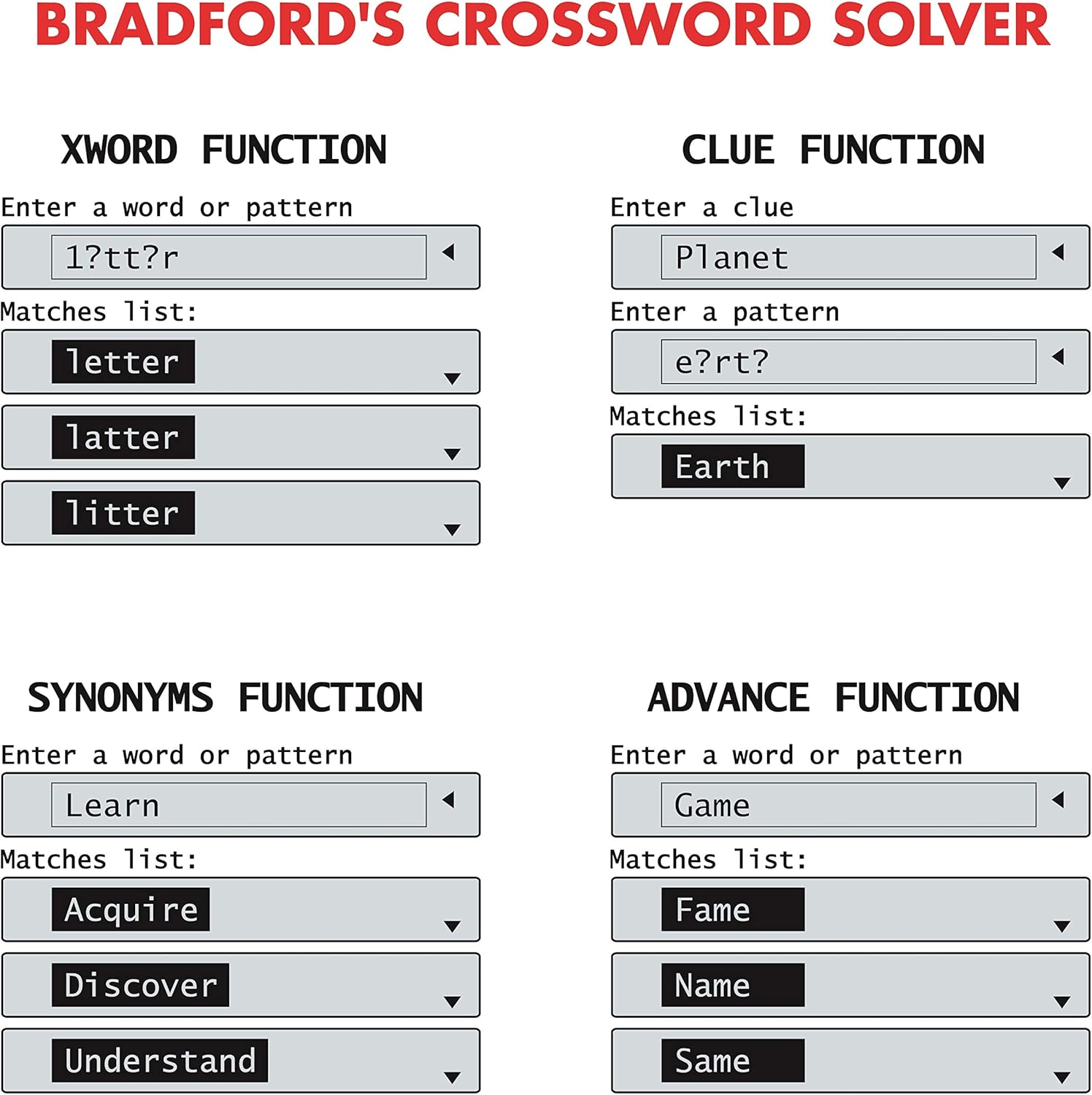
Image: Screen examples demonstrating the Xword, Clue, Synonyms, and Advance functions, showing input fields and matching word lists.
List Function (User List)
Create and manage a personalized list of words.
- -ро пахш кунед РӮЙХАТ тугма.
- Follow the on-screen prompts to add, edit, or search words within your custom list.
Solver Function (Anagram & Word Builder)
This function includes tools for solving anagrams and building words.
- -ро пахш кунед SOLV тугма.
- Якеро интихоб кунед Ҳалли анаграмма or Созандаи калима аз меню.
- For Anagram Solver: Enter a jumbled set of letters (e.g., "snutes"). Press ВОРИД to see possible words (e.g., "sunset").
- For Word Builder: Enter a set of letters, and the device will suggest words that can be formed from them.
Phonetic Spell-Correction
Corrects misspelled words phonetically.
- Enter a word as it sounds (e.g., "fonetik").
- The device will suggest the correct spelling (e.g., "phonetic"). This feature is often integrated into the main word entry functions.
Бозиҳои калима
The device includes three word games: Hangman, Word Jumble, and Anagram.
- Access the games through the main menu or a dedicated game button if available.
- Follow the on-screen instructions to play each game.

Image: Screen examples showing the Anagram Solver, Phonetic Spell-Correction, and various Word Games like Hangman and Word Jumble.
Дигар Умумӣ
The device also includes a calculator, currency converter, and unit converter. These can typically be accessed via the main menu or dedicated buttons.
Кӯмак дар экран
Contextual help is available at any time. Look for a 'Help' or '?' icon on the screen or press a designated Help button if present.
Нигоҳдорӣ
Тозакунӣ
- Дастгоҳро бо матои мулоим ва хушк тоза кунед.
- Моеъҳои тозакунанда ё маводи абразивиро истифода набаред.
Нигоҳдорӣ
- Дастгоҳро дар ҷои хунук ва хушк, дур аз нури бевоситаи офтоб нигоҳ доред.
- Агар барои муддати тӯлонӣ нигоҳ дошта шавад, батареяро барои пешгирӣ кардани шоридан хориҷ кунед.
Мушкилкушо
Дастгоҳ фурӯзон намешавад
- Санҷед, ки оё батарея дуруст насб шудааст.
- Батареяи CR2032-ро бо батареяи нав иваз кунед.
Incorrect Word Suggestions
- Ensure the correct function (Xword, Clue, Synonyms) is selected.
- Verify the spelling or pattern entered.
- The device uses the Collins Bradford 11th edition dictionary; some very obscure or newly coined words may not be included.
Масъалаҳои намоиши экран
- If the screen is dim or flickering, the battery may be low. Replace the battery.
- If the screen is blank, try turning the device off and on again.
Мушаххасоти
| Рақами модел | CR753EN |
| Бренд | Китоби лексикӣ |
| Андозаҳо (L x W x H) | 11.8 х 7.8 х 1.4 см |
| Вазн | 160 грамм |
| Манбаи нерӯ | 1 батареяи CR2032 |
| Материал | Пластмасса |
Кафолат
This Lexibook CR753EN device comes with a Кафолати 2 сол from the date of purchase. Please retain your proof of purchase for any warranty claims. The warranty covers manufacturing defects under normal use conditions.
Дастгирӣ
For further assistance or technical support, please refer to the official Lexibook webсайт ё шӯъбаи хидматрасонии муштариёни онҳо тамос гиред. Маълумоти тамосро одатан дар бастаи маҳсулот ё истеҳсолкунанда пайдо кардан мумкин аст webсайт.


