1. Муқаддима
The Korg SoundLink MW-1608 is a 16-channel hybrid mixer designed for a wide range of audio applications, including studio recording and live sound reinforcement. This mixer integrates both analog and digital processing to provide comprehensive control over audio signals. It features high-quality components such as HiVolt microphone preamps, Velvet Sound AD/DA converters, and ALPS faders.
Key functionalities include per-channel 3-band equalizers, 1-knob compressors, mute groups, a dedicated monitor section, feedback suppression, all-XLR speaker outputs, a built-in spectrum analyzer, and a suite of Korg digital effects. This manual provides essential information for the proper setup, operation, maintenance, and troubleshooting of your MW-1608 mixer.
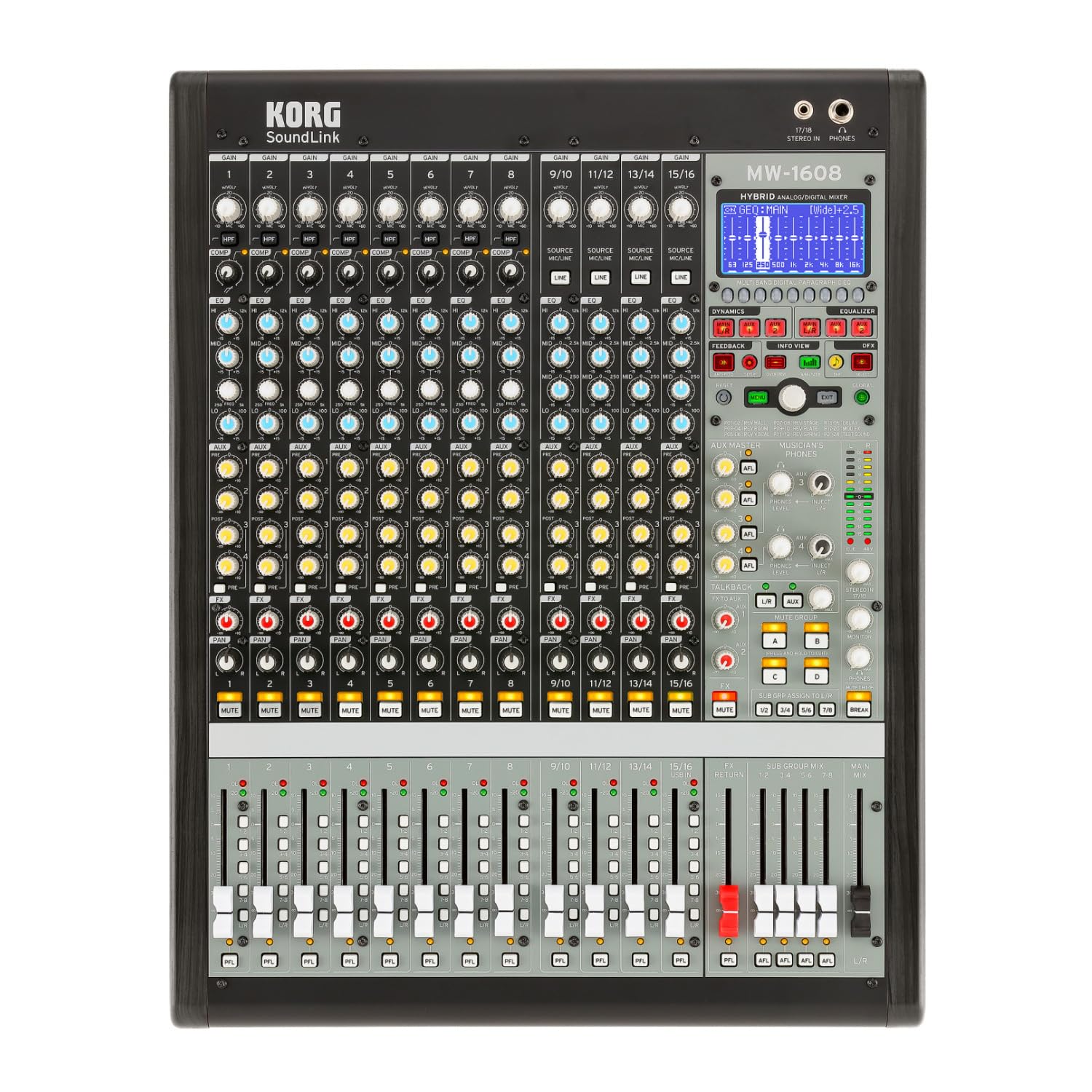
Расми 1: Пеш view of the Korg SoundLink MW-1608 mixer, showing the control surface with faders, knobs, and display.
2. Танзимот
Before operating the Korg SoundLink MW-1608, ensure all connections are made correctly and securely. This section outlines the basic steps for setting up your mixer.
2.1 Кушодан ва ҷойгиркунӣ
- Carefully remove the mixer from its packaging. Retain all packaging materials for future transport or storage.
- Place the mixer on a stable, flat surface with adequate ventilation. Avoid placing it near heat sources or in direct sunlight.
- Ensure sufficient space around the unit for cable connections and heat dissipation.
2.2 Пайвастшавии барқ
- The MW-1608 operates on a "Corded Electric" power source.
- Connect the supplied AC power cord to the mixer's power input on the rear panel.
- Plug the other end of the power cord into a suitable electrical outlet. Ensure the power switch is in the OFF position before connecting.
2.3 Пайвастҳои аудио
The MW-1608 offers various input and output options. Refer to the rear panel diagram below for connection points.

Расми 2: Қафо view of the Korg SoundLink MW-1608 mixer, showing various input and output connectors.
- Вурудҳои микрофон: Connect microphones to the XLR inputs (channels 1-12, 15/16, 13/14, 11/12, 9/10, 7, 6, 5, 4, 3, 2, 1) using balanced XLR cables.
- Воридоти хати: Connect line-level devices (e.g., keyboards, media players) to the 1/4-inch TRS or RCA line inputs.
- Натиҷаҳои асосӣ: Баландгӯякҳо ё қувваи асосии худро пайваст кунед amplifier to the MAIN OUT (XLR L/R) connectors. The mixer features "XLR" output connector type.
- Натиҷаҳои ёрирасон: Use the AUX OUT (XLR) connectors for monitor mixes or external effects processors.
- Group Outputs: Utilize the GROUP OUT (XLR) for sub-mixes.
- Пайвастшавӣ USB: The USB port allows for connection to a computer for recording or playback.
3. Дастурҳои истифодабарӣ
Ин бахш бартарӣ медиҳадview of the Korg SoundLink MW-1608's operational features and controls.
3.1 Идоракунии канал
- Фоидаи даромад: Adjust the input sensitivity for each channel to achieve optimal signal levels.
- EQ 3-Band: Each channel features a 3-band equalizer for tone shaping. Adjust the HIGH, MID, and LOW frequency bands as needed.
- 1-Knob Compressor: Engage and adjust the built-in compressor on individual channels to control dynamics and add punch.
- Aux мефиристад: Route channel signals to auxiliary outputs for monitor mixes or external effects.
- Назорати панел: Position the channel's signal within the stereo field.
- Тугмаи хомӯш: Silences the channel's output.
- Шабакаи канал: Controls the volume level of the individual channel in the main mix.
3.2 Бахши асосӣ
- Миксҳои асосии файдерҳо: Сатҳи умумии баромади микси асосии стереоро назорат кунед.
- Фадерҳои гурӯҳӣ: Adjust the output levels of the 8-bus groups.
- Monitor Section: Provides control over headphone and control room outputs. The "Musician's Phone Feature" allows for dedicated monitoring.
- Таъсири рақамӣ: Access and apply Korg's studio-quality digital effects to your mix.
- Қатъи бозгашт: Utilize the integrated feedback suppression system to prevent unwanted audio feedback.
- Спектр таҳлилгари: The built-in spectrum analyzer provides visual feedback on the frequency content of your audio.
4. Нигоҳдорӣ
Proper maintenance ensures the longevity and optimal performance of your Korg SoundLink MW-1608 mixer.
- Тозакунӣ: Use a soft, dry cloth to wipe down the exterior of the mixer. For stubborn dirt, a slightly damp матоъро бо собуни мулоим истифода бурдан мумкин аст, пас аз он матои хушк. Аз тозакунандаҳои абразивӣ ё ҳалкунандаҳо худдорӣ кунед.
- Муҳофизати чанг: When not in use, cover the mixer with a dust cover to prevent dust and debris from accumulating on controls and inside the unit.
- Шароити экологӣ: Operate and store the mixer in a clean, dry environment. Avoid extreme temperatures, high humidity, and direct exposure to liquids.
- Идоракунии кабелӣ: Боварӣ ҳосил кунед, ки кабелҳо бодиққат тартиб дода шудаанд ва зери фишор нестанд, то ба пайвасткунакҳо ва портҳо зарар нарасонанд.
5. Баррасии мушкилот
This section addresses common issues you might encounter with your MW-1608 mixer. If the problem persists after attempting these solutions, contact Korg customer support.
- Не қудрат:
- Ensure the power cord is securely connected to both the mixer and a working electrical outlet.
- Калиди барқро дар панели қафо тафтиш кунед.
- Тавассути пайваст кардани дастгоҳи дигар, васлаки барқро санҷед.
- Не баромади садо:
- Ҳама пайвастҳои кабели вуруд ва баромадро тафтиш кунед.
- Ensure channel faders, group faders, and main mix faders are raised.
- Боварӣ ҳосил кунед, ки каналҳо хомӯш карда нашудаанд.
- Check the gain settings for each input channel.
- Confirm that connected speakers or ampлифтҳо фаъол ва кор мекунанд.
- Аудиои таҳрифшуда:
- Reduce input gain levels if the signal is clipping (indicated by peak LEDs).
- Check for damaged cables or faulty connectors.
- Ensure output levels are not overdriving connected devices.
- Channel or Group Functionality Issues:
- Verify routing assignments for channels to groups or main mix.
- Ensure mute buttons are disengaged for relevant channels/groups.
- Check if any effects or processing are inadvertently applied.
6. Мушаххасоти
| Хусусият | Тафсилот |
|---|---|
| Рақами модел | МВт-1608 |
| Бренд | КОРГ |
| Шумораи каналҳо | 16 |
| Технологияи пайвастшавӣ | ёрирасон |
| Навъи пайвасткунаки баромад | XLR |
| Манбаи нерӯ | Электри симдор |
| Вазни ашё | 3.41 фунт |
| Андозаҳои маҳсулот (L x W x H) | 18.9 x 7.36 x 20.91 инч |
| ASIN | B08FSYXMW9 |
7. Кафолат ва дастгирӣ
For detailed warranty information, please refer to the warranty card included with your product or visit the official Korg webсайт. Шартҳо ва шартҳои кафолат вобаста ба минтақа метавонанд фарқ кунанд.
For technical support, service, or additional product information, please visit the official Korg support website or contact their customer service department. Keep your product's model number (MW-1608) and serial number (if applicable) ready when seeking support.
Official Korg Webсайт: www.korg.com


