1. Муқаддима
This manual provides detailed instructions for the proper use and maintenance of your LEAP PC3860 Stopwatch. Please read this manual thoroughly before operating the device to ensure optimal performance and longevity. This stopwatch is designed for accurate timekeeping in various activities, including sports, laboratory work, and other events requiring precise timing.
2. Маҳсулот ба охир расидview
The LEAP PC3860 Stopwatch features a clear digital display and multiple functions for versatile time measurement. It is equipped with a durable casing and a lanyard for convenient portability.

Тасвири 1: Пеш view of the LEAP PC3860 Stopwatch, showing the digital display and control buttons. A black lanyard is attached to the bottom.
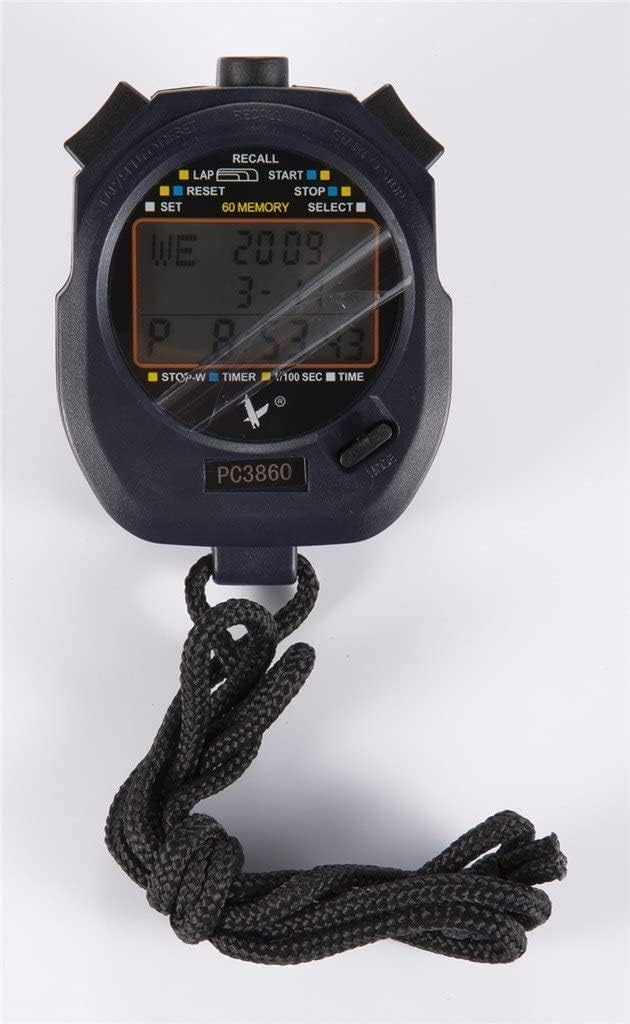
Тасвири 2: Наздик view of the LEAP PC3860 Stopwatch display, highlighting the various indicators for LAP, START, STOP, RESET, SELECT, SET, and 60 MEMORY functions.
Компонентҳои асосӣ:
- Намоиш: Digital screen showing time, lap, split, and other mode information.
- Тугмаи START/STOP: Initiates and pauses timing.
- LAP/RESET Button: Records lap times and resets the stopwatch.
- MODE/SELECT Button: Switches between different operating modes and selects settings.
- Тугмаи SET: Used for adjusting time and date in Реҷаи вақт.
- Тугмаи бозхонд: Accesses stored memory records.
- Ланёр: Барои интиқоли бехатар.
3. Танзимот
3.1 Фаъолсозии ибтидоӣ
Upon first use, or after a battery replacement, the stopwatch may require initial setup. Remove any protective film from the display.
3.2 Муқаррар кардани вақт ва сана
- -ро пахш кунед РЕЖИМ/ИНТИХОБ button repeatedly until the stopwatch is in Реҷаи вақт (displaying the current time).
- -ро пахш карда нигоҳ доред САТ button until the time digits begin to flash.
- -ро истифода баред Оғоз/Истод тугмаи барои танзими рақами дурахшанда (соат, дақиқа, сония).
- -ро истифода баред LAP/RESET button to move to the next digit or setting (e.g., month, day, year).
- Қадамҳои 3 ва 4-ро то он даме ки ҳамаи танзимоти дилхоҳ танзим карда шаванд, такрор кунед.
- -ро пахш кунед САТ тугмаи боз барои баромадан аз ҳолати танзим.
4. Дастурҳои истифодабарӣ
4.1 Усулҳои гузариш
-ро пахш кунед РЕЖИМ/ИНТИХОБ тугмаро пахш кунед, то дар байни режимҳои дастрас гузаред: Реҷаи вақт, Усули сониясанҷ, ва Усули вақтсанҷ.
4.2 Stopwatch Mode (Timing Events)
- Ensure the stopwatch is in Усули сониясанҷ. The display will typically show '00:00:00'.
- -ро пахш кунед Оғоз/Истод тугмаи барои оғози вақт.
- To pause the timing, press the Оғоз/Истод button again. The time will freeze on the display.
- To resume timing from the paused point, press the Оғоз/Истод тугмаи дигар.
- To stop and finalize the timing, press the Оғоз/Истод тугма.
- Барои аз нав танзим кардани сониясанҷ ба сифр, тугмаи LAP/RESET тугмаро пахш кунед, вақте ки сониясанҷ қатъ мешавад.
4.3 Lap and Split Timing
The PC3860 stopwatch supports lap and split timing, allowing you to record intermediate times during an event.
- In Усули сониясанҷ, пахш кунед Оғоз/Истод тугмаи барои оғози вақт.
- Барои сабти вақти даврӣ, тугмаро пахш кунед LAP/RESET button while the stopwatch is running. The lap time will be displayed briefly, and the main timer will continue running in the background.
- Repeat step 2 for subsequent laps. The stopwatch can store up to 60 lap/split records.
- To stop the overall timing, press the Оғоз/Истод тугма.
- Ба view recorded lap and split times, press the БА хотир оваред тугмача. -ро истифода баред Оғоз/Истод ва LAP/RESET buttons to navigate through the stored records.
- -ро пахш кунед БА хотир оваред button again to exit memory recall mode.
- To clear all stored memory, ensure the stopwatch is stopped and not in recall mode, then press and hold the LAP/RESET тугма.
4.4 Timer Mode (Countdown)
- -ро пахш кунед РЕЖИМ/ИНТИХОБ button until you reach Усули вақтсанҷ. The display will show a countdown time, or '00:00:00' if not set.
- Барои муқаррар кардани вақти шумориш, тугмаро пахш карда нигоҳ доред САТ button until the digits flash.
- -ро истифода баред Оғоз/Истод тугмаи барои танзими рақами дурахшанда (соат, дақиқа, сония).
- -ро истифода баред LAP/RESET тугмаи барои гузаштан ба рақами оянда.
- -ро пахш кунед САТ button again to confirm the countdown time.
- -ро пахш кунед Оғоз/Истод тугмаро барои оғози шумориши вақт пахш кунед.
- Барои таваққуф кардани вақти шумориш, тугмаи Оғоз/Истод тугма. Барои идома додан боз пахш кунед.
- When the countdown reaches zero, an alarm will sound (if enabled).
- To reset the timer to the preset time, press the LAP/RESET button while the timer is stopped.
5. Нигоҳдорӣ
5.1 Тозакунӣ
To clean the stopwatch, use a soft, dry cloth. For stubborn dirt, a slightly damp cloth with mild soap can be used, followed by immediate drying. Avoid using abrasive cleaners, solvents, or harsh chemicals, as these can damage the display or casing.
5.2 Нигоҳдорӣ
Store the stopwatch in a cool, dry place away from direct sunlight and extreme temperatures. If storing for an extended period, consider removing the battery to prevent leakage, although specific battery type information is not provided.
5.3 Иваз кардани батарея
When the display becomes dim or unresponsive, the battery may need replacement. This typically requires opening the back casing of the stopwatch. It is recommended to have battery replacement performed by a qualified technician to avoid damaging the internal components or compromising water resistance (if applicable).
6. Баррасии мушкилот
- Дисплей холӣ ё хира аст:
Check the battery. If the battery is low, replace it. Ensure the stopwatch is not exposed to extreme cold, which can temporarily affect LCD performance. - Тугмаҳо ҷавоб намедиҳанд:
Try resetting the stopwatch by removing and reinserting the battery (if accessible). Ensure no debris is lodged around the buttons. - Вақт/санаи нодуруст:
Барои аз нав танзим кардани вақт ва сана, дастурҳои бахши 3.2-ро иҷро кунед. - Stopwatch not timing accurately:
Ensure the stopwatch is in Усули сониясанҷ and has been reset before starting a new timing session. If issues persist, contact customer support.
7. Мушаххасоти
| Хусусият | Тафсилот |
|---|---|
| Бренд | ЛАП |
| Рақами модел | PC3860 (19280086-101) |
| Навъи намоиш | Рақамӣ |
| Материал | Fiber, Metal |
| Вазн | 0.09 килограмм |
| Андозаҳои бастаҳо | 17.78 х 10.16 х 3.05 см |
| Хусусияти махсус | Stopwatch, 60 Memory |
| UPC | 748079196933 |
8. Кафолат ва дастгирӣ
LEAP products are manufactured to high-quality standards. For information regarding warranty coverage, please refer to the warranty card included with your purchase or contact the retailer where the product was acquired. For technical support or further assistance, please reach out to the official LEAP customer service channels, typically found on the product packaging or the brand's official webсайт.


