1. Муқаддима
This manual provides detailed instructions for the installation, operation, and maintenance of the SINOTIMER TM919A-2 LCD Digital Programmable Timer Switch. This device is designed for automatic control of electrical appliances based on programmed time schedules, offering daily and weekly programming options.
2. Хусусиятҳои маҳсулот
- Weekly 7-day programmable digital time switch.
- Ҷилди бисёрtage options (5V, 12V, 24V, 110V, 220V, 85-265V). This specific model is 220V.
- Detachable battery design for backup power.
- 35mm DIN rail mounting for easy installation.
- LCD display for clear time and program viewing.
- 16 ON/OFF programs per day or week.
- Manual override function.
- High capacity 16A switching contact.
3. Маълумот оид ба бехатарӣ
WARNING: Risk of electric shock. Installation should only be performed by a qualified electrician or competent person.
- Боварӣ ҳосил кунед, ки пеш аз насб ё нигоҳдорӣ қувваи барқ канда шудааст.
- Do not exceed the maximum load capacity of 16A.
- Тасдиқи ҷилди дурустtage supply for the specific model (220V for TM919A-2).
- Дастгоҳро аз намӣ ва ҳарорати аз ҳад зиёд дур нигоҳ доред.
4. Маҳсулот ба охир расидview ва ҷузъҳо
The SINOTIMER TM919A-2 features an LCD display, control buttons, and wiring terminals for power input and load control.

Расми 4.1: Пеш view of the SINOTIMER TM919A-2 Digital Timer Switch, showing the LCD display, control buttons (P, D+, H+, M+, RESET, MANUAL), and wiring terminals.

Расми 4.2: The timer switch with its transparent protective cover opened, revealing the control buttons for programming and manual operation.
Тугмаҳои назорат:
- P (Program): Enters program setting mode.
- D+ (Day): Adjusts day of the week or program day.
- H+ (Hour): Adjusts hour or program hour.
- M+ (Minute): Adjusts minute or program minute.
- БАРҚАРОР кардан: Ҳама танзимотро ба ҳолати пешфарзӣ барқарор мекунад.
- ДАСТУРӢ: Toggles output ON/AUTO/OFF.
5. Танзим ва насб
5.1 Диаграммаи пайвастшавӣ
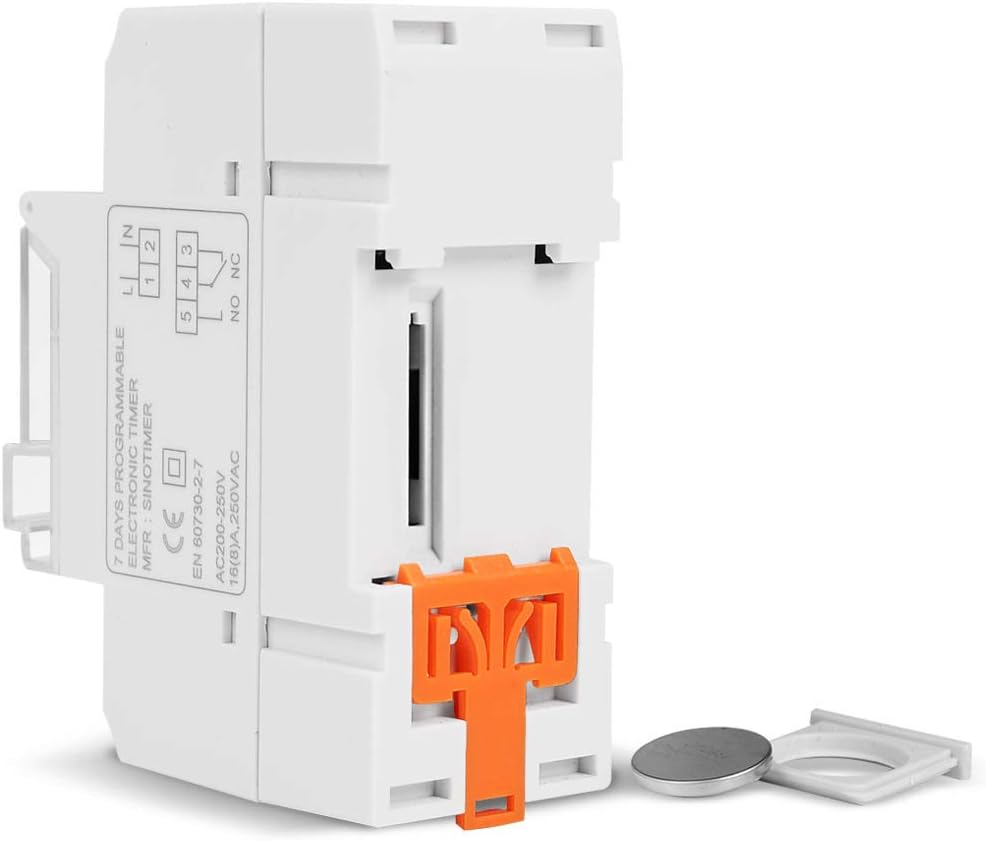
Refer to the wiring diagram on the side of the device and the illustration below for correct connection. Ensure all connections are secure.

Расми 5.1: Тараф view of the timer switch displaying the wiring diagram. Terminals 1 and 2 are for power input (L and N). Terminals 3, 4, and 5 are for the relay output (Common, Normally Open, Normally Closed).
- Terminals 1 & 2 (L, N): Connect to the main power supply (220V AC for this model).
- Terminal 3 (NO - Normally Open): Connects to the load when the timer is ON.
- Terminal 4 (COM - Common): Connects to one side of the load and the power supply.
- Terminal 5 (NC - Normally Closed): Connects to the load when the timer is OFF (less common for typical applications).
5.2 Initial Power-up and Reset
Upon first power-up or after a long period without power, the LCD display may be blank. The internal battery provides backup for settings. If the display is unresponsive or shows garbled characters, press the АЗ НАВОР КУНЕД button using a pointed object (e.g., a pen tip). This will clear all settings and restore the timer to its default state.
5.3 Муқаррар кардани вақт ва рӯзи ҷорӣ
- -ро пахш кунед P button once. The display will show the current time setting.
- пахш кунед D+ ки рузи чории хафта мукаррар карда шавад.
- пахш кунед H+ барои таъин кардани соати ҷорӣ.
- пахш кунед M+ барои таъин кардани дақиқаи ҷорӣ.
- -ро пахш кунед P button again to exit time setting mode and return to normal operation.
6. Дастурҳои истифодабарӣ
6.1 Programming ON/OFF Cycles
The timer supports up to 16 ON/OFF programs. Each program consists of an ON time and an OFF time.
- -ро пахш кунед P button repeatedly until "1 ON" appears on the display. This is the first ON program.
- пахш кунед D+ барои интихоби рӯз(ҳо)-и ин барнома. Имконот рӯзҳои алоҳида, рӯзҳои корӣ, рӯзҳои истироҳат ё ҳамаи 7 рӯзро дар бар мегиранд.
- пахш кунед H+ to set the desired hour for the "ON" event.
- пахш кунед M+ to set the desired minute for the "ON" event.
- пахш кунед P again. "1 OFF" will appear. This is the first OFF program.
- Repeat steps 2-4 to set the day(s), hour, and minute for the "OFF" event.
- Пахшро давом диҳед P to cycle through "2 ON", "2 OFF", up to "16 ON", "16 OFF". If you do not need all 16 programs, simply press P until the display returns to the current time.
- To save and exit programming mode, press the P button until the current time is displayed.
6.2 Барқароркунии дастӣ
Дар ДАСТУР button allows you to override the programmed settings temporarily or permanently.
- пахш кунед ДАСТУР once: Toggles between ON/AUTO/OFF modes.
- ДАР БОРАИ: The output is continuously ON, ignoring programs.
- OFF: The output is continuously OFF, ignoring programs.
- АВТО: The timer operates according to the programmed ON/OFF cycles. This is the standard operating mode.
7. Нигоҳдорӣ
7.1 Иваз кардани батарея
The timer includes a detachable CR2032 lithium battery to maintain time and program settings during power outages. If the display becomes dim or resets frequently, the battery may need replacement.

Расми 7.1: The timer switch shown with its battery compartment open and a CR2032 lithium battery, indicating the detachable battery design.
- Disconnect power to the timer before attempting battery replacement.
- Қисми батареяро, одатан дар паҳлӯ ё қафои дастгоҳ ҷойгир кунед.
- Батареяи кӯҳнаи CR2032-ро бодиққат хориҷ кунед.
- Insert a new CR2032 battery, ensuring correct polarity (+ side up).
- Қисмати батареяро пӯшед.
- Reconnect power and reset the current time and day if necessary.
8. Баррасии мушкилот
- Дисплей холӣ аст:
- Check power supply connections (Terminals 1 & 2).
- Ensure the internal battery is charged or replaced if old.
- -ро пахш кунед АЗ НАВОР КУНЕД тугма.
- Programs are not running:
- Боварӣ ҳосил кунед, ки таймер дар ҳолати корӣ аст АВТО mode (check the display for "AUTO"). Press ДАСТУР ба режимҳои даврӣ.
- Verify that the current time and day are set correctly.
- Check that the ON/OFF programs are correctly entered and enabled for the desired days.
- Confirm wiring to the load (Terminals 3, 4, 5) is correct.
- Timer resets unexpectedly:
- The internal battery may be low or depleted. Replace the CR2032 battery.
- Ensure stable power supply to the unit.
9. Мушаххасоти
| Хусусият | Мушаххасоти |
|---|---|
| Модели | TM919A-2 |
| Таъмини нерӯ | 220V AC (as per model) |
| Истеъмоли қувваи барқ | 4.5 ВА (максимум) |
| Диапазони ҳарорат | -20°С то +50°С |
| Намоиш | LCD |
| Switching Contact | 1 адад ивазкунанда |
| Барномаҳо | 16 ON/OFF per day or week |
| Гистерезис | 2 sec/day (at 25°C) |
| Иқтидор | 16А |
| Диапазони вақтсанҷ | 1 дақиқа то 168 соат |
| Фосилаи ҳадди ақал | 1 дақиқа |
| Black-out Memory | 60 days (with internal battery) |
| Вазни ашё | 0.15 кг (5.3 унсия) |
| Монтаж | Роҳи оҳани 35mm |
| Андозаи экран | 1.2 инч |
Расми 9.1: Dimensional drawing of the SINOTIMER TM919A-2, showing measurements in centimeters for height, width, and depth.
10. Кафолат ва дастгирӣ
Specific warranty information for the SINOTIMER TM919A-2 is not provided in the product details. For warranty claims or technical support, please contact your retailer or the manufacturer directly. Keep your purchase receipt as proof of purchase.


