Муқаддима
This manual provides comprehensive instructions for the safe and efficient use of your SUNMI M2 MAX Industrial Tablet, model TF700. Please read this manual thoroughly before operating the device and retain it for future reference.

Расми 1: Пеш view of the SUNMI M2 MAX Industrial Tablet, showing its display with various application icons.
Ташкил кардан
1. Баровардани қуттӣ ва санҷиши ибтидоӣ
Ҳама ҷузъҳоро аз бастабандӣ бодиққат хориҷ кунед. Боварӣ ҳосил кунед, ки ҳамаи ҷузъҳои дар поён овардашуда мавҷуд ва осеб надидаанд:
- SUNMI M2 MAX Industrial Tablet (TF700)
- Адаптери барқ
- Сими USB Type-C
- Hand Strap (optional, if included with your model)
2. Пуркунии дастгоҳ
Before first use, fully charge the tablet. Connect the USB Type-C cable to the tablet's charging port and the other end to the power adapter. Plug the power adapter into a wall outlet. The charging indicator will illuminate.
The tablet is equipped with an 8360mAh non-removable lithium polymer battery. A full charge can provide over 12 hours of continuous operation.
3. Installing SIM Card and MicroSD Card (Optional)
The device supports MicroSIM or NanoSIM cards (Config 1) and an eSIM (Config 2). It also supports MicroSD cards up to 128GB for expanded storage.
- Locate the SIM/MicroSD card slot on the side of the tablet.
- Use the provided SIM ejector tool (if applicable) or a small paperclip to open the tray.
- Carefully place the SIM card(s) and/or MicroSD card into the tray according to the diagram on the tray.
- Табақро бодиққат ба слот тела диҳед, то он даме, ки он ба ҷои он клик кунад.

Расми 2: Қафо view of the SUNMI M2 MAX, highlighting the camera, pogo pin charging interface, and the location of the SIM/MicroSD card slot.
4. Attaching the Hand Strap (Optional)
If your model includes a hand strap, attach it to the designated points on the back of the tablet for secure handling during mobile operations.
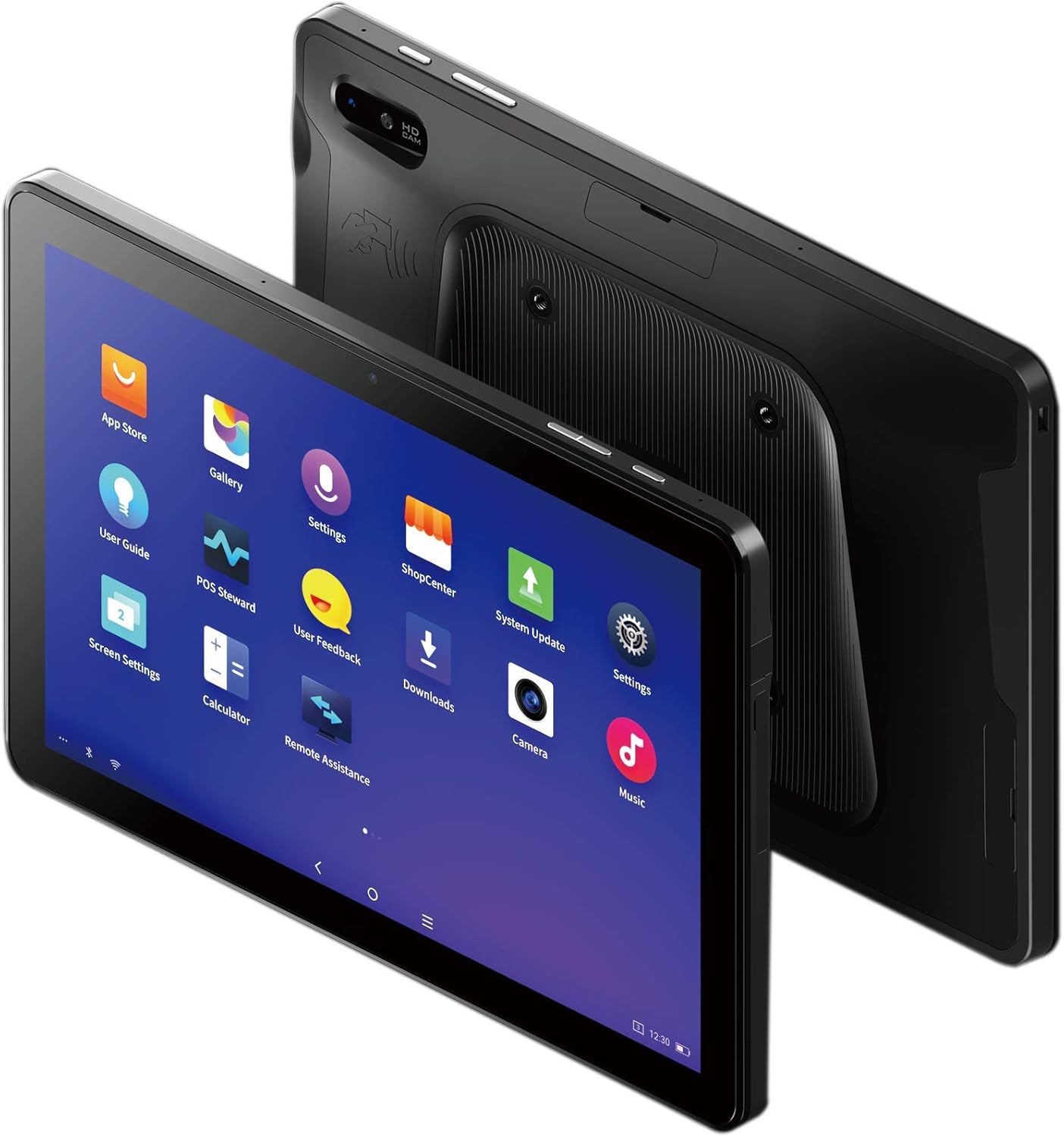
Figure 3: The SUNMI M2 MAX Industrial Tablet being held with an optional hand strap, demonstrating enhanced portability and secure grip.
Истифода бурдани Дастгоҳ
1. Фаъол/хомӯш
- Фаъол: Press and hold the Power button (located on the side) until the SUNMI logo appears on the screen.
- Хомӯш: Тугмаи барқро пахш карда нигоҳ доред, то он даме ки менюи хомӯшкунӣ пайдо шавад. "Хомӯш кардан"-ро интихоб кунед ва тасдиқ кунед.
- Оғози дубора: From the power-off menu, select "Restart" to reboot the device.
2. Навигатсияи асосӣ
The SUNMI M2 MAX runs on the Android operating system. Navigation is primarily touch-based:
- Клик кунед: Барои интихоби ашё ё кушодани барнома.
- Лағжиш: Барои ҳаракат дар рӯйхатҳо ё гузаштан байни экранҳо.
- Чимч кардан барои калон кардан: Барои калон кардан ё хурд кардани тасвирҳо ё web саҳифаҳо.
- Тугмаи хонагӣ: Ба экрани хонагӣ бармегардад.
- Тугмаи Бозгашт: Ба экрани пешина бармегардад.
- Тугмаи Барномаҳои охирин: Барномаҳои ба наздикӣ истифодашударо намоиш медиҳад.
3. Пайвастшавӣ ба шабакаҳо
The tablet supports Wi-Fi (2.4GHz/5GHz, 802.11 a/b/g/n/ac) and cellular networks (2G, 3G, 4G).
- Вай-фай: Ба Танзимотҳо > Шабака ва интернет > Wi-Fi. Wi-Fi-ро фаъол кунед, шабакаи дилхоҳатонро интихоб кунед ва агар лозим бошад паролро ворид кунед.
- Маълумоти мобилӣ: Ensure a valid SIM card is inserted. Go to Танзимотҳо > Шабака ва интернет > Шабакаи мобилӣ to enable mobile data and configure APN settings if necessary.
- Блутуз: Ба Танзимотҳо > Дастгоҳҳои пайвастшуда > Bluetooth to pair with Bluetooth devices (supports Bluetooth 5.0).
4. Using NFC
The SUNMI M2 MAX is equipped with NFC (Near Field Communication) for contactless transactions and data exchange. To use NFC, ensure it is enabled in settings and hold the tablet near a compatible NFC reader or device.
5. Амали камера
The tablet features a 13 MP rear camera with flash and autofocus, and a 5 MP front camera. Open the "Camera" application to capture photos or record videos.
Нигоҳдорӣ
1. Тоза кардани дастгоҳ
Аз матои мулоим ва матои пок каме истифода баред гampened with water or a screen cleaner to wipe the display and exterior. Avoid using harsh chemicals, abrasive cleaners, or excessive moisture.
2. Нигоҳубини батарея
- Avoid exposing the tablet to extreme temperatures (below -20°C or above 70°C).
- Нагузоред, ки батарея зуд-зуд холӣ шавад.
- Use only the original or certified compatible power adapter and cable.
3. Навсозии нармафзор
Мунтазам тафтиш ва насб кардани навсозиҳои системаро барои таъмини иҷрои беҳтарин ва бехатарӣ. Ба Танзимотҳо > Система > Навсозии система.
4. Ҳифзи муҳити зист
The SUNMI M2 MAX is designed with IP68 protection and a 1m drop specification, making it suitable for demanding environments. However, avoid intentional drops or prolonged submersion in water.
Мушкилкушо
| Мушкилот | Сабаби эҳтимолӣ | Ҳалли |
|---|---|---|
| Дастгоҳ фаъол нест. | Батареяи кам; суқути нармафзор. | Дастгоҳро на камтар аз 30 дақиқа пур кунед. Тугмаи барқро барои 10-15 сония пахш карда нигоҳ доред, то дубора оғоз кунед. |
| Ба Wi-Fi пайваст шуда наметавонад. | Incorrect password; Wi-Fi disabled; router issue. | Verify password. Ensure Wi-Fi is enabled in settings. Restart router. Forget and reconnect to the network. |
| Экрани сенсорӣ ҷавоб намедиҳад. | Хатогии муваққатии нармафзор. | Force restart the device by holding the Power button. |
| Applications crashing. | Insufficient RAM; app bug. | Close background apps. Clear app cache/data (Settings > Apps). Update the app. |
Мушаххасоти
The following table outlines the key technical specifications of the SUNMI M2 MAX Industrial Tablet (Model: TF700).

Figure 4: Comprehensive technical specifications for the SUNMI M2 MAX Industrial Tablet.
- Модели: TF700
- Низоми амал: Android 9.0 (SUNMI OS)
- Протсессор: Kryo-260, Octa-core 2.2GHz (Qualcomm)
- Хотира: 3GB RAM + 32GB ROM (eMMC)
- Намоиш: 10.1-inch FHD, 1920x1200, Capacitive multitouch, Corning Gorilla Glass 3
- Камераҳо: Front: 5MP FF; Rear: 13MP AF + Flashlight, supports 1D/2D barcode recognition
- NFC: Type-A&B card, Mifare card, Felica card, ISO/IEC 14443 and ISO/IEC 15693 compliant
- Speaker/MIC: 1W Speaker, 2x MIC
- Слот корти PSAM: 1x PSAM
- Слот корти SIM: 1x MicroSD (TF), 1x MicroSIM or 1x NanoSIM (TF700 Config 1), eSIM (TF700 Config 2)
- Шабака: 2G & 3G & 4G
- Вай-фай: 2.4GHz/5GHz, 802.11 a/b/g/n/ac
- Блутуз: Supports Bluetooth 2.1/3.0/4.2/5.0 (BLE)
- НИЗОМИ МУАЙЯНКУНИИ ҶАҲОНИИ ҶОИ ИСТ: Supports AGPS, GPS, GLONASS, Beidou (Config 2)
- Сенсор: Gravity sensor, light sensor, compass, Hall
- Тугмаҳо: 1x Power (lock screen), 2x Volume (+/-)
- Бандарҳо: 1x Type-C (supports OTG), 1x Audio Jack, 1x MicroSD (up to 128GB expansion)
- Батарея: Non-removable Lithium Polymer battery, 8360mAh
- Адаптери барқ: Input: AC 100-240V, Output: DC 5V/2A
- Андозаҳо (LxWxH): 249.8 x 160 x 9.9 мм (0.39 x 6.3 x 9.84 инч)
- Вазни умумӣ: 673г (1.48 фунт)
- Муҳофизат: IP68, 1m drop spec
- Ҳарорати корӣ: -20°С то 55°С
- Ҳарорати нигоҳдорӣ: -40°С то 70°С
Кафолат ва дастгирӣ
For warranty information and technical support, please refer to the documentation provided with your purchase or visit the official SUNMI webсайт. Барои даъвоҳои кафолат далели хариди худро нигоҳ доред.
SUNMI Official Webсайт: www.sunmi.com