1. Муқаддима
Thank you for choosing the Hama 186369 Weather Forecast Center. This device provides comprehensive weather data, including satellite-based forecasts, indoor and outdoor temperature/humidity, and more. This manual will guide you through the setup, operation, and maintenance of your weather station to ensure optimal performance.
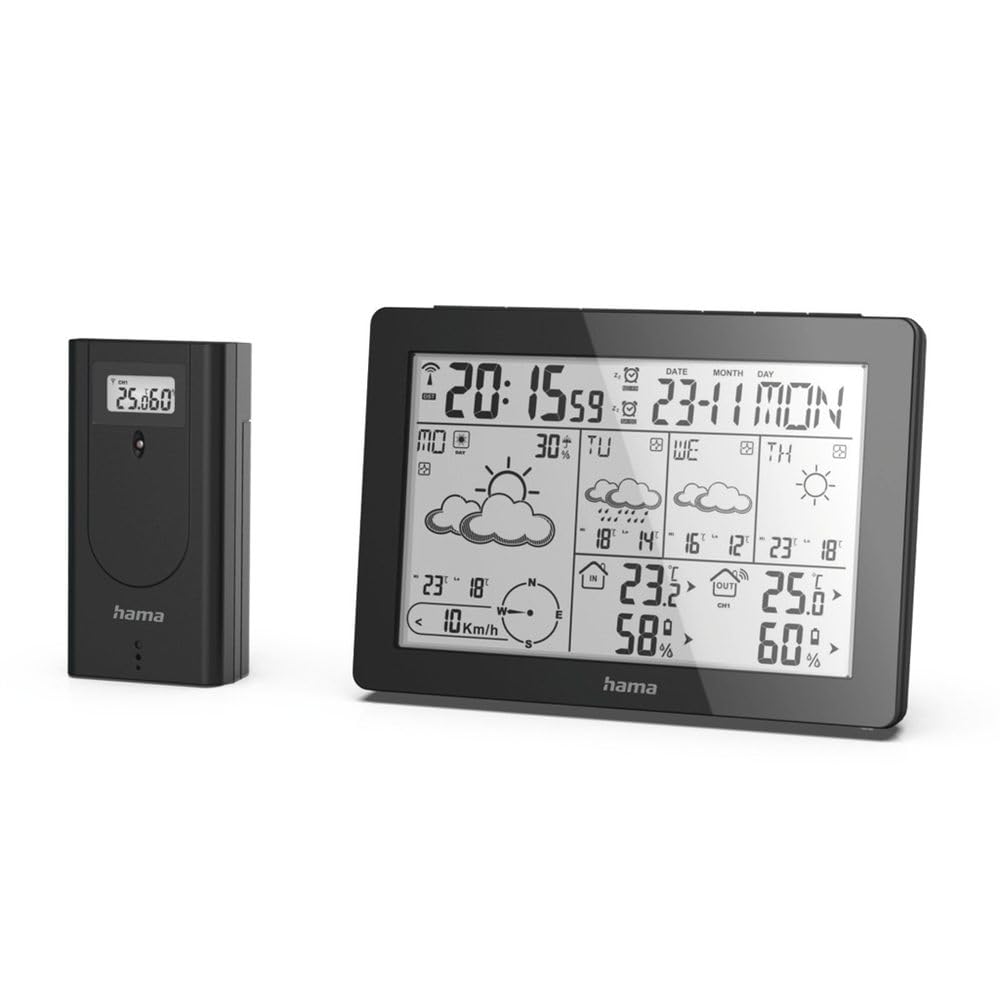
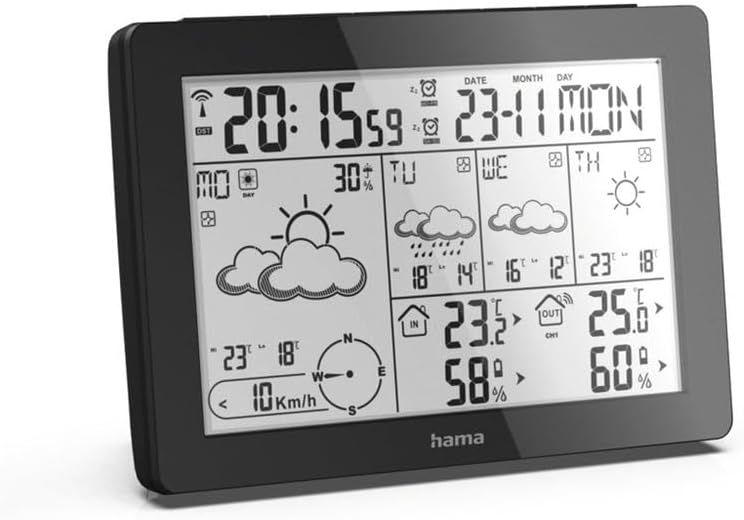
The Hama 186369 Weather Forecast Center main unit, showcasing its digital display with various weather parameters.
2. Мундариҷаи баста
Please check that all items listed below are present and in good condition:
- Hama 186369 Weather Forecast Center (Base Station)
- Сенсори берунаи бесим
- 4 x AA Batteries (for both units)
- Дастури мазкур

The complete set, including the base station and the wireless outdoor sensor.
3. Дастурамал оид ба бехатарӣ
- Do not open the device. Improper repair can lead to considerable hazards for the user.
- Do not expose the product to direct sunlight, extreme temperatures, or high humidity.
- Ин маҳсулотро мисли ҳама маҳсулоти барқӣ аз дастрасии кӯдакон дур нигоҳ доред.
- Маҳсулотро аз лой, намӣ ва аз ҳад зиёд гармшавӣ муҳофизат кунед.
- Маҳсулотро танҳо мувофиқи мақсадаш истифода баред.
- Маҳсулотро дар ҷойҳое истифода набаред, ки маҳсулоти электронӣ иҷозат дода нашудааст.
- When inserting batteries, note the correct polarity (+ and - markings) and insert the batteries accordingly. Otherwise, the batteries could leak or explode.
- Replace all batteries of a set at the same time. Do not mix old and new batteries or batteries of different types.
4. Танзимот
4.1 Ҷойгиркунии батареяҳо
The Hama 186369 Weather Forecast Center and its outdoor sensor require AA batteries for operation.
- Open the battery compartment cover on the back of both the base station and the outdoor sensor.
- Insert the AA batteries, ensuring correct polarity (+ and -). The base station requires 2x AA batteries, and the outdoor sensor requires 2x AA batteries.
- Сарпӯшҳои қисмати батареяро бехатар пӯшед.
Inserting batteries into the base station. Ensure correct polarity.

The wireless outdoor sensor, which also requires batteries.
4.2 Initial Operation and Signal Reception
After inserting the batteries, the base station will automatically search for the DCF-77 signal and connect to the outdoor sensor.
- Place the base station and the outdoor sensor close to each other during initial setup.
- The DCF-77 radio signal for time and date synchronization will be automatically received. This process may take several minutes.
- The outdoor sensor will transmit temperature and humidity data to the base station. Ensure they are within range (up to 30 meters in open areas).

Барview of the weather station's features and components, including the outdoor sensor and base station display.
5. Operating the Weather Forecast Center
5.1 Намоишview
The main display shows various information at a glance:
- Вақт ва сана: Synchronized via DCF-77 signal.
- Indoor Temperature and Humidity: Аз ҷониби истгоҳи базавӣ чен карда шудааст.
- Outdoor Temperature and Humidity: Received from the wireless outdoor sensor.
- Обу ҳаво: Satellite-based 4-day forecast for 60 regions/30 regions in Europe, updated daily.
- Rain Probability: Indication of precipitation likelihood.
- Суръат ва самти шамол: Displayed graphically.
- Сигнализатсияи сармо: Activates when temperatures drop to a critical level.
5.2 Функсияҳои тугмаҳо
The buttons on the top of the base station allow you to adjust settings and view different information.

боло view of the base station showing the control buttons.
- РЕЖМ: Switches between display modes (e.g., time, alarm setting).
- КАНАЛ: Selects different outdoor sensor channels if multiple sensors are used.
- DAY/NIGHT/SNOOZE+LIGHT: Activates backlight, snooze function for alarm, or switches between day/night display.
- Озмоиш: Initiates a test of the sensor connection.
- БОЛО ПОЁН: Adjusts values during settings or navigates through forecast data.
5.3 Танзими вақт ва сана (Танзими дастӣ)
While the time and date are usually set automatically via the DCF-77 signal, you can manually adjust them if needed.
- -ро пахш карда нигоҳ доред РЕЖИМ тугмаро то он даме ки дисплейи вақт милт-милт кунад, пахш кунед.
- -ро истифода баред UP ва ПОЁН тугмаҳоро барои танзими соат пахш кунед, сипас РЕЖИМ тасдиқ кунед ва ба дақиқа гузаред.
- Барои дақиқаҳо, сол, моҳ ва рӯз такрор кунед.
- пахш кунед РЕЖИМ барои баромадан аз ҳолати танзимот дубора пахш кунед.
5.4 Функсияи ҳушдор
The weather station includes an alarm function.
- -ро пахш кунед РЕЖИМ button repeatedly until the alarm time is displayed.
- Пахш кунед ва доред РЕЖИМ барои дохил шудан ба ҳолати танзимкунии ҳушдор.
- Истифода баред UP ва ПОЁН барои таъин кардани вақти дилхоҳи занг.
- пахш кунед РЕЖИМ барои тасдиқи ҳар як танзим.
- Барои фаъол/хомӯш кардани ҳушдор, -ро пахш кунед UP button when the alarm time is displayed. An alarm icon will appear/disappear.
6. Нигоҳдорӣ
6.1 Тозакунӣ
- Ин маҳсулотро танҳо бо каме тоза кунед гamp, матои тоза пӯшед ва аз маводи тозакунандаи хашмгин истифода набаред.
- Ensure that no water gets into the device.
6.2 Иваз кардани батарея
When the battery indicator appears on the display, replace all batteries in the respective unit (base station or outdoor sensor).
- Follow the steps in section 4.1 "Inserting Batteries".
- Батареяҳои истифодашударо мувофиқи қоидаҳои маҳаллӣ партов кунед.
7. Баррасии мушкилот
| Мушкилот | Сабаби эҳтимолӣ | Ҳалли |
|---|---|---|
| No display / Weak display | Batteries are empty or incorrectly inserted. | Батареяҳоро иваз кунед, қутбшавии дурустро таъмин кунед. |
| Хониши ҳарорати берунӣ / намӣ нест | Outdoor sensor not connected or out of range. |
|
| Вақт/санаи нодуруст | DCF-77 signal not received or interference. |
|
| Пешгӯии обу ҳаво нодуруст | Incorrect region setting or temporary signal issue. |
|
8. Мушаххасоти
| Хусусият | Тафсилот |
|---|---|
| Рақами модел | 186369 |
| Dimensions (Base Station) | 3 х 15.3 х 10.5 см |
| Вазн | 510 гр |
| Материал | Акрилӣ |
| Манбаи нерӯ | Battery-powered (4 AA batteries required, included) |
| Пайвастшавӣ | Wireless (for outdoor sensor) |
| Хусусиятҳои махсус | Alarm, Wireless Outdoor Sensor, Frost Alarm, DCF-77 Radio Clock |
| Пешгӯии обу ҳаво | Satellite-based 4-day forecast for 60 regions/30 regions in Europe, daily updated data for 611 locations. |
| Истифодаи тавсияшаванда | Temperature measurement, hobby, private, business. |
9. Кафолат ва дастгирӣ
Hama GmbH & Co KG ҳеҷ гуна масъулиятро ба дӯш намегирад ва барои зараре, ки дар натиҷаи нодуруст насб кардан/монтаж кардан, истифодаи нодурусти маҳсулот ё риоя накардани дастурҳои истифода ва/ё ёддоштҳои бехатарӣ бармеояд, кафолат намедиҳад.
For technical support or warranty claims, please contact your retailer or visit the official Hama webсайт барои кӯмаки иловагӣ.

Hama: Experience and competence since 1923.


