Муқаддима
This manual provides instructions for the operation and maintenance of your WIITHINK Portable CD Boombox, model WTB771. This device features multiple audio playback options including CD, FM radio, Bluetooth, USB, and AUX input, designed for versatile use.

Тасвир: Пеш view of the WIITHINK Portable CD Boombox WTB771, black color, showing the display, control buttons, speakers, and handle.
Мундариҷаи баста
- 1 x WIITHINK Portable CD Radio Boombox (WTB771)
- 1 x кабели барқ
- 1 x хати AUX
- 1 x Дастури корбар
- 1 x Идоракунии дурдаст
Ташкил кардан
Таъмини нерӯ
The boombox can be powered by AC power or batteries.
- Қувваи AC: Connect the provided power cable to the AC port on the back of the unit and plug it into a standard wall outlet (AC voltage: 220V / 50Hz, 110V / 60Hz).
- Қувваи батарея: For portable use, insert 4 C-sized batteries (not included) into the battery compartment located on the bottom of the unit. Ensure correct polarity.
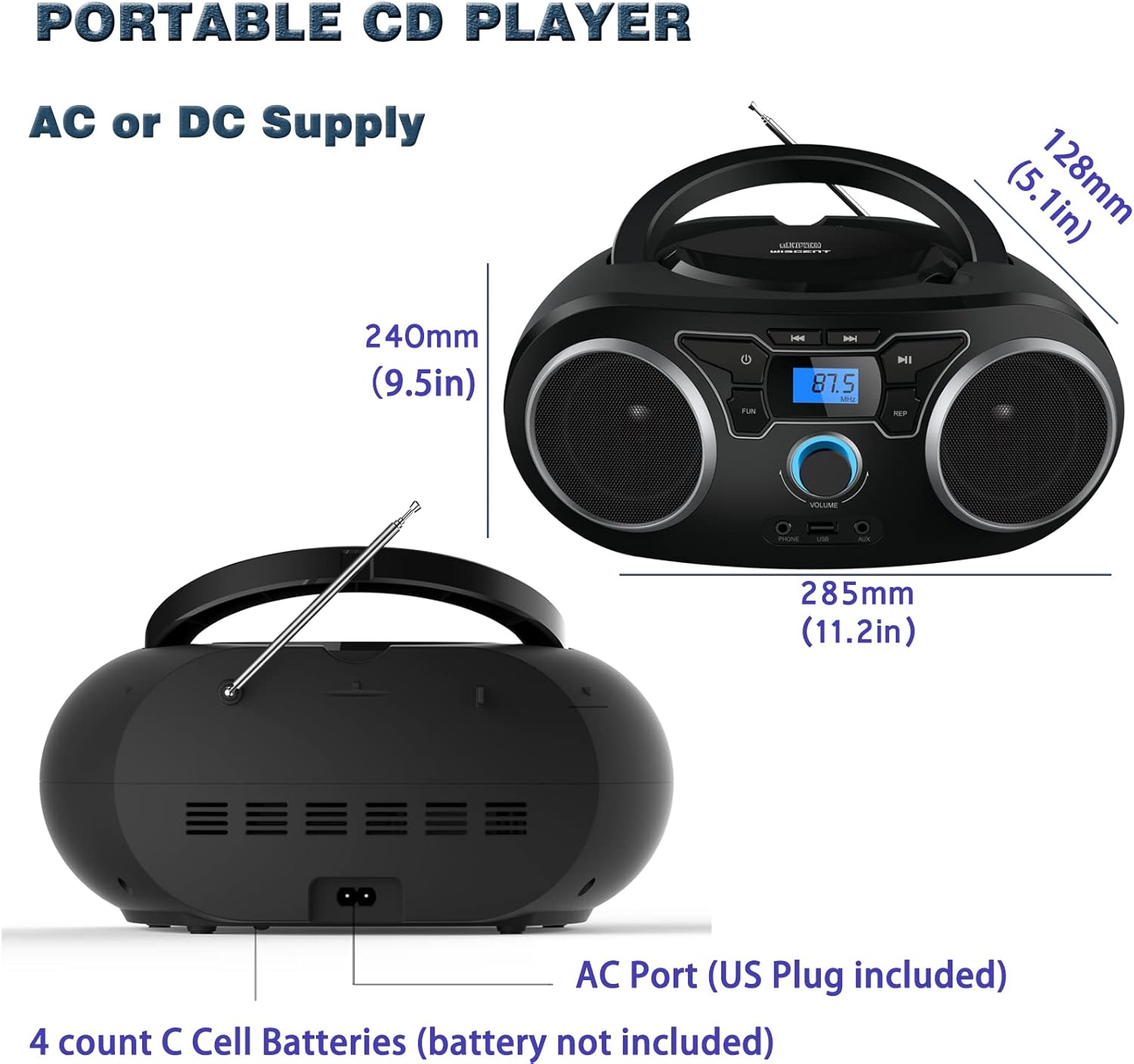
Тасвир: Қафо view of the boombox, highlighting the AC power port and the battery compartment for 4 C-sized batteries.
Дастурҳои амалиётӣ
Назорати умумӣ
The unit features a digital LCD screen and various control buttons and knobs. The main volume control is a rotary knob on the front. A remote control is also included for convenient operation.

Тасвир: аз боло ба поён view of the boombox, showing the CD compartment, control buttons, and volume knob.
1. Бозии CD
- Open the CD compartment lid located on the top of the unit.
- Place a CD (CD, CD-R, CD-RW, MP3-CD) onto the spindle with the label side facing up.
- Сарпӯши қисмати CD-ро пӯшед.
- -ро пахш кунед РЕЖИМ тугма барои интихоби ҳолати CD.
- -ро пахш кунед Бозӣ/Таваққуф тугмаи барои оғози навозиш.
- -ро истифода баред Гузариш / Ҷустуҷӯ тугмаҳо барои паймоиш байни трекҳо.
- Дар ТАКРОР КУНЕД button allows for repeating a single track or all tracks.
- Дар ПРОГРАММАМ function allows you to create a custom playback order for tracks.
The boombox supports MP3 and WMA audio formats on compatible discs.
2. Фаъолияти радиои FM
- Антеннаи телескопиро барои қабули оптималӣ дароз кунед.
- -ро пахш кунед РЕЖИМ тугмаро пахш кунед, то режими радиои FM-ро интихоб кунед.
- Барои худкор скан кардан ва захира кардани истгоҳҳо, -ро пахш карда нигоҳ доред Скан button. The unit will automatically search for and store up to 30 FM stations.
- Барои дастӣ танзим кардан, -ро истифода баред ТУНИНГ тугма ё Гузариш / Ҷустуҷӯ buttons to find desired frequencies.
- -ро истифода баред ПАХШИНОСОН тугмаҳо барои паймоиш тавассути пойгоҳҳои ҳифзшуда.
Video: A user demonstrating the FM radio tuning function on the WIITHINK Portable CD Boombox WTB771, showing the digital display changing frequencies.
3. Пайвасти Bluetooth
- -ро пахш кунед РЕЖИМ button to select Bluetooth mode. The display will indicate "BT" and the unit will enter pairing mode.
- On your Bluetooth-enabled device (e.g., smartphone, tablet), search for available devices and select "WTB771".
- Пас аз ҷуфт кардан, шумо метавонед аудиоро аз дастгоҳи худ ба бумбокс бесим интиқол диҳед.
Видео: Пешниҳоди кӯтоҳview demonstrating Bluetooth connectivity, showing a smartphone wirelessly connected to the boombox.
4. Бозии USB
- Диски флеши USB-ро, ки дорои MP3 мебошад, ҷойгир кунед fileс ба порти USB дар пеши дастгоҳ ворид кунед.
- -ро пахш кунед РЕЖИМ тугмаи барои интихоби ҳолати USB.
- Дастгоҳ ба таври худкор MP3-ро муайян мекунад ва навохтани онро оғоз мекунад files аз гардонандаи USB.
- Use the playback controls (PLAY/PAUSE, SKIP/SEARCH) to manage your music.
5. Вуруди AUX
- Connect an external audio device (e.g., MP3 player, laptop) to the AUX input jack on the front of the unit using the provided 3.5mm AUX cable.
- -ро пахш кунед РЕЖИМ тугмаи барои интихоби ҳолати AUX.
- Audio from the connected device will now play through the boombox speakers. Control playback from your external device.
Идоракунӣ ва портҳоview
| Хусусият | Тавсифи |
|---|---|
| Тугмаи барқ | Дастгоҳро фурӯзон/хомӯш мекунад. |
| Тугмаи MODE | Байни режимҳои CD, FM, Bluetooth, USB ва AUX гузариш мекунад. |
| Ҳаҷми тугма | Adjusts the audio output level (up to 32 levels). |
| Тугмаи PLAY/PAUSE | Starts or pauses playback in CD, USB, and Bluetooth modes. |
| Тугмаҳои ГУЗАРЕД/Ҷустуҷӯ | Navigates tracks in CD/USB mode; tunes frequencies in FM mode. |
| Тугмаи ТАКРОР | Repeats current track or all tracks in CD/USB mode. |
| Тугмаи PROGRAM | Sets a custom playback order for CD/USB tracks. |
| Антеннаи FM | Антенаи телескопӣ барои қабули радиои FM. |
| Порти USB | Connects USB flash drives for MP3 playback. |
| Jack AUX вуруди | Вуруди 3.5 мм барои пайваст кардани дастгоҳҳои аудиоии беруна. |
| Ҷеки гӯшмонак | Баромади 3.5 мм барои гӯш кардани хусусӣ. |
| Назорати дурдаст | Provides wireless control over all functions. |

Image: Close-up of the front panel, showing the USB port, AUX input, and headphone jack.
Нигоҳдорӣ
- Дастгоҳро бо матои нарм ва хушк тоза кунед. Аз тозакунандаҳои абразивӣ ё ҳалкунандаҳо истифода набаред.
- Қисми CD-ро тоза ва аз чанг холӣ нигоҳ доред.
- Дастгоҳро ба ҳарорати аз ҳад зиёд, намӣ ё нури бевоситаи офтоб дучор накунед.
- When not in use for extended periods, remove batteries and unplug the AC power cable.
Мушкилкушо
| Мушкилот | Ҳалли |
|---|---|
| Не қудрат |
|
| Садо нест |
|
| CD Skipping/Not Playing |
|
| Қабули пасти FM |
|
| Масъалаҳои пайвасткунии Bluetooth |
|
Мушаххасоти
- Модели: WTB771
- Андозаҳои маҳсулот: 7 x 10 x 4.8 инч (17.8 x 25.4 x 12.2 см)
- Вазни ашё: 2.64 фунт (1.2 кг)
- Баромади барқ: 2 x 2 Вт RMS
- Пайвастшавӣ: Ёрӣ, Bluetooth, USB
- Навъи баландгӯяк: Дохилшуда
- Таъмини нерӯ: AC (220V/50Hz, 110V/60Hz) or 4 x C batteries (not included)
- Намудҳои дискҳои дастгирӣ: CD, CD-R, CD-RW, MP3-CD
- Форматҳои аудиои дастгирӣшаванда: MP3, WMA
- FM Radio Presets: То 30 истгоҳ
Кафолат ва дастгирӣ
WIITHINK offers an 18-month after-sales service for this product. For any inquiries or technical support, please contact WIITHINK customer service through your purchase platform. Lifetime technical support is provided.
For further assistance, you may refer to the "Your Orders" section on Amazon, locate your order, and contact "WIITHINK Direct".

Image: Graphic illustrating WIITHINK's customer support, including 18-month replacement and lifetime technical support.
