Муқаддима
This manual provides detailed instructions for the installation, operation, and maintenance of your Lockly Secure Pro Wi-Fi Smart Door Lock. Please read this manual thoroughly before installation and use to ensure proper function and to maximize the security features of your device. Keep this manual for future reference.

Image: Lockly Secure Pro Smart Door Lock with Wi-Fi Hub and smartphone app interface.
Маълумот оид ба бехатарӣ
- Do not attempt to disassemble or modify the lock. This may cause damage to the product, void the warranty, and compromise security.
- Танҳо батареяҳои махсус (AA alkaline)-ро истифода баред. Батареяҳои кӯҳна ва нав ё намудҳои гуногуни батареяҳоро бо ҳам омехта накунед.
- Боварӣ ҳосил кунед, ки ҳамаи ҷузъҳо ҳангоми насб ба таври мӯътадил пайваст карда шудаанд, то аз кор пешгирӣ карда шаванд.
- Keep physical keys in a secure location outside the property to be used as a backup.
- Protect your PIN codes and fingerprint data. Do not share them with unauthorized individuals.
Маҳсулот ба охир расидview
Хусусиятҳои асосӣ
- Усулҳои дастрасии гуногун: Patented PIN Genie digital keypad, 3D biometric fingerprint reader, smartphone app, voice control (Alexa/Hey Google), and physical key.
- Клавиатураи рақамии PIN Genie: Features dynamic shuffling of digits to prevent code guessing.
- Сенсори изи ангушти биометрии 3D: Quick access with less than 0.3-second recognition, storing up to 99 fingerprints.
- Назорати барномаҳои мобилӣ: Remote lock/unlock, real-time monitoring, and access history via the Lockly App.
- Назорати овоз: Compatible with Amazon Alexa and Hey Google for hands-free operation.
- Қулфи худкори барномарезишаванда: Customizable auto-lock feature for enhanced security.
- Offline Access Codes: Generate access codes usable without Wi-Fi or internet connection.
- Муқовимат ба обу ҳаво: Durable design suitable for various environmental conditions.
Компонентхо
The Lockly Secure Pro package includes the smart lock assembly, a Wi-Fi hub, a door sensor, four AA batteries, and two backup physical keys.

Image: Summary of Lockly Secure Pro features.
Насб ва насб
Мутобиқати дарҳо
Пеш аз насб, боварӣ ҳосил кунед, ки дари шумо ба хусусиятҳои зерин мувофиқат мекунад:
- Door thickness: 1 3/8" - 2"
- Backset: 2 3/8" or 2 3/4"
- Cross bore diameter: 2 1/8"
- Edge bore diameter: 1"

Image: Door compatibility measurements.
Раванди насб
The Lockly Secure Pro is designed for easy DIY installation using common household tools. A detailed installation guide video is available to assist you through each step.

Image: Installation guide video demonstration.
Wi-Fi Hub Setup
The included Wi-Fi hub enables remote control and monitoring of your smart lock. Simply plug it into a power outlet within range of your lock and follow the instructions in the Lockly app for plug-n-play setup.

Image: Lockly Wi-Fi Hub for remote connectivity.
Дастурҳои амалиётӣ
Unlocking and Locking Methods
Your Lockly Secure Pro offers multiple convenient ways to secure and access your property:
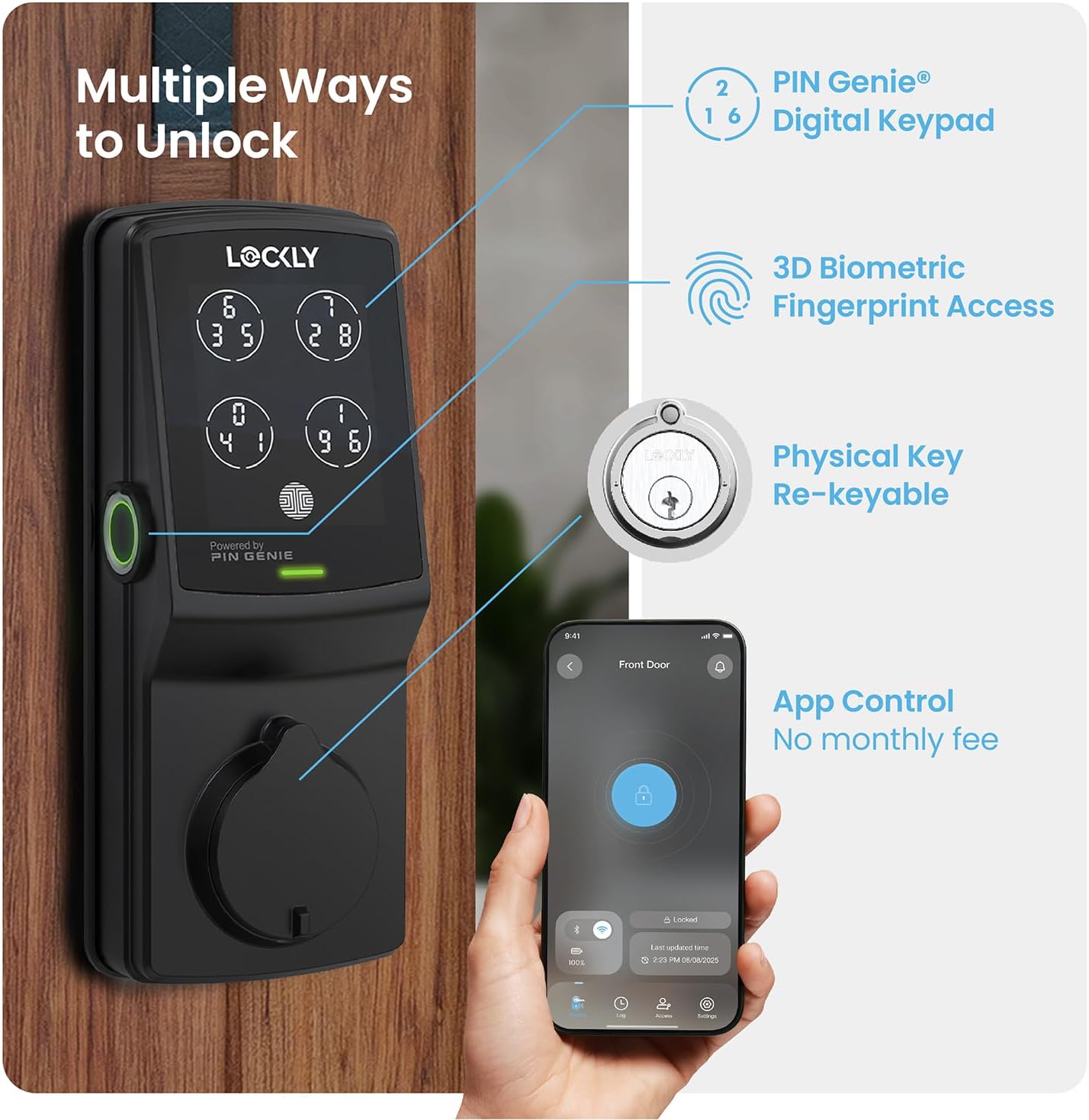
Тасвир: тамомview of multiple unlocking methods.
- Клавиатураи рақамии PIN Genie: Enter your secure PIN code on the patented keypad. The numbers on the four virtual buttons dynamically shuffle after each use, making it difficult for onlookers to guess your code.
- Сенсори изи ангушти биометрии 3D: Place your registered finger on the sensor for quick access. The sensor recognizes fingerprints in less than 0.3 seconds and opens the lock in under 0.5 seconds.
- Назорати барномаи смартфон: Use the Lockly App to remotely lock or unlock your door from anywhere. The app also provides real-time monitoring and access history.
- Назорати овоз: Integrate with Amazon Alexa or Hey Google to unlock, lock, or check the status of your door using voice commands.
- Калиди физикӣ: Two backup physical keys are included for manual access in case of power failure or other issues. The lock also features rekeying capability.

Image: PIN Genie keypad in operation.

Image: Using the 3D biometric fingerprint sensor.

Image: Lockly App interface for remote control.

Image: Voice control and physical key backup.
Хусусиятҳои пешрафта
- Қулфи худкори барномарезишаванда: Customize the auto-lock duration (5 to 300 seconds) to ensure your door is always secured after closing.
- eKeys & eBadges: Grant and revoke access to family, friends, or visitors directly through the Lockly app.
- Offline Access Codes: Generate temporary or permanent access codes that can be used even when the lock is not connected to Wi-Fi.

Image: Programmable auto-lock feature.
Нигоҳдорӣ
Идоракунии батарея
The Lockly Secure Pro operates on four AA batteries, providing up to 8 months of battery life. The Lockly app will send real-time notifications for low battery alerts. In case of complete battery depletion, an external 9V battery can be used for emergency power supply.

Image: Battery and emergency power supply details.
Тозакунӣ ва устуворӣ
берунии кулфро бо нарм тоза кунед, гamp cloth. Avoid abrasive cleaners or solvents. The Lockly Secure Pro features a durable, weather-resistant design (IP54 rated) to withstand various outdoor conditions.

Image: Lockly Secure Pro demonstrating weather resistance.

Image: Durability and weather resistance specifications.
Бозгаштан
The lock cylinder can be rekeyed by a professional locksmith without needing to replace the entire lock, using a standard rekey kit.

Image: Rekeyable cylinder feature.
Мушкилкушо
If you encounter issues with your Lockly Secure Pro, please refer to the following common solutions:
- Қулф ҷавоб намедиҳад: Check battery levels. Replace batteries if low. Ensure the lock is properly installed and all cables are connected.
- Изи ангушт эътироф нашудааст: Ensure your finger is clean and dry. Re-register your fingerprint if recognition issues persist.
- PIN Code Issues: Verify the correct PIN is being entered. Remember the PIN Genie keypad shuffles digits; ensure you are pressing the correct virtual button for each digit.
- Мушкилоти пайвастшавӣ ба барнома: Ensure your Wi-Fi hub is powered on and within range of the lock. Check your home Wi-Fi network status. Restart the Lockly app or your smartphone.
- Қулфи худкор фаъол нест: Verify the auto-lock feature is enabled and configured with the desired delay in the Lockly app.
For further assistance, consult the Lockly app's help section or contact customer support.
Мушаххасоти
| Хусусият | Тафсилот |
|---|---|
| Бренд | Қулф |
| Номи модел | Lockly Secure Pro |
| Рақами модели ашё | PGD728WYMB |
| Навъи қулф | Smart Lock, Deadbolt |
| Материал | руҳ |
| Ранги | Мат сиёҳ |
| Навъи анҷом | Шӯхташуда |
| Андозаҳои ашё (L x W x H) | 7.4 x 3.15 x 4.5 инч |
| Вазни ашё | 3.8 фунт |
| Манбаи нерӯ | 4 x батареяҳои ишқории АА |
| Қувваи фавқулодда | Батареяи 9V |
| Протоколи пайвастшавӣ | Bluetooth, Wi-Fi (via included hub) |
| Усули назорат | Барнома, дурдаст, ламс, овоз |
| Навъи назораткунанда | Amazon Alexa, Google Assistant |
| Хусусиятҳои махсус | App Control, Auto-Lock, Left Fingerprint Reader, Voice Control, Waterproof (IP54) |
| UPC | 810055600656 |
Маълумот дар бораи кафолат
The Lockly Secure Pro comes with a limited 5-year mechanical and finish warranty ва а 2-year electronics warranty. Лутфан далели хариди худро барои даъвоҳои кафолат нигоҳ доред.
Дастгирии муштариён
Lockly provides lifetime technical support for all its products. For assistance with installation, operation, or troubleshooting, please contact Lockly customer support through their official website or the contact information provided in the Lockly app.


