1. Муқаддима ва зиёдаview
This manual provides essential information for the setup, operation, and maintenance of your Thrustmaster Ferrari SF 1000 Edition Formula Wheel Add On. This life-size (1:1 scale) replica of the wheel from the 2020 and 2021 Ferrari one-seater race cars is designed to enhance your sim racing experience with its advanced features and realistic design.

Расми 1: Пеш view of the Thrustmaster Ferrari SF 1000 Edition Formula Wheel Add On.
2. Дар қуттӣ чӣ мавҷуд аст
Upon unboxing your Thrustmaster Ferrari SF 1000 Edition Formula Wheel Add On, please ensure all components are present:
- Thrustmaster Ferrari SF 1000 Edition Formula Wheel Add On
- Дастури таълимӣ (ин ҳуҷҷат)
- Mounting screws and tools (if applicable for attachment to wheel base)
3. Танзимот
To begin using your Ferrari SF 1000 Edition Formula Wheel Add On, follow these general setup steps:
- Attach to Compatible Wheel Base: Securely mount the Formula Wheel Add On to a compatible Thrustmaster T-Series racing wheel base (sold separately), such as the T818, TS-XW, T-GT, T300, TX, or TS-PC. Refer to your wheel base's manual for specific attachment instructions.
- Пайвастшавӣ ба система: Connect your wheel base to your PC (Windows 10), PlayStation, or Xbox console.
- Навсозии нармафзор: It is highly recommended to visit the official Thrustmaster technical support website to download and install the latest firmware for your wheel base and the SF 1000 wheel add-on. This ensures optimal performance and compatibility.
- Худкалибрченкунӣ: Upon initial connection and power-on, the wheel will perform a self-calibration sequence. Allow this process to complete without interruption.
For detailed setup instructions, including specific connection diagrams and troubleshooting tips, please refer to the comprehensive дастури расмии корбар (PDF).
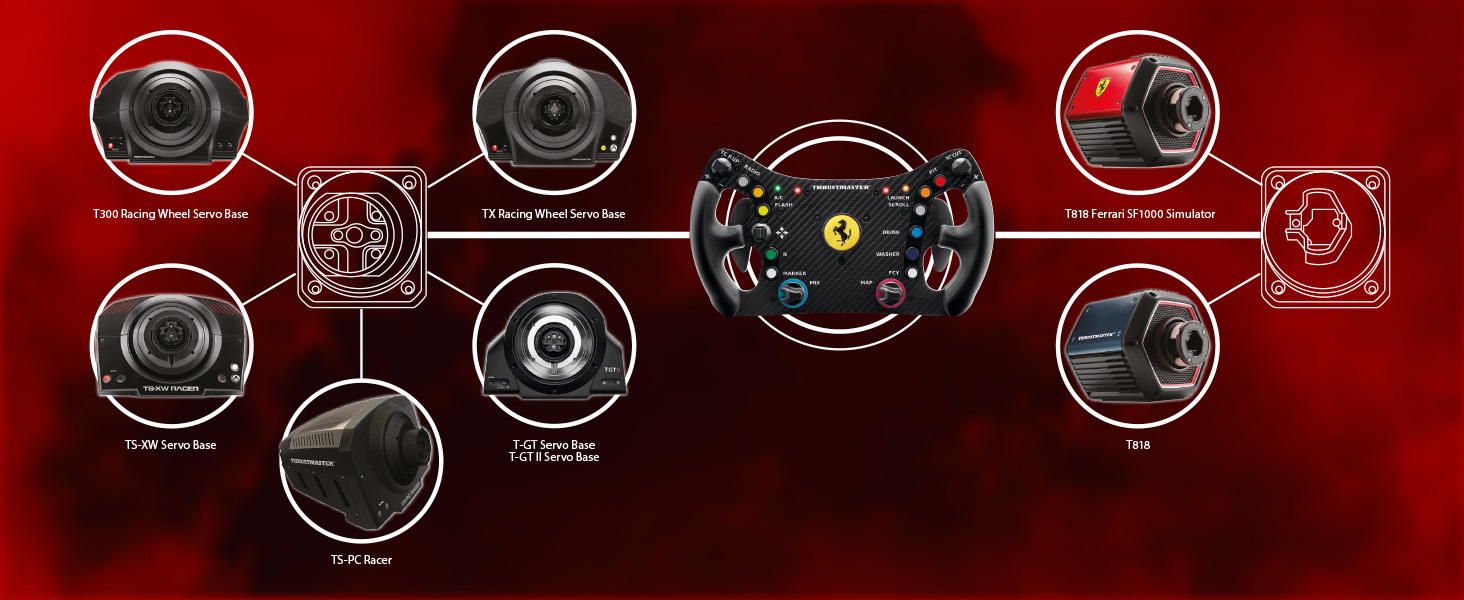
Figure 2: Compatibility with Thrustmaster T-Series racing wheel bases.
4. Features & Components
The Ferrari SF 1000 Edition Formula Wheel Add On is engineered with high-quality materials and advanced technology to provide an immersive racing experience.
4.1. IPS LCD Display
The wheel features a 4.3-inch (109-mm) IPS LCD display that shows up to 69 key items of information. This includes real-time telemetry data, engine RPM, gear selection, fuel levels, tire temperatures, and more. The display offers different skins to match the type of game being played, optimizing racing comfort and immersion. Wireless telemetry connectivity ensures a clean setup.

Figure 3: Iconic 1:1 scale replica with official Ferrari markings.

Figure 4: Clear and intuitive race dash with 4.3" IPS LCD display.
4.2. Carbon Fiber Faceplate and Action Buttons
The 3 mm-thick carbon fiber faceplate (21 layers) provides both rigidity and a lightweight design, contributing to balanced Force Feedback. The wheel is equipped with up to 25 action buttons, including 7 encoders, offering intuitive driving controls and extensive configuration possibilities for various racing scenarios.

Figure 5: 100% carbon fiber faceplate with up to 25 action buttons.
4.3. Paddle Shifters
The wheel features 100% aluminum interchangeable magnetic paddle shifters for crisp and precise gear changes. Additionally, two customizable analog paddle shifters provide further control options, such as clutch or handbrake functions, depending on your preference and game compatibility.

Figure 6: Aluminum magnetic paddles, replaceable with T-Chrono Paddles.

Figure 7: Fully programmable analog paddles.
5. Дастурҳои истифодабарӣ
The Ferrari SF 1000 Edition Formula Wheel Add On is designed for intuitive operation. Once connected and calibrated, you can begin your racing simulation.
- Намоиши Навигатсия: Use the rotary encoders and directional buttons to navigate through the various display screens and telemetry data.
- Харитасозии тугмаҳо: Customize the function of the 25 action buttons and analog paddles within your game's control settings to suit your preferred racing style.
- Real-time Feedback: The display provides critical real-time information, allowing you to monitor vehicle performance and make strategic adjustments during races.
For detailed instructions on customizing display parameters, button assignments, and advanced telemetry features, please consult the дастури расмии корбар (PDF).
Видео 1: Маҳсулоти расмӣ ба охир расидview of the Thrustmaster Ferrari SF 1000 Edition Formula Wheel Add On, highlighting its features and functionality.
6. Мутобиқат
The Ferrari SF 1000 Edition Formula Wheel Add On is designed for broad compatibility within the Thrustmaster ecosystem and various gaming platforms:
- Платформаҳо: Compatible with PC (Windows 10), PlayStation (PS4, PS5, PS5 Pro), and Xbox (Xbox Series X/S, Xbox One).
- Thrustmaster Wheel Bases: Compatible with the following Thrustmaster T-Series racing wheel bases (sold separately): T818, TS-XW, T-GT, T300, TX, and TS-PC.
- Аксессуарҳо: Compatible with the Thrustmaster T-Chrono Paddles paddle shifters (sold separately).
7. Нигоҳдорӣ
Proper maintenance ensures the longevity and optimal performance of your racing wheel add-on:
- Тозакунӣ: Use a soft, dry cloth to clean the wheel's surface. Avoid abrasive cleaners or solvents that could damage the carbon fiber finish or electronic components.
- Нигоҳдорӣ: Store the wheel in a clean, dry environment away from direct sunlight and extreme temperatures.
- Нармафзори миёнаравӣ: Regularly check the Thrustmaster technical support website for new firmware updates and install them as recommended.
8. Баррасии мушкилот
If you encounter issues with your Ferrari SF 1000 Edition Formula Wheel Add On, consider the following common troubleshooting steps:
- No Power/Recognition: Ensure all cables are securely connected to the wheel base and the gaming system. Verify the wheel base is powered on.
- Incorrect Calibration: Disconnect and reconnect the wheel base to force a new self-calibration. Ensure no obstructions are present during calibration.
- Button/Paddle Malfunction: Check in-game control settings to ensure buttons are correctly mapped. Perform a firmware update if not already done.
- Масъалаҳои намоиш: Ensure the wheel is properly connected to the wheel base and that the game supports the display's telemetry features.
For more in-depth troubleshooting guides and technical support, please visit the official Thrustmaster support webсайт ё ба сайт муроҷиат кунед дастури расмии корбар (PDF).
9. Мушаххасоти
| Хусусият | Тафсилот |
|---|---|
| Андозаҳои маҳсулот | 13 x 12.5 x 4.88 инч |
| Вазни ашё | 5.4 фунт |
| Навъи намоиш | 4.3-inch (109-mm) IPS LCD |
| Маводи рӯйпӯш | 3 mm-thick carbon fiber (21 layers) |
| Тугмачаҳои амал | Up to 25 (including 7 encoders) |
| Тағйирдиҳандаҳои падл | 100% aluminum interchangeable magnetic, two customizable analog |
| Пайвастшавӣ | Native or wireless telemetry |
| Истеҳсолкунанда | Thrustmaster |
| Кишвари аслӣ | Хитой |
| Рӯзи нашр | 31 августи соли 2021 |
10. Кафолат ва дастгирӣ
Thrustmaster products are covered by a manufacturer's warranty. For specific warranty terms and conditions, please refer to the documentation included with your product or visit the official Thrustmaster webсайт.
For technical assistance, driver downloads, firmware updates, and frequently asked questions, please visit the Thrustmaster Technical Support Webсайт.
You can also download the complete user manual in PDF format here: Thrustmaster Ferrari SF 1000 Edition Formula Wheel Add On User Manual (PDF).


