Муқаддима
This manual provides detailed instructions for the operation and maintenance of your Sharp Projection Alarm Clock (Model SPC585BCAMZ). This device is designed to display the time on your ceiling or wall and features 8 soothing nature sleep sounds to aid in relaxation and sleep.
Please read this manual thoroughly before using the product to ensure proper function and to maximize your user experience.

Расми 1: Пеш view of the Sharp Projection Alarm Clock, displaying the time 10:45 PM and alarm settings.
Хусусиятҳои асосӣ
- Пешгӯии вақт: Projects the current time onto your ceiling or wall. The projection arm is 90° adjustable for optimal viewing. This feature works best in darker environments.
- 8 Soothing Sleep Sounds: Choose from a selection of nature sounds to help you fall asleep. Available sounds include Campfire, Thunder, Rain, Ocean, White Noise, Fan, Stream, and Rainforest. Sound volume is adjustable.
- Ҳушдорҳои дугона: Set two independent alarm times, allowing for separate weekday and weekend wake-up schedules. Bell indicators on the display show when alarms are active.
- Display Dimmer Control: Adjust the brightness of the LCD clock screen to your preference.
- Нусхаи батарея: Requires 2 AAA batteries (not included) to maintain time and alarm settings during a power outage.

Figure 2: Visual representation of the alarm clock's key features, including adjustable time projection, 8 sleep sounds, dual alarms, display dimmer, and optional battery backup.
Қисмҳо ва назорат
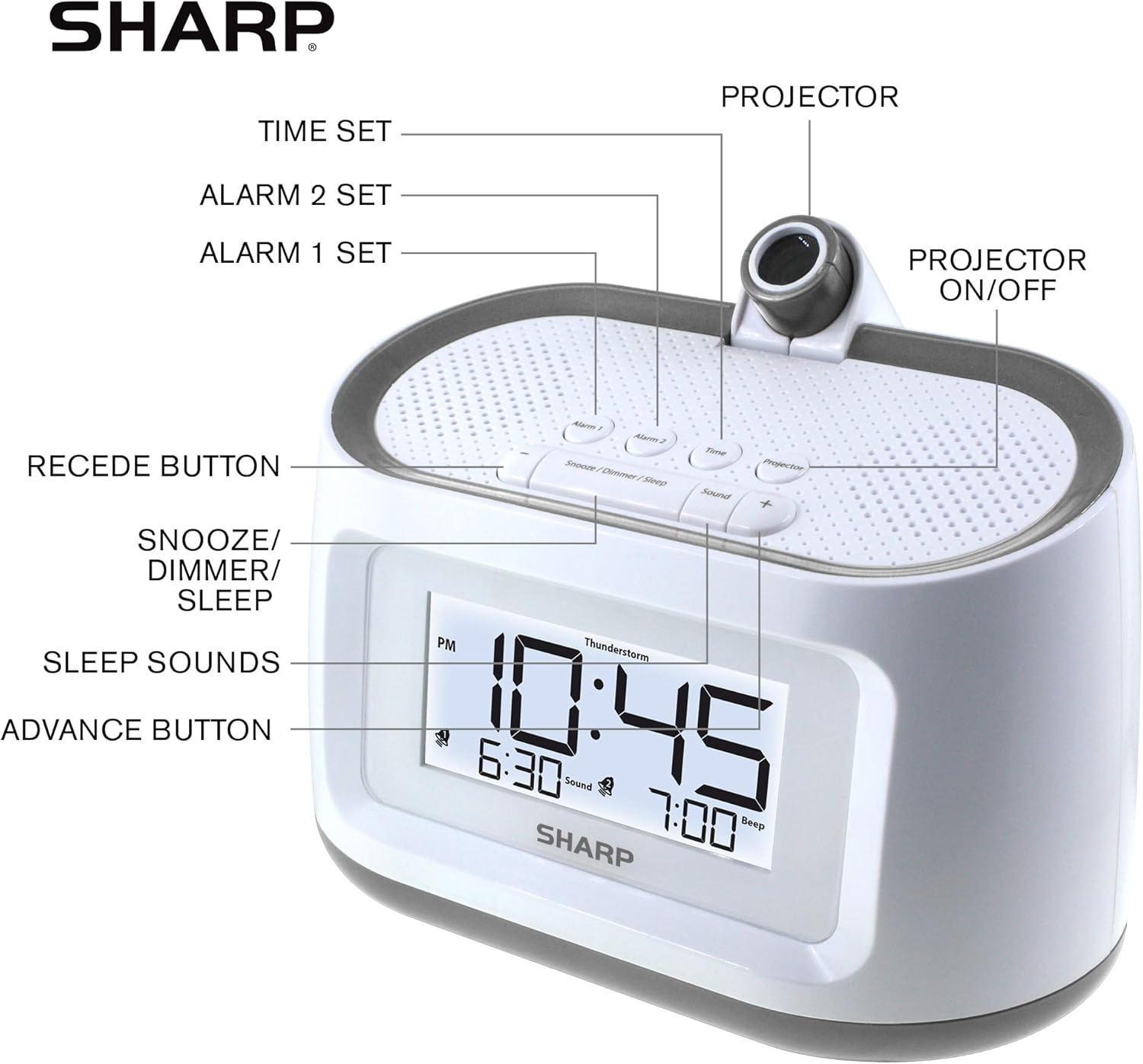
Figure 3: Diagram illustrating the various buttons and components of the alarm clock.
- Тугмаи танзими вақт: Used to enter and adjust time settings.
- Alarm 1 Set Button: Used to set the first alarm time.
- Alarm 2 Set Button: Used to set the second alarm time.
- Проектор: The lens through which the time is projected.
- Projector On/Off Button: Toggles the time projection feature.
- Recede Button (-): Decreases values during setting or adjusts volume/brightness.
- Snooze/Dimmer/Sleep Button: Activates snooze, adjusts display brightness, or sets sleep timer for sounds.
- Sleep Sounds Button: Cycles through available nature sounds.
- Advance Button (+): Increases values during setting or adjusts volume/brightness.
Ташкил кардан
1. Пайвастшавии барқ
Connect the provided AC adapter to the DC input jack on the back of the alarm clock and then plug it into a standard electrical outlet. The display will light up.
2. Насби батареяи эҳтиётӣ
For battery backup, insert 2 AAA batteries (not included) into the battery compartment located on the bottom of the unit. Ensure correct polarity (+/-) as indicated inside the compartment. The battery backup preserves time and alarm settings during a power interruption but does not power the display or projection.
3. Танзими вақти ибтидоӣ
- -ро пахш карда нигоҳ доред Танзими вақт тугмаро то он даме, ки рақамҳои соат дурахшанда шаванд, пахш кунед.
- -ро истифода баред Advance (+) or Recede (-) тугмаҳоро барои танзими соат пахш кунед. Ба нишондиҳандаи PM диққат диҳед.
- -ро пахш кунед Танзими вақт button again to confirm the hour and move to the minute setting. The minute digits will flash.
- -ро истифода баред Advance (+) or Recede (-) тугмаҳо барои танзими дақиқаҳо.
- -ро пахш кунед Танзими вақт button one last time to save the time and exit time setting mode.
Дастурҳои амалиётӣ
Танзими сигналҳо (сигнал 1 ва сигнал 2)
- -ро пахш карда нигоҳ доред Alarm 1 Set or Alarm 2 Set тугмаро то он даме, ки рақамҳои соати ҳушдор дурахшиданд, пахш кунед.
- -ро истифода баред Advance (+) or Recede (-) buttons to set the desired alarm hour. Observe the PM indicator.
- Тугмаи мувофиқро пахш кунед Маҷмӯи ҳушдор button again to confirm the hour and move to the minute setting.
- -ро истифода баред Advance (+) or Recede (-) тугмаҳо барои таъин кардани дақиқаҳои дилхоҳи ҳушдор.
- Тугмаи мувофиқро пахш кунед Маҷмӯи ҳушдор button again to select the alarm sound type (Beep or Sound). Use Advance (+) or Recede (-) иваз кардан.
- Тугмаи мувофиқро пахш кунед Маҷмӯи ҳушдор button one last time to save the alarm setting and exit. The corresponding bell icon will appear on the display, indicating the alarm is active.
To turn an alarm ON or OFF, repeatedly press the Alarm 1 Set or Alarm 2 Set button (without holding) until the bell icon appears or disappears.
Using Sleep Sounds
- -ро пахш кунед Садо button to cycle through the 8 available nature sounds: Campfire, Thunder, Rain, Ocean, White Noise, Fan, Stream, Rainforest.
- To adjust the volume of the sleep sound, use the Advance (+) or Recede (-) buttons while a sound is playing.
- To set a sleep timer for the sounds, press the Snooze/Dimmer/Sleep button repeatedly while a sound is playing to select the desired duration (e.g., 15, 30, 60, 90 minutes, or OFF).
- To turn off the sleep sound immediately, press the Садо button until no sound is playing, or cycle through the sleep timer options until OFF is selected.
Пешгӯии вақт

Figure 4: The alarm clock projecting the time onto a ceiling in a bedroom setting, demonstrating the 90-degree adjustable projection.
- -ро пахш кунед Проектор фурӯзон/хомӯш button to activate or deactivate the time projection.
- Adjust the angle of the projection by manually rotating the projector arm up to 90 degrees.
- For optimal clarity, ensure the room is dark. The projection may appear faint in brightly lit environments.
- The focus of the projected time is fixed and cannot be adjusted.

Расми 5: Наздик view of the alarm clock with the time 10:45 PM projected in red, illustrating the projection feature.
Намоиши идоракунии Dimmer
-ро пахш кунед Snooze/Dimmer/Sleep button (when no alarm is sounding and no sleep sound is playing) to cycle through different brightness levels for the LCD display.
Функсияи таъхир
Вақте ки ҳушдор садо медиҳад, -ро пахш кунед Snooze/Dimmer/Sleep button to temporarily silence the alarm for a few minutes (default snooze time). The alarm will sound again after the snooze period ends.
Нигоҳдорӣ
- Тозакунӣ: Барои тоза кардани соат, сатҳро бо матои нарм ва хушк нарм пок кунед. Аз тозакунандаҳои абразивӣ, мум ё ҳалкунандаҳо истифода набаред, зеро онҳо метавонанд ба рӯйпӯш зарар расонанд.
- Иваз кардани батарея: If the clock experiences a power outage and the time/settings are not retained, it may be time to replace the AAA backup batteries. Ensure the AC adapter is connected before replacing batteries to avoid losing settings.
- Ҷойгиршавӣ: Соатро дар сатҳи устувор ва ҳамвор аз нурҳои бевоситаи офтоб, манбаъҳои гармӣ ва намии аз ҳад зиёд дур ҷойгир кунед.
Мушкилкушо
| Мушкилот | Сабаби эҳтимолӣ | Ҳалли |
|---|---|---|
| Намоиши соат холӣ аст. | Пайвасти барқ нест. | Боварӣ ҳосил кунед, ки адаптери AC ба соат ва васлаки барқии корӣ боэътимод васл шудааст. |
| Огоҳӣ садо намедиҳад. | Огоҳӣ фаъол нашудааст ё нодуруст насб карда шудааст. | Verify the alarm time is set correctly and the alarm bell icon is visible on the display. Ensure alarm volume is not set to zero. |
| Time projection is dim or unclear. | Room is too bright; projector lens is obstructed. | Ensure the room is dark for optimal projection visibility. Check if anything is blocking the projector lens. |
| Sleep sounds are not playing. | Sound feature is off or volume is too low. | -ро пахш кунед Садо button to activate. Adjust volume using Advance (+) or Recede (-). Check if sleep timer is set to OFF. |
| Time/settings reset after power outage. | Батареяҳои эҳтиётӣ мурдаанд ё насб нашудаанд. | Install 2 new AAA batteries or replace existing ones in the battery compartment. |
Мушаххасоти

Figure 6: Dimensions of the Sharp Projection Alarm Clock: 6.85 inches wide, 4.5 inches high, and 4.2 inches deep.
| Бренд | Тез |
| Рақами модел | SPC585BCAMZ |
| Ранги | White - Gunmetal Trim |
| Навъи намоиш | Рақамӣ |
| Андозаҳои маҳсулот (W x H) | 6.85"W x 4.5"H |
| Вазни ашё | 1.08 фунт |
| Манбаи нерӯ | Electrical (AC Adapter) |
| Нусхаи батарея | 2 x батареяҳои AAA (дохил карда намешаванд) |
| Материал | Plastic, Metal Frame |
| Навъи васлкунӣ | Tabletop (Projection for Ceiling/Wall Mount) |
| Хусусиятҳои махсус | Time Projection, 8 Nature Sleep Sounds, Dual Alarms, Display Dimmer, Battery Backup |
| UPC | 049353006024 |
Кафолат ва дастгирӣ
Барои маълумоти кафолат ва дастгирии техникӣ, лутфан ба ширкати расмии Sharp муроҷиат кунед webсайт ё шӯъбаи хидматрасонии муштариёни онҳо тамос гиред. Квитансияи хариди худро ҳамчун далели харид барои ҳама даъвоҳои кафолат нигоҳ доред.
You can typically find support contact details and warranty terms on the manufacturer's official product page or in the packaging materials that came with your device.
Барои маълумоти иловагӣ, боздид кунед Мағозаи Sharp дар Amazon.


