1. Муқаддима
The ACEMIC GT-5 is a portable digital wireless microphone system designed for instruments, particularly electric blowpipes, and stage performances. It features digital audio transmission, 16 selectable frequencies, and a digital ID code to prevent interference. This manual provides detailed instructions for setting up, operating, and maintaining your GT-5 system.

Расми 1.1: The ACEMIC GT-5 wireless microphone system, showing the transmitter (left) and the receiver (right). The transmitter features a 6.35mm plug, while the receiver has controls for power and frequency synchronization.
2. Мундариҷаи баста
Лутфан мундариҷаи бастаро тафтиш кунед, то боварӣ ҳосил кунед, ки ҳама ашё мавҷуд аст:
- GT-5 Wireless Transmitter
- GT-5 Wireless Receiver
- Battery (Note: While the product specifications list a battery as an included component, some descriptions indicate it may not be included. Please verify upon receipt.)
3. Хусусиятҳои асосӣ
- Digital wireless audio transmission for clear sound.
- Pre-set 16 selectable frequencies to avoid interference.
- Digital ID code technology for robust signal integrity.
- Operating range of up to 40 meters (line-of-sight).
- Suitable for electric blowpipe, stagд спектакльхо ва намоишхои куча.
- Portable plug-on receiver, directly connects to mixers or active speakers.
- Lithium battery power supply for extended use.
4. Дастурамал оид ба насб
4.1. Пур кардани батареяҳо
Both the transmitter and receiver are powered by 3.7V lithium batteries. Ensure both units are fully charged before first use. Connect the appropriate charging cables (not specified in product details, assume standard USB charging) to a power source.
4.2. Пайваст кардани қабулкунанда
- Identify the receiver unit. It features a 6.35mm (1/4 inch) plug.
- Plug the receiver directly into the 6.35mm input jack of your mixer, amplifier, or active speaker. The receiver's plug can swivel for optimal positioning.

Расми 4.2.1: The GT-5 receiver connected to a mixer, demonstrating its plug-and-play functionality.
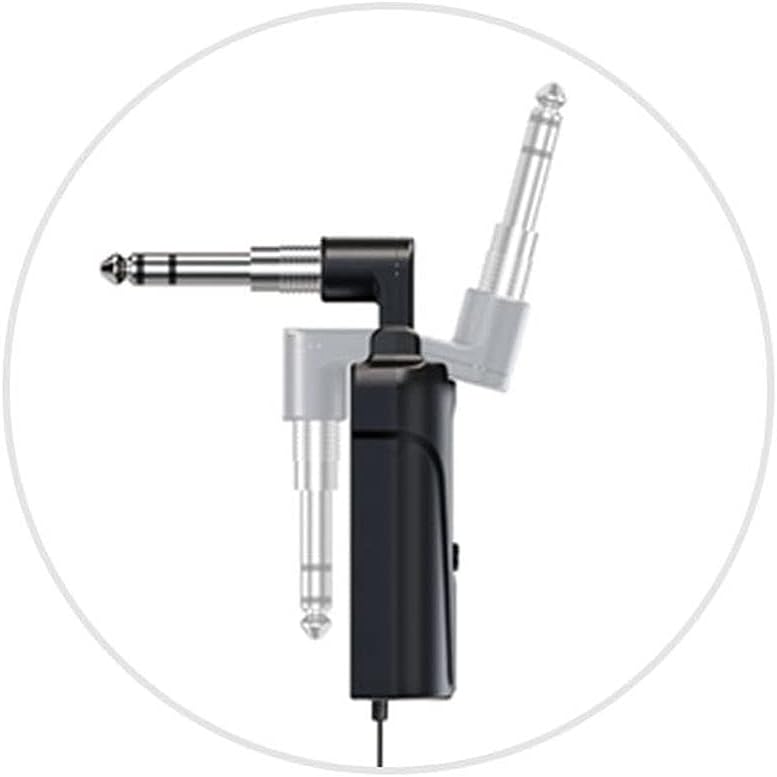
Расми 4.2.2: Detail of the receiver's swivel plug, allowing for flexible connection angles.
4.3. Powering On and Synchronization
- Turn on the receiver by pressing its power button. The display should illuminate.
- Turn on the transmitter by pressing its power button.
- The system uses IR sync to download the frequency from the receiver to the transmitter. Ensure both units are in close proximity (within a few inches) and facing each other's IR windows (if present, otherwise ensure general proximity).
- Press the "SYNC" button on the receiver (or follow specific synchronization instructions if provided with the physical product) to initiate frequency pairing. The RF indicator on both units should show a stable connection once synchronized.
- If interference occurs, you can change the frequency. The system offers 16 selectable channels. Refer to the operating section for frequency adjustment.

Расми 4.3.1: The GT-5 transmitter attached to an electric blowpipe, ready for use.
5. Дастурҳои истифодабарӣ
5.1. Истифодаи Микрофон
Once the transmitter and receiver are synchronized, the system is ready for use. The transmitter is designed to be attached to an instrument, such as an electric blowpipe.
- Ensure the microphone is positioned correctly to capture the instrument's sound effectively.
- Monitor the audio output from your mixer/speaker to adjust volume levels as needed.
- Maintain a line-of-sight operating range of up to 40 meters between the transmitter and receiver for optimal signal quality. Obstacles can reduce this range.
5.2. Changing Frequencies
If you experience interference or need to operate multiple GT-5 systems simultaneously, you can change the operating frequency.
- On the receiver, use the channel selection buttons (usually labeled CHR or similar, or up/down arrows) to cycle through the 16 available frequencies.
- After selecting a new frequency on the receiver, perform the IR synchronization process again (as described in Section 4.3) to pair the transmitter with the new frequency.
6. Нигоҳдорӣ
- Тозакунӣ: Барои тоза кардани берунии интиқолдиҳанда ва қабулкунанда аз матои нарм ва хушк истифода баред. Аз тозакунандаҳои моеъ ё ҳалкунандаҳо истифода набаред.
- Нигоҳдорӣ: Ҳангоми истифода нашудан, системаро дар ҷои хунук ва хушк, дур аз нурҳои бевоситаи офтоб ва ҳарорати аз ҳад зиёд нигоҳ доред.
- Нигоҳубини батарея: For optimal battery life, avoid fully discharging the batteries frequently. If storing for extended periods, charge the batteries to approximately 50% every few months.
- Аз намӣ канорагирӣ кунед: Protect the units from water and excessive humidity.
7. Баррасии мушкилот
| Мушкилот | Сабаби эҳтимолӣ | Ҳалли |
|---|---|---|
| Баромади садо нест |
|
|
| Интерференсия ё статикӣ |
|
|
| Муҳлати кӯтоҳи батарея |
|
|
8. Мушаххасоти
Мушаххасоти умумии система:
- Диапазони басомад: Region dependent
- Интиқоли аудио: Digital wireless
- Аудио С.ampҲолати ling: 48 КГц
- Басомадҳои интихобшаванда: 16 pre-set channels
- Рамзи ID: Digital ID code for interference prevention
- Диапазони фаъолият: То 40 м (хатти дидан)
- Таъмини нерӯ: 3.7V Lithium battery (for both units)
Мушаххасоти қабулкунанда:
- Усули модуляция: pi/4 DQPSK
- Таъхир: <6ms
- Ҷавоби басомад: 60Hz - 15KHz ± 2dB
- Таҳрифи умумии гармонӣ: <0.8% (1КГц)
- Таносуби сигнал/садо: >92дБ
- Ҳассосияти қабул: -92дБм
- Натиҷа: сими 6.35 мм
- Истифодаи доимӣ: > 6 соат
- Андозаҳо: 185 x 20 x 10мм
Мушаххасоти интиқолдиҳанда:
- Усули модуляция: pi/4 DQPSK
- Қувваи интиқол: 10мВт
- Ҳассосият: -47 дБ ± 2дБ
- Frequency Change: IR sync
- Навъи микрофон: Конденсатор
- Андозаи микрофон: Φ14 x 5.0мм
- Истифодаи доимӣ: > 6 соат
- Андозаҳо: 125 x 40 x 20мм
9. Кафолат ва дастгирӣ
For warranty information and technical support, please refer to the documentation provided with your purchase or contact ACEMIC customer service directly. Keep your proof of purchase for warranty claims.


