Муқаддима
The FreedConn T-COMVB Bluetooth Helmet Headset is designed to provide wireless communication for motorcyclists. This system allows for hands-free phone calls, music listening, FM radio, GPS voice prompts, and intercom communication between riders. It features Bluetooth 5.0 technology, noise cancellation, and a waterproof design for various riding conditions.
Дар қуттӣ чӣ ҳаст
Боварӣ ҳосил кунед, ки ҳама ҷузъҳо дар бастаи шумо мавҷуданд:
- FreedConn T-COMVB Bluetooth Headset Unit (x2 for 2-pack)
- Стерео баландгӯякҳо
- Boom Microphone (for open-face/modular helmets)
- Soft-Wire Microphone (for full-face helmets)
- Helmet Mount Bracket (clip-on and adhesive options)
- Сими пуркунандаи USB
- Дастури корбар
- Дастпӯшакҳои Velcro барои баландгӯякҳо ва микрофонҳо
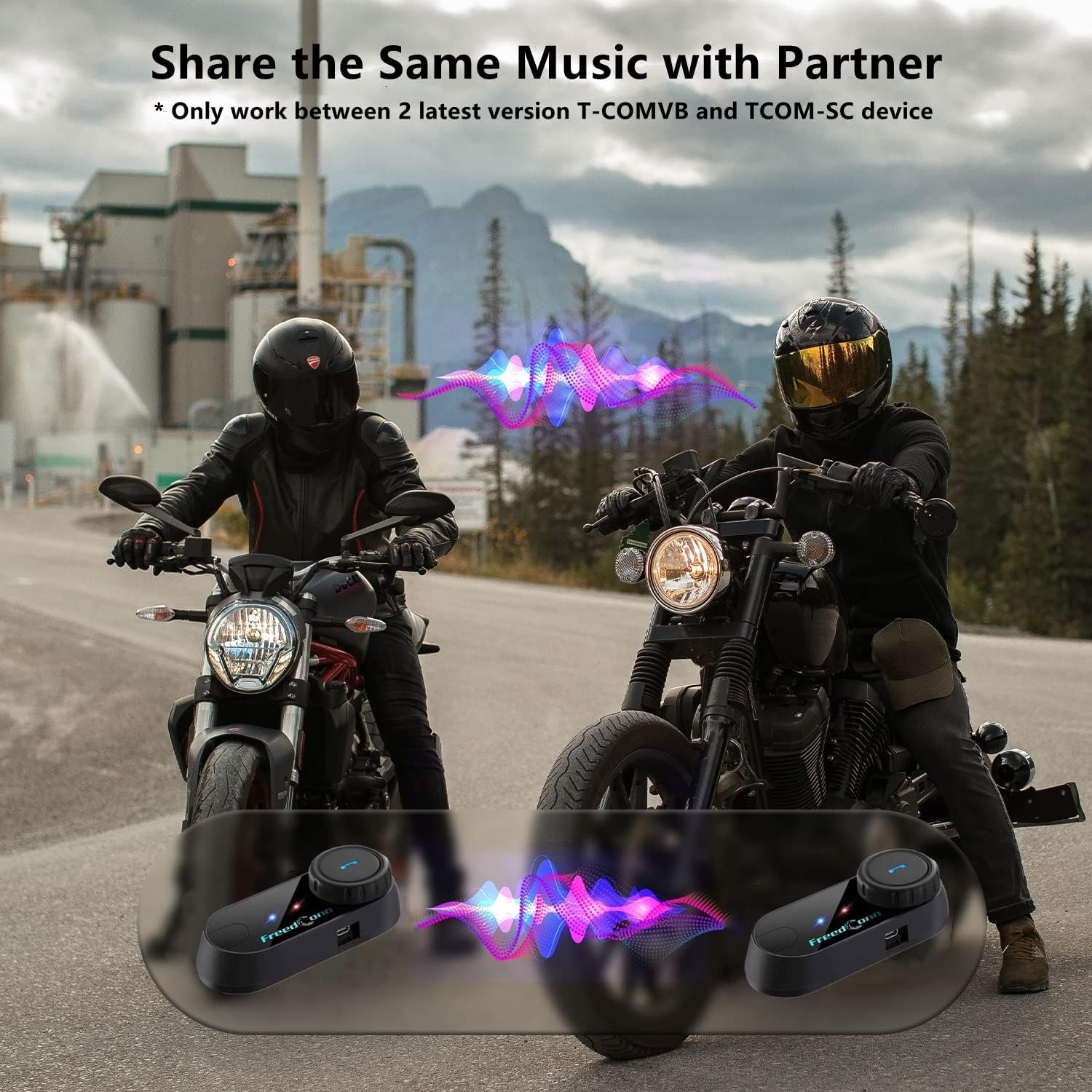
Image: Package contents for the FreedConn T-COMVB Bluetooth Helmet Headset 2-pack, showing all included accessories.
Ташкил кардан
1. Пуркунии дастгоҳ
Before first use, fully charge the T-COMVB unit. Connect the USB charging cable to the headset's charging port and a USB power source. The indicator light will show charging status.
- Вақти пуркунӣ: Тақрибан 3-4 соат.
- Ҳаёти батарея: Up to 7-8 hours of intercom, 10 hours of phone calls/music, 300 hours standby.

Image: Visual representation of the 400mAh battery capacity and estimated usage times for intercom, phone calls, and standby.
2. Microphone Selection
Choose the appropriate microphone for your helmet type:
- Микрофони бумӣ: Recommended for open-face, half, and modular flip-up helmets.
- Soft-Wire Microphone: Recommended for full-face and off-road helmets.
Connect the chosen microphone and speakers to the corresponding ports on the headset unit.
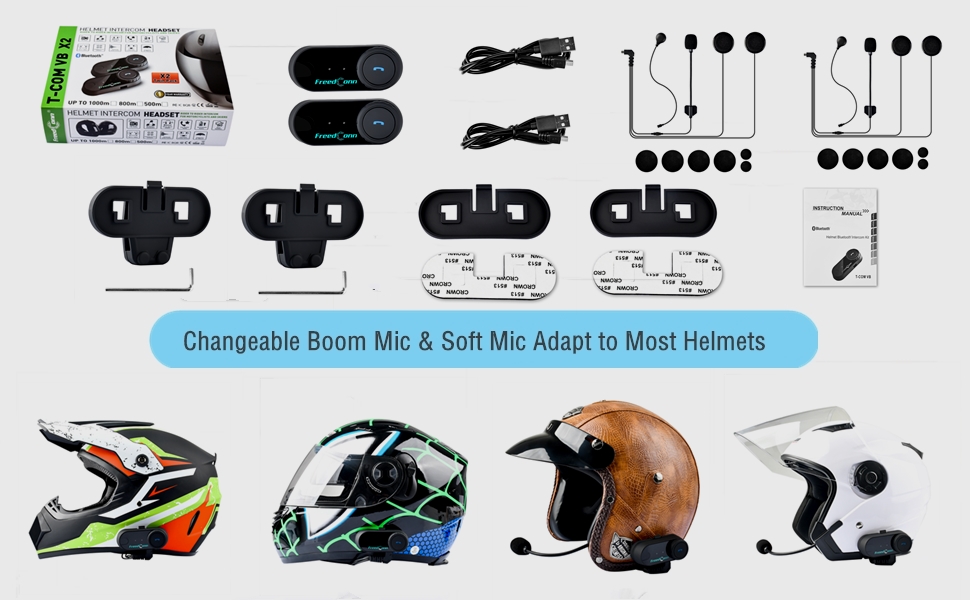
Image: Illustration demonstrating the compatibility of boom and soft-wire microphones with various helmet styles.
3. Насби кулоҳ
Mount the T-COMVB unit to the side of your helmet using either the clip-on bracket or the adhesive bracket. Ensure the unit is securely attached and the speakers are positioned correctly inside the helmet for optimal audio.

Image: A FreedConn T-COMVB unit securely installed on the exterior of a motorcycle helmet.
Дастурҳои амалиётӣ
1. Фаъол/хомӯш
- Фаъол: Press and hold the Power button until the indicator light flashes.
- Хомӯш: Тугмаи барқро то хомӯш шудани чароғи нишондиҳанда пахш кунед ва нигоҳ доред.
2. Bluetooth Pairing (with Phone/GPS)
To connect your T-COMVB to a Bluetooth-enabled device (phone, GPS):
- Ensure the T-COMVB is off.
- Тугмаи барқро тақрибан 5-7 сония пахш карда нигоҳ доред, то он даме ки чароғи нишондиҳанда ба таври навбатӣ сурх ва кабуд медурахшад, ки ин ҳолати ҷуфтшавиро нишон медиҳад.
- On your phone or GPS, enable Bluetooth and search for available devices.
- Select "FreedConn T-COMVB" from the list. If prompted, enter "0000" as the PIN.
- Пас аз ҷуфт кардан, чароғи нишондиҳанда оҳиста-оҳиста кабуд медурахшад.

Image: The T-COMVB headset demonstrating its Bluetooth 5.0 and universal connectivity with different devices and helmet types.
3. Intercom Communication (Rider to Rider)
The T-COMVB supports intercom communication with other T-COMVB or TCOM-SC units.
- Ensure both units are powered on and not connected to other Bluetooth devices.
- On one unit, press and hold the Intercom button until the indicator light flashes red and blue alternately.
- On the second unit, press the Intercom button once.
- Дастгоҳҳо ба таври худкор ҷустуҷӯ ва ҷуфт карда мешаванд. Пас аз пайваст шудан, чароғҳои нишондиҳанда оҳиста-оҳиста бо ранги кабуд милт-милт мекунанд.
- To initiate intercom, press the Intercom button once. To end, press it again.
4. Навозиш ва мубодилаи мусиқӣ
Once paired with your phone, you can play music. Music sharing is supported between two latest version T-COMVB and TCOM-SC devices.
- Бозӣ/Таваққуф: Тугмаи бисёрфунксияро як маротиба пахш кунед.
- Треки навбатӣ: Rotate the Multi-function button clockwise.
- Track гузашта: Rotate the Multi-function button counter-clockwise.
- Мубодилаи мусиқӣ: While music is playing, press and hold the Intercom button on both units to initiate music sharing.

Image: Two riders sharing music through their FreedConn T-COMVB headsets, highlighting the music sharing feature.
5. Радиои FM
To activate the built-in FM radio:
- Turn On FM: Press the FM button once.
- Каналҳои скан: Rotate the Multi-function button to scan for stations.
- Turn Off FM: Press the FM button again.
6. Зангҳои телефонӣ
When paired with your phone, the T-COMVB allows for hands-free calls.
- Ҷавоб ба занг: Тугмаи бисёрфунксияро як маротиба пахш кунед.
- Занги хотимавӣ: Ҳангоми занг задан тугмаи бисёрфунксияро як маротиба пахш кунед.
- Рад кардани занг: Тугмаи бисёрфунксияро барои 2 сония пахш карда нигоҳ доред.
- Рақами охирини такрорӣ: Тугмаи бисёрфунксионалиро ду маротиба пахш кунед.
- Voice Assistant (Siri/Google Voice): Press the Voice Assistant button to activate your phone's voice assistant.

Image: Icons representing voice assistant activation (Siri, Google Voice) for hands-free calling functionality.
Нигоҳдорӣ
- Тозакунӣ: нармро истифода баред, гamp cloth to clean the unit. Do not use harsh chemicals or solvents.
- Муқовимат ба об: The unit is waterproof, but avoid submerging it in water. Ensure all ports are securely closed when exposed to rain.
- Нигоҳубини батарея: If the device is not used for an extended period, charge it at least once a month to preserve battery life.

Image: The FreedConn T-COMVB headset on a helmet, illustrating its waterproof feature in rainy conditions.
Мушкилкушо
- Не қудрат: Ensure the unit is fully charged. Connect to a power source and check the charging indicator.
- Bluetooth пайваст карда намешавад: Ensure the unit is in pairing mode (red and blue flashing light). Make sure other Bluetooth devices are disconnected. Try restarting both the headset and your phone/GPS.
- Аз баландгӯякҳо садо нест: Check that the speakers are securely plugged into the headset unit. Ensure volume is not set to minimum.
- Интерком пайваст намешавад: Ensure both units are T-COMVB or TCOM-SC models and are in intercom pairing mode. Keep units within range (up to 800 meters).
- Сифати пасти аудио/садо: Ensure the microphone is positioned correctly, close to your mouth. The T-COMVB features advanced noise cancellation technology.

Image: A visual representation of the advanced noise cancellation technology, demonstrating its effect on sound quality.
Мушаххасоти
| Модели | T-COMVB |
| Версияи Bluetooth | 5.0 + EDR |
| Диапазони интерком | Up to 800 meters (2-3 riders) |
| Иқтидори батарея | 400 мАч |
| Вақти пуркунии барқ | 3-4 соат |
| Вақти интерком | 7-8 соат |
| Phone Call/Music Time | 10 соат |
| Вақти интизорӣ | 300 соат |
| Муқовимат ба об | Обногузар |
| Усули назорат | Voice, Manual Buttons |
| Хусусиятҳои махсус | Microphone Included, Noise Cancellation, FM Radio |
| Материал | Полимер |
| Вазни ашё | Approximately 1.15 pounds (for 2 units) |
Кафолат ва дастгирӣ
For warranty information, technical support, or service inquiries, please refer to the contact details provided with your purchase or visit the official FreedConn webсайт. Барои даъвоҳои кафолат далели хариди худро нигоҳ доред.


