1. Муқаддима
Thank you for choosing the Hama Digital Radio DR7 USB. This manual provides essential information for the safe and efficient operation of your new radio. Please read it thoroughly before use and keep it for future reference. This portable radio supports DAB/DAB+ digital radio and conventional FM reception, offering clear sound quality and portability.
2. Дастурамал оид ба бехатарӣ
- Protect the product from dirt, moisture, and overheating. Use it only in dry environments.
- Маҳсулотро наафтонед ва онро дар ҳолати зарбаҳои шадид нагузоред.
- Агар маҳсулот вайрон шавад, онро накушоед ё кор карданро идома надиҳед.
- Худатон кӯшиш накунед, ки маҳсулотро таъмир кунед. Ҳама гуна кори хидматрасониро ба коршиносони соҳибихтисос гузоред.
- Ин маҳсулотро мисли ҳама маҳсулоти барқӣ аз дастрасии кӯдакон дур нигоҳ доред.
- Маводи бастабандиро дарҳол мувофиқи қоидаҳои дар маҳал татбиқшаванда партояд.
- Батареяҳо бояд бо қутбҳои дуруст ҷойгир карда шаванд.
- Remove batteries from the product if it is not to be used for an extended period.
3. Мундариҷаи баста
- Hama Digital Radio DR7 USB
- 4 x батареяҳои АА
- Дастури дастурамал
4. Танзимот
4.1 Таъмини барқ
The Hama Digital Radio DR7 USB can be powered by either batteries or an external USB power source.
4.1.1 Насби батарея
To use the radio with batteries, open the battery compartment cover located on the back of the device. Insert 4 AA alkaline batteries, ensuring correct polarity (+/-). Close the battery compartment cover securely.

Тасвир: Бозгашт view of the radio with the battery compartment open, showing battery insertion.
4.1.2 Пайвасти барқи беруна
For continuous operation, connect the radio to a USB power source using a compatible USB 2.0 cable. The DC IN port requires 5.0V-0.5A. The USB port is located on the back of the radio.
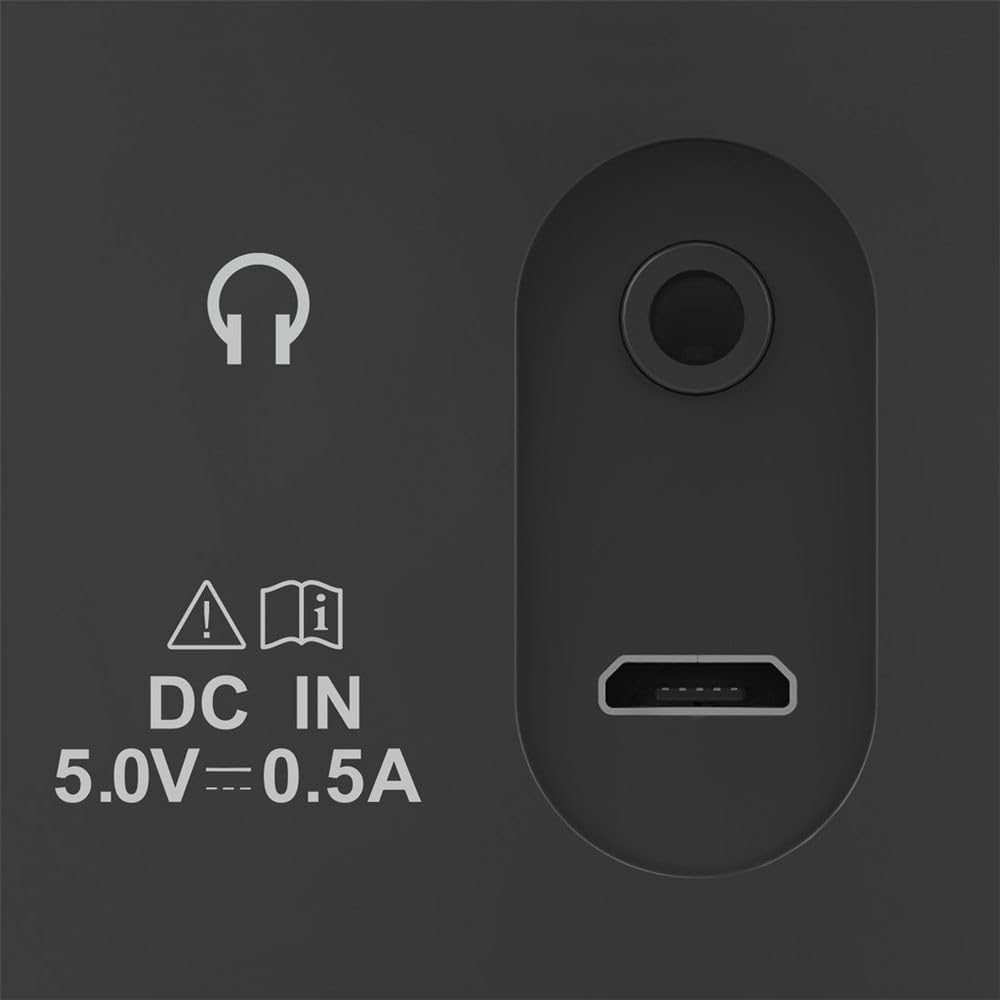
Image: Close-up of the radio's rear ports, including DC IN and USB.
4.2 Антенна
Extend the telescopic antenna fully for optimal radio reception. Adjust its position to improve signal strength if needed.

Тасвир: Бозгашт view of the radio with the antenna extended.
5. Дастурҳои истифодабарӣ
5.1 Фурӯзон/хомӯш кардан
-ро пахш кунед Қувва button (usually marked with a circle and a vertical line) to turn the radio on or off.
5.2 Mode Selection (DAB/DAB+ and FM)
-ро истифода баред Режим or Манбаъ button to switch between DAB/DAB+ digital radio and FM radio modes.
5.3 Station Tuning
5.3.1 Automatic Scan (DAB/DAB+)
In DAB/DAB+ mode, press the Скан button to automatically search for available digital radio stations. The radio will store all found stations.
5.3.2 Manual Tuning (FM)
Дар ҳолати FM, истифода баред Танзим кардан +/- buttons or the rotary knob (if available) to manually adjust the frequency. Press and hold the Танзим кардан +/- buttons for automatic station seeking.

Тасвир: Пеш view of the radio, highlighting the display and controls.
5.4 истгоҳи пешакӣ
The radio features two direct selection buttons and allows for storing up to 10 preset stations.
- Барои захира кардан: Tune to the desired station. Press and hold a preset button (e.g., 1 or 2) or the Пешакӣ button until the display confirms the station is saved.
- Ёдовар мешавем: Briefly press the corresponding preset button to quickly switch to a saved station.
5.5 Назорати баландии овоз
Баландии овозро бо ёрии Ҳаҷм rotary knob or dedicated volume buttons.
5.6 Функсияи соати зангдор
The radio includes an alarm clock feature. Refer to the detailed instructions in the printed manual for setting and managing alarms.
5.7 Истифодаи гӯшмонак
Connect standard 3.5mm headphones to the headphone jack on the back of the radio for private listening. The internal speaker will mute automatically.
6. Нигоҳдорӣ
- Ин маҳсулотро танҳо бо каме тоза кунед гamp, матои тоза пӯшед ва аз маводи тозакунандаи хашмгин истифода набаред.
- Ensure no water gets into the product.
- When replacing batteries, always replace all batteries at once.
- Радиоро дар ҷои хунук ва хушк нигоҳ доред, вақте ки муддати тӯлонӣ истифода намешаванд.
7. Баррасии мушкилот
| Мушкилот | Сабаби эҳтимолӣ | Ҳалли |
|---|---|---|
| Не қудрат | Batteries are depleted or incorrectly inserted; power cable is disconnected. | Replace batteries, check polarity; ensure power cable is securely connected. |
| Қабули кам ё тамоман | Антенна дароз карда нашудааст; сигнали заиф; халал. | Fully extend and adjust the telescopic antenna; try moving the radio to a different location; perform a new station scan. |
| Садо нест | Садои баланд хеле паст аст; гӯшмонакҳо пайваст карда шудаанд. | Increase volume; disconnect headphones if you want to use the speaker. |
8. Мушаххасоти
- Модели: 00054242
- Андозаҳо (L x W x H): 16.5 х 5.5 х 10.5 см
- Вазн: 448.54 гр
- Технологияи танзимкунанда: DAB, DAB+, FM
- Frequency (FM): 87.5 МГц
- Манбаи нерӯ: 4 x AA Alkaline Batteries, USB 2.0 (DC IN 5.0V-0.5A)
- Мавод: Пластмасса
- Хусусиятҳои махсус: Alarm clock, 2 direct selection buttons, 10 preset stations
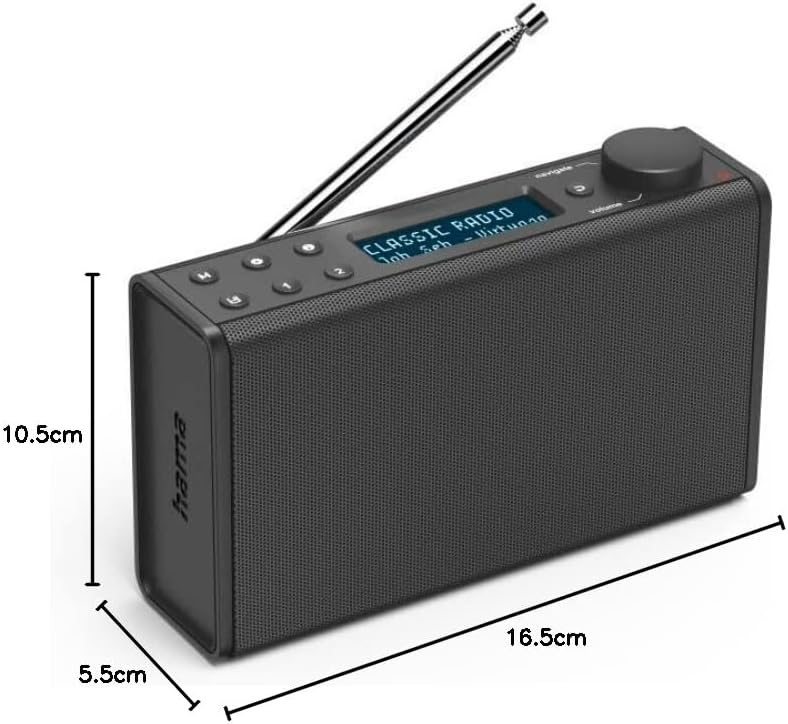
Image: Dimensions of the Hama Digital Radio DR7 USB.
9. Кафолат ва дастгирӣ
Hama GmbH & Co KG assumes no liability and provides no warranty for damage resulting from improper installation/mounting, improper use of the product, or from failure to observe the operating instructions and/or safety notes. For further support, please visit the official Hama webсайт ё бо хидмати мизоҷони худ тамос гиред.


