1. Муқаддима
Welcome to the user manual for your Ulefone Armor X9 Rugged Phone. This guide provides essential information on setting up, operating, maintaining, and troubleshooting your device. The Ulefone Armor X9 is designed for durability and performance, featuring robust protection and advanced functionalities.
Key features of your Ulefone Armor X9 include:
- IP68/IP69K Grade 360 All Round Protection: Барои муқовимат ба муҳити сахт сохта шудааст.
- Системаи оператсионии Android 11: Enjoy the latest Android experience.
- 4 ГБ RAM + 128 ГБ ROM: Ampхотира ва нигоҳдорӣ барои барномаҳо ва маълумоти шумо.
- 16MP Triple Rear Camera: Capture high-quality photos and videos.
- Massive 5580mAh Battery Capacity: Extended usage time.
- Triple Navigation System: Enhanced positioning accuracy.
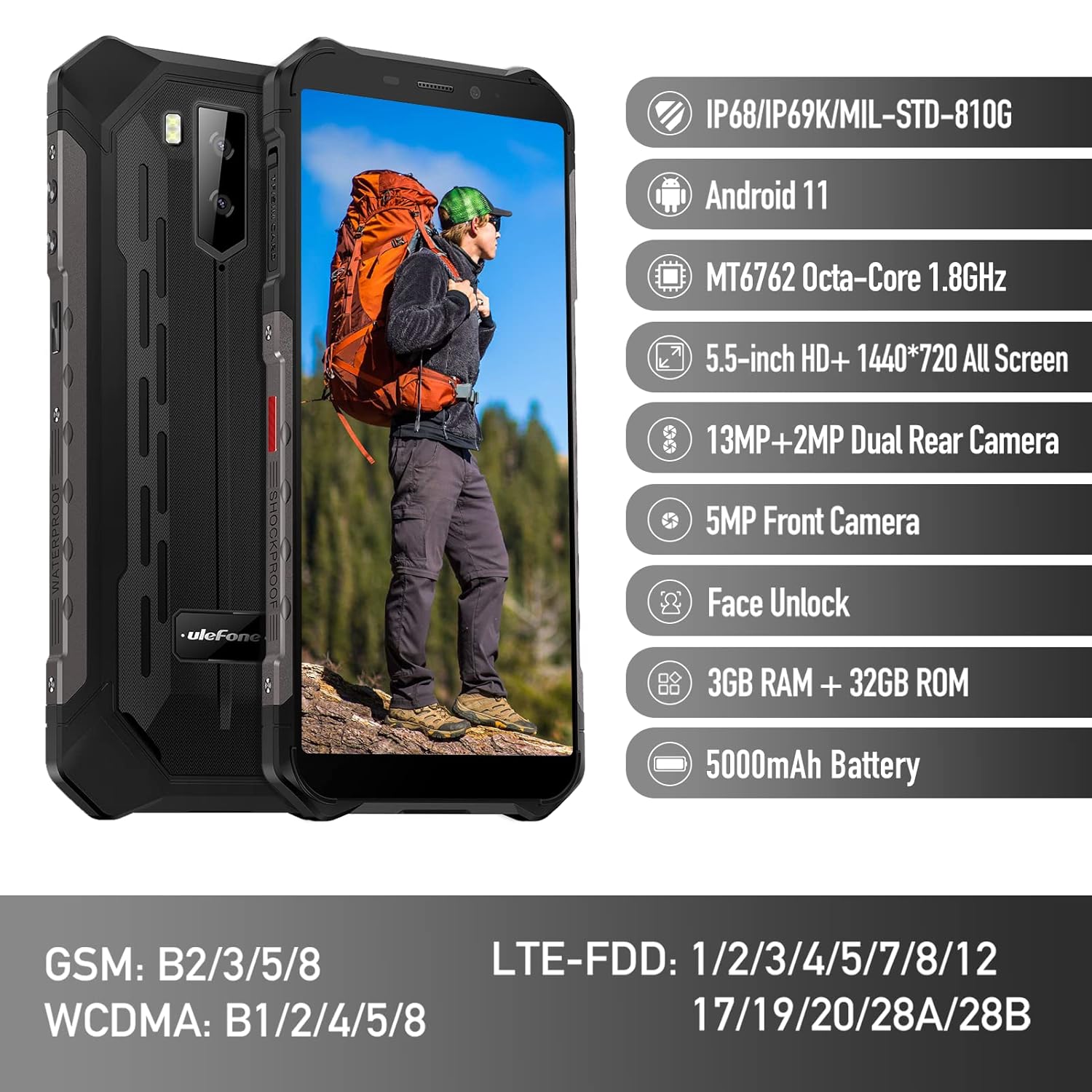
Figure 1: Ulefone Armor X9 Rugged Phone overview, highlighting its robust design and core specifications like IP68/IP69K rating, Android 11, Octa-Core processor, 5.5-inch HD+ screen, 13MP+2MP dual rear camera, 5MP front camera, Face Unlock, 3GB RAM + 32GB ROM, and 5000mAh battery.
2. Танзимот
2.1. Насби корти SIM ва корти TF
The Ulefone Armor X9 supports dual SIM cards and a TF (microSD) card for expandable storage. Follow these steps to install them:
- Табақчаи SIM-кортро дар паҳлӯи телефон ҷойгир кунед.
- Барои кушодани табақ асбоби барориши SIM-ро истифода баред.
- Кортҳои Nano-SIM-и худро бодиққат ба слотҳои таъиншуда (SIM1 ва SIM2) ҷойгир кунед.
- If using a TF card, place it into the dedicated TF card slot. Note that some configurations may share a slot between SIM2 and the TF card.
- Gently push the tray back into the phone until it is flush with the device body. Ensure the tray is properly sealed to maintain water and dust resistance.

Figure 2: Illustration of the dual SIM and TF card tray, showing how to insert SIM1, SIM2, and a TF card into the Ulefone Armor X9.
2.2. Пуркунии ибтидоӣ
Before first use, it is recommended to fully charge your Ulefone Armor X9. Use the provided USB cable and power adapter.
- Сими USB-ро ба порти пуркунандаи телефони худ пайваст кунед.
- Қисми дигари сими USB-ро ба адаптери барқ пайваст кунед.
- Адаптери барқро ба васлаки деворӣ пайваст кунед.
- Нишондиҳандаи барқ дар экран пайдо мешавад. То он даме, ки тасвири батарея пур шавад, телефонро пур кунед.
2.3. Фурӯзон/хомӯшкунӣ
- Барои фаъол кардан: Тугмаи барқро (одатан дар тарафи рост) то пайдо шудани логотипи Ulefone пахш карда нигоҳ доред.
- Барои хомӯш кардани барқ: Press and hold the Power button until the power options menu appears on the screen. Select "Power off" and confirm.
- Барои аз нав оғоз кардан: Аз менюи имконоти барқ, "Бозоғоз" -ро интихоб кунед ва тасдиқ кунед.
3. Дастурҳои истифодабарӣ
3.1. Навигатсияи асосӣ (Android 11)
Your Ulefone Armor X9 runs on Android 11, offering an intuitive user interface. Common gestures and navigation include:
- Ба боло лағжед: Ба панели барнома дастрасӣ пайдо кунед.
- Ба поён лағжед: Панели огоҳӣ ва танзимоти зудро кушоед.
- Клик кунед: Элементро интихоб кунед ё барнома кушоед.
- Пахшкунии дароз: Ба менюҳои контекстӣ дастрасӣ пайдо кунед ё нишонаҳоро интиқол диҳед.
- Пич-то-масштаб: Тасвирҳоро калон ё хурдтар кунед ва web саҳифаҳо.

Figure 3: Screenshots of the Android 11 interface on the Ulefone Armor X9, showing settings menus, quick toggles, and the sound recorder application.

Figure 4: The 5.5-inch 18:9 All Screen display of the Ulefone Armor X9, showcasing its immersive viewing experience with an image of a skier.
3.2. Истифодаи камера
Your phone is equipped with a 16MP Triple Rear Camera and a Front Camera. To use the camera:
- Барномаи "Камера"-ро аз экрани асосӣ ё ҷадвали барнома кушоед.
- Барои аксбардорӣ тугмаи пардаро клик кунед.
- Агар лозим бошад, байни шеваҳои акс ва видео гузаред.
- Tap the icon to switch between the front and rear cameras.
- Explore various camera modes and settings for optimal results.
3.3. Пайвастшавӣ
The Ulefone Armor X9 supports various connectivity options:
- Вай-фай: Барои пайваст шудан ба шабакаҳои дастрас ба Танзимотҳо > Шабака ва интернет > Wi-Fi гузаред.
- Блутуз: Барои пайваст шудан бо дастгоҳҳои Bluetooth ба Танзимотҳо > Дастгоҳҳои пайвастшуда > Bluetooth равед.
- НИЗОМИ МУАЙЯНКУНИИ ҶАҲОНИИ ҶОИ ИСТ: The phone features AGPS for accurate location services. Ensure location services are enabled in Settings > Location.
- USB: Connect your phone to a computer using a USB cable for data transfer or charging.
3.4. Қулфи чеҳра
For convenient and secure unlocking, your Ulefone Armor X9 supports Face Unlock:
- Ба Танзимотҳо > Амният > Қулфи рӯй гузаред.
- Барои сабти чеҳраи худ дастурҳои дар экран бударо иҷро кунед.
- Ensure good lighting and hold the phone at eye level during registration.
- Пас аз сабти ном, шумо метавонед телефони худро танҳо бо нигоҳ кардан ба камераи пешӣ кушоед.
4. Нигоҳдорӣ
4.1. Тозакунӣ ва нигоҳубин
To maintain the performance and appearance of your rugged phone:
- Экран ва баданро бо матои мулоим ва бе пахта хушк кунед.
- Барои лой якрав, истифода каме гamp матоъ. Аз маводи кимиёвии сахт ё маводи абразивӣ худдорӣ намоед.
- Ensure all port covers are securely closed to maintain water and dust resistance, especially after charging or using headphones.

Figure 5: The Ulefone Armor X9's 360° All Protection Design, showcasing its superior materials and superb durability against impacts and harsh conditions.
4.2. Water and Dust Resistance (IP68/IP69K)
The Ulefone Armor X9 is rated IP68/IP69K, meaning it is resistant to dust and water immersion. However, this resistance is not permanent and may decrease over time with normal wear. To ensure optimal protection:
- Do not intentionally submerge the phone in water for extended periods or beyond specified depths.
- Avoid exposing the phone to high-pressure water or extreme temperatures.
- Ensure all port covers are tightly sealed before exposure to water or dust.
- If the phone gets wet, dry it thoroughly before charging or opening any ports.
4.3. Нигоҳубини батарея
To prolong the life of your 5580mAh Lithium Polymer battery:
- Аз ҳарорати аз ҳад зиёд (гарм ё хунук) худдорӣ кунед, зеро онҳо метавонанд кори батареяро коҳиш диҳанд.
- Use only the original charger and cable or certified compatible accessories.
- Батареяро зуд-зуд холӣ накунед. Пеш аз он ки ба сатҳи хеле паст расад, онро пур кунед.
5. Баррасии мушкилот
If you encounter issues with your Ulefone Armor X9, try the following troubleshooting steps:
5.1. Телефон фурӯзон нест
- Боварӣ ҳосил кунед, ки батарея пур карда шудааст. Телефонро ба пуркунандаи барқ на камтар аз 30 дақиқа пайваст кунед.
- Тугмаи барқро барои 10-15 сония пахш карда нигоҳ доред, то бозоғозро маҷбур созед.
5.2. Масъалаҳои пуркунии барқ
- Verify that the charging cable and adapter are working correctly. Try a different charger if available.
- Боварӣ ҳосил кунед, ки порти пуркунандаи барқ тоза ва аз партовҳо холӣ аст.
- Make sure the charging cable is fully inserted into the port. Some rugged phone ports may require a firm connection due to protective covers.
5.3. SIM/TF Card Not Detected
- Ensure the SIM/TF card is correctly inserted into the tray and the tray is fully seated.
- Телефонро аз нав оғоз кунед.
- Check if the SIM card is active with your network provider.
5.4. App Crashes or Freezing
- Барномаи мушкилотро пӯшед ва боз кунед.
- Clear the app's cache and data (Settings > Apps > [App Name] > Storage & cache).
- Боварӣ ҳосил кунед, ки барнома ба версияи охирин навсозӣ шудааст.
- Телефонро аз нав оғоз кунед.
5.5. Баргардонидани ҳолати заводӣ
Агар мушкилот боқӣ монад, барқароркунии завод метавонад онҳоро ҳал кунад. Огоҳӣ: Ин ҳама маълумотро дар телефони шумо нест мекунад. Пеш аз идома додан маълумоти муҳимро нусхабардорӣ кунед.
- Ба Танзимотҳо > Система > Параметрҳои барқароркунӣ гузаред.
- "Тоза кардани ҳама маълумот (аз нав танзимкунии завод)" -ро интихоб кунед.
- Қарори худро тасдиқ кунед ва дар ҳолати дархостшуда PIN/паролро ворид кунед.
6. Мушаххасоти
Below are the detailed specifications for the Ulefone Armor X9:

Figure 6: Details of the Ulefone Armor X9's Octa-Core Processor, highlighting its power-efficient yet powerful performance, along with 3GB RAM and 32GB ROM, and support for up to 256GB TF card extendable storage.
| Хусусият | Мушаххасоти |
|---|---|
| Низоми амал | Android 11.0 |
| RAM | 3 ГБ (Note: Feature bullets mention 4GB RAM, please verify actual model) |
| Иқтидори нигаҳдории хотира | 32 ГБ (Expandable with TF card up to 256GB. Feature bullets mention 128GB ROM, please verify actual model) |
| Модели CPU | MT6762 Окта-аслӣ 1.8 ГГц (Note: Specifications list 'Snapdragon', but image indicates MT6762. Please verify actual model) |
| Андозаҳои маҳсулот | 15.8 х 7.75 х 1.38 см |
| Вазни ашё | 472 гр |
| Батареяҳо | 1 Lithium Polymer battery (5580mAh, included) |
| Алоқаи бесим | Cellular, Bluetooth, USB, Wi-Fi |
| Низоми муайянкунии ҷаҳонии ҷои ист | AGPS |
| Хусусиятҳои махсус | Rear Camera, Face Unlock, IP68/IP69K, MIL-STD-810G |
| Намоиш | 5.5-inch HD+ 1440*720 All Screen |
| Камераи пушти | 13MP+2MP Dual Rear Camera (Note: Feature bullets mention 16MP Triple Rear Camera, please verify actual model) |
| Камераи пеши | Камераи пеши 5MP |
| Ранги | Сиёҳ |
| Истеҳсолкунанда | Улефон |
Note: Specifications are based on available product data and may vary slightly. Please refer to your product packaging for the most accurate information. There are discrepancies between feature bullets, specifications, and image text regarding RAM, ROM, CPU, and camera megapixels. This manual uses the most frequently cited or detailed information, with notes for clarification.
7. Кафолат ва дастгирӣ
7.1. Маълумот дар бораи кафолат
Your Ulefone Armor X9 is covered by a manufacturer's warranty. The specific terms and duration of the warranty may vary by region and retailer. Please refer to the warranty card included in your product packaging or contact your point of purchase for detailed information regarding warranty coverage and claims.
7.2. Дастгирии муштариён
For technical assistance, troubleshooting beyond this manual, or warranty inquiries, please contact Ulefone customer support or your authorized dealer. You can typically find contact information on the official Ulefone webсайт ё дар ҳуҷҷатҳои маҳсулоти шумо.
- Visit the official Ulefone website for FAQs, software updates, and support contact details.
- Ҳангоми тамос бо дастгирӣ, чеки харид ва рақами силсилавии маҳсулотро дар даст нигоҳ доред.


