1. Муқаддима
Ташаккур ба шумо барои харидasing the KEPLUG Sunrise Alarm Clock. This device is designed to enhance your waking and sleeping experience with its unique features, including sunrise and sunset simulations, dual alarms, FM radio, and various natural sounds. Please read this manual carefully to ensure proper use and optimal performance.
Мундариҷаи баста:
- 1 x KEPLUG Sunrise Alarm Clock
- 1 x кабели хурди USB
- 1 x Адаптери девор
- 1 x Дастури корбар
2. Маҳсулот ба охир расидview
Familiarize yourself with the main components and controls of your KEPLUG Sunrise Alarm Clock.

Тасвири 2.1: Пеш view of the KEPLUG Sunrise Alarm Clock, showing the digital time display and the illuminated light panel. The clock face is round with a white base.
Тугмаҳо ва портҳои идоракунӣ:
Refer to the diagram below for button identification (exact button layout may vary slightly by model, but functions are consistent).
- Тугмаи танзими вақт: Барои ворид кардани режими танзими вақт истифода мешавад.
- Тугмаи ҳушдор 1: Used to set and activate Alarm 1.
- Тугмаи ҳушдор 2: Used to set and activate Alarm 2.
- FM Radio Button: Activates and controls FM radio functions.
- Тугмаи нур: Controls the light brightness and color modes.
- Тугмаҳои баландии овоз +/-: Ҳаҷми садоро танзим мекунад.
- Тугмаҳои боло/поён: Менюҳоро паймоиш мекунад ва арзишҳоро танзим мекунад.
- Snooze/Sleep Aid Button: Activates snooze during an alarm or sleep aid function.
- Порти барқи USB: Барои пур кардани дастгоҳҳои беруна.
- Micro USB Power Input: Ба адаптери барқ пайваст мешавад.
3. Танзимот
3.1 Пайвастшавии барқ
- Connect the micro USB cable to the power input port on the back of the alarm clock.
- Адаптери девориро ба васлаки барқии стандартӣ пайваст кунед.
- Дар экран нишондиҳанда фурӯзон мешавад, ки нишон медиҳад, ки дастгоҳ фаъол аст.
The clock includes a built-in backup battery to retain settings during power outages or disconnections.
3.2 Танзими вақт
- -ро пахш кунед Тугмаи танзими вақт (often represented by a clock icon). The hour display will start flashing.
- -ро истифода баред Тугмаҳои боло / поён ба танзим даровардани соат.
- -ро пахш кунед Тугмаи танзими вақт again to confirm the hour and move to minute setting. The minute display will flash.
- -ро истифода баред Тугмаҳои боло / поён дақиқаро танзим кардан.
- -ро пахш кунед Тугмаи танзими вақт a third time to confirm the minutes.
- Барои гузаштан байни формати 12-соата ва 24-соата, тугмаи ... -ро пахш кунед. Тугмаҳои боло / поён while the time is flashing during setup, or refer to the specific instructions in your manual for a dedicated time format button.
3.3 Time Display Brightness
The time display offers three brightness settings: High, Low, and Off. This can typically be adjusted by repeatedly pressing a dedicated display brightness button or by holding the Time Setting button. Refer to your specific model's instructions for exact control.
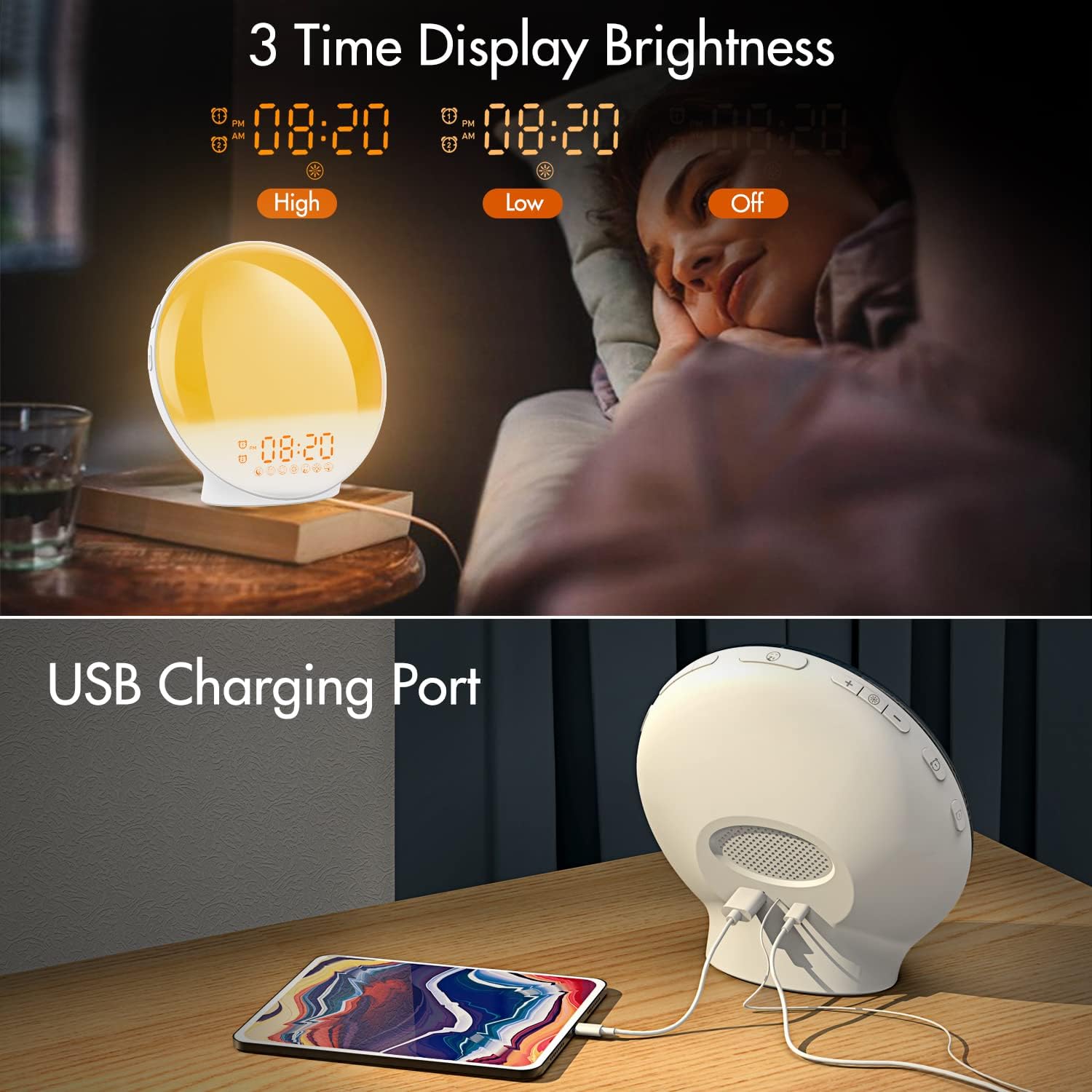
Тасвири 3.1: Illustration of the three time display brightness options: High, Low, and Off, allowing users to customize visibility for different times of day or night.
4. Дастурҳои истифодабарӣ
4.1 Танзими сигналҳои огоҳкунанда (сигналҳои 1 ва сигналҳои 2)
The clock features two independent alarms, allowing for separate wake-up times (e.g., weekday and weekend).

Тасвири 4.1: Depiction of the dual alarm functionality, allowing users to set different alarms for weekdays and weekends, along with the snooze feature.
- -ро пахш кунед Тугмаи ҳушдор 1 (ё Тугмаи ҳушдор 2) to activate and enter alarm setting mode. The alarm time will flash.
- -ро истифода баред Тугмаҳои боло / поён барои муқаррар кардани соати дилхоҳи ҳушдор.
- -ро пахш кунед Тугмаи ҳушдор again to confirm the hour and set the minutes.
- -ро истифода баред Тугмаҳои боло / поён барои таъин кардани дақиқаҳои ҳушдорҳои дилхоҳ.
- -ро пахш кунед Тугмаи ҳушдор again to select the wake-up sound. Use Тугмаҳои боло / поён to cycle through 7 nature sounds or FM radio.
- -ро пахш кунед Тугмаи ҳушдор again to set the volume level (1-16) for the alarm sound. Use Тугмаҳои боло / поён танзим кардан.
- -ро пахш кунед Тугмаи ҳушдор one last time to confirm all settings and activate the alarm. An alarm icon will appear on the display.
4.2 Функсияи таъхир
When an alarm sounds, tap the Тугмаи такрорӣ (often the large button on top or front) to pause the alarm for 9 minutes. This can be repeated up to 5 times.
4.3 Моделсозии тулӯи офтоб
The sunrise simulation gradually brightens the light before your alarm time, mimicking a natural sunrise.

Тасвири 4.2: Visual representation of the sunrise simulation feature, where the light intensifies gradually over a set period before the alarm, designed for a gentle wake-up.
- When setting an alarm, after selecting the sound and volume, you will typically be prompted to set the sunrise duration.
- -ро истифода баред Тугмаҳои боло / поён to choose a duration between 10 to 60 minutes. The light will gradually increase from 0% to the set brightness level (0-20) during this period.
- The light color will transition from deep red to bright yellow, simulating a natural sunrise.
4.4 Sunset Simulation / Sleep Aid
The sunset simulation gradually dims the light and can play soothing sounds to help you fall asleep.

Тасвири 4.3: Illustration of the sunset simulation, where the light gradually dims over a period of 10 to 120 minutes, accompanied by optional sleep sounds like rain, forest, river, or FM radio.
- -ро пахш кунед Snooze/Sleep Aid Button (or a dedicated Sleep Aid button) to activate the sleep aid function.
- -ро истифода баред Тугмаҳои боло / поён to select a duration for the dimming process (10-120 minutes).
- You can also select a natural sound (Rain, Forest, River) or FM radio to play during this period.
- The light will gradually dim from 100% to 0% over the selected duration, and the sound will fade out.
4.5 Радиои FM
The built-in FM radio allows you to listen to your favorite stations or use them as an alarm sound.

Тасвири 4.4: Барview of the 7 available alarm sounds and the FM radio option, providing diverse choices for waking up.
- -ро пахш кунед Тугмаи радиои FM барои даргир/хомуш кардани радио.
- -ро нигоҳ доред Тугмаи радиои FM to automatically scan and save available stations.
- -ро истифода баред Тугмаҳои боло / поён to manually tune to a specific frequency or cycle through saved stations.
- Баландии овозро бо ёрии Ҳаҷми +/- Тугмаҳо.
4.6 Night Light / Color Light
The clock can function as a night light with various color options and adjustable brightness.

Тасвири 4.5: Display of the 7 color atmosphere light options and 20 brightness levels, highlighting the clock's versatility as a mood light or reading lamp.
- -ро пахш кунед Тугмаи нур чароғро фурӯзон кардан.
- -ро пахш кунед Тугмаи нур repeatedly to cycle through 7 static colors (e.g., Red, Green, Blue, Yellow, Indigo, Purple, White) or an automatic color-changing mode.
- -ро истифода баред Тугмаҳои боло / поён to adjust the brightness level (0-20) of the selected color or white light.
- -ро нигоҳ доред Тугмаи нур барои хомӯш кардани чароғ.
4.7 Порти барқи USB
A 5V/2.4A USB port is located on the back of the device, allowing you to charge your smartphone or other small electronic devices.
Тасвири 4.6: Қафо view of the alarm clock showing the USB charging port in use, connected to a tablet for charging.
5. Нигоҳдорӣ
- Тозакунӣ: Дастгоҳро бо матои мулоим ва хушк пок кунед. Тозакунанда ё ҳалкунандаҳои абразивиро истифода набаред.
- Нигоҳдорӣ: Дастгоҳро дар ҷои хунук ва хушк нигоҳ доред, вақте ки дар муддати тӯлонӣ истифода намешаванд.
- Қувва: Always use the provided power adapter to prevent damage.
6. Баррасии мушкилот
| Мушкилот | Сабаби эҳтимолӣ | Ҳалли |
|---|---|---|
| Соат фаъол намешавад. | Адаптери барқ пайваст нест ё нодуруст аст. | Ensure the power adapter is securely connected to both the clock and a working power outlet. Try a different outlet. |
| Огоҳӣ садо намедиҳад. | Сигнал фаъол нашудааст ё садои занг хеле паст аст. | Check if the alarm icon is displayed. Re-set the alarm and ensure the volume is set to an audible level. |
| Симулятсияи тулӯи офтоб кор намекунад. | Sunrise duration not set during alarm setup. | Ensure you have set a sunrise duration (10-60 minutes) when configuring the alarm. |
| Радиои FM статикӣ ё қабули суст. | Мавқеи сусти сигнал ё антенна. | Extend the antenna wire fully. Reposition the clock to improve reception. Perform an auto-scan for stations. |
| Пуркунии USB кор намекунад. | Device not compatible or cable faulty. | Ensure the device you are charging is compatible with 5V/2.4A USB charging. Try a different USB cable. |
7. Мушаххасоти
- Бренд: КЕПЛУГ
- Модели: B09FRY71NH
- Андозаҳои маҳсулот: 16 х 16 х 6.1 см
- Вазни ашё: 481 гр
- Ҷилдиtage: 5 вольт
- Манбаи нерӯ: Battery Powered (with AC adapter)
- Навъи намоиш: Рақамӣ
- Хусусиятҳои махсус: Charging Port, Dimmable Light, Sunrise/Sunset Simulation, Dual Alarm, FM Radio, Nature Sounds
- Санаи аввалин дастрас: 12 ноябри соли 2021
8. Кафолат ва дастгирӣ
For warranty information or technical support, please refer to the contact details provided with your purchase documentation or visit the official KEPLUG webсайт. Квитансияи хариди худро ҳамчун далели харид нигоҳ доред.