Муқаддима
Thank you for choosing the MURPISO U-Pro2 Wireless Earbuds. These earbuds are designed to provide a superior audio experience with advanced features such as Active Noise Cancellation (ANC), deep bass, and extended battery life. This manual will guide you through the setup, operation, maintenance, and troubleshooting of your new earbuds.

Image: The MURPISO U-Pro2 wireless earbuds resting inside their sleek black charging case, with the lid open, showcasing конструксияи компакти онхо.
Ташкил кардан
1. Пур кардани гӯшмонакҳо ва қуттиҳо
Before first use, fully charge the earbuds and the charging case. The earbuds provide 8-10 hours of playtime on a single charge, and the charging case extends this to a total of 35 hours. A full charge for the earbuds takes approximately 1.5 hours.

Image: An infographic illustrating the 35-hour total playtime, with 10 hours per charge for the earbuds and 35 hours with the charging case, along with a 1.5-hour charging time for the earbuds.
2. One-Step Pairing
- Сарпӯши қуттии барқро кушоед. Гӯшмонакҳо ба таври худкор фаъол мешаванд ва ба ҳолати ҷуфтшавӣ дохил мешаванд.
- Дар дастгоҳи худ (смартфон, планшет ва ғайра) Bluetooth-ро фаъол созед ва дастгоҳҳои дастрасро ҷустуҷӯ кунед.
- Select "MURPISO U-Pro2" from the list of devices to connect.
- Once paired, the earbuds will automatically connect to the last paired device when the charging case lid is opened.
The latest Bluetooth 5.2 technology ensures a faster, more stable connection with greater distance and reduced latency.

Image: A visual representation of the one-step pairing process, showing the earbuds connecting to a smartphone via Bluetooth, with a checkmark indicating successful connection.
3. Comfortable Fit
The U-Pro2 earbuds feature an ergonomic design for a stable and comfortable fit. They come with 5 additional sizes of soft eartips to ensure a perfect seal and prevent ear pain even during extended use. Choose the eartip size that provides the best comfort and sound isolation for you.
Дастурҳои амалиётӣ
1. Audio Quality and Deep Bass
Experience immersive and superior quality audio with the U-Pro2 earbuds. Equipped with 10mm drivers and high-quality audio decoding, they deliver powerful, thumping bass and clear Hi-Fi stereo sound, perfect for music, videos, and calls.

Image: A close-up diagram highlighting the 10mm drivers responsible for delivering premium bass in the earbuds.
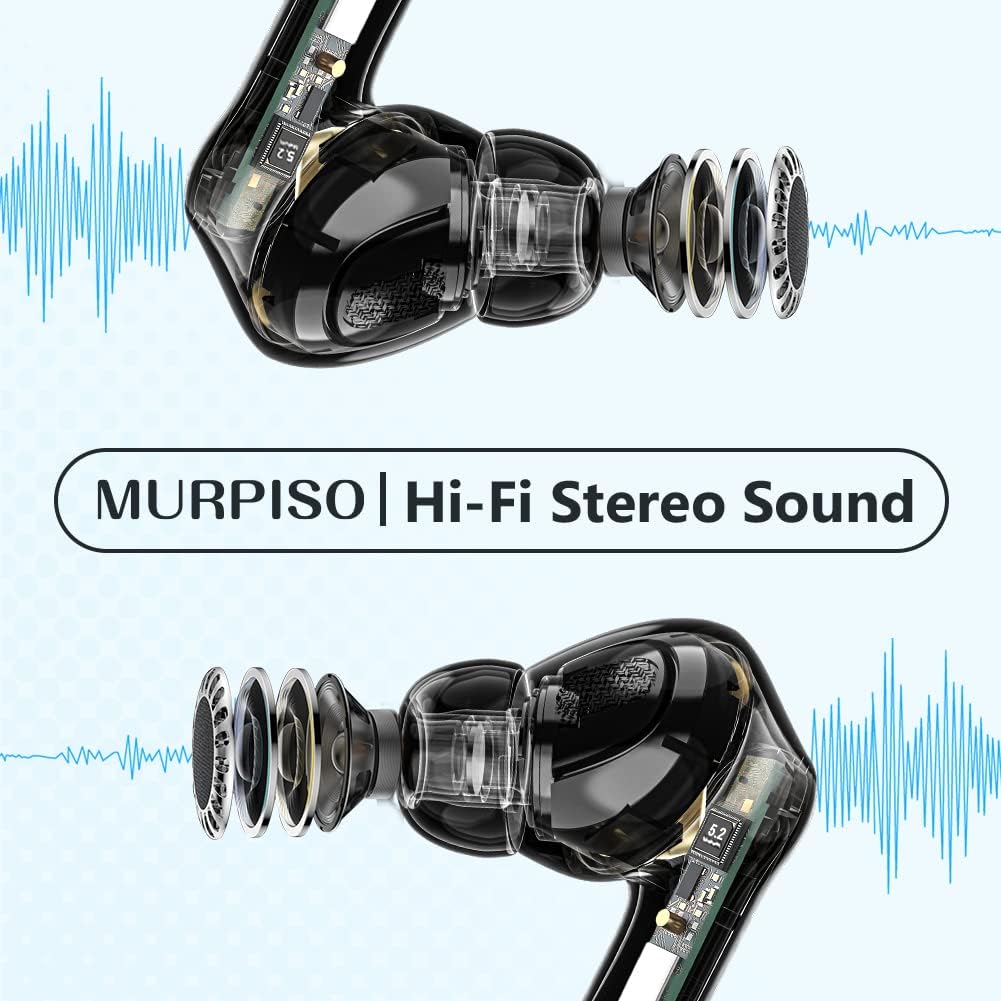
Тасвир: шаффоф view of the earbuds, showcasing their internal components and emphasizing the Hi-Fi Stereo Sound technology.
2. Бекоркунии садои фаъол (ANC)
The U-Pro2 earbuds feature advanced ANC technology to significantly reduce ambient noise. They offer three optional modes:
- ANC Фаъол: For maximum noise reduction, ideal for noisy environments like subways, buses, or offices.
- Ҳолати шаффофият: Ба шумо имкон медиҳад, ки атрофатонро бишнавед, дар ҳоле ки аз садои худ лаззат баред, ки барои огоҳӣ дар ҷойҳои ҷамъиятӣ муфид аст.
- ANC хомӯш: Бекор кардани садоро ғайрифаъол мекунад, ки барои муҳити ором ё сарфаи батарея мувофиқ аст.
Refer to the product's quick start guide or touch control instructions (if applicable) for switching between these modes.

Image: A person wearing the MURPISO earbuds on a train, demonstrating the effectiveness of Active Noise Cancellation in a busy environment.
3. Сифати занг
Equipped with 4 microphones, the U-Pro2 earbuds ensure clear phone calls. The active noise cancellation mode also enhances call clarity by reducing background noise for both you and the person you are speaking with.
4. Муқовимат ба об IPX6
The earbuds are rated IPX6 water-resistant, protecting them from sweat, splashes, and rain. This makes them suitable for workouts and outdoor activities. Шарҳ: Қуттии барқгиранда ба об тобовар нест.

Image: A person pouring water from a bottle onto their face, with the MURPISO earbud visible, illustrating its IPX6 water-resistant and ergonomic design.
Нигоҳдорӣ
Нигоҳдории дуруст умри дароз ва кори оптималии гӯшмонакҳои шуморо таъмин мекунад.
- Тозакунӣ: Regularly clean the earbuds, especially the eartips and charging contacts, with a soft, dry, lint-free cloth. Do not use harsh chemicals or abrasive materials.
- Нигоҳдорӣ: Ҳангоми истифода нашудан, гӯшмонакҳоро дар қуттии пуркунандаи худ нигоҳ доред, то онҳоро аз чанг ва осеб муҳофизат кунед.
- Нигоҳубини батарея: Avoid fully depleting the battery frequently. Charge the case and earbuds regularly, even if not in constant use, to maintain battery health.
- Таъсири об: While IPX6 rated, avoid prolonged exposure to water or submerging the earbuds. Dry them thoroughly if they get wet before placing them back in the charging case.
Мушкилкушо
| Мушкилот | Сабаби эҳтимолӣ | Ҳалли |
|---|---|---|
| Гӯшмонакҳо пайваст намешаванд/пайваст карда намешаванд | Bluetooth off on device, earbuds not in pairing mode, previously paired to another device. | Ensure Bluetooth is on. Place earbuds in case, close lid, then open to re-enter pairing mode. Forget "MURPISO U-Pro2" on your device's Bluetooth settings and re-pair. |
| Садо ва баландии овоз нест | Volume too low on device, earbuds not properly seated, dirty eartips/speakers. | Increase device volume. Adjust earbuds for a secure fit. Clean eartips and speaker mesh. |
| ANC самаранок кор намекунад | Incorrect ANC mode selected, improper fit. | Ensure ANC mode is active. Adjust earbuds for a tighter seal in your ear canal. Try different eartip sizes. |
| Гӯшмонакҳо пур карда намешаванд | Charging contacts dirty, charging case battery low, faulty cable/charger. | Clean charging contacts on earbuds and case. Charge the charging case. Try a different USB cable and power adapter. |
Мушаххасоти
- Модели: U-Pro2
- Бренд: МУРПИСО
- Пайвастшавӣ: Bluetooth 5.2
- Андозаи ронанда: 10мм
- Микрофонҳо: 4 (for clear calls)
- Playtime (Earbuds): 8-10 hours (single charge)
- Вақти умумии бозӣ (бо қуттии пуркунӣ): То 35 соат
- Вақти барқдиҳии гӯшӣ: тахминан. 1.5 соат
- Бекор кардани садо: Active Noise Cancellation (ANC) with Transparency Mode
- Муқовимат ба об: IPX6 (танҳо гӯшмонакҳо)
- Ранги: Сиёҳ
- Омили шакл: Дар-гӯш
- Мавод: Пластмасса
- Навъи батарея: Литий-ион (3 дохил)
Кафолат ва дастгирӣ
For warranty information and customer support, please refer to the documentation included with your purchase or visit the official MURPISO website. If you encounter any issues not covered in this manual, please contact customer service for assistance.
Истеҳсолкунанда: МУРПИСО


