1. Муқаддима
This manual provides detailed instructions for the setup, operation, and maintenance of your Inkbird IBS-P01R Wireless Pool Thermometer and IBS-TH2 Plus Smart Thermometer bundle. Please read this manual thoroughly before using the devices to ensure proper function and longevity.
2. Қисмҳои маҳсулот
The Inkbird bundle includes two primary devices:
- IBS-P01R Wireless Pool Thermometer: A floating, waterproof thermometer designed for water temperature measurement, paired with a receiver unit.
- IBS-TH2 Plus Smart Thermometer: An indoor temperature and humidity monitor with Bluetooth connectivity and an external temperature probe.

Image: The Inkbird IBS-P01R floating pool thermometer and its accompanying receiver unit, displaying water temperature.

Image: The Inkbird IBS-TH2 Plus smart thermometer, showing its digital display for temperature and humidity.
3. Хусусиятҳои асосӣ
IBS-P01R Wireless Pool Thermometer:
- Пайвасти бесим: Up to 300 feet (91 meters) transmission distance for remote monitoring.
- IPX7 обногузар: Муносиб барои муҳитҳои гуногуни об.
- Диапазони ҳарорат: -40℃ to 70℃ (-40℉ to 158℉).
- Истифодаи чандкарата: Ideal for swimming pools, fish ponds, aquariums, baby baths, and spas.
IBS-TH2 Plus Smart Thermometer:
- Built-in Temperature & Humidity Sensor: Monitors ambient conditions.
- External Waterproof Temperature Probe: For specific temperature measurements.
- Нигоҳдории маълумот: Stores up to 30,000 data points.
- Намоиши LCD рақамӣ: Shows temperature, humidity, Bluetooth signal, and battery level.
- Пайвасти Bluetooth: Connects to a smartphone for monitoring and data export.
- Дастгирии чанд дастгоҳ: Connects to multiple phones or reads multiple sensors with one phone.
4. Мушаххасоти техникӣ
IBS-P01R Wireless Pool Thermometer:
- Рейтинги обногузар: IPX7
- Диапазони ченкунии ҳарорат: -40℃ то 70℃ (-40℉ то 158℉)
- Диапазони бесим: То 300 фут (91 метр)
- Манбаи нерӯ: Battery Powered (specific battery type not provided, refer to device compartment)
- Мавод: Пластмасса
IBS-TH2 Plus Smart Thermometer:
- Temperature Sensor Range (Built-in): -40℉ то 140℉
- Humidity Sensor Range (Built-in): 0% RH то 99% RH
- External Probe Temperature Range: -40℃ то 125℃ (-40℉ то 257℉)
- Нигоҳдории маълумот: То 30,000 хол
- Навъи намоиш: LCD рақамӣ
- Пайвастшавӣ: блутуз
- Диапазони Bluetooth: Тақрибан 30 метр (98 фут)
- Манбаи нерӯ: Battery Powered (specific battery type not provided, refer to device compartment)
- Мавод: Пластмасса
5. Дастури насб
5.1. IBS-P01R Wireless Pool Thermometer Setup
- Батареяҳоро насб кунед: Open the battery compartment of both the floating thermometer and the receiver unit. Insert the required batteries, ensuring correct polarity. Close the compartments securely.
- Фаъол: Turn on both the floating thermometer and the receiver. They should automatically attempt to pair.
- Ҷойгиршавӣ: Place the floating thermometer in the water body (pool, spa, etc.). Position the receiver unit within the 300-foot wireless range, ensuring no major obstructions for optimal signal.

Image: Diagram illustrating the wireless connection between the IBS-P01R floating sensor and its receiver, highlighting the 300-foot range.
5.2. IBS-TH2 Plus Smart Thermometer Setup
- Батареяҳоро насб кунед: Open the battery compartment and insert the required batteries, observing polarity. Close the compartment.
- Фаъол: The device will power on automatically or via a power button (refer to device for specific button location). The LCD will display current temperature and humidity.
- External Probe (Optional): If using the external temperature probe, plug it into the designated port on the IBS-TH2 Plus.
- Насби барнома: Download the Inkbird Pro app from your smartphone's app store (iOS or Android).
- Ҷуфтсозии Bluetooth: Open the Inkbird Pro app, enable Bluetooth on your phone, and follow the in-app instructions to add and pair your IBS-TH2 Plus device.

Image: Illustration of the IBS-TH2 Plus connecting to a smartphone via Bluetooth, showing the approximate 30-meter range within a home environment.
6. Дастурҳои истифодабарӣ
6.1. Using the IBS-P01R Pool Thermometer
- Reading Temperature: The receiver unit will display the water temperature measured by the floating thermometer.
- Интихоби канал: If multiple IBS-P01R units are used, the receiver may have a button to cycle through channels (refer to device for specific button).

Image: Various applications for the IBS-P01R pool thermometer, including swimming pools, baby baths, hot springs, spas, fish ponds, and aquariums.
6.2. Using the IBS-TH2 Plus Smart Thermometer
- Намоиши дастгоҳ: The LCD shows real-time temperature and humidity.
- Мониторинги барнома: Open the Inkbird Pro app to view current and historical data, set alerts, and export data.
- Содироти маълумот: Within the app, navigate to the historical data section and use the export function to save data (e.g., as a CSV file).

Image: Screenshots from the Inkbird Pro app demonstrating historical data viewing and the data export feature for the IBS-TH2 Plus.
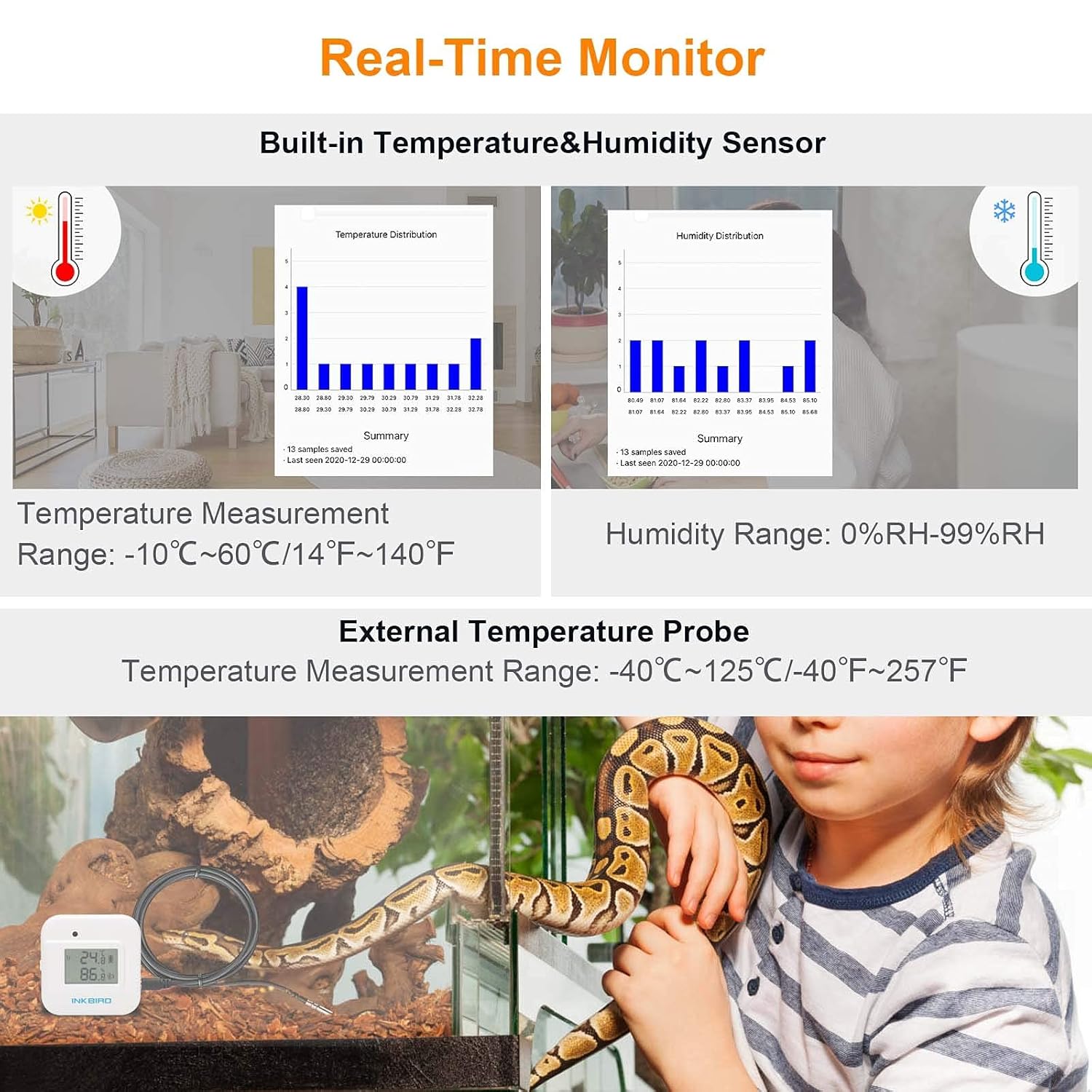
Image: The IBS-TH2 Plus displaying real-time temperature and humidity, with graphs showing historical data distribution and an example of the external probe in use for a terrarium.

Image: Various applications for the IBS-TH2 Plus, including refrigerators, humidors, offices, greenhouses, warehouses, rooms, cars, and pet enclosures.
7. Нигоҳдорӣ
- Иваз кардани батарея: When the battery indicator on the display is low, replace the batteries promptly. Use the specified battery type (refer to the device's battery compartment).
- Тозакунӣ: Дастгоҳҳоро бо матои нарм пок кунед, damp cloth. Do not use abrasive cleaners or immerse the IBS-TH2 Plus in water. The IBS-P01R is waterproof but should be cleaned gently.
- Нигоҳдорӣ: Store the devices in a cool, dry place when not in use for extended periods. Remove batteries if storing for several months to prevent leakage.
- Нигоҳубини маҳсулот: The manufacturer recommends hand washing only for cleaning.
8. Баррасии мушкилот
- Намоиш / Қувва: Насби батареяро тафтиш кунед ва боварӣ ҳосил кунед, ки батареяҳо тару тоза мебошанд.
- IBS-P01R No Reading on Receiver: Ensure both units are powered on and within range. Reduce obstructions between the floating unit and receiver. Replace batteries in both units.
- IBS-TH2 Plus Not Connecting to App: Ensure Bluetooth is enabled on your phone. Restart the app and the IBS-TH2 Plus. Make sure the device is within the 30-meter Bluetooth range.
- Хонишҳои нодуруст: Ensure sensors are clean and not obstructed. For the IBS-P01R, ensure it is fully submerged in the water. For the IBS-TH2 Plus, ensure it is placed in an area with good air circulation, away from direct heat sources or drafts.
- Ба қайд гирифта нашудани маълумот: Check the device's battery level. Ensure the app is connected periodically to sync data.
9. Маълумот оид ба бехатарӣ
- Do not attempt to disassemble or modify the devices.
- Батареяҳоро аз дастрасии кӯдакон дур нигоҳ доред. Батареяҳои истифодашударо мувофиқи қоидаҳои маҳаллӣ партов кунед.
- Ensure the IBS-P01R is securely floating and does not interfere with pool cleaning systems or other equipment.
- Avoid exposing the IBS-TH2 Plus to extreme temperatures or humidity outside its specified operating range.
10. Кафолат ва дастгирӣ
Inkbird products typically come with a limited warranty. For specific warranty details, product support, or technical assistance, please refer to the warranty card included with your purchase or visit the official Inkbird website. Contact information for customer service is usually available on the product packaging or the official webсайт.


