1. Муқаддима
Thank you for choosing the Aerocool Crown AeroSuede Gaming Chair. This manual provides essential information for the safe and correct assembly, operation, and maintenance of your new chair. Please read these instructions thoroughly before assembly and retain this manual for future reference.
The Aerocool Crown AeroSuede Gaming Chair is designed for comfort and durability, featuring an ergonomic design and high-quality materials to support extended periods of use.
2. Хусусиятҳои маҳсулот
The Aerocool Crown Gaming Chair incorporates several features designed to enhance user experience:
- High-Performance Comfort: Constructed with durable stitching on the backrest and seat, providing both aesthetic appeal and exceptional comfort.
- Тарҳрезии эргономикӣ: Engineered to offer sustained ergonomic support, promoting relaxation and comfort during prolonged work, gaming, or study sessions.
- Tilt Control Mechanism: Allows for a rocking motion up to 18 degrees. A locking mechanism is included to secure the chair in a fixed position if preferred.
- Robust and Reliable Structure: Built with premium materials, including a sturdy steel frame and a durable nylon base, ensuring long-term stability and quality.
- Дастпӯшакҳои танзимшаванда: Provides customizable support for arms and shoulders.
- Дастгирии бели танзимшаванда: Offers personalized lower back support.
- Баландии танзимшаванда: Allows for customization of the chair's height to suit individual preferences and desk setups.
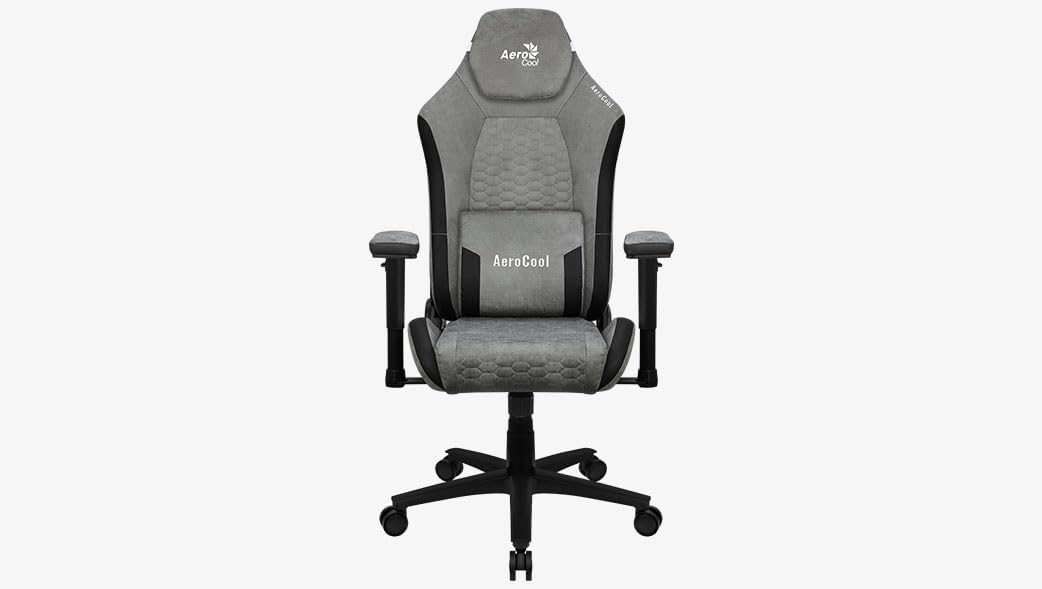
Расми 1: Пеш view of the Aerocool Crown AeroSuede Gaming Chair. The chair features a grey AeroSuede material with black accents, adjustable armrests, a headrest, and a five-star base with casters.
3. Дастурамал оид ба васлкунӣ
Before beginning assembly, ensure all components are present and undamaged. It is recommended to assemble the chair on a soft, clean surface to prevent scratching. Two people may be required for certain steps.
- Компонентҳоро кушоед: Carefully remove all parts from the packaging and lay them out.
- Пойгоҳро ҷамъ кунед: Insert the five casters into the holes at the end of each leg of the five-star base. Ensure they are securely seated.
- Насб кардани лифтҳои газӣ: Place the gas lift cylinder into the central hole of the assembled five-star base.
- Механизмро ба нишастгоҳ пайваст кунед: Secure the tilt mechanism to the underside of the seat using the provided screws. Ensure the front of the mechanism aligns with the front of the seat.
- Дастпӯшакҳоро пайваст кунед: Fasten the armrests to the sides of the seat base using the designated screws. Do not overtighten initially.
- Пайваст кардани пушт ба нишастгоҳ: Align the backrest with the seat and secure it using the screws. Once all screws are in place for the backrest and armrests, tighten them firmly.
- Маҷмӯи нишастгоҳро ба лифтҳои газӣ насб кунед: Carefully place the assembled seat and backrest onto the gas lift cylinder, ensuring it is centered and stable.
- Attach Cushions (if separate): If your model includes separate headrest and lumbar cushions, attach them as desired using their integrated straps.
After assembly, test all functions and ensure all screws are tightened. Do not use the chair if any part feels loose or unstable.
4. Дастурҳои истифодабарӣ
Your Aerocool Crown Gaming Chair offers several adjustment options for personalized comfort:
- Танзими баландӣ: To adjust the chair height, pull the lever located under the right side of the seat upwards. While seated, lift your weight off the seat to raise it, or remain seated to lower it. Release the lever to lock the height.
- Функсияи майл/ҷунбондан: To enable the rocking function, pull the lever located under the left side of the seat outwards. To disable it and lock the chair in an upright position, push the lever inwards.
- Танзими шиддати чархиш: The round knob located under the front of the seat controls the tension of the rocking mechanism. Turn clockwise to increase tension (making it harder to rock) or counter-clockwise to decrease tension (making it easier to rock).
- Танзими дастӣ: The armrests can be adjusted in height. Press the button on the side of each armrest support and move the armrest up or down to your desired position. Release the button to lock.
- Пойгоҳи тахтапушт: Pull the recline lever (typically on the right side, near the seat) upwards and lean back to adjust the backrest angle. Release the lever to lock the backrest in place.
5. Нигоҳдорӣ
Proper maintenance ensures the longevity and performance of your gaming chair:
- Тозакунӣ: Wipe the chair surfaces with a clean, damp cloth. For synthetic leather, use a mild soap solution if necessary, then wipe with a clean, dry cloth. Avoid harsh chemicals or abrasive cleaners.
- Санҷиши мунтазам: Periodically check all screws and bolts to ensure they are tight. Retighten if necessary to maintain stability and safety.
- Нигоҳубини кастер: Барои таъмини ҳаракати бемамониат чархҳоро аз мӯй ва партовҳо тоза нигоҳ доред.
- Аз нурҳои бевоситаи офтоб худдорӣ намоед: Таъсири дарозмуддати нури офтоб метавонад боиси фарсудашавӣ ва вайроншавии мавод гардад.
6. Баррасии мушкилот
This section addresses common issues you might encounter with your gaming chair:
- Ҷингираки курсӣ:
- Check and tighten all screws, especially those connecting the backrest, seat, and mechanism.
- Apply a small amount of silicone lubricant to moving parts or joints if the squeaking persists.
- Chair is Unstable/Wobbly:
- Боварӣ ҳосил кунед, ки ҳама винтҳо пурра мустаҳкам карда шудаанд.
- Verify that the gas lift is properly seated in the base and the seat mechanism.
- Check if the casters are fully inserted into the base.
- Height Adjustment Not Working:
- Ensure the height adjustment lever is fully engaged when attempting to adjust.
- Check for any obstructions around the gas lift mechanism.
- If the gas lift is completely unresponsive, it may need replacement.
- Chair Does Not Rock/Tilt:
- Ensure the tilt lock lever is disengaged (pulled outwards).
- Adjust the tilt tension knob (under the seat) to a looser setting (counter-clockwise).
7. Мушаххасоти
| Аттрибут | Тафсилот |
|---|---|
| Бренд | Aerocool |
| Рақами модел | CROWNSG |
| Ранги | Stone Grey |
| Андозаҳои маҳсулот (L x W x H) | 52 х 52 х 133 см |
| Материал | Synthetic Leather (AeroSuede) |
| Маводи чаҳорчӯба | Пӯлоди хӯлаи |
| Вазни ашё | 18.9 килограмм |
| Хусусиятҳои махсус | Armrest, Ergonomic, Adjustable Height, Adjustable Lumbar Support |
| Дастурҳои нигоҳубин | Clean (Wipe with damp матоъ) |
8. Кафолат ва дастгирӣ
Specific warranty information for the Aerocool Crown AeroSuede Gaming Chair is not provided in the available product data. For details regarding warranty coverage, claims, or technical support, please contact Aerocool customer service directly or refer to the official Aerocool webсайт.
Барои ҳама гуна саволҳои марбут ба кафолат, ҳамеша далели хариди худро нигоҳ доред.


