1. Муқаддима
This manual provides detailed instructions for the setup, operation, and maintenance of your ITECH Fusion 2 S Smartwatch and accompanying Wireless Headphones. The ITECH Fusion 2 S is designed to help you monitor your health and fitness goals, offering features such as heart rate tracking, step counting, sleep monitoring, and multi-sport modes. The included wireless headphones provide an integrated audio experience.
2. Мундариҷаи баста
Лутфан тасдиқ кунед, ки ҳама ашё дар бастаи шумо мавҷуданд:
- ITECH Fusion 2 S Smartwatch
- Гӯшмонакҳои бесим
- USB Charging Cable (for smartwatch)
- USB Charging Cable (for headphones)
- Дастури корбар (ин ҳуҷҷат)

Image: The ITECH Fusion 2 S Smartwatch and Wireless Headphones displayed within their retail packaging.
3. Дастгоҳ тамом шудview
3.1. ITECH Fusion 2 S Smartwatch

Image: The ITECH Fusion 2 S Smartwatch with a grey camouflage band shown alongside the matching wireless headphones.
The smartwatch features a touch screen display, a side button for navigation, and sensors on the rear for health monitoring. The display shows time, date, activity data, and notifications.

Image: A close-up of the ITECH Fusion 2 S Smartwatch display, highlighting features such as heart rate monitor, apps and notifications, multi-sports modes, water resistance, calorie tracker, music remote, pedometer, sleep monitor, hydration reminder, and extended 14-day battery life.
3.2. Wireless Headphones
The wireless headphones are over-ear style with cushioned earcups and an adjustable headband. Controls for audio playback and calls are located on the earcup.

Тасвир: як тараф view of the ITECH Wireless Headphones, illustrating features like powerful sound quality, convenient controls, comfort for hours, and a go-anywhere design.

Тасвир: Муфассал view of the ITECH Wireless Headphones, emphasizing noise isolating fit, built-in microphone, Bluetooth wireless technology, and up to 8 hours of playback.

Image: A diagram of the ITECH Wireless Headphones highlighting the flexible headband, comfortable ear cushion, foldable design, and convenient controls, along with key technical specifications.
4. Танзимот
4.1. Барқдиҳии дастгоҳҳои шумо
Before first use, fully charge both your smartwatch and wireless headphones.
- Смарт соат: Connect the USB charging cable to the charging port on the back of the smartwatch and to a USB power source. The battery icon on the screen will indicate charging status.
- Wireless Headphones: Connect the USB charging cable to the charging port on the headphones and to a USB power source. An indicator light will show charging status and turn off when fully charged.
4.2. Фаъол/хомӯш
- Смарт соат: To power on, press and hold the side button until the screen illuminates. To power off, navigate to the 'Settings' menu on the smartwatch, then select 'Power Off'.
- Wireless Headphones: To power on, press and hold the power button until the indicator light flashes. To power off, press and hold the power button again until the indicator light turns off.
4.3. Pairing the Smartwatch with Your Smartphone
The ITECH Fusion 2 S Smartwatch is compatible with both iPhone and Android devices.
- -ро зеркашӣ кунед iTECH Wearables барнома аз Store App Store ё Google Play Store.
- Боварӣ ҳосил кунед, ки Bluetooth дар смартфони шумо фаъол аст.
- Open the iTECH Wearables app and follow the on-screen instructions to create an account and pair your smartwatch.
- The app will guide you through connecting the smartwatch via Bluetooth. Confirm the pairing request on both your phone and smartwatch.
4.4. Pairing the Wireless Headphones
- Боварӣ ҳосил кунед, ки гӯшмонакҳо хомӯш карда шудаанд.
- Тугмаи барқро пахш карда нигоҳ доред, то он даме ки чароғи нишондиҳанда зуд дурахшад ва ҳолати ҷуфтшавиро нишон диҳад.
- Дар смартфони худ ё дигар дастгоҳи дорои Bluetooth, ба танзимоти Bluetooth равед ва дастгоҳҳои дастрасро ҷустуҷӯ кунед.
- Select "ITECH Headphones" (or similar name) from the list to connect. The indicator light will change to a steady blue when successfully paired.
5. Идоракунии соати интеллектуалӣ
5.1. Навигатсия
- Шишаи ламсӣ: Барои паймоиш дар менюҳо ва хусусиятҳо ба чап/ рост, боло/поён лағжед. Барои интихоб клик кунед.
- Тугмаи тарафӣ: Барои баргаштан ба экрани асосӣ ё бедор кардани дастгоҳ, пахш кунед.
5.2. Watch Faces
Customize your smartwatch display by changing watch faces. On the home screen, press and hold the display, then swipe left or right to browse available watch faces. Tap to select your preferred design.
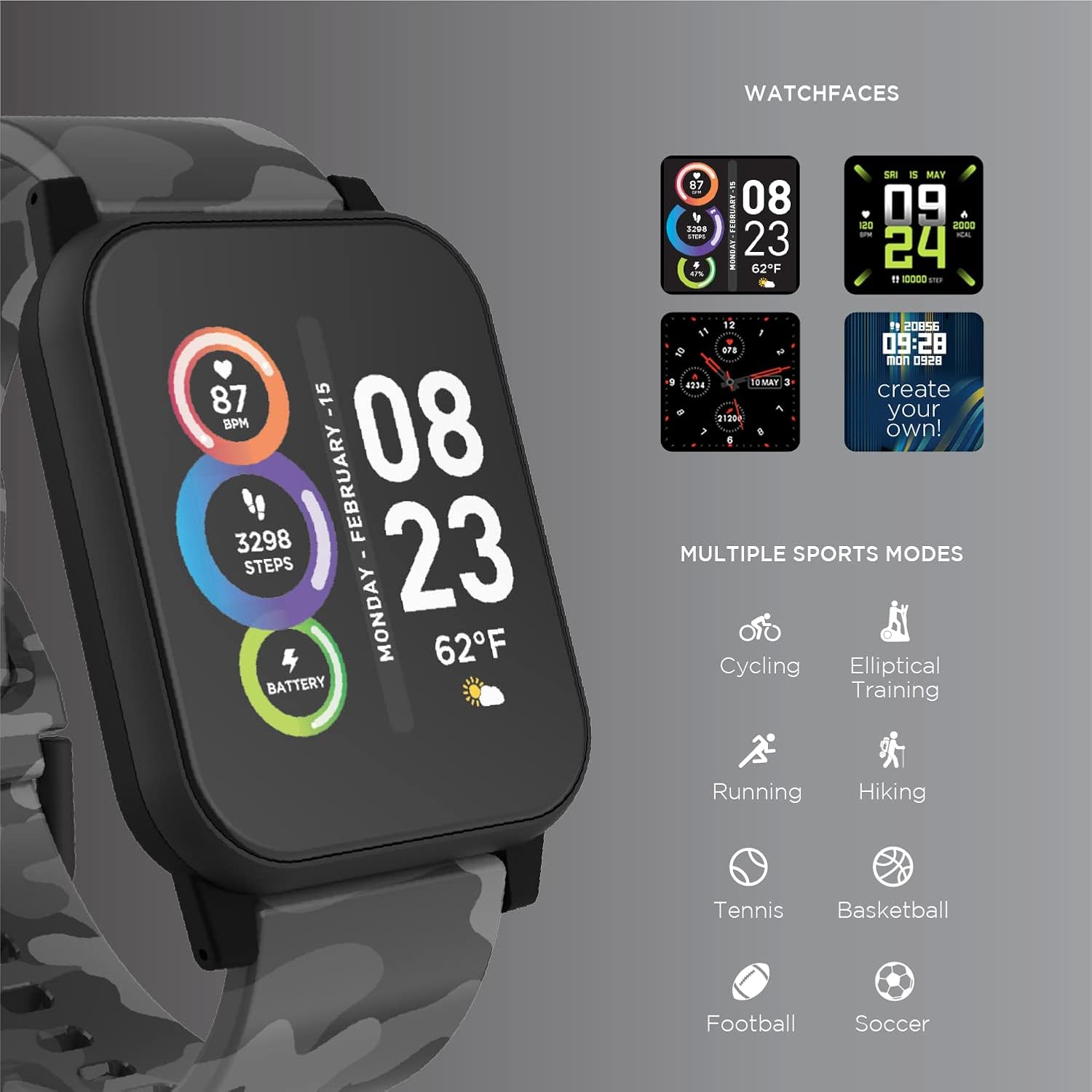
Image: The ITECH Fusion 2 S Smartwatch display showing various customizable watch faces and icons representing multiple sports modes including cycling, elliptical training, running, hiking, tennis, basketball, football, and soccer.
5.3. Хусусиятҳои асосӣ
- Мониторҳои набзи дил: Access the heart rate feature on your smartwatch to measure your heart rate using the built-in optical sensor. Ensure the watch is snug on your wrist for accurate readings.
- Қадамсанҷ (Қадамсанҷ): The smartwatch automatically tracks your daily steps, distance, and calories burned. View your progress on the device or in the iTECH Wearables app.
- Монитори хоб: Wear your smartwatch to bed to track your sleep patterns, including light and deep sleep stages. Data is synchronized with the app for detailed analysis.
- Усулҳои бисёр варзишӣ: Select from various sports modes (e.g., running, cycling, hiking) to track specific workout data, including duration, distance, and calories.
- Огоҳиҳои паёмӣ: Receive notifications for calls, texts, and app alerts directly on your smartwatch when connected to your smartphone.
- Назоратчии калория: Monitors calories burned throughout the day based on your activity level.
- Ёдраскунии гидратсия: Set reminders to drink water at regular intervals through the app.
- Мусиқии дурдаст: Control music playback on your smartphone directly from your smartwatch (play, pause, skip tracks).
5.4. Интегратсияи барномаҳо
Барои ҳамаҷониба view of your health and fitness data, regularly sync your smartwatch with the iTECH Wearables app. The app allows you to set goals, view historical data, customize settings, and manage notifications.
6. Operating the Wireless Headphones
6.1. Назоратҳо
The headphones feature intuitive controls for media playback and call management:
- Тугмаи барқ: Барои фаъол/хомӯш кардан пахш карда нигоҳ доред. Барои бозӣ/таваққуф кӯтоҳ пахш кунед.
- Тугмаҳои баландии овоз: Барои зиёд кардани баландии овоз тугмаи "+"-ро ва барои кам кардани баландии овоз тугмаи "-"-ро пахш кунед.
- Назорати трек: Press and hold '+' for next track, '-' for previous track.
- Идоракунии зангҳо: Short press power button to answer/end calls. Press and hold to reject calls.
6.2. Хусусиятҳои аудио
- Сифати баланди садо: Designed to deliver clear and rich audio.
- Noise Isolating Fit: The over-ear design helps to reduce external noise for an immersive listening experience.
- Микрофони дарунсохт: Зангҳои бедастро фаъол мекунад.
6.3. Муҳлати батарея
The wireless headphones provide up to 8 hours of playback on a single charge, depending on usage and volume levels.

Image: A person wearing the ITECH Fusion 2 S Smartwatch on their wrist and the matching wireless headphones, demonstrating typical use.
7. Нигоҳдорӣ
7.1. Тозакунӣ
- Смарт соат: Wipe the screen and band with a soft, damp, матои бехат. Аз маводи кимиёвии сахт ё маводи абразивӣ худдорӣ намоед.
- Гӯшмонакҳо: Gently wipe earcups and headband with a soft, dry cloth. Do not immerse in water.
7.2. Water Resistance (Smartwatch)
The ITECH Fusion 2 S Smartwatch is IP67 water resistant. This means it is protected against dust and can withstand immersion in water up to 1 meter for up to 30 minutes. It is suitable for daily use and light splashes, but not recommended for swimming, showering, or prolonged water immersion.
7.3. Нигоҳдорӣ
Store your devices in a cool, dry place away from direct sunlight and extreme temperatures when not in use.
8. Баррасии мушкилот
If you encounter issues with your ITECH Fusion 2 S devices, please refer to the following common solutions:
- Дастгоҳ фаъол нест: Ensure the device is fully charged. Try connecting it to a different USB power source.
- Smartwatch not pairing with phone: Ensure Bluetooth is enabled on your phone and the smartwatch is within range. Restart both devices and try pairing again through the iTECH Wearables app.
- Гӯшмонакҳо пайваст намешаванд: Ensure headphones are in pairing mode (rapidly flashing indicator light). Check your device's Bluetooth settings and try reconnecting.
- Inaccurate heart rate/step readings: Боварӣ ҳосил кунед, ки соати интеллектуалӣ дар дастатон маҳкам пӯшида шудааст, на он қадар танг ё хеле фуҷур. Сенсори қафои соатро тоза кунед.
- Огоҳиҳо пайдо намешаванд: Check app permissions on your smartphone to ensure the iTECH Wearables app has access to notifications. Verify notification settings within the app.
- Audio issues with headphones: Ensure headphones are fully charged and properly paired. Check volume levels on both the headphones and the connected device.
If problems persist, consider performing a factory reset (refer to the smartwatch settings menu or contact customer support for headphones). For further assistance, please contact Itech customer support.
9. Мушаххасоти
| Хусусият | Тафсилот |
|---|---|
| Андозаҳои маҳсулот | 22.86 x 5.08 x 22.86 см; 621 г. |
| Рақами модели ашё | 900366B-40-G57 |
| Низоми амал | Android (Compatible with iPhone and Android) |
| Хусусиятҳои махсус | Heart Rate Monitor, Step Counter, Sleep Monitor, Message Notifications, Multi-Sport Modes |
| Технологияи пайвастшавӣ | USB |
| Стандартҳои алоқаи бесим | блутуз |
| Таркиби ҳуҷайраҳои батарея | Иони литий |
| Низоми муайянкунии ҷаҳонии ҷои ист | Дуруст |
| Smartwatch Shape | Майдон |
| Smartwatch Screen Size | 1.3 инч |
| Бренд | ITech |
| Номи модел | Fusion 2 Bundle |
| Муқовимат ба об | IP67 |
| Headphones Playback Time | То 8 соат |
| Headphones Driver Diameter | 40мм |
| Headphones Connection Type | Bluetooth® 5.0 |
| Импеданси гӯшмонакҳо | 32 Ом ±15% |
| Ҷавоб ба басомади гӯшмонакҳо | 20Гц - 20КГц |
10. Кафолат ва дастгирӣ
Your ITECH Fusion 2 S Smartwatch and Wireless Headphones are covered by a manufacturer's warranty. Please refer to the warranty card included in your package or visit the official Itech webсайт барои шартҳо ва шартҳои кафолати муфассал.
For technical support, troubleshooting assistance, or warranty claims, please contact Itech customer service through their official webсайт ё маълумоти тамос, ки дар ҳуҷҷатҳои маҳсулоти шумо оварда шудааст.


