1. Муқаддима
Ташаккур ба шумо барои харидasing the Aogamb D3000 Kids Alarm Clock. This device combines a digital alarm clock, Bluetooth speaker, wake-up light, and sleep sound machine to create a versatile and engaging experience for children's bedrooms. Please read this manual carefully to ensure proper use and maintenance of your device.
Мундариҷаи баста:
- Aogamb D3000 Alarm Clock
- Сими пуркунандаи USB
- Дастури корбар

Image: The Aogamb D3000 Alarm Clock, USB charging cable, and user manual are shown as included items.
2. Маълумот оид ба бехатарӣ
- Дастгоҳро ба ҳарорати аз ҳад зиёд, нурҳои бевоситаи офтоб ё намии баланд нагузоред.
- Дастгоҳро аз об ё дигар моеъҳо дур нигоҳ доред.
- Дастгоҳро худатон ба қисмҳо ҷудо кунед ё таъмир накунед. Барои кӯмак бо дастгирии мизоҷон тамос гиред.
- Танҳо сими пуркунандаи USB-и додашуда ё сими муодили тасдиқшударо истифода баред.
- Ensure the device is placed on a stable surface to prevent falling.
3. Танзимот
Пуркунии ибтидоӣ
Before first use, fully charge the alarm clock using the provided USB cable. Connect the USB cable to the charging port on the back of the device and to a suitable USB power adapter (not included). The charging indicator light will be red during charging and turn blue when fully charged.
Тасвир: Нақшаи наздик view of the USB charging interface located on the back of the alarm clock.
Protective Film Removal
Before operating the device, gently remove the transparent protective film from the black display lens.
Image: A hand is shown peeling off a transparent protective film from the black display area of the alarm clock.
4. Дастурҳои истифодабарӣ
Назоратҳоview
Familiarize yourself with the buttons located on the top of the alarm clock:
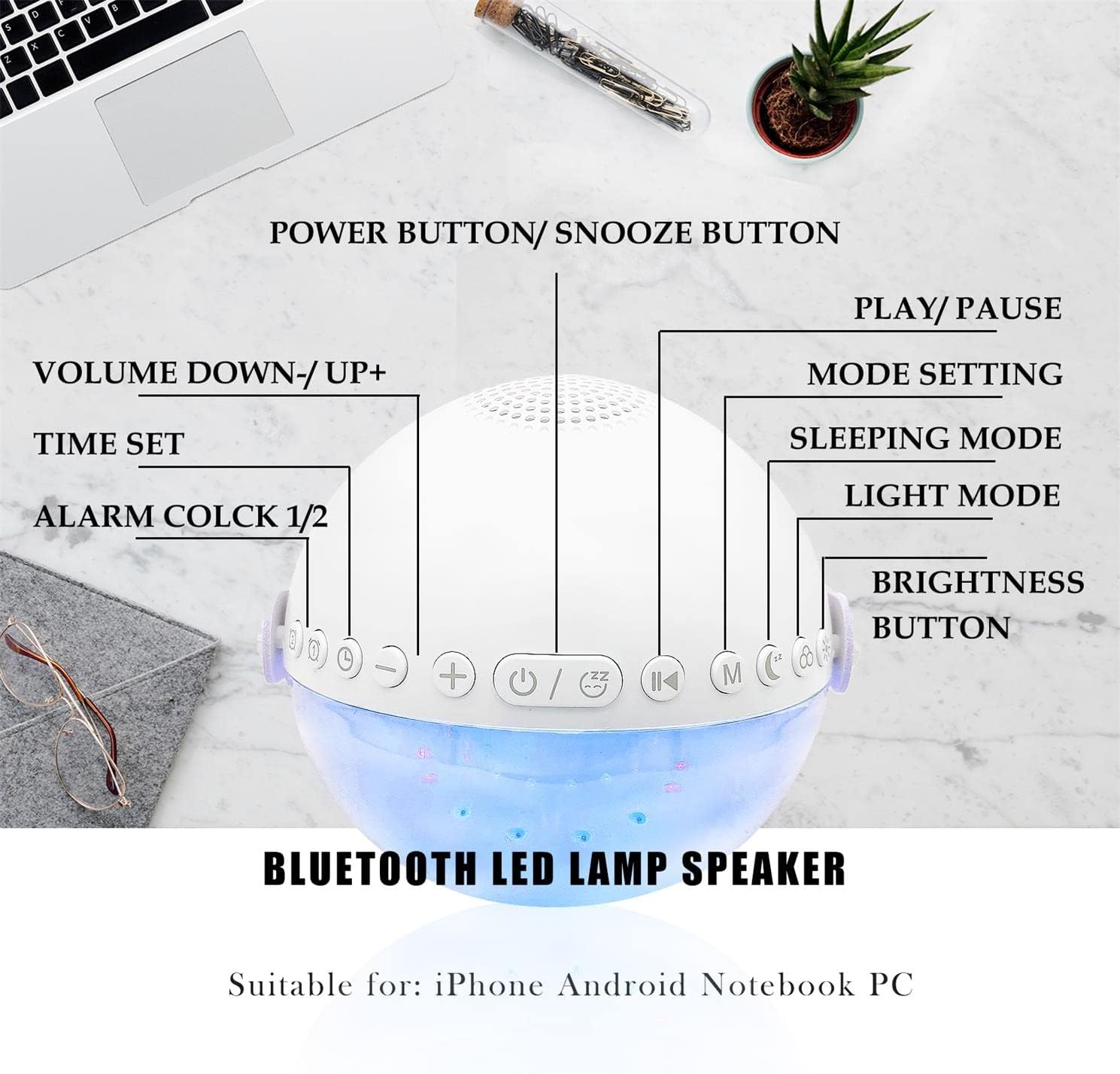
Тасвир: Сари боло view of the alarm clock with labels pointing to each button: Power/Snooze, Volume Down/Up, Time Set, Alarm 1/2, Play/Pause, Mode Setting, Sleeping Mode, Light Mode, and Brightness Button.
- Power Button / Snooze Button: Press to power on/off. Short press during an alarm to activate snooze.
- Volume Down (-) / Volume Up (+): Барои танзими баландии овоз кӯтоҳ пахш кунед.
- Танзими вақт: Press to enter time setting mode.
- Сигнализатсияи 1 / Сигнализатсияи 2: Press to set or activate/deactivate Alarm 1 or Alarm 2.
- Бозӣ / Таваққуф: Controls media playback in Bluetooth or Sound Machine mode.
- Mode Setting (M): Press to cycle through modes (Bluetooth, Sound Machine).
- Ҳолати хоб: Activates sleep mode features.
- Ҳолати нур: Cycles through light colors and effects.
- Тугмаи равшанӣ: Adjusts display and light brightness.
Танзими вақт
- -ро пахш кунед Танзими вақт тугма. Намоиши соат дурахшанда мешавад.
- -ро истифода баред Баланд бардоштани овоз (+) or Баланд шудани овоз (-) тугмаҳо барои танзими соат.
- пахш кунед Танзими вақт барои тасдиқи соат ва гузаштан ба танзимоти дақиқа дубора пахш кунед.
- -ро истифода баред Баланд бардоштани овоз (+) or Баланд шудани овоз (-) тугмаҳо барои танзими дақиқаҳо.
- пахш кунед Танзими вақт one more time to confirm and exit time setting.
- The clock supports a 24-hour format.
Alarm Setting (Dual Alarms)
The device features two independent alarms. You can customize ringtones, alarm volume, and light color/brightness for each.
- -ро пахш кунед Ҳушдор 1 or Ҳушдор 2 button to select an alarm. The alarm icon will flash.
- Follow the time setting steps to set the desired alarm time.
- After setting the time, you can customize the alarm sound, volume, and wake-up light settings using the respective buttons (e.g., Ҳолати нур, Ҳаҷм +/-).
- -ро пахш кунед Ҳушдор 1 or Ҳушдор 2 button again to activate/deactivate the alarm. The alarm icon will appear/disappear on the display.
Image: Two panels illustrate customized alarm times: one for waking up at 7:30 AM and another for going to sleep at 10:00 PM, both for Monday to Friday.
Функсияи таъхир
Вақте ки ҳушдор садо медиҳад, -ро пахш кунед Power Button / Snooze Button to activate the snooze function. The alarm will pause for 5 minutes and then sound again. This can be repeated up to three times, after which the alarm will turn off automatically.
Image: The alarm clock is displayed with a clear indication of its snooze function.
Ҳолати баландгӯяки Bluetooth
The alarm clock features advanced Bluetooth 5.0 technology for wireless audio streaming.
- -ро пахш кунед Mode Setting (M) button repeatedly until the Bluetooth icon appears on the display.
- On your smartphone or Bluetooth-enabled device, search for "Aogamb D3000" in the Bluetooth settings and pair.
- Once connected, you can play music or audio from your device through the alarm clock speaker.
- -ро истифода баред Бозӣ / Таваққуф тугма барои назорати бозикунии.
- -ро истифода баред Баланд бардоштани овоз (+) or Баланд шудани овоз (-) тугмаҳо барои танзими баландии овоз.

Image: A child and adult are shown with the alarm clock, which is wirelessly connected to a smartphone via Bluetooth, playing music.
Мошини садои хоб
The alarm clock offers 8 soothing natural sounds to aid sleep or relaxation.
- -ро пахш кунед Mode Setting (M) button repeatedly until the Sound Machine icon appears on the display.
- -ро кӯтоҳ пахш кунед Баланд бардоштани овоз (+) or Баланд шудани овоз (-) buttons to cycle through the 8 available sounds: Rain, Ocean Waves, Birds, Water Stream, White Noise, Cicada, Bonfire, Tick-Tock.
- -ро дароз пахш кунед Баланд бардоштани овоз (+) or Баланд шудани овоз (-) buttons to adjust the volume of the sleep sounds.
- -ро пахш кунед Бозӣ / Таваққуф button to start or stop the sound.

Image: A child and adult are shown sleeping, with the alarm clock nearby. Icons for 8 natural sounds (Rain, Water Stream, Cicadas, Birds, Ocean Waves, White Noise, Bonfire, Tick-Tock) are displayed, indicating the sleep sound feature.
Wake-up Light / Night Light
The alarm clock features a touch-activated backlight and adjustable colored lights.
- Touch-Activated Backlight: Gently tap the device to activate the backlight for checking the time in the dark.
- Ҳолати нур: -ро пахш кунед Ҳолати нур button to cycle through various light colors (Warm White, Green, Red, Blue, Orange, Yellow) and lighting effects (e.g., breathing lights, flashing light).
- Танзими равшанӣ: -ро пахш кунед Тугмаи равшанӣ to adjust the intensity of the light (3 levels: Low, Middle, High).

Image: The alarm clock is shown displaying various colorful night light options, including 9 different colors, 3 breathing light effects, and 1 flashing light, with adjustable brightness levels (Low, Middle, High).

Image: The alarm clock is shown with various light colors and brightness settings, illustrating its wake-up light functionality.
Sleep Trainer Function (Sun & Moon Icons)
The alarm clock features sun and moon icons on the LED display to help children understand day and night cycles, promoting better sleep habits. The sun icon indicates daytime, and the moon icon indicates nighttime.
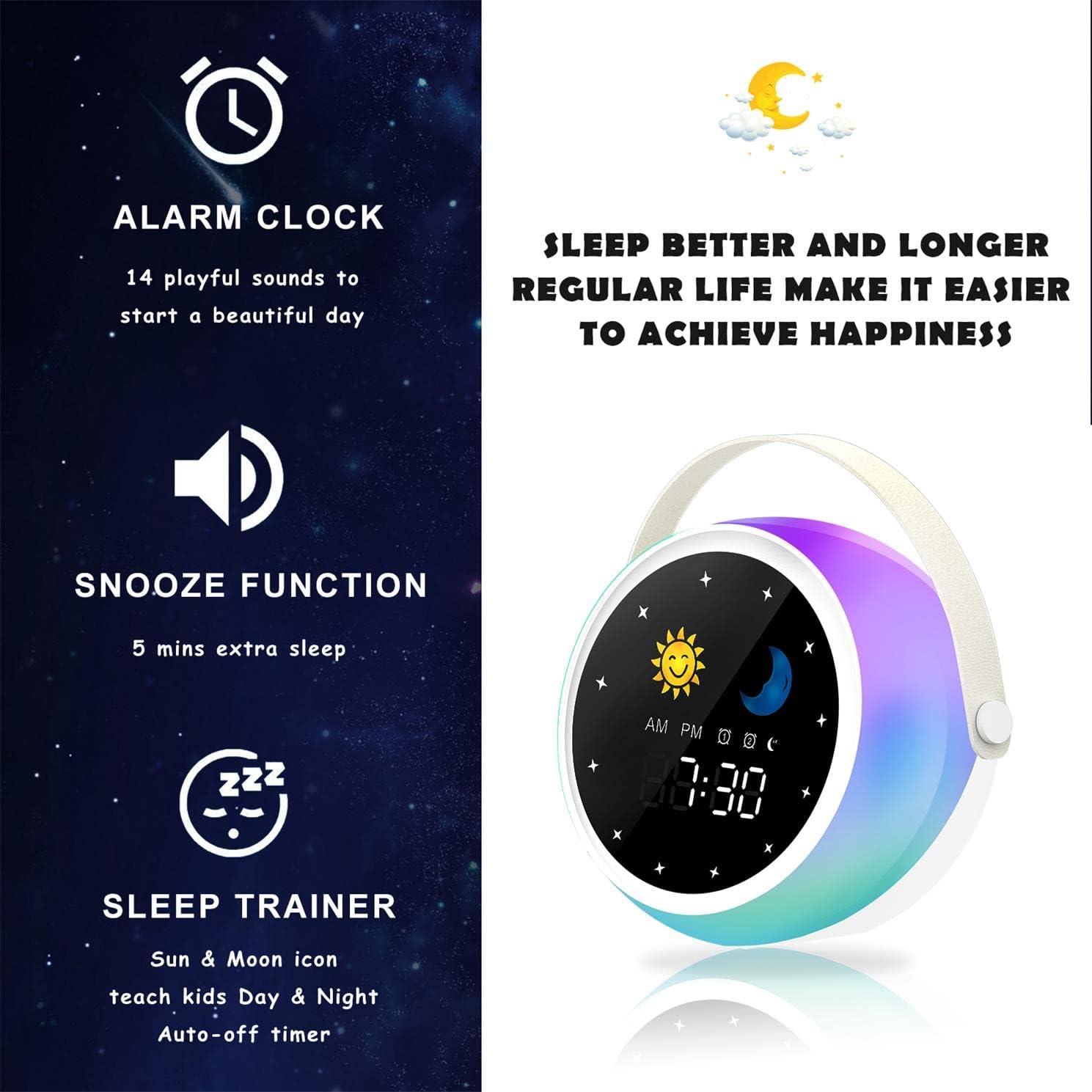
Image: A visual representation of the alarm clock's key features: alarm, snooze, and sleep trainer, with the sun and moon icons visible on the display to teach day and night.

Image: Two panels show the alarm clock display: one for sleep time (10:30 PM with moon icon) and one for wake-up time (7:00 AM with sun icon), illustrating the sleep trainer function.
5. Нигоҳдорӣ
- Дастгоҳро бо матои хушк ва мулоим тоза кунед. Тозакунанда ё ҳалкунандаҳои абразивиро истифода набаред.
- Боварӣ ҳосил кунед, ки порти барқгиранда аз чанг ва партовҳо холӣ аст.
- Дастгоҳро дар ҷои хунук ва хушк нигоҳ доред, вақте ки дар муддати тӯлонӣ истифода намешаванд.
6. Баррасии мушкилот
Дастгоҳ фурӯзон нест:
- Ensure the device is fully charged. Connect it to a power source using the USB cable.
- Press and hold the Power Button for a few seconds.
Масъалаҳои пайвасткунии Bluetooth:
- Make sure the alarm clock is in Bluetooth mode (Bluetooth icon visible).
- Ensure your smartphone or device's Bluetooth is enabled and within range.
- Try restarting both the alarm clock and your Bluetooth device.
- Дастгоҳро аз рӯйхати Bluetooth-и телефони худ фаромӯш кунед ва дубора пайваст кунед.
Огоҳӣ садо намедиҳад:
- Боварӣ ҳосил кунед, ки сигнализатсия фаъол аст (нишонаи сигнализатсия дар экран намоён аст).
- Танзимоти баландии овози ҳушдорро санҷед.
- Боварӣ ҳосил кунед, ки вақти ҳушдор дуруст муқаррар шудааст.
7. Мушаххасоти
| Бренд | Аогамб |
| Рақами модел | D3000 |
| Ранги | Сафед |
| Андозаҳо (L x W x H) | 12 х 12.1 х 10.5 см |
| Вазн | 430 гр |
| Материал | Кристал |
| Навъи намоиш | Рақамӣ |
| Манбаи нерӯ | Кабели электр |
| Хусусиятҳои махсус | Alarm, Charging Port, Snooze, Bluetooth Speaker, Wake-up Light, Sleep Sound Machine |
| Батареяҳо дохил карда шудаанд | Не |
8. Кафолат ва дастгирӣ
This product comes with a standard manufacturer's warranty. For detailed warranty information, please refer to the product packaging or contact Aogamb customer support. If you encounter any issues or have questions not covered in this manual, please reach out to our support team for assistance.
Тамос бо дастгирии муштариён: Please refer to the contact information provided on the product packaging or the official Aogamb webсайт.


