Дастури истифодабарандаи тирандозии Pulsar Talion XQ38
Model: PL76561 | Brand: Pulsar
Муқаддима
Welcome to the user manual for your Pulsar Talion XQ38 Thermal Riflescope. This document provides essential information for the safe and effective operation, setup, and maintenance of your device. The Talion XQ38 is designed for detecting heat signatures in various conditions, offering advanced thermal imaging capabilities for hunting and observation.
Маълумоти муҳим оид ба бехатарӣ
Read all instructions carefully before using the device. Failure to follow safety guidelines may result in injury or damage to the device.
- Do not look directly at intense light sources through the device.
- Дастгоҳро аз ҳарорати аз ҳад зиёд ва нурҳои бевоситаи офтоб дур нигоҳ доред.
- Ensure proper mounting on a firearm to prevent recoil-related injuries.
- This product is controlled for export and in-country transfer under the International Traffic in Arms Regulations (ITAR). Diversion contrary to U.S. law is prohibited.
Мундариҷаи баста
Боварӣ ҳосил кунед, ки ҳама ашё дар баста мавҷуд аст:
- Рифлескопи гармидиҳӣ
- Rechargeable APS5 Battery Pack
- Пуркунандаи батареяи APS
- Сими USB
- Қуттии интиқол
- Матои тоза кардани линза
- Quick User Manual (this document)
- Корти кафолат
Маҳсулот ба охир расидview
The Pulsar Talion XQ38 is a compact thermal riflescope featuring a 384x288 microbolometer sensor and a variable magnification of 2.5-10x. It is housed in a durable magnesium alloy body, designed for robust performance in the field.


Ташкил кардан
1. Насби батарея
The Talion XQ38 uses a rechargeable APS5 Battery Pack for power.

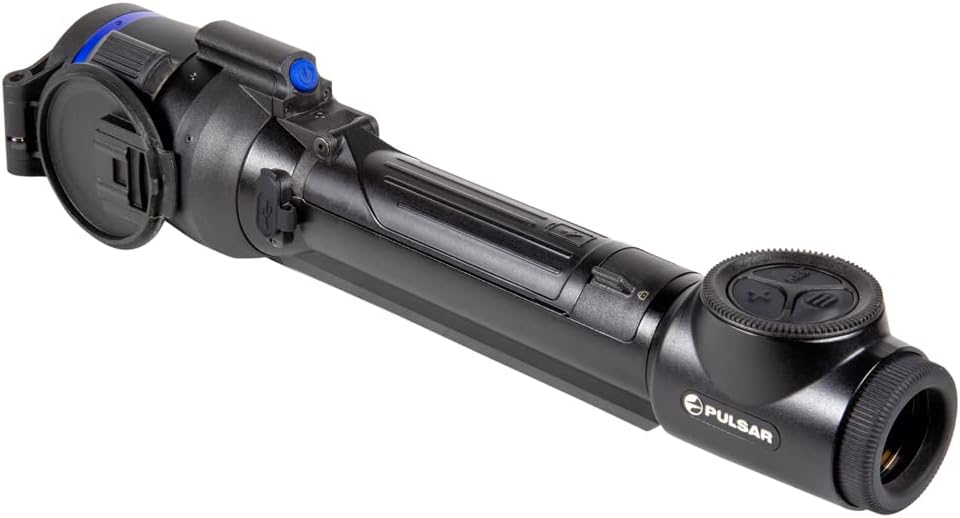
- Қисмати батареяро дар дастгоҳ ҷойгир кунед.
- Сарпӯши қисмати батареяро кушоед.
- Insert the APS5 battery pack, ensuring correct polarity.
- Сарпӯши қисмати батареяро бехатар пӯшед.
- Charge the battery using the provided APS battery charger and USB cable before first use.
2. Насби винтовка
The Talion features a multi-point prism mount for precise positioning on your firearm.
- Attach the riflescope to your firearm's Picatinny mount using appropriate mounting hardware (not included).
- Ensure the riflescope is securely fastened and aligned for optimal viewing.
- Refer to your firearm's manual for specific mounting instructions.
Истифода бурдани Дастгоҳ
1. Фаъол/хомӯш
To power on the device, press and hold the power button.

Барои хомӯш кардани дастгоҳ, тугмаи барқро бори дигар пахш карда нигоҳ доред, то он даме ки дастгоҳ хомӯш шавад.
2. Назорати асосӣ
The device features intuitive controls for navigation and settings adjustment.

Назорати калидӣ иборатанд аз:
- Тугмаи REC: For recording videos and taking photos.
- Тугмаи X: Typically used for zoom or navigation within menus.
- Тугмаи меню: Барои танзими танзимот ба менюи асосӣ дастрасӣ пайдо мекунад.
3. Magnification Adjustment
The Talion XQ38 offers a variable magnification of 2.5-10x. Adjust magnification using the designated control (often the 'X' button or a rotary encoder, depending on the specific model's interface).
4. Reticle Selection and Zeroing
The device provides a selection of ten reticle shapes in nine color modes. Precision aiming is enhanced with Picture-in-Picture mode.
- Access the reticle settings through the main menu.
- Select your desired reticle shape and color.
- Utilize the 5 shooting profiles and 50 zeroing distances for accurate calibration. Refer to the on-screen interface for detailed zeroing procedures.
5. Wi-Fi Integration and Stream Vision 2 App
The Talion XQ38 supports Wi-Fi integration with iOS and Android devices via the Stream Vision 2 application.

- Download the Stream Vision 2 app from your device's app store.
- Enable Wi-Fi on your Talion XQ38 through the device menu.
- Connect your smartphone or tablet to the riflescope's Wi-Fi network.
- Use the app for remote control, live streaming, and managing recorded media.
6. Сабти акс ва видео
The device has built-in photo and video recording capabilities.
- -ро пахш кунед REC тугма барои оғоз/қатъ кардани сабти видео.
- Як пахши кӯтоҳи тугмаи REC button typically captures a still image.
- Recorded media can be accessed via the device's internal memory or through the Stream Vision 2 app.
7. Color Palettes and Sensitivity
The Talion XQ38 offers a large selection of different color palettes and three sensitivity amplification levels to optimize thermal imaging for various environments.
- Navigate to the display settings in the menu to select your preferred color palette.
- Ҳассосиятро танзим кунед amplification level to enhance detection based on ambient conditions.
Нигоҳдорӣ
1. Тозакунӣ
Use the provided lens-cleaning cloth to gently wipe the optical surfaces. Avoid abrasive materials.
For the device body, use a soft, damp матоъ. Моддаҳои кимиёвӣ ё ҳалкунандаҳои сахтро истифода набаред.
2. Нигоҳдорӣ
Store the riflescope in its carrying case in a cool, dry place when not in use.
Агар батареяро муддати тӯлонӣ нигоҳ доред, онро аз қуттӣ ҷудо кунед.
Мушкилкушо
This section addresses common issues you might encounter with your Talion XQ38.
| Мушкилот | Сабаби эҳтимолӣ | Ҳалли |
|---|---|---|
| Дастгоҳ фаъол нест | Battery discharged or incorrectly installed | Charge battery, ensure correct installation |
| Сифати бади тасвир | Lens dirty, incorrect focus, environmental factors | Clean lens, adjust focus, change color palette/sensitivity |
| Масъалаҳои пайвасти Wi-Fi | Wi-Fi disabled, app not connected | Enable Wi-Fi on device, ensure app is running and connected |
Мушаххасоти
Detailed technical specifications for the Pulsar Talion XQ38 Thermal Riflescope.
| Хусусият | Арзиш |
|---|---|
| Бренд | Пулсар |
| Ранги | XQ38 |
| Варзиш | Airsoft, Hunting |
| Вазни ашё | 1.5 фунт |
| Материал | Хӯлаи магний |
| Диаметри линзаи объективӣ | 38 миллиметр |
| Ҳадди ақали калонкунӣ | 2.5 х |
| Дастгоҳҳои мувофиқ | таппонча |
| Навъи васлкунӣ | Кӯҳи Пикатинни |
| Биниш шабона | Не |
| Майдони Оф View | 68.3 фут |
| Номи модел | Talion |
| Истеҳсолкунанда | Sellmark Corporation |
| UPC | 812495029639 |
| Андозаи бастаи ашё L x W x H | 18 x 6.25 x 4 инч |
| Вазни баста | 4 фунт |
| Андозаҳо LxWxH | 13 x 2.24 x 2.65 инч |
| Истифодабарандагони тавсияшуда | мардон |
| Шумораи ашё | 1 |
| Рақами қисм | PL76561 |
| Санаи аввалин дастрас | 18 феврали соли 2022 |
Кафолат ва дастгирӣ
Маълумот дар бораи кафолат
The Pulsar Talion XQ38 Thermal Riflescope comes with a Кафолати маҳдуди 3 сол. Please refer to the included Warranty card for full terms and conditions regarding coverage and claims.
Дастгирии муштариён
For technical assistance, service, or warranty claims, please contact Pulsar customer support. Visit the official Pulsar website or the Pulsar Store on Amazon for contact details and additional resources: Pulsar Store.


