1. Маҳсулот ба охир расидview
The Hantek HDP135V6 is a single-channel programmable DC power supply designed for various electronic applications. It offers precise control over voltage and current output, with a maximum output of 35V and 6A. Key features include a clear 4-digit display, multiple protection mechanisms, and memory settings for frequently used configurations.
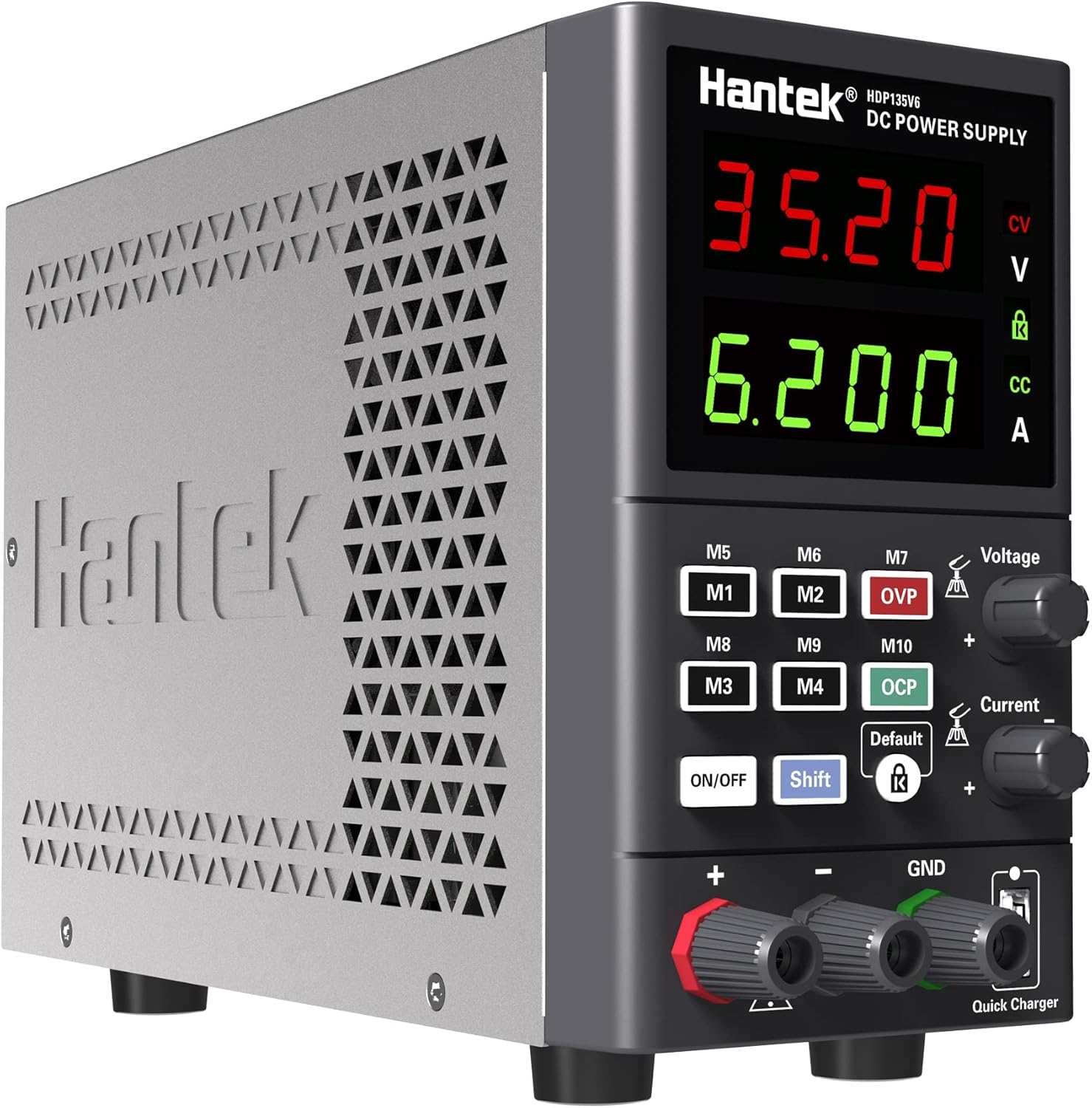
Расми 1.1: Пеш view of the Hantek HDP135V6 Programmable DC Power Supply, showing the display, control knobs, and output terminals.
Хусусиятҳои асосӣ:
- Easy setup with two separate rapid adjustment knobs for voltagд ва ҷорӣ.
- 4-digit display for voltage and current, with 10mV/1mA resolution.
- Selectable 230V/115V input voltage.
- Maximum output of 35V/6A.
- Standard 5~12V USB quick charge port.
- 10 save/recall memory settings (M1-M10).
- Comprehensive protection features: Over Current (OC), Over Voltage (OV), Overload, Overheat, and Short-circuit protection.
- Key lock function to prevent accidental changes.
- Output ON/OFF switch lock.
- Smart temperature-controlled cooling fan.
- Тарҳи паймон ва сабук барои интиқол.
2. Дастурамал оид ба бехатарӣ
To ensure safe operation and prevent damage to the device or connected equipment, please read and follow these safety instructions carefully.
- Манбаи нерӯ: Ensure the power supply is connected to a grounded AC outlet with the correct voltage. Verify the AC selector switch on the rear panel is set to the appropriate voltage (115V or 230V) for your region before connecting the power cord.
- Вентилятсия: Do not block the ventilation openings on the device. Ensure adequate airflow around the unit to prevent overheating.
- Муҳити зист: Operate the power supply in a dry, well-ventilated area, away from direct sunlight, high temperatures, humidity, and dust.
- Пайвастшавии бор: Always connect the load to the output terminals before turning on the output. Ensure the load is within the specified voltage ва маҳдудиятҳои ҷории манбаи барқ.
- Терминалҳои баромад: Do not touch the output terminals when the power supply is operating.
- Нигоҳдорӣ: Ҳамаи хизматрасониҳоро ба кормандони соҳибихтисос супоред. Кӯшиш накунед, ки дастгоҳро худатон кушоед ё таъмир кунед.
- Ҳифз: Replace fuses only with the specified type and rating.
3. Танзимот
3.1 Кушодан ва тафтиш
Upon receiving your Hantek HDP135V6, carefully unpack the unit and inspect it for any signs of damage during transit. Retain the packaging materials for future transport or storage.
3.2 Пайвастшавии барқ
- Locate the AC selector switch on the rear panel of the power supply.
- Set the switch to the appropriate voltage барои минтақаи шумо (115V ё 230V). Incorrect setting can cause damage to the unit.
- Connect the provided AC power cord to the power input socket on the rear panel and then to a grounded AC outlet.

Расми 3.1: Қафо view of the Hantek HDP135V6, highlighting the AC selector switch, power input, and cooling fan.
3.3 Назорати панели пеши ва нишондиҳандаҳо
The front panel provides all necessary controls and displays for operating the power supply.
- Ҷилдиtage Намоиш: Ҳаҷми баромади муқарраршуда ё воқеиро нишон медиҳадtage.
- Намоиши ҷорӣ: Ҷараёни баромади муқарраршуда ё воқеиро нишон медиҳад.
- ҶилдиtagТугмаи танзимкунии e: Барои муқаррар кардани ҳаҷми баромад истифода мешавадtage.
- Тугмаи танзими ҷорӣ: Барои муқаррар кардани ҳадди ҷараёни баромад истифода мешавад.
- M1-M10 Buttons: Memory buttons for saving and recalling settings.
- Тугмаи фурӯзон/хомӯш: Toggles the output power.
- Тугмаи Shift: Used in combination with other buttons for advanced functions.
- Тугмаи қулф: Activates/deactivates the key lock function.
- Output Terminals (+, -, GND): Connect your load here.
- Quick Charger USB Port: Provides 5~12V USB output.
4. Дастурҳои истифодабарӣ
4.1 Амалиёти асосӣ
- Ensure the power supply is properly connected to AC power.
- Press the main power switch on the rear panel to turn on the unit. The display will illuminate.
- Танзимоти ҷилдиtage: ро гардиш кунед Ҷилдиtage Тугмаи танзим барои муқаррар кардани ҳаҷми баромади дилхоҳtage.
- Муқаррар кардани маҳдудияти ҷорӣ: ро гардиш кунед Тугмаи танзими ҷорӣ to set the desired maximum output current. This acts as a current limit for your connected load.
- Боргирии пайвастшавӣ: Connect your device or circuit to the output terminals (Red for positive '+', Black for negative '-', Green for Ground 'GND').
- Фаъолсозии баромад: -ро пахш кунед ФУРУШ/ХОМУШ button on the front panel to enable the output. The display will show the actual output voltagд ва ҷорӣ.
- Deactivating Output: -ро пахш кунед ФУРУШ/ХОМУШ button again to disable the output.
4.2 Функсияҳои хотира (M1-M10)
The power supply allows you to save and recall up to 10 sets of voltage ва танзимоти ҷорӣ.
- Танзимоти нигоҳдорӣ: Ҳаҷми дилхоҳро таъин кунедtage and current. Press and hold the Гузариш button, then press one of the М1-М10 buttons until the display indicates the setting is saved.
- Бозхонди танзимот: Тугмаи дилхоҳро пахш кунед М1-М10 button to recall the saved voltage ва танзимоти ҷорӣ.
4.3 Функсияҳои муҳофизатӣ
The HDP135V6 includes several protection features to safeguard the unit and connected devices:
- Over Current Protection (OCP): Automatically limits or shuts down output if current exceeds the set limit.
- Беш аз ҷtage Муҳофизат (OVP): Shuts down output if voltage exceeds a preset limit.
- Муҳофизати аз ҳад зиёд: Аз истеъмоли аз ҳад зиёди нерӯи барқ муҳофизат мекунад.
- Муҳофизати аз ҳад зиёд гармӣ: Activates the cooling fan and may shut down if internal temperature is too high.
- Муҳофизати ноқилҳои кӯтоҳ: Immediately cuts off output in case of a short circuit.
4.4 Функсияи қулфи калид
To prevent accidental changes to settings during operation, you can activate the key lock function.
- Қулфро фаъол кунед: -ро пахш кунед Қулф button. A lock icon will appear on the display.
- Хомӯш кардани қулф: -ро пахш кунед Қулф button again. The lock icon will disappear.
4.5 USB Quick Charge
The front panel features a USB port for quick charging compatible devices. This port provides a variable output from 5V to 12V, depending on the connected device's charging protocol.
5. Нигоҳдорӣ
5.1 Тозакунӣ
To clean the exterior of the power supply, use a soft, damp cloth. Do not use abrasive cleaners or solvents. Ensure the unit is powered off and disconnected from the AC supply before cleaning.
5.2 Иваз кардани сӯзишворӣ
If the power supply fails to power on, the fuse may need replacement. The fuse holder is located on the rear panel, integrated with the AC input socket.
- Disconnect the power supply from the AC outlet.
- Using a small flat-head screwdriver, gently pry open the fuse compartment within the AC input socket.
- Remove the old fuse and replace it with a new fuse of the same type and rating (e.g., 5.0AT/250V for 110V/115V input, or 3.15AT/250V for 220V/230V input). Refer to the rating label on the rear panel.
- Қисми сӯзишвориро бехатар пӯшед.
6. Баррасии мушкилот
If you encounter issues with your Hantek HDP135V6, refer to the following common problems and solutions:
| Мушкилот | Сабаби эҳтимолӣ | Ҳалли |
|---|---|---|
| Дастгоҳ фаъол нест. | No AC power, faulty power cord, blown fuse, incorrect AC selector setting. | Check AC power connection. Verify AC selector switch is correct. Replace fuse if blown (refer to Section 5.2). |
| Ҳаҷми баромад нестtagд/ҷорӣ. | Output is OFF, OCP/OVP activated, short circuit in load. | Press the ON/OFF button to enable output. Check for OCP/OVP indicators. Disconnect load and check for short circuits. |
| Натиҷаи ҳаҷмtage/current is unstable or incorrect. | Пайвастҳои суст, бори ноқис, мушкилоти дохилӣ. | Ҳамаи пайвастҳоро тафтиш кунед. Бо бори дигар санҷед. Агар мушкил идома ёбад, бо дастгирӣ тамос гиред. |
| Агрегат аз ҳад зиёд гарм мешавад. | Вентилятсияи басташуда, фишори аз ҳад зиёд. | Ensure ventilation openings are clear. Reduce load or operate in a cooler environment. |
| Ҷилди ғайричашмдоштtage spikes on output activation. | Characteristic of power supply design, especially with very light or no load. | Always connect a suitable load before activating output. Monitor output carefully, especially with sensitive devices. If critical, consider adding a dummy load or using a power supply with soft-start features. |
7. Мушаххасоти
| Параметр | Арзиш |
|---|---|
| Модели | HDP135V6 |
| Натиҷаи ҳаҷtage | 0-35В |
| Ҷараёни баромад | 0-6А |
| Ҷилдиtage Қарори | 10мВ |
| Қарори ҷорӣ | 1мА |
| Вуруди ҷилдиtage | 115V/230V AC (Switchable) |
| Натиҷаи Ватtage | 210 Ватт |
| Баромади пуркунии зуди USB | 5~12В |
| Андозаҳои маҳсулот (L x W x H) | 5.91 x 3.35 x 9.06 инч (150 x 85 x 230 мм) |
| Вазни ашё | 4.44 фунт (2.01 кг) |
| Истеҳсолкунанда | Qingdao Hantek Electronic Co., Ltd. |
8. Кафолат ва дастгирӣ
8.1 Маълумот дар бораи кафолат
Hantek products are typically covered by a manufacturer's warranty against defects in materials and workmanship. Please refer to the warranty card included with your product or contact Hantek customer service for specific warranty terms and conditions.
8.2 Дастгирии муштариён
For technical assistance, troubleshooting, or service inquiries, please contact Hantek customer support. Contact information can usually be found on the manufacturer's official webсайт ё дар бастаи маҳсулот.


