Муқаддима
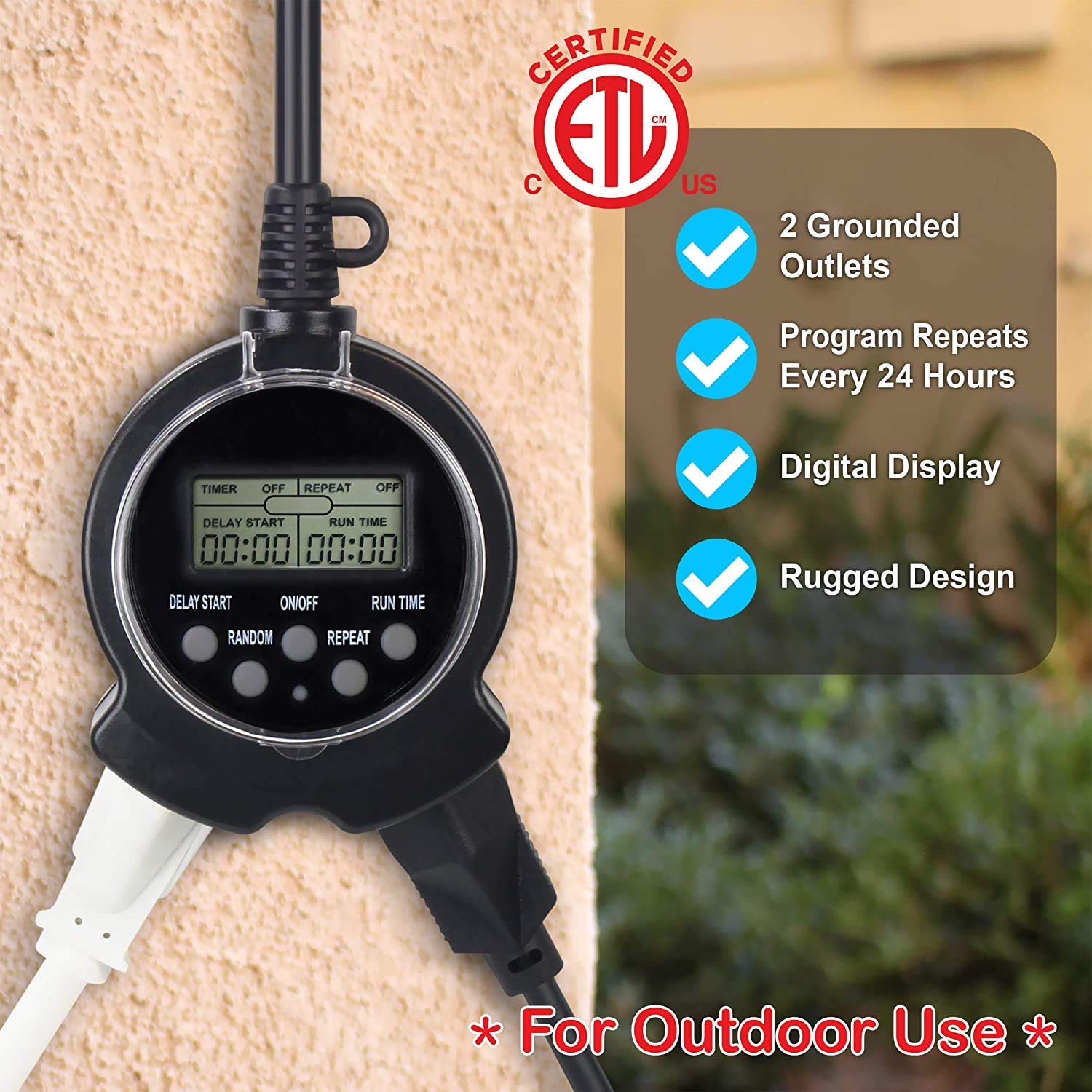
Thank you for choosing the Clear Power Outdoor Digital Programmable Timer. This manual provides detailed instructions for the safe and efficient operation of your new timer. Designed for outdoor use, this digital timer offers convenient control over your outdoor lighting and electrical devices, featuring two grounded outlets and a user-friendly interface.
Маълумоти муҳим оид ба бехатарӣ
WARNING: To reduce the risk of electric shock, fire, or injury, always follow basic safety precautions when using electrical products.
- Танҳо барои истифодаи берунӣ.
- Дар об нагардед.
- Always ensure the timer is securely mounted vertically and not laid on the ground.
- Works with Incandescent, Compact Fluorescent, and LED light sources.
- Ensure the connected devices do not exceed the timer's maximum electrical rating.
- Кӯдаконро аз таймер ва дастгоҳҳои пайваст дур нигоҳ доред.
For more detailed safety guidelines, please refer to the official Маълумот дар бораи бехатарӣ PDF.
Хусусиятҳои асосӣ
- 2 Нуқтаҳои зеризаминӣ: Allows control of two devices simultaneously.
- 24-Hour Repeating Cycle: Programs turn on/off at the same time daily.
- Simple Digital Programming: Easy to set with only three buttons.
- Random Vacation Mode: Turns devices on/off +/- 30 minutes from programmed times for a "lived-in" appearance.
- Калиди бекоркунии дастӣ: Enables bypassing the timer to manually control connected items.
- Тарҳрезии ба обу ҳаво тобовар: Safe for year-round outdoor use in various weather conditions.
- Flat Grounded Plug: Patented reversed ground pin enables use with right angle & lo-profile печҳо.
Мундариҷаи баста
- 1 x Clear Power Outdoor Digital Programmable Timer (Model: DCOT-0004-DC)
- 1 x Дастури дастурӣ (ин ҳуҷҷат)
Дастурҳои насб
- Пардохти аввалия: To fully charge the internal battery and ensure proper operation, plug the timer into a standard 120V AC outlet for at least 30 minutes before first use or after prolonged storage.
- Аз нав танзимкунии таймер: Before programming, it is recommended to reset the timer. Use a small pointed object (like a pen tip) to press the recessed "RESET" button located on the timer's face. The display will clear.
- Монтаж: Install the timer vertically close to an outdoor-rated grounded receptacle. Use the integrated eye-hole on the cord to secure the timer to a wall or suitable surface with a screw. Do not lay the timer on the ground.


Дастурҳои амалиётӣ
Programming the Timer (Easy 3-Step Process)
The Clear Power Digital Timer is designed for simple programming with only three main buttons: DELAY START, ON/OFF, and RUN TIME.
- Step 1: Turn Timer ON. -ро пахш кунед ФУРУШ/ХОМУШ button to activate the timer. The display will show "TIMER ON".
- Step 2: Set Delay Start Time. -ро пахш карда нигоҳ доред Оғози таъхир button to quickly advance the time in hours. Lightly touch and release the button to move the time in 1-minute intervals. This sets how many hours and minutes from the current moment the timer will turn ON. For example, if the current time is 1:00 PM and you want the timer to turn ON at 6:00 PM, set DELAY START for 5:00 (5 hours).
- Step 3: Set Run Time. -ро пахш карда нигоҳ доред Вақти кор button to quickly advance the time in hours. Lightly touch and release the button to move the time in 1-minute intervals. This sets how long the timer will remain ON after it activates. For example, if the timer turns ON at 6:00 PM and you want it to turn OFF at 10:30 PM, set RUN TIME for 4:30 (4 hours and 30 minutes).

Функсияро такрор кунед
To have the timer turn ON/OFF at the same programmed times every day, press the ТАКРОР КУНЕД button. The display will show "REPEAT ON". This is ideal for daily routines like garden lights or holiday decorations.
Random Mode (Vacation Mode)
For a more "lived-in" appearance when you are away, use the ТАСОДУФИ режим. -ро пахш кунед ТАСОДУФИ button. The display will show "RANDOM ON". In this mode, the timer will randomly turn ON/OFF up to +/- 30 minutes from your programmed DELAY START and RUN TIME settings. For example, if DELAY START is 6:00 PM, it might turn on as early as 5:30 PM or as late as 6:30 PM. Similarly, the RUN TIME will randomly vary by up to 30 minutes.
Барқароркунии дастӣ
To bypass the timer's program and manually control the attached device, press the ФУРУШ/ХОМУШ button again. The timer will hold its program until you change it. To return control of the device to the timer, press the ФУРУШ/ХОМУШ тугмаи дигар.
Video Guide: Programming and Features
Нигоҳдорӣ
- Тозакунӣ: Disconnect the timer from the power outlet before cleaning. Wipe the exterior with a soft, damp матоъ. Моддаҳои кимиёвии сахт ё тозакунандаи абразивиро истифода набаред.
- Нигоҳдорӣ: Вақте ки дар муддати тӯлонӣ истифода набаред, таймерро дар ҷои хунук ва хушк аз нурҳои бевоситаи офтоб ва ҳарорати аз ҳад зиёд дур нигоҳ доред.
- Санҷиш: Periodically inspect the timer and its cord for any signs of damage, such as cuts, fraying, or exposed wires. If damage is found, discontinue use immediately and replace the unit.
Мушкилкушо
| Мушкилот | Сабаби эҳтимолӣ | Ҳалли |
|---|---|---|
| Намоиши таймер холӣ ё хира аст. | Батареяи дохилӣ кам ё холӣ шудааст. | Барои пур кардани батарея, таймерро ҳадди аққал 30 дақиқа ба розеткаи барқӣ пайваст кунед. |
| Таймер дар вақтҳои барномарезишуда фурӯзон/хомӯш намешавад. | Incorrect programming; Timer is in manual override mode; Power outage. | Review programming steps carefully. Ensure the timer is not in manual override (press ON/OFF button). If there was a power outage, the internal battery should maintain the program, but verify settings. |
| Connected device does not turn ON. | Device is not properly plugged in; Device is faulty; Timer is not receiving power. | Ensure the device is securely plugged into the timer. Test the device in another outlet. Check the power outlet the timer is plugged into. |
| Random mode not working as expected. | Misunderstanding of random mode function. | Random mode varies ON/OFF times by +/- 30 minutes from programmed settings, it does not completely randomize. This is normal operation. |
Мушаххасоти
- Модели: DCOT-0004-DC
- Бренд: Қувваи тоза
- Андозаҳои маҳсулот: 1"D x 2"W x 3"H
- Шумораи фурӯшгоҳҳо: 2 Ба замин гузошта шудааст
- Андозаи экран: 6 Inches (display area)
- Ранги: Сиёҳ
- Истеҳсолкунанда: Қувваи тоза
- Аввалин дастрас: 17 июни соли 2020
Кафолат ва дастгирӣ
Clear Power products are designed for reliability and performance. For specific warranty information and customer support, please refer to the documentation included with your purchase or visit the official Clear Power website. You can also contact the seller, DATACONCT SOLUTIONS INC, for assistance.
For additional resources, you may find the Дастури корбар (PDF) муфид.


